


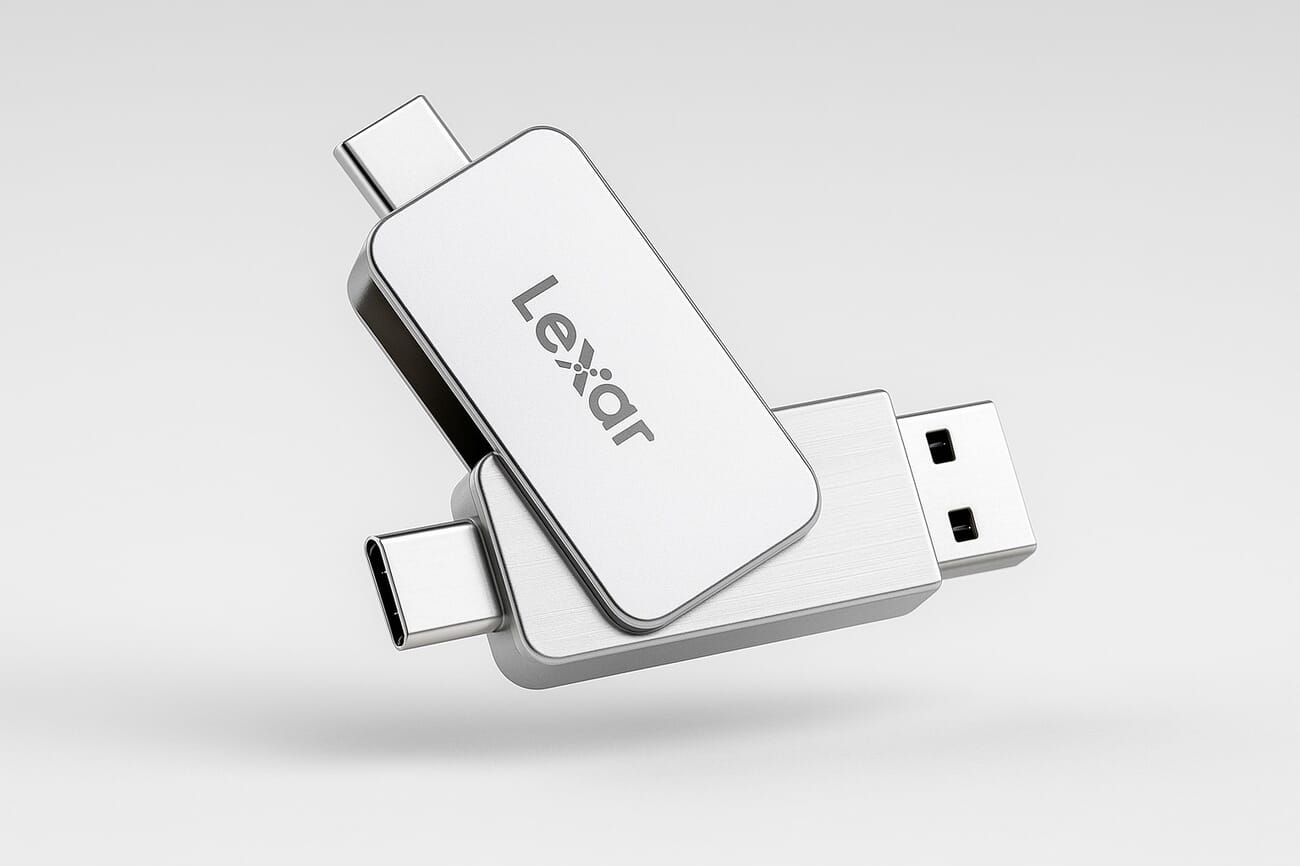
- Lexar dropped the D70E on May 7 — a metal thumb-drive form factor SSD with 2TB at the top end and dual USB-C / USB-A connectors.
- USB-C side claims 2,000 MB/s read and 1,800 MB/s write. USB-A drops to 1,000 / 900 MB/s.
- Pricing: $120 (512GB), $200 (1TB), $300 (2TB) — significantly cheaper than equivalent-capacity premium portable SSDs.
- On paper, those USB-C speeds beat most photographers’ current Samsung T7 / SanDisk Extreme Pro SSDs and edge out a typical CFexpress Type B card.
- But: PetaPixel’s caveat is the right one — thumb-drive SSDs use cheaper components than tethered enclosures and shouldn’t be a primary working drive or sole backup.
- The right photographer use case: a transit drive for client deliveries, an iPhone 17 video offload, or a third copy in a 3-2-1 backup chain.
- The wrong use case: editing a wedding gallery directly off the drive, or running it as a Lightroom catalog scratch volume.
Lexar quietly launched the D70E on May 7, 2026 — a dual-connector portable SSD in a thumb-drive sized metal body, capping out at 2TB and asking $300 for the flagship capacity. The 2TB on Amazon sits alongside 1TB ($200) and 512GB ($120) variants. The press release leans hard on the cable-free, pocket-friendly form factor and the rated USB-C speeds — 2,000 MB/s read, 1,800 MB/s write — which on paper put it ahead of most premium portable SSDs photographers currently carry.
The question is the one PetaPixel raised in its initial coverage and the one every photographer should be asking: are those numbers the working speeds in a real offload session, and is a thumb-drive form factor SSD a serious tool or a glorified file-delivery stick? The answer matters because storage gear is a meaningful editorial budget line, and the 3-2-1 backup math we covered in our guide to storing digital photos depends on knowing which device sits in which slot of that chain.
The Specs at a Glance
The D70E line is a single-product family with three capacity tiers and a fixed feature set across all of them. The only thing that changes between $120 and $300 is the storage.
- Capacities: 512GB, 1TB, 2TB.
- Pricing (US MSRP): $120 / $200 / $300 respectively.
- USB-C peak speeds: 2,000 MB/s read, 1,800 MB/s write (1TB and 2TB; the 512GB drops write to 1,300 MB/s).
- USB-A peak speeds: 1,000 MB/s read, 900 MB/s write across all capacities.
- Connectors: Dual USB Type-C and Type-A in a single swivel body, no cable required.
- Build: Metal housing with protective port covers and a built-in lanyard loop.
- Compatibility: Windows, macOS, iPadOS, iOS 17+, Android. Lexar specifically markets it as iPhone 17-compatible.
Speed numbers are manufacturer-rated peaks. Real-world sustained writes — which is what matters for a 64GB raw video offload — typically come in 20–30% under the rated peak on portable SSDs. The D70E hasn’t been independently benchmarked yet; expect sustained writes in the 1,200–1,400 MB/s range on USB-C if it follows the pattern of every other thumb-drive SSD on the market.
The Photographer’s Math: Can It Handle 4K RAW Offloads?
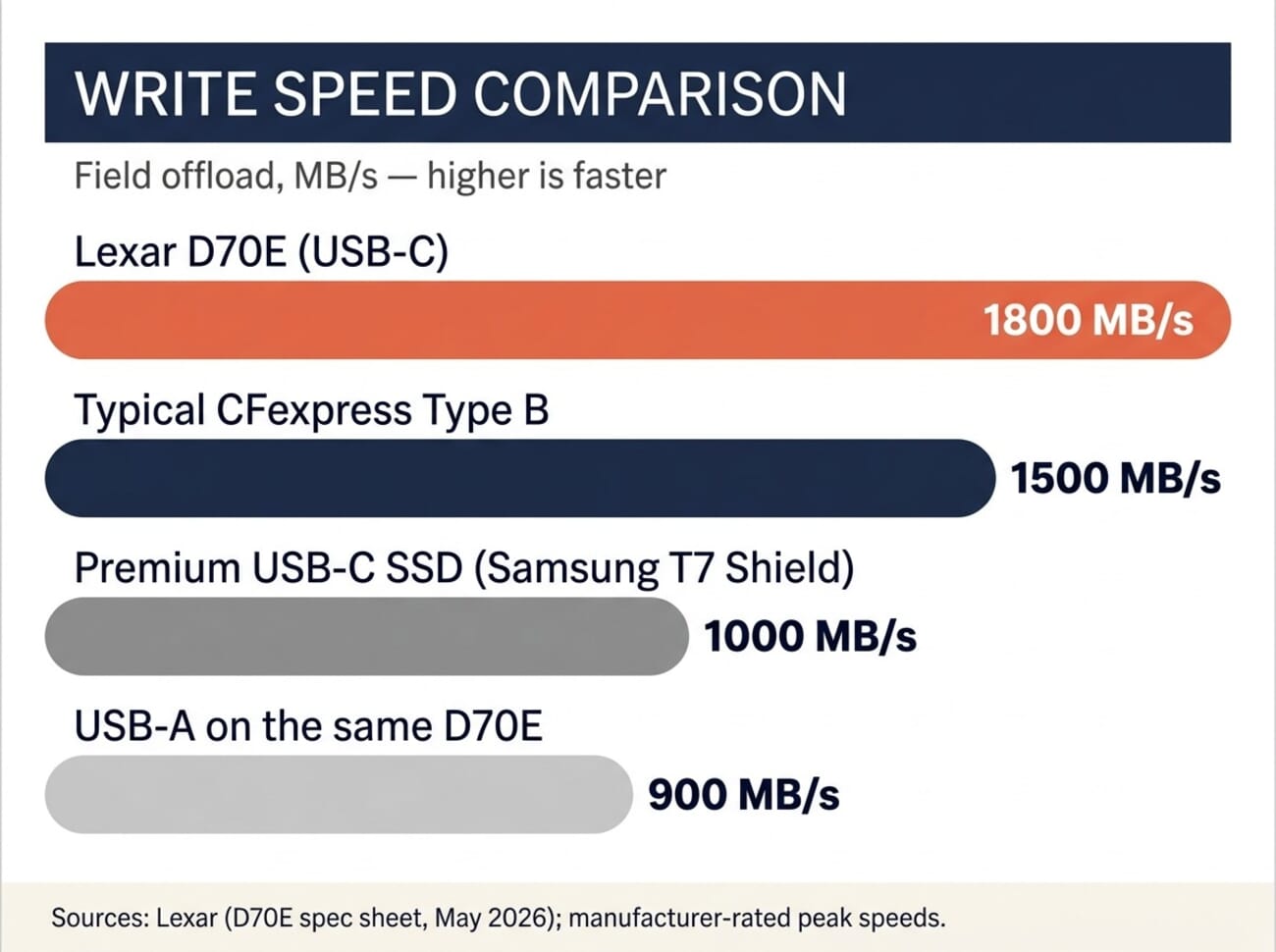
For a typical wedding photographer pulling a 256GB CFexpress card off a Sony A7R V at the end of a 10-hour shoot, the offload time on a 1,800 MB/s drive is roughly 2 minutes 30 seconds at peak — closer to 3 minutes 30 seconds in practice. That is meaningfully faster than a Samsung T7 Shield (around 1,000 MB/s sustained) and broadly comparable to copying to an internal NVMe drive on most current laptops.
For 4K and 8K raw video, the math changes. A single 64GB ProRes RAW clip from a Sony FX6 or a 5.8K Blackmagic clip lands at around 8 GB per minute. A full card of those clips — say, 256GB — pushes about 32 minutes of footage. At 1,800 MB/s peak (roughly 1,400 sustained), that’s a 3-minute offload. At USB-A speeds (900 MB/s peak, ~700 sustained), the same offload is closer to 6 minutes. The dual-connector convenience is real, but the USB-A side is meaningfully slower — use the C connector when speed matters.
For comparison, a CFexpress Type B card at 1,500 MB/s peak write hits sustained writes around 1,200 MB/s on the better cards — see the lineup in our SD and CFexpress card guide. The D70E on USB-C is faster than every CFexpress Type B card on the market, on paper. Whether the sustained writes hold up over a 200GB sequential transfer is the open question.
The Cable-Free Dual-Connector Design — A 2026 Practical Win
Form factor is the genuine differentiator here. Most portable SSDs — Samsung T7 Shield, SanDisk Extreme Pro, WD My Passport SSD — ship as a small enclosure plus a USB-C cable. The cable gets lost, frays, or sits at the bottom of a camera bag tangled with a charging brick. The D70E plugs directly into a laptop, an iPhone 17, an iPad Pro, or a desktop USB-A port without a cable in the loop.
The dual-connector design specifically is built around the iPhone 17’s switch to USB-C. A shoot-and-edit-on-iPhone workflow now works without dongles: the D70E plugs straight into the iPhone for a Lightroom Mobile offload, then flips around and plugs into a 2018-era MacBook with USB-A for a transfer to a desktop SSD. That’s a real workflow improvement over a Samsung T7 with a USB-C-to-A adapter dangling off the cable.
The metal housing and port covers also matter. Cable-routed enclosures expose their cable ports to dust and bend stress; a sealed thumb-drive form factor with covers tucks neatly into a pocket or a clip on a camera strap. The lanyard loop is the kind of small touch Lexar’s competition usually skips.
The Big Caveat: Thumb-Drive SSDs Aren’t Working Drives
PetaPixel’s coverage flagged the right concern in its initial review: thumb-drive form factor SSDs typically use cheaper NAND flash and cheaper controllers than enclosure-based portable SSDs at the same price point. The thermal envelope of a thumb-drive body is smaller — there’s nowhere for heat to dissipate during a sustained 200GB write — and that means write speeds throttle harder under sustained load. Lexar hasn’t published a TBW (terabytes-written) endurance figure, which is itself telling.
The practical implication: a D70E should not be a photographer’s primary working drive, should not be the sole backup of a paid client gallery, and should not host a Lightroom catalog or a Capture One session. Those use cases benefit from the enclosure SSDs we ranked in our roundup of the best external SSDs for photographers — drives like the Samsung T9, the SanDisk Pro-G40, and the OWC Envoy Pro FX, all built around tougher thermal designs and stronger sustained-write specs.
What the D70E IS good for, by contrast:
- Client deliveries. Hand a clean 2TB drive over with an entire wedding gallery on it. The form factor is unobtrusive and the price doesn’t sting if it doesn’t come back.
- iPhone 17 video offload in the field. The cable-free, dual-connector design is the right tool for a fast offload between shots when an iPhone 17 fills its internal storage.
- The third copy in a 3-2-1 backup chain. Two enterprise-grade copies live on a NAS and an enclosure SSD; the D70E is the cheap, portable third copy that goes to a friend’s house or a safe-deposit box.
- Quick-transfer between machines. Moving a 64GB project from a desktop to a laptop without a network or a cable.
Treat it like a memory card, not a working drive. That’s the right mental model.
How the D70E Stacks Up Against the Drives Photographers Already Carry
Three drives to compare against, all sitting on photographer desks today:
vs. Samsung T7 Shield (the incumbent)
The Samsung T7 Shield is the workhorse — IP65 dust/water resistance, rugged rubber housing, 1,050 MB/s rated reads, ~1,000 sustained writes. At $200 for a 2TB T7 Shield vs $300 for the 2TB D70E, Samsung is cheaper. The D70E wins on peak speeds and the cable-free form factor; the T7 Shield wins on ruggedness, sustained-write endurance, and price-per-terabyte.
vs. SanDisk Extreme Pro v2 (the other incumbent)
SanDisk’s Extreme Pro v2 ships at 2,000 MB/s rated, around 1,800 sustained, in an enclosure with a separate USB-C cable. Functionally identical peak speeds to the D70E, with better thermals because the enclosure has more surface area. Same $300-ish at 2TB. Choose the D70E if cable-free matters; choose the SanDisk if you’ll do sustained writes.
vs. CFexpress Type B (the in-camera option)
CFexpress Type B cards on the better lineups (Lexar Diamond, ProGrade Cobalt) hit 1,500 MB/s peak writes — slower on paper than the D70E. But CFexpress lives inside the camera, which is the real comparison: are you copying off a card to a portable SSD, or are you swapping cards and editing directly off the CFexpress in a card reader? Different workflows. The D70E doesn’t replace CFexpress; it sits downstream of it.
Pricing and Where to Buy
The D70E is available on Amazon today across all three capacities: the 512GB at $120, the 1TB at $200, and the 2TB at $300. The 1TB is the value sweet spot — same peak speeds as the 2TB, half the price. The 512GB drops the rated write to 1,300 MB/s, which is enough of a step down that the 1TB is the better buy for any serious offload workflow.
Worth noting: Lexar sometimes runs early-buyer promotions through B&H and Adorama in the first few weeks after a launch. Check those sites if waiting a few days is acceptable. If on-the-day delivery matters more than saving $20, Amazon Prime is the path of least friction.
The Bottom Line
The D70E is not a primary photographer’s working drive, and the marketing copy doesn’t claim it is. What it actually solves is a real problem: a 2TB SSD with iPhone 17 and USB-A compatibility in a cable-free metal body, at a price that doesn’t punish you when it lives in a client’s hand or a third-copy safe-deposit box.
The peak speed numbers are credible — Lexar’s recent portable SSD line has held up to third-party benchmarks within 5–10% of the marketing peak. The real test is the sustained-write thermal envelope, which won’t be known until reviewers get production units through a 1TB sequential transfer. Worth bookmarking and checking back in two weeks.
For photographers thinking about where the D70E fits in their kit: yes if it’s a transit drive, a third backup, or an iPhone 17 offload tool. No if it’s the only place a wedding gallery lives. Buy the 1TB if pure value is the metric; buy the 2TB if a single-drive client delivery has to fit a full project. Skip the 512GB unless the form factor alone is the reason for the purchase.
Frequently Asked Questions
Is the Lexar D70E fast enough for 4K and 8K RAW video offloads?
On the USB-C side, yes — peak rated writes of 1,800 MB/s and likely sustained writes around 1,200–1,400 MB/s mean a 256GB CFexpress card offloads in roughly 3 minutes. On the USB-A side, the rated write drops to 900 MB/s, which puts the same offload at 5–6 minutes. Use the USB-C connector when speed matters.
How does the D70E compare to a Samsung T7 Shield or SanDisk Extreme Pro?
The D70E’s peak speeds (2,000 / 1,800 MB/s) beat the Samsung T7 Shield (1,050 / 1,000) on paper and broadly match the SanDisk Extreme Pro v2 (2,000 / 1,800). The trade-off is thermal envelope — the thumb-drive form factor has less surface area to dissipate heat during a sustained write than an enclosure-based SSD, so sustained-write endurance under long transfers is the open question.
Should I use the D70E as my primary backup drive?
No. Thumb-drive form factor SSDs typically use cheaper NAND and controllers than enclosure-based drives, and Lexar hasn’t published a TBW endurance figure for the D70E. Use it as a transit drive, a client delivery drive, an iPhone 17 offload tool, or the third copy in a 3-2-1 backup chain — not the primary working drive or sole backup.
Does the D70E work with the iPhone 17?
Yes. Lexar specifically markets it as iPhone 17-compatible, which means it works with the iPhone 17’s USB-C port for direct video offload from the Camera app or Lightroom Mobile. It also works with iPad Pro, iPad Air, and any USB-C iPhone or USB-C Android device.
What capacity should I buy?
The 1TB at $200 is the value sweet spot — it shares the full 2,000 / 1,800 MB/s rated peak speeds with the 2TB and costs $100 less. The 2TB at $300 is the right pick if a full client project has to fit on a single drive. The 512GB drops the rated write to 1,300 MB/s, which makes it less interesting unless the smallest possible form factor is the whole point.
Is $300 expensive for a 2TB SSD in 2026?
No, not for one with these speeds. A 2TB Samsung T9 (the upgrade to the T7 Shield) lands around $230 with similar speeds; a 2TB SanDisk Extreme Pro v2 lands at $280–$310. The D70E is priced where the market expects, and the cable-free dual-connector form factor is the differentiator that justifies the small premium over the cheapest competition.
Sources used for this article:
Primary Coverage
- PetaPixel — Lexar's D70E Compact SSD Packs 2TB into a Tiny Thumb Drive (May 7, 2026) – First major outlet coverage of the launch, with the working-drive caveat used in the body.
- MacSources — Lexar Launches Dual Drive Portable SSD D70E – Independent coverage of the launch with iPhone 17 compatibility framing.
Manufacturer References
- Lexar Americas — SSD Product Hub – Lexar's portable SSD product line, including pricing and capacity tiers used in the body.
- Lexar — D70E 2TB Amazon Listing – Current US retail pricing and full spec sheet referenced for the comparison table.
Image Sources
- Lexar D70E product photography (manufacturer press) – Inline product image — official Lexar marketing photography hosted by Amazon.
- PhotoWorkout — speed-comparison infographic – Editorial infographic by PhotoWorkout, generated for this article. No external license.
PhotoWorkout earns from qualifying purchases as an Amazon Associate. Affiliate links in this article may earn us a commission at no additional cost to you.



