


Add key takeaways to display here
Canva just launched Magic Layers, a new AI-powered feature that takes flat, static images and transforms them into fully editable, multi-layered designs — and it could meaningfully change how photographers handle their design workflows.
Announced on March 11, 2026, the tool uses Canva’s proprietary AI design model to intelligently recognize individual components within a flat image — text, objects, people, backgrounds — and separate them into distinct, editable layers. Think of it as reverse-engineering a flattened PSD file, but powered by AI and available to anyone.
What Is Canva Magic Layers?
Magic Layers is built into Canva’s editor and works on any single-page PNG or JPEG file you upload. The AI analyzes the image, identifies its visual components, and rebuilds it as a structured, multi-layered Canva project — usually in under a minute.
Once separated, each element can be individually selected, moved, resized, recolored, or replaced. The original layout and visual hierarchy are preserved, so the design doesn’t fall apart when you start editing.
“After a breakthrough from our AI research team, we’re introducing Magic Layers so anyone can take a flat image and turn it into a fully editable design inside Canva,” said Cameron Adams, Canva’s co-founder and Chief Product Officer. “There’s no need to start over, or to figure out the right prompt.”
How It Works
The technology behind Magic Layers goes beyond simple object detection. Canva’s AI model uses contextual awareness to understand the relationship between elements in an image, then fills in the gaps between components that were previously covered by overlapping objects.
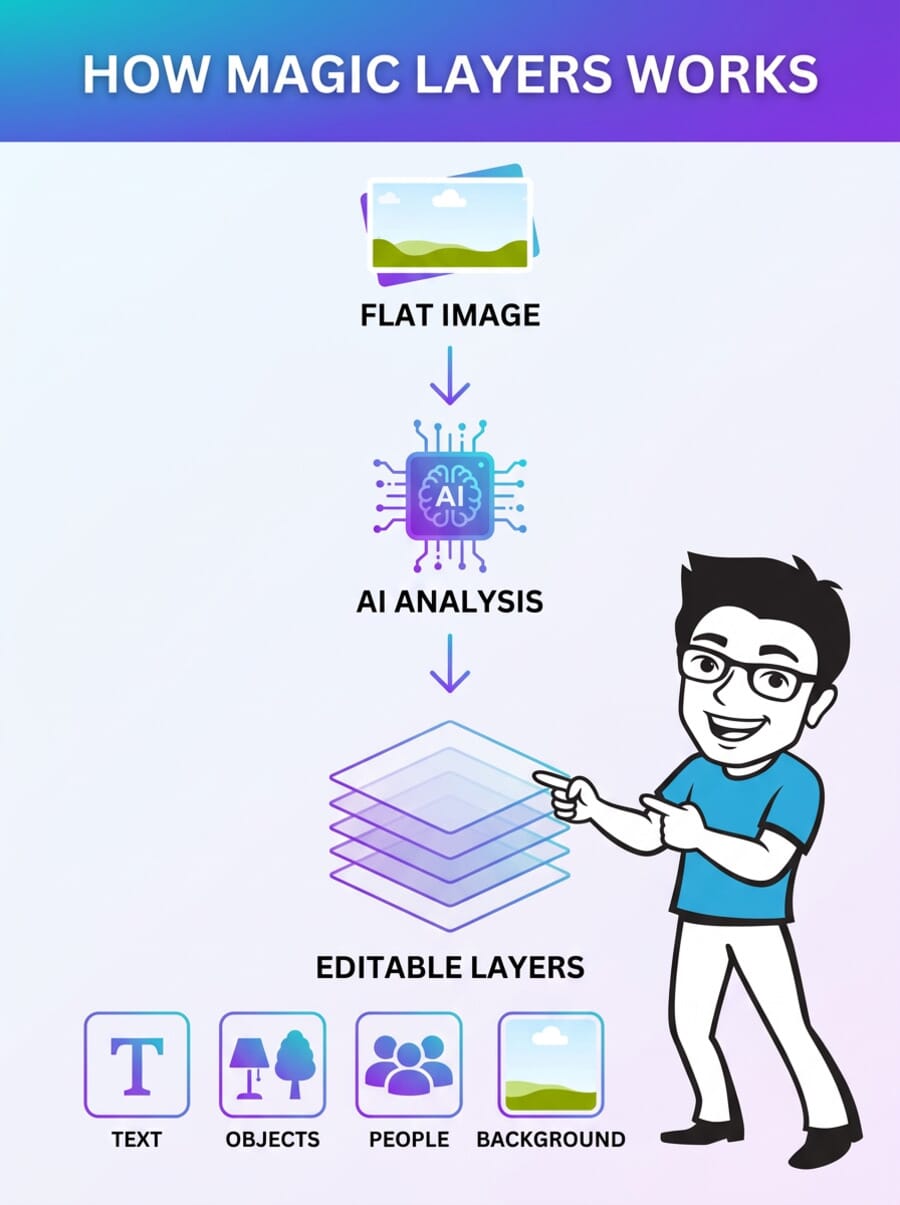
Here’s the practical workflow:
- Upload any flat image — PNG, JPEG, AI-generated output, or an old flattened design file
- AI analyzes the composition — identifying text, shapes, people, backgrounds, and graphic elements
- Layers are created automatically — each element becomes independently editable within Canva’s editor
- Edit freely — swap backgrounds, fix text, move objects, apply filters to individual elements
This is notably different from what Adobe currently offers. While Photoshop and Express place AI-generated elements on separate layers, they don’t provide an automated way to decompose an entire existing image into its component parts. Magic Layers does this in one step.
Why Photographers Should Care
At first glance, Magic Layers might seem like a tool designed for graphic designers and marketing teams. But it has real implications for photographers who use Canva for non-photography design tasks.
Social media templates. If you’ve ever received a branded social media template as a flat JPEG from a client or agency, you know the pain. Previously, you’d need to recreate it from scratch or wrestle with design tools you’re not comfortable with. Magic Layers lets you upload that flat file, break it into layers, and swap in your own photos — all without leaving Canva.
Client deliverables. Photographers who create photo collages, mood boards, or styled presentations can now repurpose older flattened designs without rebuilding them. Change a date, swap a headshot, update a logo — all possible because the AI separates those elements into editable layers.
AI-assisted design iteration. If you use AI image generators (Midjourney, DALL-E, Gemini) to create marketing materials for your photography business — flyers, ads, social posts — Magic Layers means you’re no longer stuck with the AI’s output. Generate the base design, import it into Canva, and fine-tune specific elements without re-prompting.
The Bigger Picture: AI as Collaborator, Not Replacement
What makes Magic Layers interesting from a creative-industry perspective is the philosophy behind it. While many AI tools push toward full automation — generate an entire design, write the copy, pick the colors — Canva is going in the opposite direction with this feature.
Magic Layers positions AI as a preparation tool that does the tedious work (separating layers, filling in backgrounds behind objects) so the human can focus on the creative decisions. As CNET’s Katelyn Chedraoui noted, “creators want more hands-on control, not less.”
That said, The Verge’s Jess Weatherbed raised a valid concern: Magic Layers could make it harder to distinguish AI-generated designs from human-made ones. Since AI image generators currently produce only flat files, the presence of layers was one way artists could prove they built something from scratch. With Magic Layers, that distinction blurs.
For photographers who are navigating the evolving relationship between AI and creative work, this is worth watching. The tool itself is practical and useful — but the broader implications for creative attribution continue to be debated.
Availability and Pricing
Magic Layers launches today (March 11, 2026) in public beta across the United States, United Kingdom, Canada, and Australia, with global availability planned to follow.
The feature is available to all Canva users — both free and paid tiers. It currently supports single-page PNG and JPEG files, with Canva noting that “expanded capabilities are in development.”
Canva also confirmed that Magic Layers will integrate with third-party platforms, including ChatGPT, Claude, and Microsoft Copilot — meaning AI-generated images from those tools can be imported and decomposed into layers directly within Canva.
Bottom Line
Magic Layers is a genuinely useful tool that solves a real problem: the inability to edit flat images without rebuilding them from scratch. For photographers, it won’t replace Photoshop for serious retouching or compositing work, but it fills a gap in the design workflow — especially for social media, marketing materials, and client-facing templates.
If you regularly use Canva alongside your AI photo editing tools, Magic Layers is worth trying. It’s the kind of quality-of-life improvement that saves 20 minutes here and there — and those add up.
Is Canva Magic Layers free?
Yes, Magic Layers is available to all Canva users during the public beta, including free-tier accounts. It launched in the US, UK, Canada, and Australia on March 11, 2026, with more regions to follow.
Can Magic Layers work on photos from other AI generators like Midjourney or DALL-E?
Yes. Magic Layers works on any single-page PNG or JPEG file you upload to Canva, regardless of where it was created. This includes AI-generated images from Midjourney, DALL-E, Gemini, or any other tool.
How is Magic Layers different from Photoshop layers?
Photoshop requires you to manually create and manage layers while designing. Magic Layers takes an already-flattened image and uses AI to automatically separate it into editable components. It’s a reverse-engineering process rather than a creation process.
Will Magic Layers replace Photoshop for photographers?
No. Magic Layers is designed for design workflows in Canva — social media templates, marketing materials, presentations. It doesn’t offer the pixel-level control, advanced retouching tools, or RAW processing capabilities that photographers need from Photoshop or Lightroom.
Featured image: Screenshot from Canva Newsroom.
Sources used for this article:
Related Posts
Get the Weekly Photography News Digest
Join photographers who get our top stories delivered every Monday morning. No spam, unsubscribe anytime.