


- Amazon Photos’s May 2026 redesign adds a Memory Feed, natural-language AI photo search, and Alexa voice controls — closing the AI gap with Google Photos for the first time.
- For RAW shooters with Prime, Amazon Photos is hard to beat: unlimited full-resolution storage including RAW files, no compression, no per-GB charges. The catch is a vault-only experience with no real editing tools.
- Google Photos still leads on AI editing (Magic Editor, Generative Remove, Ask Photos) and remains the strongest cross-device experience. Best for mobile shooters who want the most powerful free AI.
- iCloud Photos has the strongest privacy posture and the cleanest Apple-ecosystem workflow, but charges from gigabyte one and is a second-class experience anywhere outside the Apple bubble.
- PhotoPrism is the free, open-source, self-hosted option — runs in Docker on a NAS or home server, includes TensorFlow face recognition, and never sends a pixel to anyone’s cloud. Higher setup cost; total privacy.
Amazon Photos got a major AI overhaul on May 5, 2026. The redesigned app opens to a Memory Feed instead of a static grid, adds natural-language search (“beach sunset last summer”), and connects to Alexa+ for voice control and Echo Show ambient slideshows. For Prime members who already get unlimited full-resolution photo storage, the upgrade is significant — and it raises the obvious question: does Amazon Photos finally deserve a place in serious photographers’ workflows?
This guide compares the four photo cloud options that actually matter for photographers in 2026: Amazon Photos, Google Photos, iCloud Photos, and PhotoPrism — the free, open-source, self-hosted alternative most comparisons quietly leave out. Each has a clear use case. Picking wrong means paying for storage you don’t need, losing RAW quality you do need, or handing over privacy you’d rather keep.
When you buy through links on our site, we may earn a commission at no cost to you. We evaluate products independently. Commissions do not affect our evaluations.
Amazon Photos in 2026: What Just Changed
Amazon Photos launched in 2014 as a quiet Prime perk and stayed quiet for a decade. The May 2026 redesign is the first substantial rethink. Three changes matter:
- Memory Feed — the app now opens to a curated narrative feed (trips, people, key moments) instead of a static grid. “On This Day” is promoted to first-class. Closer to a personal slideshow than a gallery.
- Natural-language search — type “kids playing in the snow” or “beach sunset last summer” and the right photos surface without album hunting. Works across captions, faces, and visual content.
- Alexa+ voice control — request photos by voice, push curated collections to Echo Show or Fire TV ambient displays, narrate slideshows. Tied to the Alexa+ rollout that hit US general availability in February 2026.
Pricing remains the strongest argument. Prime members get unlimited full-resolution photo storage, RAW files included, no compression, plus 5 GB for video — bundled with a Prime membership ($14.99/month or $139/year in the US). For non-Prime users, the free tier is 5 GB combined, scaling to $1.99/month for 100 GB and $6.99/month for 1 TB.
What Amazon Photos still lacks: real editing. There is no Magic Editor equivalent, no generative removal, no local masking. It is a vault, not a workflow. For RAW shooters who already pay for Prime and want lossless backup, that’s exactly the trade. For anyone hoping to edit-and-archive in one place, it is not the answer.
Best for
Existing Prime members shooting RAW who want a zero-additional-cost backup vault. Families with Echo Show displays. Anyone whose photo workflow is already Prime-adjacent.
Top weakness
Editing tools are minimal. If editing is part of the workflow, Amazon Photos is a backup destination, not a primary library.
Google Photos: Still the AI Editing Leader
Google Photos is the default for most non-Apple users for a reason. The 2026 AI feature stack is unmatched: Magic Editor (generative reposition, sky swap, background fill), Magic Eraser, Photo Unblur, Portrait Light, and Generative Remove are all free across Android and iOS. Ask Photos — Gemini-powered conversational search — answers questions like “where did I park at the airport last fall” by reading the visible signage in your photos. Photo Stacks groups burst shots automatically; manual stacking is rolling out on Android in 2026 (was iOS-only).
Pricing starts with the most generous free tier of the three commercial clouds: 15 GB free. Google One paid plans are $1.99/month (100 GB), $2.99/month (200 GB), and $9.99/month (2 TB). The AI Premium tier at $19.99/month bundles 2 TB with Gemini Advanced for users who want the full LLM stack alongside their photos.
RAW handling is the gotcha. Google Photos preserves DNG, CR3, NEF, ARW, and ProRAW only if “Original Quality” is selected — the default “Storage Saver” option compresses everything. Photographers must check the upload setting before assuming RAW survives.
Privacy is the other concern. Google has stated that Google Photos content is not used to train generative AI models for ads or general LLM training, but content still passes through Google’s servers, and “helpful suggestions” do process images. It is more open than Apple’s posture and less open than self-hosting.
Best for
Mobile-first shooters who want the most powerful AI editing without paying extra. Cross-platform households (Android + iOS in the same family). Anyone who already lives in Gmail / Drive / Docs.
Top weakness
Privacy posture — large amounts of personal data on Google’s servers, even with no LLM training. The default “Storage Saver” compression is a separate gotcha for RAW shooters.
iCloud Photos: The Privacy + Apple Workflow Pick
iCloud Photos is the default for Apple-ecosystem photographers and arguably the best privacy posture of the four. All AI processing runs on-device or via Apple’s Private Cloud Compute (a stateless, audited system Apple built specifically so even Apple staff cannot inspect data). End-to-end encryption is available via Advanced Data Protection. No model training on photos, ever.
The 2026 feature set is more conservative than Google Photos but increasingly capable. Clean Up handles distraction removal (people, wires, signs) on-device with Apple Intelligence. Memory Movies auto-curate themed videos with AI-selected soundtracks. Live Photos preserve full motion through sync without quality loss. iOS 27 — announced April 2026, shipping in September — adds new on-device editing for subtle quality, positioning, and focus changes. Our deep dive on the iOS 27 AI photo features covers what Apple has actually shipped.
RAW handling is excellent. Apple ProRAW (DNG up to 48 MP on Pro iPhones) and third-party RAW from Sony, Canon, and Nikon all sync via iCloud Photos. Non-destructive edits propagate across iPhone, iPad, and Mac without re-rendering.
Pricing is the friction. The free tier is 5 GB — the smallest of the three commercial clouds. iCloud+ paid plans run $0.99/month (50 GB), $2.99/month (200 GB), $9.99/month (2 TB), $29.99/month (6 TB), and $59.99/month (12 TB). All paid tiers bundle Private Relay, Hide My Email, custom email domain support, and HomeKit Secure Video — useful extras that bring the effective price closer to comparable services.
Best for
Apple-ecosystem photographers (iPhone + iPad + Mac) who care about privacy, want a real editing app integrated with the library, and value the cross-device sync over feature breadth.
Top weakness
Walled garden. Outside Apple devices it’s a web client only — no Android app, no Linux client. Smallest free tier of the three.
PhotoPrism: The Free, Self-Hosted Open-Source Pick
PhotoPrism is the photo library most comparison guides skip because it does not have a cloud or a marketing budget — it is an open-source application that runs on the user’s own hardware. The trade is simple: more setup work, no monthly fee, and total control over the photos.
It runs in Docker on essentially anything: a NAS (Synology, QNAP, Unraid), a home server, a Raspberry Pi 5, a mini-PC, or a cheap VPS. Setup is one Docker Compose file:
mkdir ~/photoprism && cd ~/photoprism
wget https://dl.photoprism.app/docker/docker-compose.yml
docker compose up -d
# UI runs at http://localhost:2342
The AI features are surprisingly complete. TensorFlow-based face recognition, roughly 10,000 object and scene labels, location clustering, duplicate detection, semantic search, and smart albums all run locally — no calls to any cloud. RAW support is broad: CR2, CR3, NEF, ARW, DNG, RAF, ORF, and more, converted via Darktable or RawTherapee at index time with originals preserved untouched.
Pricing is the headline. The Community Edition is free under AGPL v3 with the full feature set, including TensorFlow recognition. The Essentials membership at roughly $5/month and Plus membership at roughly $10/month add multi-user sharing, advanced extensions, and priority support. Patreon contributions at Silver, Gold, or Platinum tiers convert into lifetime Plus access after 24, 12, or 6 months respectively.
The realistic costs are hardware (a NAS or home server) and time (initial Docker setup, plus owning the backups and disk-failure risk). For a multi-terabyte library that would otherwise cost $9.99/month at iCloud or $19.99/month at Google AI Premium, a one-time NAS purchase pays for itself in 1–3 years and never sends a photo to anyone’s cloud.
Best for
Privacy-first photographers, archivists with multi-terabyte libraries, anyone uncomfortable storing personal images on Big Tech servers, technical hobbyists who already run a NAS or home server.
Top weakness
No first-party mobile app. Access on iPhone or Android is through the progressive web app or WebDAV sync — workable but not as polished as native iOS or Google Photos apps. The user also owns uptime, backups, and disk-failure risk.
Comparison Table: Storage, RAW, AI, Privacy
| Dimension | Amazon Photos | Google Photos | iCloud Photos | PhotoPrism |
|---|---|---|---|---|
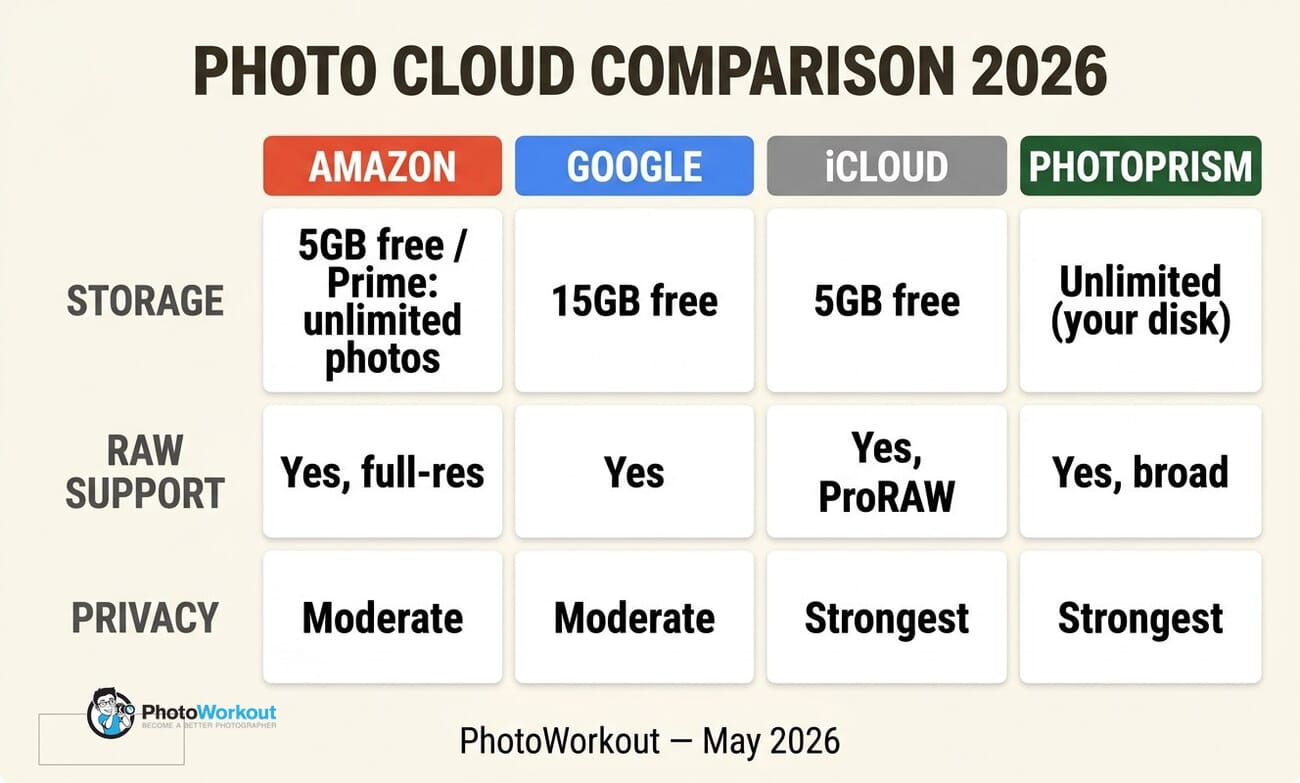
| Free tier | 5 GB (Prime: unlimited photos + 5 GB video) | 15 GB | 5 GB | Unlimited (your disk) |
| Paid baseline | $1.99/mo for 100 GB; Prime $139/yr | $1.99/mo for 100 GB | $0.99/mo for 50 GB | Free; Plus ~$10/mo |
| RAW support | Yes, full-res lossless | Yes (Original Quality on) | Yes, including ProRAW | Yes, broad format coverage |
| AI search | New (May 2026), natural language | Best-in-class (Ask Photos / Gemini) | Strong on-device, no chat | Good (TensorFlow tags + facets) |
| AI editing | Minimal | Magic Editor, Generative Remove, Remix | Clean Up, Memory Movies | None (uses external tools) |
| Privacy posture | Moderate | Moderate (no LLM training) | Strongest (E2E option, on-device) | Strongest (your hardware) |
| Mobile app | iOS + Android | iOS + Android (excellent) | iOS native; Android = web only | PWA only (no native apps) |
| Best for | Prime users with RAW | Mobile shooters wanting AI | Apple ecosystem creators | Privacy-first archivists |
Which One Should a Photographer Pick?
The right choice depends less on features than on which specific trade you can live with.
- Already have Prime and shoot RAW? Use Amazon Photos as the backup vault. Unlimited full-resolution storage at zero additional cost is the strongest value of any commercial cloud. Pair it with a separate editing app — see our guide to photo editing for beginners for the modern stack.
- Mobile-first, edit on the phone, want the most AI? Google Photos. The 2 TB Google One plan at $9.99/month is the most generous AI feature set for the price. Switch upload setting to “Original Quality” if you shoot RAW.
- Apple-ecosystem, value privacy, edit across iPhone and Mac? iCloud Photos with the 200 GB or 2 TB tier. Combined with Photos.app and a third-party RAW editor (Photomator, Pixelmator Pro), this is the cleanest workflow short of self-hosting.
- Multi-terabyte archive and willing to set up a NAS? PhotoPrism. A four-bay Synology or QNAP runs $400–$700 once and replaces a $120/year iCloud bill in roughly four years. The privacy gain is permanent.
- Mix of all of the above? Use iCloud Photos as the live working library and PhotoPrism as the cold-archive home server — a setup that’s becoming common among photographers with 5+ TB libraries.
One more consideration: the AI features that look most exciting today are also the ones changing fastest. Google’s Ask Photos was a research demo three years ago. Amazon’s Memory Feed didn’t exist last week. iCloud’s Clean Up rolled out in late 2024. PhotoPrism’s TensorFlow stack updates with every release. Whichever cloud you pick, expect the feature set to look meaningfully different by mid-2027.
Frequently Asked Questions
Is Amazon Photos really unlimited for Prime members in 2026?
Yes — unlimited full-resolution photo storage (RAW files included, no compression) plus 5 GB for video, bundled with the standard Prime membership ($14.99/month or $139/year in the US). Confirmed in Amazon’s May 2026 redesign documentation. The unlimited applies to photos only; videos hit the 5 GB cap and require a paid storage upgrade beyond that.
Can I use multiple photo clouds at once?
Yes, and many photographers do. A common pattern is iCloud Photos for the active working library, Google Photos for AI search and family sharing, and Amazon Photos as a backup vault — each does one thing well. PhotoPrism layered on top adds an offline cold archive. The cost is duplicate storage (you pay for what each service uses).
Does Google Photos compress my RAW files?
Only if “Storage Saver” is selected as the upload setting (it is the default). Switch to “Original Quality” in Google Photos settings to preserve DNG, CR3, NEF, ARW, and ProRAW files at full size. Original Quality counts against your Google One quota — Storage Saver compresses but stays small.
Is PhotoPrism really free?
The Community Edition is genuinely free under AGPL v3 license, with the full feature set including TensorFlow face recognition. The hidden cost is hardware (a NAS or home server) and the time to set up Docker. For a five-year horizon, the math typically beats any commercial cloud past about 2 TB of usage.
Which cloud is most private for photographers?
PhotoPrism (self-hosted) and iCloud Photos with Advanced Data Protection are the strongest. PhotoPrism never sends a pixel anywhere; iCloud’s Advanced Data Protection makes photo data end-to-end encrypted such that even Apple cannot decrypt it. Google Photos and Amazon Photos both store data on company servers in plaintext, even though neither uses it for LLM training.
Pricing, AI features, and storage tiers verified directly against vendor documentation in May 2026. Specific feature claims linked to source pages.
Vendor Documentation
- PetaPixel — Amazon Photos redesign adds Memory Feed, AI search, Alexa controls – Source for the May 2026 Amazon Photos overhaul announcement
- Amazon — Drive pricing and storage plans – Current Amazon Photos paid storage tiers
- Google Photos — Editing and AI features – Magic Editor, Magic Eraser, Generative Remove official feature documentation
- Google One — Plans and pricing – Google One paid storage tiers
- Apple — iCloud Photos – iCloud Photos features and Apple Intelligence integration
- Apple Support — iCloud+ plans – iCloud+ paid storage tiers and bundled features
- PhotoPrism — Official site – Self-hosted, AI-powered open source photo management
- PhotoPrism — Docker Compose installation guide – Setup instructions for NAS / home server / Pi installs
- PhotoPrism — Editions and membership pricing – Community vs Essentials vs Plus membership tiers
Image Sources
- Editorial illustrations by PhotoWorkout – Original GPT image-2 + Gemini-rendered editorial graphics created for this guide



