

- iPhone Food Photography is a specialized food photography course from iPhone Photography School — 23 video lessons across 6 modules, taught by New York Times food photographer Andrew Scrivani.
- Filmed on location in Sicily, Italy, combining practical food photography techniques with cultural storytelling and real restaurant shoots.
- Covers 5 common food photography mistakes (lighting, styling, props, angles, composition) and how to fix them using just your iPhone.
- At ~$49-$99 (discounted), includes lifetime access, 7 free bonuses including a Going Pro section, low light photography, editing tutorials, and 14 photo projects.
- Best suited for home cooks, food bloggers, and restaurant-goers who want their food photos to actually look as good as the food tastes.

A food photography course by Andrew Scrivani (New York Times photographer) covering lighting, styling, angles, composition, props, and editing for iPhone food photography. Filmed in Sicily with 23 video lessons (3+ hours). Includes Going Pro bonus section, low light photography, editing tutorials, 14 photo projects, and AI photo feedback. Lifetime access with updates.
Normal Price: ~$199 Discounted: ~$49-$99 USD- Taught by a genuine industry expert — Andrew Scrivani NYT and commercial credentials are unmatched.
- Going Pro bonus section adds real commercial value — stock photography, restaurant shoots, and editorial food storytelling.
- Cultural immersion approach makes every lesson engaging — learn while exploring Sicilian food markets.
- Practical, actionable techniques using inexpensive tools (A-clamps, foam boards, household items) anyone can access.
- Only 23 lessons (3 hours) — significantly shorter than other IPS courses.
- Limited editing content — only one 10-minute editing lesson despite food photos benefiting greatly from post-processing.
- Some iPhone-specific features are outdated and student comments mention needing updates for newer iPhones.
iPhone Food Photography is iPhone Photography School’s dedicated course for anyone who wants to take food photos that actually make people hungry. Taught by Andrew Scrivani — a food photographer whose work has appeared in The New York Times, The Wall Street Journal, and The New Yorker — it is the only IPS course taught by someone outside their core team.
Filmed on location in Sicily, Italy, the course follows Andrew as he shoots in busy food markets, rustic restaurants, and a Michelin-starred kitchen. It is part photography course, part cultural experience — and at just 23 lessons (about 3 hours and 15 minutes), it is one of the more focused offerings on the platform.
We went through every lesson on the course platform to write this review. Here is what is inside, how the teaching compares to other IPS courses, and whether it is worth the price.
Course Overview: What’s Inside
iPhone Food Photography is organized into 6 modules with 23 video lessons totaling 3 hours and 14 minutes. It is noticeably more compact than other IPS courses — iPhone Landscape Mastery has 83 lessons, and iPhone Photo Academy has 44. But the focused approach means very little filler.
Here is the structure:
- Introduction – 1 lesson covering Andrew’s approach to food photography in a Sicilian market (11 minutes)
- Food Photography Essentials – 9 lessons on lighting, styling, angles, props, composition, and storytelling (65 minutes)
- Implementing Your Photography – 5 lessons on drink photography, inspiration, and Instagram growth (47 minutes)
- Going Pro (Bonus) – 6 lessons on commercial shoots, stock photography, and restaurant photography (55 minutes)
- Editing Food Photos (Bonus) – 1 lesson on iPhone editing techniques (10 minutes)
- Low Light Food Photography (Bonus) – 1 lesson on shooting in dark restaurants (6 minutes)
The course also includes 14 optional photo projects to practice what you learn, AI-powered photo feedback, daily photo tips, and access to the IPS private community.
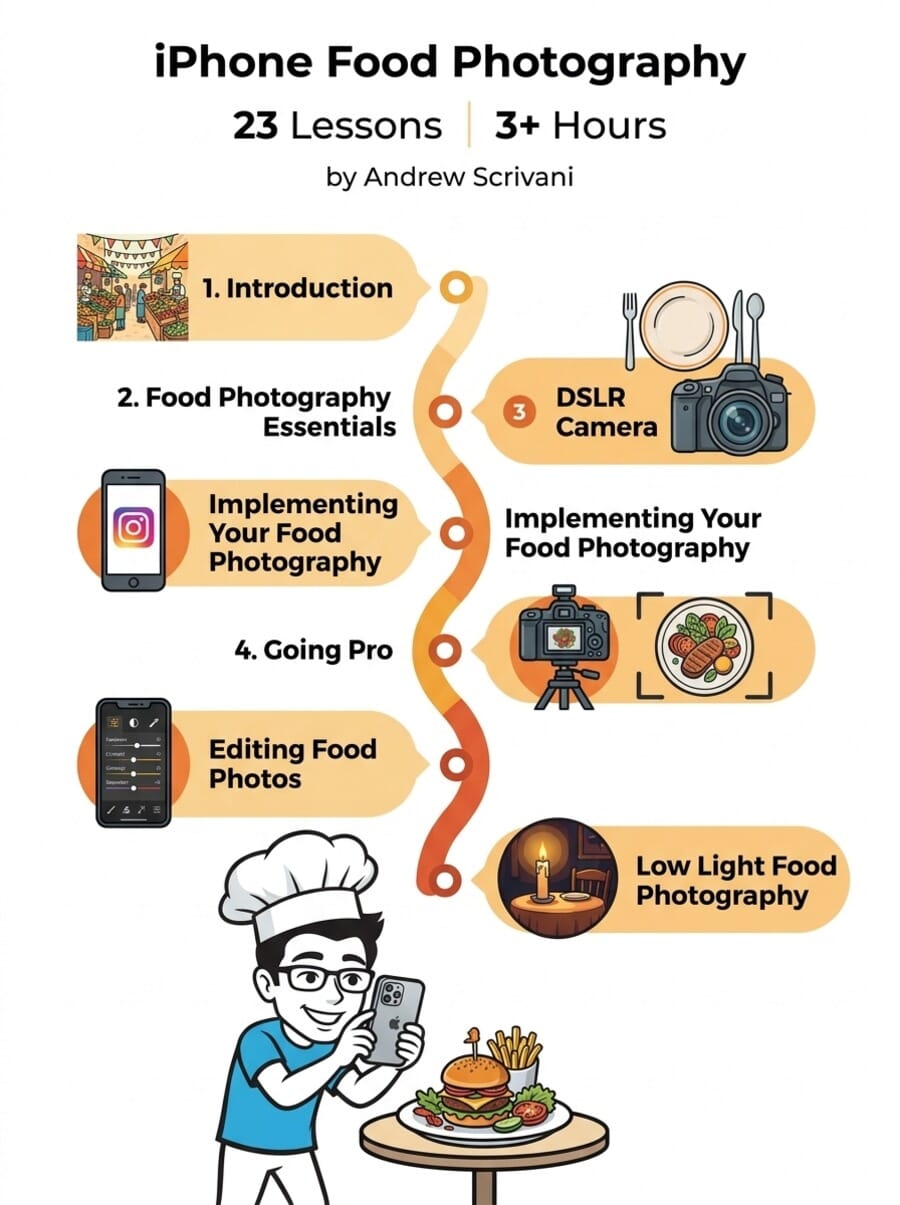
Food Photography Essentials: The Core of the Course
This is where the real learning happens. Nine lessons across 65 minutes cover the five most common food photography mistakes and exactly how to fix them.
“Simple Hacks For Amazing Food Photography In Natural Light” (5:14) kicks things off with the most important variable in food photography: light. Andrew demonstrates how to use inexpensive tools — A-clamps, foam core boards, and diffusion panels — to shape natural window light into professional-quality illumination.
“The Best Camera Angles For Incredible Food Photography” (13:55) is the longest lesson in the essentials section. Andrew covers the four essential angles every food photographer needs: overhead (flat lay), 45-degree, eye-level, and low angle. He explains when each works best — overhead for flat dishes like pizza, 45-degree for stacked foods like burgers, and eye-level for drinks and layered desserts.
Other essential lessons include:
- Simple Styling Tricks (8:15) — making food camera-ready using common household items. Students called it “the lesson to go back to.”
- Using Simple Props (7:55) — how plates, napkins, cutlery, and cutting boards transform a basic food shot into a styled composition.
- 4 Tricks To Isolate Your Subject (5:13) — selective focus, negative space, and color contrast to make the main dish pop.
- Lifestyle Food Photography: Storytelling (4:43) — going beyond the plate to capture the experience of eating.
- The 2 Keys To A Successful Shoot (6:31) — pre-shoot planning process.
Implementing Your Photography: From Practice to Social Media
Module 3 shifts from technique to application. The 5 lessons cover drink photography, personal projects, and Instagram growth strategies.
“Simple Tips For Magazine-Worthy Drink Photography” (12:17) is the standout. Drink photography presents unique challenges — transparency, condensation, reflections — and Andrew shows how to handle each one.
The Instagram lessons (11:41 + 7:23) teach growth strategies and Instagram Stories techniques. While helpful for food bloggers, these lessons feel somewhat dated in 2026 given platform changes. The underlying principles of consistent visual identity and story-driven content remain relevant.
Andrew’s lesson on “The Importance Of Feeling Inspired” (11:42) is surprisingly personal. He shares how he maintains creative momentum through personal photography projects — shooting for himself, not clients.
Going Pro: The Bonus That Justifies the Price
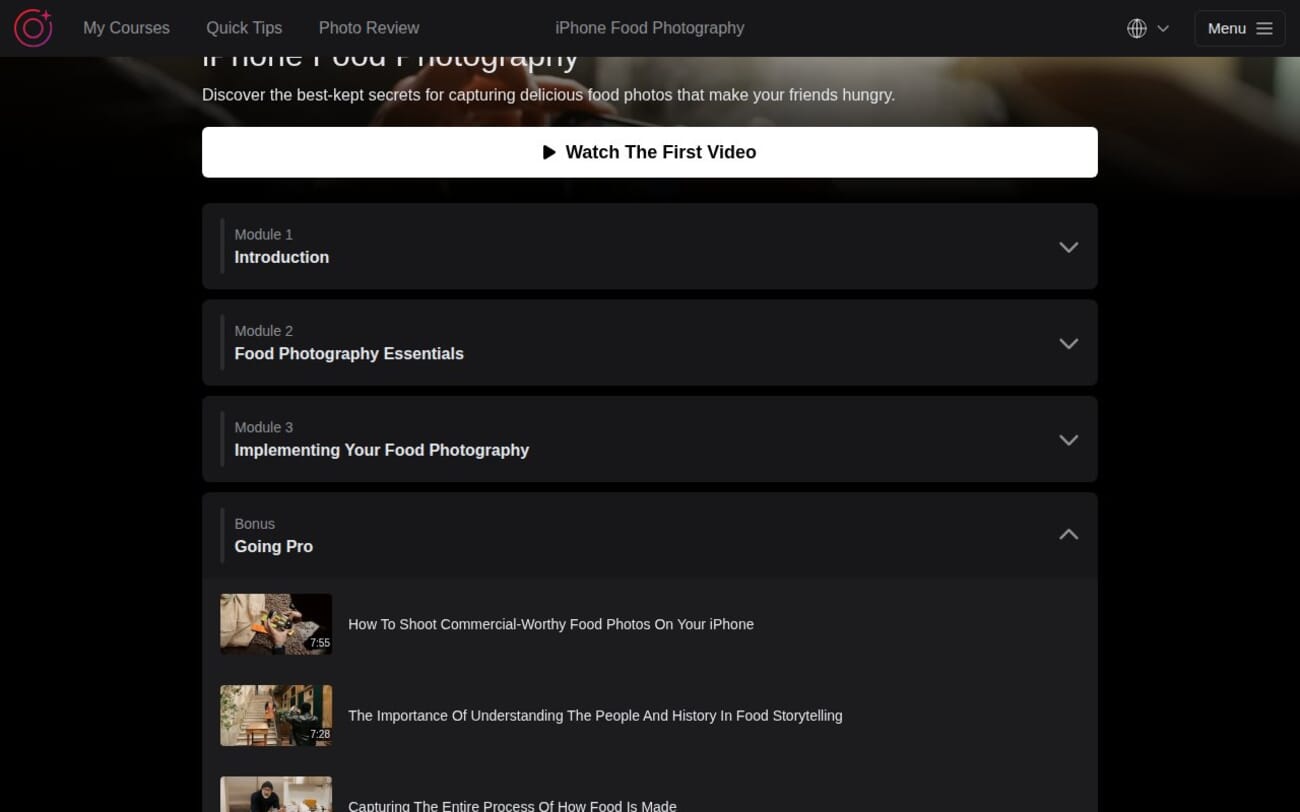
The “Going Pro” bonus section is labeled as free bonus content, but with 6 lessons spanning 55 minutes, it is actually the second-largest module in the course. And it may be the most valuable.
This is where Andrew’s 20+ years of professional experience really shines:
- Commercial-Worthy Food Photos on iPhone (7:55) — achieving results that could land commercial work.
- Understanding People and History in Food Storytelling (7:28) — the cultural context that elevates food photography.
- Capturing How Food Is Made (5:25) — behind-the-scenes and process photography.
- Photographing People and Food in a Cafe (14:16) — real-world restaurant shoots.
- iPhone Stock Photography (9:01) — shooting food images that sell on stock platforms.
- Michelin Star Restaurant Photography (11:48) — capturing fine dining at its best.
The Michelin star lesson received enthusiastic feedback: “I love how he incorporates the chef’s hands in some of his pictures.” If you have any interest in turning food photography into a side income, this bonus provides a practical roadmap.
Editing and Low Light: The Brief Bonuses
The remaining bonus modules are short — a single lesson each. “3 iPhone Editing Techniques” (9:44) covers basic editing in the Photos app, TouchRetouch, and Lightroom Mobile. The Low Light Food Photography lesson (5:42) addresses shooting in dim restaurants with pocket LED lights.
Both sections could benefit from expansion. Food photography arguably needs more editing instruction than most genres — white balance correction, color enhancement, and removing plate imperfections are crucial skills that deserve more coverage.
About the Instructor: Andrew Scrivani
Andrew Scrivani brings genuine industry credentials: The New York Times, Apple, Disney, Adobe, The Wall Street Journal, The New Yorker, ABC, plus many leading grocery brands. For over 20 years, his food photography has appeared in top publications.
His teaching style is calm, confident, and story-driven. He translates high-end expertise into accessible techniques using an iPhone, natural light, and $5 worth of props. Students praise his impact: “My photography has improved immensely” and “Andrew gave me the confidence to progress.”
Who Is This Course For?
Home cooks and bakers: Lighting, styling, and angle techniques immediately applicable to home kitchen photography.
Food bloggers and Instagram creators: Photography technique plus Instagram strategy plus stock photography guidance creates a practical toolkit.
Restaurant owners: Better menu and social media photos using just an iPhone and simple tools.
Travel food enthusiasts: Market photography, street food, and restaurant shooting techniques are ideal for food travelers.
Who might not benefit: Professional food photographers with existing studio setups will find the essentials too basic.
Pricing and Value
iPhone Food Photography is listed at $199 but typically available at $49-$99. At 3 hours from a New York Times photographer, the value is solid. Includes a 30-day money-back guarantee.
Consider the All-Access Pass if you want multiple IPS courses bundled together.
Get iPhone Food Photography (Discounted)
What Could Be Better
Limited editing instruction: One 10-minute editing lesson is not enough for food photography where post-processing is crucial.
Shorter than expected: At 23 lessons and 3 hours, it feels light compared to other IPS courses.
Aging iPhone references: Students mention needing updates for newer iPhone models.
Dated Instagram content: Social media strategy lessons need refreshing for 2026 platform changes.
Final Verdict
iPhone Food Photography succeeds on the strength of its instructor. Andrew Scrivani brings genuine expertise that most online food photography courses cannot match. His techniques for lighting, styling, and choosing angles are immediately actionable.
The Going Pro bonus section is a genuine standout for anyone interested in commercial food photography or stock sales.
The main weakness is brevity. At 3 hours, it covers essentials well but leaves you wanting more depth on editing and advanced techniques. Think of it as a masterclass introduction rather than a comprehensive program.
Rating: 4/5 — Expert-led food photography course with genuine commercial value in the Going Pro section. Docked for limited editing content and shorter runtime.
Try iPhone Food Photography Risk-Free
Related Reading
More iPhone Photography School Reviews
Do I need cooking experience to take this course?
No. If you eat at restaurants, visit food markets, or want to photograph any food, the techniques apply regardless of whether you prepared the dish.
How long is the course?
23 video lessons totaling 3 hours and 14 minutes. Most students complete it within 1-2 weeks. Lifetime access included.
Will this help me take better restaurant photos?
Yes. The course specifically addresses restaurant photography including low light conditions and busy environments.
Can I use these techniques with an Android phone?
Most techniques (lighting, styling, angles, composition, props) are universal and apply to any camera.
What is the refund policy?
30-day money-back guarantee. Email support for a full refund, no questions asked.
