

- iPhone Video Academy is a comprehensive iPhone videography course — 44 video lessons across 7 modules covering shooting, composition, advanced techniques, editing, and creative projects.
- Taught by Simone Ferretti, a professional videographer, with a structured 5-week curriculum plus drone and social media bonus modules.
- Covers everything from basic camera movements to Cinematic Mode, Action Mode, slow motion, gimbal use, and CapCut editing.
- At ~$49-$99 (discounted from ~$199), includes lifetime access, drone videography bonus, social media sharing guides, and a 30-day money-back guarantee.
- Best for iPhone owners who want to create polished videos — family memories, travel recaps, vlogs, or social media content.
iPhone Video Academy is iPhone Photography School’s dedicated video course, designed to take you from basic clips to polished, shareable videos using just your iPhone. With 44 lessons spanning over 6 hours, it is one of the more substantial courses on the platform.
Taught by Simone Ferretti, the course follows a structured 5-week format covering everything from basic camera movements and composition to Cinematic Mode, gimbal stabilization, and CapCut editing. We went through the full course on the platform to evaluate every module.


A comprehensive iPhone videography course by Simone Ferretti covering camera movements, composition, Cinematic Mode, Action Mode, slow motion, gimbals, time-lapses, audio, CapCut editing, and creative project tutorials. 44 lessons (6+ hours) with drone bonus and social media modules. Lifetime access with updates.
Normal Price: ~$199 Discounted: ~$49-$99 USD- Structured 5-week curriculum makes it easy to follow and build skills progressively.
- Strong coverage of modern iPhone video features — Cinematic Mode, Action Mode, and slow motion.
- Week 5 creative projects (family videos, travel recaps, vlogs) provide practical, real-world application.
- Includes audio recording lesson (14:55) — a topic most video courses skip entirely.
- Some students report audio/language issues in certain lessons — quality control could be tighter.
- Drone bonus section feels basic compared to the dedicated Drone Mastery course.
- CapCut-focused editing may not suit users who prefer other editors like iMovie or LumaFusion.
Course Overview: What’s Inside
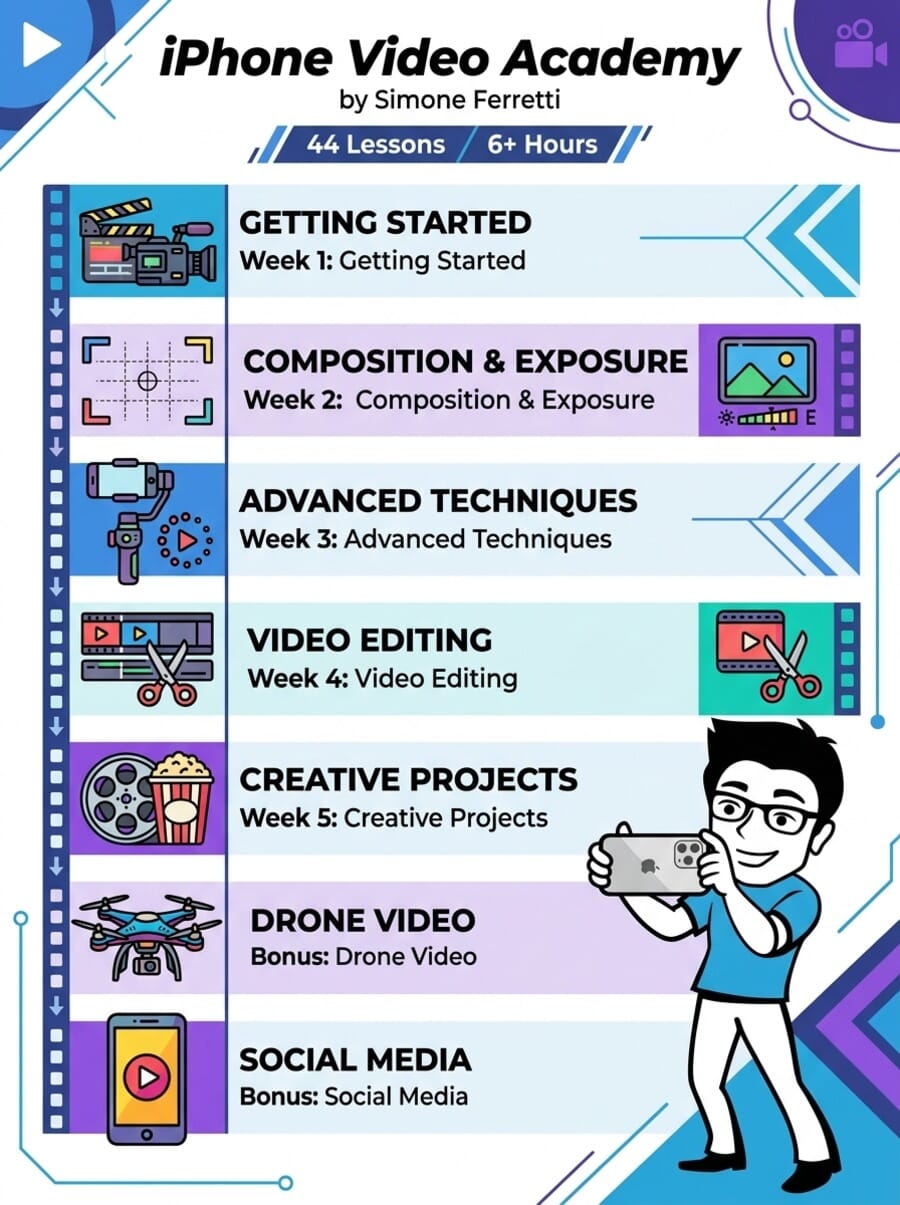
iPhone Video Academy is organized into 7 modules with 44 video lessons totaling 6 hours and 14 minutes. The course follows a structured 5-week learning path, plus drone and social media bonus modules.
- Week 1: Getting Started – 6 lessons on video interface, shots, lenses, and camera movements (47 minutes)
- Week 2: Composition and Exposure – 8 lessons on framing, rule of thirds, angles, and lighting (55 minutes)
- Week 3: Advanced Techniques – 8 lessons covering slow motion, Cinematic Mode, Action Mode, gimbals, and audio (56 minutes)
- Week 4: Video Editing – 6 lessons on the Photos app, CapCut editing, music, and advanced techniques (54 minutes)
- Week 5: Creative Projects – 7 lessons with full project tutorials for family, travel, fashion, vlog, and talent showcase videos (103 minutes)
- Bonus: Drone Video – 7 lessons on aerial photography and videography basics (43 minutes)
- Bonus: Social Media – 2 lessons on sharing to Instagram Reels and TikTok (13 minutes)
Week 1: Getting Started With iPhone Videography
The opening module covers fundamentals that many iPhone users have never explored. “Exploring the iPhone’s Video Interface” (9:44) walks through every video-related setting and button. “Static Shots vs Motion Shots” (9:57) establishes the foundation for understanding when to hold steady and when to move.
The camera movement lessons are the highlight: “Essential Camera Movements” (9:34) covers pans, tilts, and tracking shots, while “Advanced Camera Movements” (8:03) introduces reveal shots and orbits. Students found the information clear: “I’m just loving what I’m learning here, and he explains everything so simply that it doesn’t feel overwhelming.”
Week 2: Mastering Composition and Exposure
Week 2 translates photography composition principles to video. The rule of thirds, dynamic angles, layering/parallax, and creative composition techniques each get dedicated lessons. “Dynamic Angles” (7:02) received praise: “Another professional tutorial, packed with tips and great ideas.”
The “Mastering Exposure” lesson (10:04) addresses a practical concern — one student asked: “How is adjusting the exposure during editing different than adjusting it as you film?” This is exactly the kind of real-world question the lesson answers.
Week 3: Advanced Techniques — The Standout Module
This is where iPhone Video Academy distinguishes itself from generic video courses:
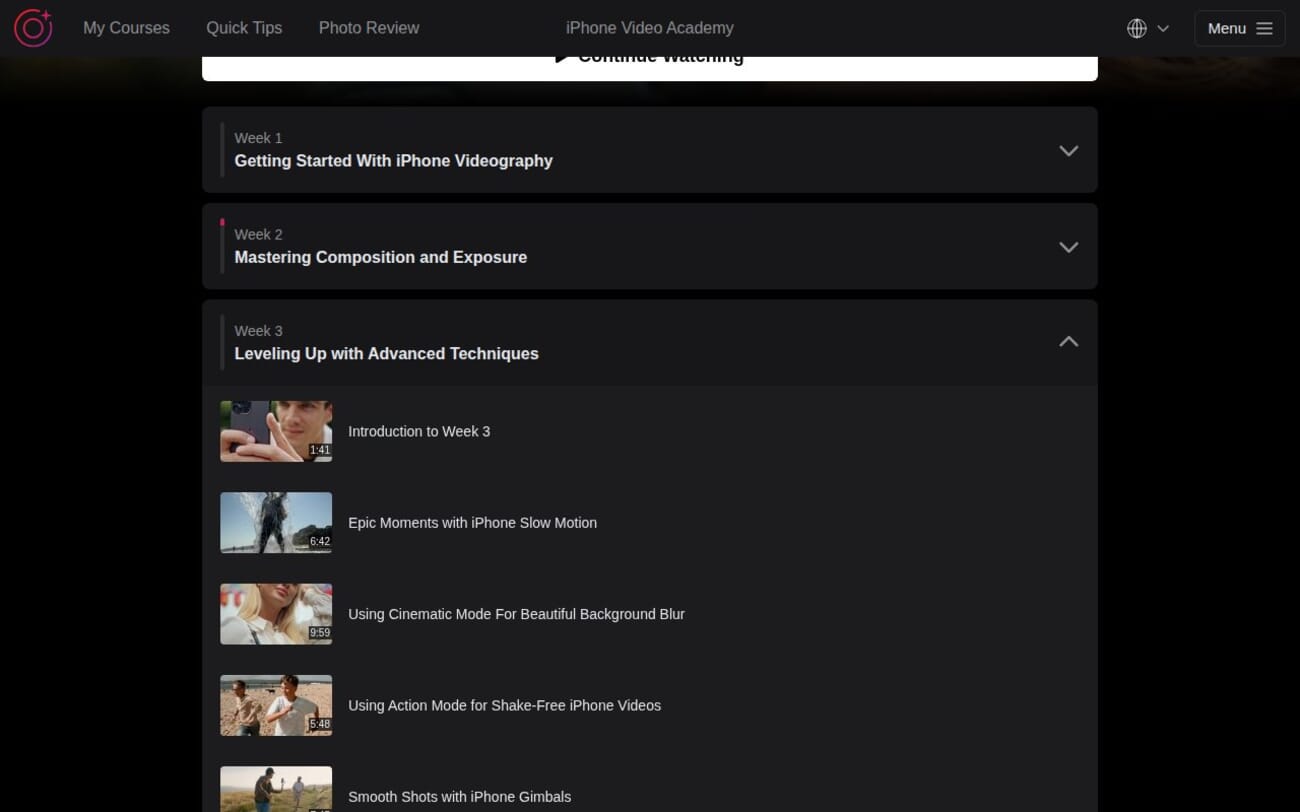
- Cinematic Mode (9:59) — how to use the iPhone’s computational depth-of-field for professional-looking background blur in video.
- Action Mode (5:48) — stabilization for handheld shooting while walking or moving.
- Slow Motion (6:42) — capturing dramatic slow-motion footage.
- Gimbals (7:45) — selecting and using a gimbal for ultra-smooth stabilization.
- Time-lapses and Hyperlapses (6:40) — creating time-bending video effects.
- Audio Recording (14:55) — the longest lesson in the module, covering a topic most video courses ignore. Good audio is what separates amateur from polished video.
Week 4: The Video Editing Studio
The editing module focuses primarily on CapCut as the recommended editing app, with a basic introduction to the Photos app. The “Taking Video Editing To The Next Level” lesson (18:19) is the longest in the module and covers advanced CapCut features including transitions, effects, and color grading.
The decision to focus on CapCut rather than iMovie or LumaFusion is practical — it is free, powerful, and widely used. However, students who prefer other editors may find the lessons less directly applicable. One student asked: “Could you make a video about masking?” suggesting appetite for even more advanced editing content.
Week 5: Creative Projects — Putting It All Together
The final core module is the longest at 103 minutes across 7 lessons. Each lesson is a complete project walkthrough:
- Family Memories (19:52) — capturing and editing meaningful family moments
- Travel Recap (12:45) — documenting a day’s highlights into a shareable video
- Fashion Video at Home (15:03) — creative product/fashion content creation
- Showcasing Talents (30:41) — the longest lesson, covering how to film skill demonstrations
- Creating Engaging Vlogs (19:13) — vlogging techniques and structure
These project-based lessons are what make the course practical. You see the complete workflow from planning to shooting to editing for each video type.
Bonus: Drone Video and Social Media
The drone bonus (7 lessons, 43 minutes) provides a basic introduction to aerial videography. It covers drone controls, first shots, cinematic moves, and panoramic photos. If you already own the Drone Mastery course, this section will feel redundant. But as a free introduction for video-focused students, it adds value.
The social media bonus (2 lessons, 13 minutes) covers sharing to Instagram Reels and TikTok — brief but practical for the target audience.
About the Instructor: Simone Ferretti
Simone Ferretti is a professional videographer and content creator. His teaching style is clear, structured, and beginner-friendly. Students consistently praise his approach: “Enjoying this course, information given in a clear way. Learning lots of things I didn’t know.”
Unlike Cliff Pickett’s field-based teaching in the landscape and drone courses, Simone’s approach is more structured and studio-like. Each lesson has clear objectives and demonstrations, making it easy to follow and revisit specific techniques.
Who Is This Course For?
Parents and family documentarians: The family memories project lesson alone makes this course valuable if you want to create polished videos of your children, holidays, and milestones.
Travel content creators: Travel recap and vlogging lessons provide a complete workflow for documenting trips.
Social media creators: If you create content for Instagram Reels, TikTok, or YouTube Shorts, the combination of shooting techniques, CapCut editing, and social media optimization is directly applicable.
Small business owners: Product videos, talent showcases, and fashion content techniques translate well to business video marketing.
Who might not benefit: Professional videographers or anyone already comfortable with Cinematic Mode, gimbals, and video editing will find most content too basic.
Pricing and Value
Listed at $199, typically discounted to $49-$99. For 44 lessons and 6+ hours covering shooting through editing and creative projects, the value is solid. Includes lifetime access and a 30-day money-back guarantee.
Pairs naturally with the Video Editing Academy for deeper editing skills. The All-Access Pass bundles everything together.
Get iPhone Video Academy (Discounted)
What Could Be Better
Audio/quality issues: Students report language/audio problems in some lessons. One commented: “There is something wrong with the audio. If I choose English it sounds like Arabic.” Quality control needs improvement.
CapCut dependency: The editing module is heavily CapCut-focused. Students who prefer iMovie, LumaFusion, or DaVinci Resolve will need to adapt the techniques.
Drone section is basic: The 7-lesson drone bonus covers the same ground as the first third of Drone Mastery. It works as an introduction but adds limited value for anyone with drone experience.
Final Verdict
iPhone Video Academy fills an important gap in the IPS catalog. While the platform’s strength has traditionally been photography, this course proves they can teach video equally well. The structured 5-week approach, modern iPhone feature coverage (Cinematic Mode, Action Mode), and practical creative projects make it a solid choice for beginners.
The audio lesson and creative projects in Week 5 are particular highlights — these are the sections that transform basic phone clips into content you would actually want to share.
Rating: 4/5 — Well-structured video course with strong creative project content. Docked for occasional quality issues and CapCut-centric editing.
Try iPhone Video Academy Risk-Free
Do I need a gimbal for this course?
No. The course covers gimbal use in one lesson, but the majority of techniques work with handheld shooting and the iPhone’s built-in Action Mode stabilization.
Which iPhone do I need?
Most techniques work with any recent iPhone. Cinematic Mode requires iPhone 13 or later, and Action Mode requires iPhone 14 or later. Basic shooting, composition, and editing techniques work with any model.
Is this course about photography or video?
Primarily video. The course focuses on recording, editing, and sharing video content. For photography, see the iPhone Photo Academy or other IPS photography courses.
How long does it take to complete?
44 lessons totaling 6 hours and 14 minutes. The 5-week structure suggests completing it over about a month, but with lifetime access you can go at your own pace.
Does it cover video editing?
Yes. Week 4 is entirely dedicated to editing, primarily using CapCut (free). It covers basic enhancements in the Photos app, CapCut fundamentals, music selection, and advanced editing techniques.
Related Reading
More iPhone Photography School Reviews
