

- Video Editing Academy is a dedicated video editing course from iPhone Photography School — 43 lessons across 6 modules focusing on CapCut editing from basics to advanced compositing.
- Taught by Simone Ferretti, the same instructor behind iPhone Video Academy, with a structured progression from native Photos app tools through advanced CapCut techniques.
- Covers CapCut essentials, travel video editing, interview editing, color grading, green screens, masking, and creative compositing — plus 5 creative effect tutorials.
- At ~$49-$99 (discounted), includes lifetime access, Instagram growth tips, creative effects bonus, and a 30-day money-back guarantee.
- Best for iPhone video creators who want to level up their editing — pairs perfectly with the iPhone Video Academy for a complete shooting + editing education.
Video Editing Academy is the editing companion to iPhone Photography School’s Video Academy. While that course teaches you how to shoot, this one teaches you how to turn raw footage into polished, shareable videos using CapCut and the native Photos app.
With 43 lessons spanning over 7 hours, it goes significantly deeper into editing than the single editing module in the Video Academy. From basic clip trimming to green screen compositing and advanced color grading, there is a clear progression from beginner to advanced.

A comprehensive video editing course by Simone Ferretti focused on CapCut and iPhone Photos app editing. Covers 43 lessons (7+ hours) including basic trimming, color correction, music, transitions, interview editing, color grading, green screens, masking, compositing, and creative effects. Includes Instagram growth module and creative effects bonus.
Normal Price: ~$199 Discounted: ~$49-$99 USD- Most comprehensive mobile video editing course available — 7+ hours from basic trimming to advanced compositing.
- Complete interview editing sequence (4 lessons, 67 minutes) teaches professional narrative editing from start to finish.
- Creative effects tutorials (mirror, clone, X-ray) add fun, shareable techniques beyond standard editing.
- Logical progression from Photos app basics through CapCut fundamentals to advanced techniques.
- Heavily CapCut-dependent — students using other editors (iMovie, LumaFusion, DaVinci Resolve) will need to adapt.
- Some students report issues with CapCut features being behind a paywall that were free when the course was recorded.
- Instagram growth module feels disconnected from the editing focus of the rest of the course.
Course Overview: What’s Inside
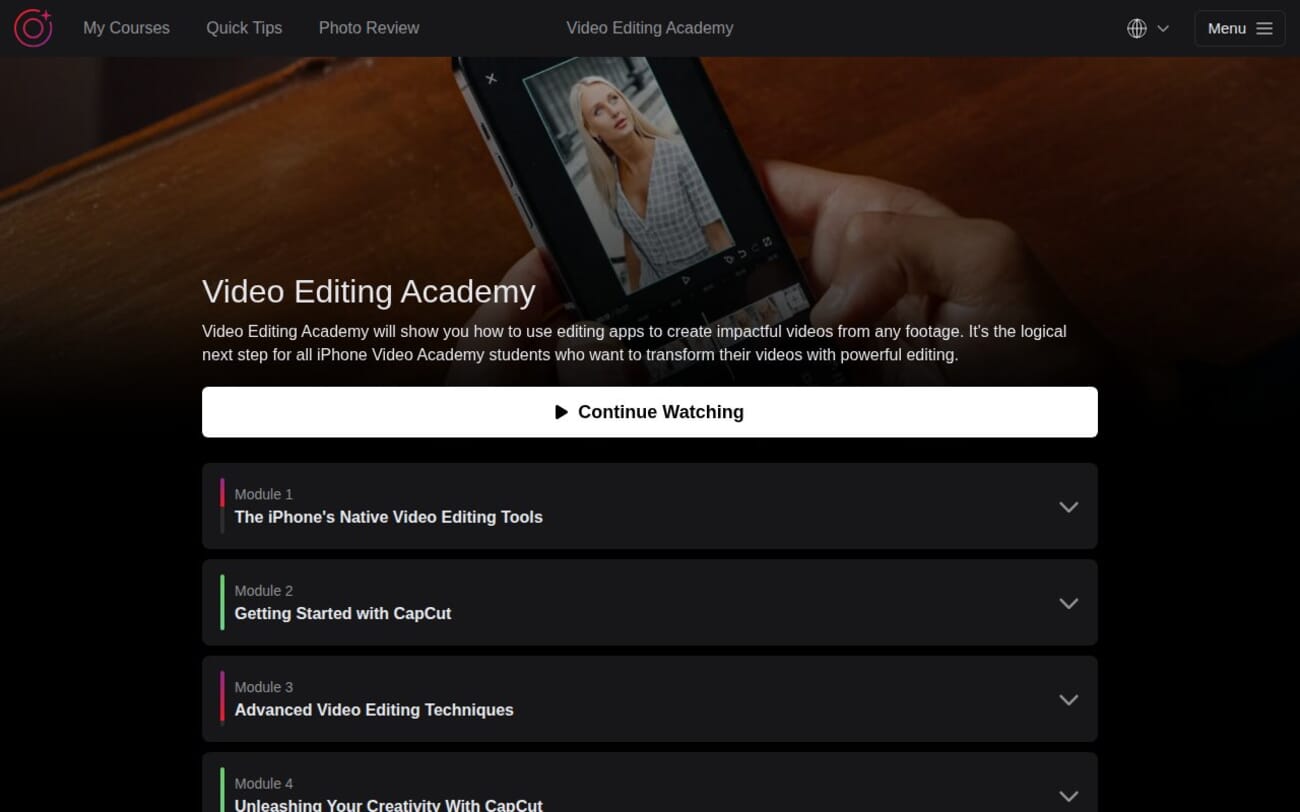
Video Editing Academy contains 43 lessons across 6 modules totaling 7 hours and 9 minutes. The structure progresses from native iPhone tools through CapCut basics to genuinely advanced editing techniques.
- Native iPhone Editing Tools – 6 lessons covering Photos app editing, trimming, color/exposure, cropping, blur, and slow motion (41 minutes)
- Getting Started with CapCut – 10 lessons on sequencing, photo montages, Live Photos, music, travel video editing, text, color correction (119 minutes)
- Advanced Video Editing – 9 lessons covering split-screens, timelapses, slow motion, transitions, and a complete 4-part interview editing series (128 minutes)
- Unleashing Creativity with CapCut – 7 lessons on green screens, masking, AutoCut, and creative compositing (67 minutes)
- 5 Creative Video Effects – 5 lessons with specific creative techniques: mirror, jumping, X-ray, cloning, and self-conversation effects (29 minutes)
- Instagram Growth Tips – 6 lessons on audience engagement, hashtags, posting consistency, and TikTok vs Instagram (43 minutes)
Native iPhone Editing: Starting Simple
The opening module covers what your iPhone can do without any third-party apps. The standout revelation for many students: “O my god! I did not know you could crop videos in the Photos app!” Basic trimming, color/exposure adjustments, perspective corrections, and the built-in background blur tool are all covered.
This module serves as an effective on-ramp. If you have never edited a video before, starting with familiar iPhone tools builds confidence before moving to CapCut.
Getting Started with CapCut: The Core Editing Module
The largest module at 10 lessons and nearly 2 hours covers CapCut fundamentals through a practical travel video project. Rather than isolated tutorials, Simone builds a complete travel video across 4 connected lessons — crafting the main sequence (10:46), adding text and graphics (14:32), color correction (10:03), and transitions/effects (14:12).
Other highlights include creating photo montages from still images (14:06), working with Live Photos (12:21), and music synchronization (13:51). A travel agent in the comments shared: “I just bought CapCut, hope I am not late to the party. I am a travel agent and had so much footage.”
Advanced Editing: Interview Series and Color Grading
The advanced module is where this course truly justifies its existence. The 4-part interview editing series (67 minutes total) is unlike anything in other mobile editing courses:
- Editing an Interview: Narrative Techniques (14:18) — structuring a story from raw interview footage
- B-Roll and Music Integration (14:49) — layering visual and audio elements
- Advanced Color Grading (16:47) — creating a consistent visual mood
- Audio Refinement and Graphics (21:29) — the longest lesson, covering professional audio cleanup and title cards
Students appreciated the depth: “All good and useful. I was trying to develop a video from 1900 shots and a few videos from a short trip to Cambodia.” Another asked about transcription-based editing, noting: “That is awesome for finding the soundbytes you want.”
Creative CapCut and Effects
The creativity modules add techniques that make videos stand out on social media. Green screen removal (15:45), advanced masking (11:42), and two creative compositing lessons teach skills that most mobile editors never explore.
The 5 Creative Effects bonus is pure fun — mirror effects (7:39), jumping videos (5:04), X-ray effects (4:12), cloning (4:10), and creating a conversation with yourself (8:20). These are the techniques that generate engagement on Instagram Reels and TikTok.
About the Instructor: Simone Ferretti
Simone Ferretti teaches both the iPhone Video Academy and this editing course. His editing instruction is detailed and methodical — he walks through every step, every menu, and every setting. Students who took his video shooting course will find the same clear, structured approach here.
Who Is This Course For?
iPhone Video Academy graduates: The natural next step. The shooting course has a single editing module; this course provides 7+ hours of dedicated editing instruction.
Content creators: If you create videos for Instagram, TikTok, or YouTube and want to move beyond basic cuts, the advanced modules teach professional-level techniques on a phone.
Small business video editors: The interview editing series is directly applicable to client testimonials, behind-the-scenes content, and promotional videos.
Who might not benefit: Anyone already proficient with CapCut or desktop editing software like Premiere Pro or DaVinci Resolve will find most content too basic.
Pricing and Value
Listed at ~$199, typically $49-$99 on sale. At 43 lessons and 7+ hours focused entirely on editing, it offers more depth than any other mobile video editing course we have reviewed. The 30-day money-back guarantee applies.
Pairs perfectly with iPhone Video Academy for a complete shoot-to-share workflow. The All-Access Pass includes both.
Get Video Editing Academy (Discounted)
What Could Be Better
CapCut paywall changes: Some features Simone uses were free when recorded but now require a CapCut Pro subscription. Students report frustration when they cannot replicate steps.
No alternative editor coverage: iMovie, LumaFusion, and DaVinci Resolve for iPad are all viable alternatives that are never mentioned.
Instagram module feels tacked on: The social media growth tips, while useful, break the editing focus of the course.
Final Verdict
Video Editing Academy is the most comprehensive mobile video editing course we have seen. The progression from basic Photos app edits through CapCut fundamentals to advanced compositing and interview editing is well-structured and thorough.
The 4-part interview editing series and creative compositing lessons are the standout sections — they teach skills that genuinely elevate mobile video from amateur to polished.
Rating: 4/5 — The most thorough mobile video editing course available. Docked for CapCut dependency and an out-of-place Instagram module.
Try Video Editing Academy Risk-Free
Do I need CapCut Pro for this course?
Most lessons work with the free version of CapCut. Some advanced features may require CapCut Pro, which has changed pricing since the course was recorded. The native iPhone editing module requires no third-party apps.
Should I take iPhone Video Academy first?
Not required, but recommended. Video Academy teaches shooting techniques; this course focuses entirely on editing. Together they provide a complete iPhone video education.
How long does it take to complete?
43 lessons totaling 7 hours and 9 minutes. With lifetime access, you can progress at your own pace.
Can I use these techniques with other editing apps?
The principles (sequencing, color grading, transitions, audio) transfer to any editor. The specific button-by-button tutorials are CapCut-focused.
Related Reading
More iPhone Photography School Reviews
