

- Capture It All is iPhone Photography School’s most comprehensive course — 63 video lessons across 9 modules + a drone bonus, shot entirely on location in Mexico.
- Taught by Clifford Pickett, a professional iPhone photographer whose clients include Clinique, British Airways, and National Geographic.
- Goes beyond still photos to cover video, timelapse, hyperlapse, slo-mo, long exposure, night mode, and drone photography — all with an iPhone.
- At ~$99 (normally ~$495), it is the most expensive IPS course but also the most ambitious in scope and production value.
- Best suited for intermediate iPhone photographers who want to master every creative medium their phone can produce.
The Capture It All course is iPhone Photography School’s flagship advanced offering. Where iPhone Photo Academy teaches you to take better photos, this course teaches you to use every creative capability your iPhone has — stills, video, timelapse, hyperlapse, slo-mo, long exposure, night photography, panoramas, cinematic video, and even aerial drone footage.
Shot entirely on location in Mexico with professional production values, it feels less like an online course and more like a photography travel documentary you learn from. We reviewed the full platform to break down what is inside.

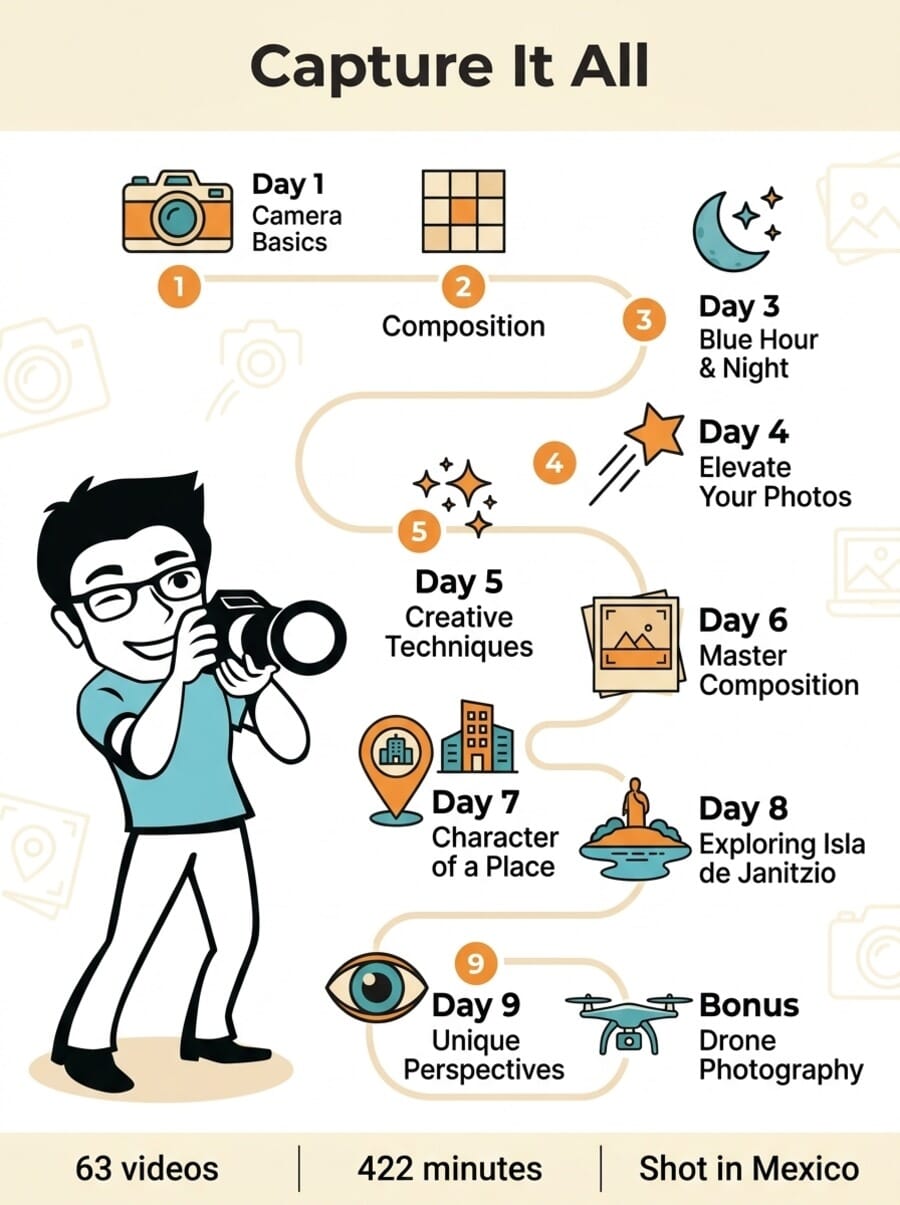
The most comprehensive iPhone photography and videography course from iPhone Photography School. 63 video lessons (422 minutes) across 9 day-based modules + a drone bonus, shot on location in Mexico. Covers stills, video, timelapse, hyperlapse, slo-mo, long exposure, night mode, panoramas, cinematic video, gimbals, and aerial drone photography. Taught by Clifford Pickett. Includes 7 bonuses, photo projects, and community access.
Normal Price: ~$495 Today Only: ~$99 USD- The most comprehensive iPhone photography course available — covers every creative medium.
- Outstanding production quality — shot on location in Mexico with professional cinematography.
- Clifford Pickett is an exceptional field instructor who demonstrates techniques in real-world conditions.
- Includes video, timelapse, and drone content that no other single course covers.
- At ~$99, it is significantly more expensive than the other IPS courses (~$49 each).
- Some advanced techniques require accessories (gimbal, tripod, drone) not included.
- The day-based structure means some modules feel unfocused, mixing techniques by location rather than topic.
Course Overview: What Sets It Apart
Capture It All is structured as a 9-day journey through Mexico, with each day introducing new techniques in new locations. The 63 video lessons total 422 minutes (about 7 hours), making it the longest course on the platform by lesson count.
The course structure:
- Day 1: Camera Basics and Getting Started
- Day 2: Composition Fundamentals
- Day 3: Blue Hour and Night Photography
- Day 4: Simple Tricks To Elevate Your Photography
- Day 5: Creative iPhone Photography Techniques
- Day 6: Mastering Photo Composition
- Day 7: Capturing The Unique Character Of A Place
- Day 8: Exploring Isla de Janitzio
- Day 9: Finding Unique Perspectives In A Beautiful Landscape
- Bonus: Aerial Photography and Video With A Drone
What makes this course fundamentally different from iPhone Photo Academy is scope. IPA teaches photography. Capture It All teaches visual storytelling across every medium your iPhone supports. By the end, you will know how to shoot stills, video, timelapse, hyperlapse, slo-mo, long exposure, night mode, panoramas, cinematic video, and drone footage — all from one device.
The On-Location Teaching Approach
Unlike most online photography courses, Capture It All was filmed entirely on location in Mexico. Cliff does not lecture from a studio — he walks through markets, climbs rooftops, explores islands, and shoots blue hour cityscapes while explaining his thought process in real time.
This field-based approach has a major advantage: you see techniques applied in real conditions with real challenges. When Cliff shoots blue hour, the light is actually changing. When he demonstrates street photography, real people walk through the frame. When he uses a gimbal for cinematic video, you see the actual stabilization difference compared to handheld.
The production quality is noticeably higher than the other IPS courses. Emil Pakarklis was on-site directing, and a professional film crew captured the lessons with cinematic B-roll, drone establishing shots, and multiple camera angles. It feels less like a tutorial and more like a beautifully shot travel documentary that teaches you along the way.
Key Techniques Covered
The breadth of techniques is the course’s strongest selling point. Here is what Cliff covers across the 9 days:
Still Photography: Camera settings, composition, leading lines, symmetry, framing, negative space, angles, perspectives, portraits, street photography, architecture, and landscape techniques. Much of this overlaps with iPhone Photo Academy but is taught from a more advanced perspective by a different instructor.
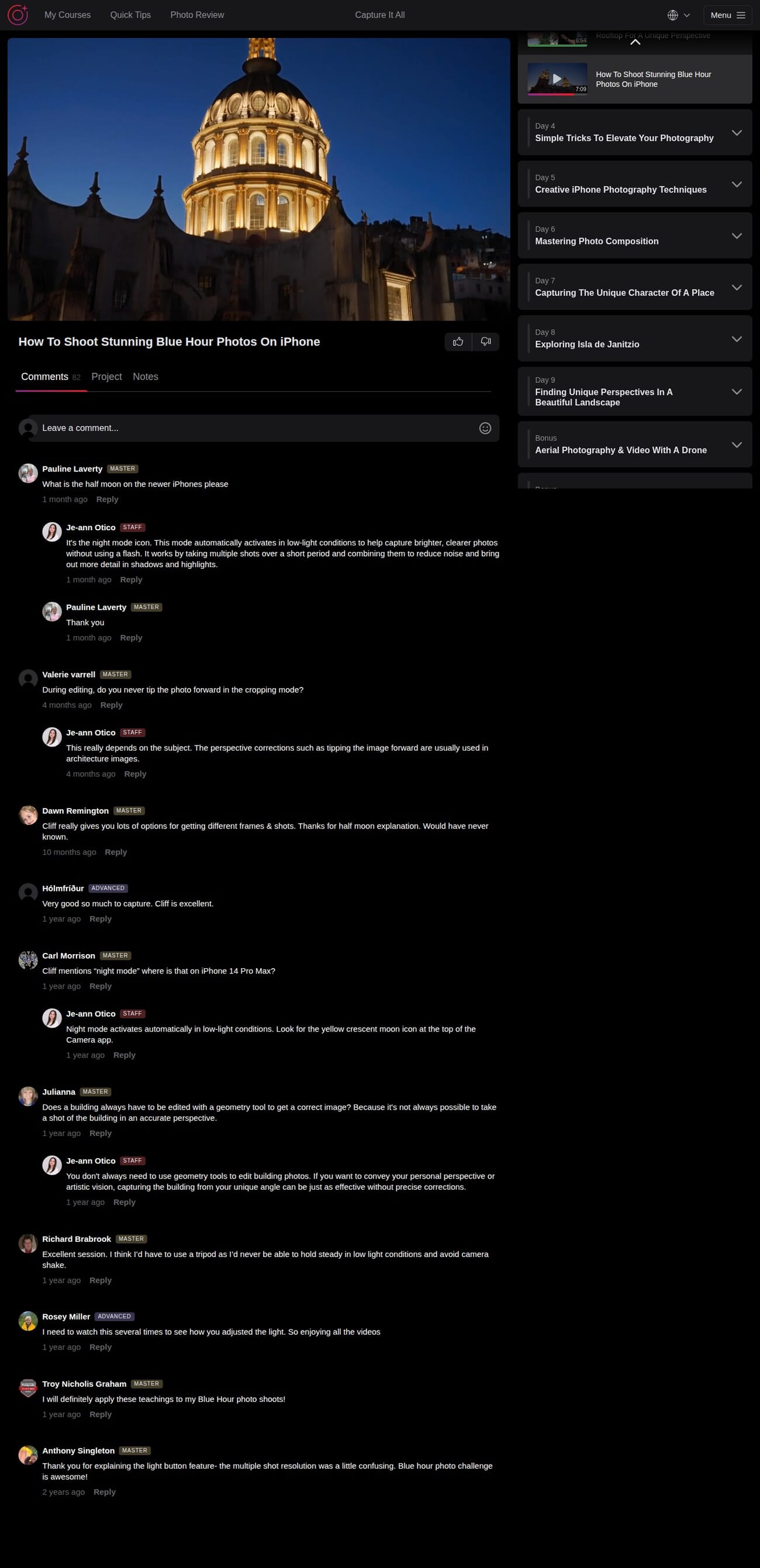
Night and Blue Hour Photography: One of the course highlights. Cliff demonstrates how to shoot stunning blue hour photos, use Night Mode effectively, adjust exposure time, and compose nighttime cityscapes. The blue hour lesson (7:09) alone covers settings, timing, and composition techniques specific to twilight shooting.
Video: Shooting techniques for iPhone video, including cinematic movements, stabilization with gimbals, and how to think in sequences rather than individual clips. The video content is a strong addition that most photography-only courses ignore.
Timelapse and Hyperlapse: How to create smooth timelapses and hyperlapses using the iPhone’s built-in features. Cliff shows both stationary timelapses (clouds, sunsets) and moving hyperlapses (walking through streets, driving).
Long Exposure and Slo-Mo: Creative techniques using Live Photos for long exposure effects and the slo-mo camera mode for dramatic action shots.
Drone Photography (Bonus): An introduction to aerial photography and video using a consumer drone. If you want more depth on drone work, the dedicated Drone Mastery course covers this topic in much greater detail.
About the Instructor: Clifford Pickett
Clifford Pickett is a professional photographer who has shot commercial work for Clinique, British Airways, and National Geographic — all using just an iPhone. That credential alone sets him apart from most online photography instructors.
His teaching style is calm, practical, and field-focused. Rather than explaining theory in a studio, he demonstrates techniques in real locations with real lighting challenges. His compositions are consistently strong, and he has a gift for explaining why he chooses specific angles, lenses, and moments to capture.
What makes Cliff particularly effective as an instructor is his 11+ years of dedicated iPhone photography experience. He knows the device’s capabilities and limitations intimately, which means his advice is specific to iPhone rather than adapted from DSLR techniques.
Cliff also teaches iPhone Landscape Mastery and the Drone Mastery course on the same platform.
Bonus Content: 7 Extras
The 7 bonuses add significant value:
- Shooting Videos — Extended video techniques including cinematic shots, settings, gimbals, and video editing
- Flying Drones — Aerial photography and cinematic drone footage basics
- Personalized Photo Feedback — AI-powered review tool for your photos
- Travel Photo eBook — Capturing the essence of a place while traveling
- 25 Photo Projects — Structured assignments for hands-on practice
- Daily Photo Tips — Ongoing creative ideas and techniques
- Private Community — Lifetime membership for sharing and feedback
The video and drone bonuses are substantial enough to be courses on their own. The 25 photo projects are particularly valuable for converting passive watching into active skill-building.
Community and Support
Like all IPS courses, Capture It All has active comments sections with staff support. The blue hour lesson, for example, has 82+ comments with students asking about Night Mode, device-specific settings, and technique clarifications.
Je-ann Otico from the IPS team responds to technical questions with detailed, device-specific answers. We noticed responses covering Night Mode icon locations on different iPhone models, perspective correction techniques, and tips for reducing camera shake in low light.
The community uses the familiar badge system (Beginner, Advanced, Master) with comments spanning from recent months to 2+ years ago, indicating ongoing engagement.
Who Is This Course For?
Capture It All works best for:
- Intermediate iPhone photographers who have mastered the basics and want to explore every creative medium their phone can produce.
- Travel photographers who want to document trips with photos, videos, timelapses, and aerials — all from one device.
- Content creators who need to produce diverse visual content (stills + video + timelapse) for social media or clients.
- Anyone who owns accessories (gimbal, tripod, drone) but does not know how to use them effectively with their iPhone.
It is not ideal for:
- Complete beginners — start with iPhone Photo Academy first.
- People who only want to learn still photography — the course’s value is in its breadth across multiple mediums.
- Anyone looking for editing training — this is a capture-focused course.
Pricing and Value
Capture It All has a list price of ~$495, typically discounted to ~$99 — double the price of most other IPS courses. A 3-payment installment option is available. The price includes:
- Lifetime access to all 63 lessons and 7 bonuses
- Video, timelapse, and drone content included
- 25 photo projects with community feedback
- Travel photo eBook
- 30-day money-back guarantee
At $99, the value depends on how many of the covered techniques you will actually use. If you want to learn photography, video, timelapse, and drone, this single course covers all of them for less than buying them separately. Our full IPS review notes that Capture It All has generated over $31,000 in affiliate commissions for us — the most of any IPS course — which suggests students find strong value in it.
Check current pricing and enroll in Capture It All →
What Could Be Better
The day-based structure can feel unfocused. Organizing by location/day rather than by technique means composition tips, video techniques, and creative tricks are scattered across multiple days rather than consolidated into topical modules. If you want to revisit “everything about timelapse,” you will need to jump between days.
Accessories are needed for some content. Several techniques require a tripod, gimbal, or drone that you may not own. While Cliff explains what you need and why, the course does not always offer non-accessory alternatives for achieving similar results.
Price premium. At ~$99, it costs about double what the other IPS courses charge. The production values justify some premium, but budget-conscious learners may get better value from the iPhone Photo Academy for stills and iPhone Video Academy for video, purchased separately.
Some overlap with other courses. If you have already taken iPhone Photo Academy, some of the still photography content will feel familiar. The unique value is in the video, timelapse, and drone material.
Final Verdict
Capture It All is the most ambitious and comprehensive iPhone course iPhone Photography School has produced. The on-location filming in Mexico, Clifford Pickett’s expert instruction, and the breadth of techniques covered make it a unique offering in the iPhone photography education space.
It earns our highest rating among the IPS courses because it delivers something no other single course does: mastery of every creative medium your iPhone can produce. The production quality alone sets it apart.
The question is whether you need that breadth. If you only want better still photos, the iPhone Photo Academy is a better starting point at half the price. But if you want to become a complete iPhone visual creator — stills, video, timelapse, and aerial — Capture It All is worth the investment.
Enroll in Capture It All (30-day guarantee) →
Frequently Asked Questions
How is Capture It All different from iPhone Photo Academy?
iPhone Photo Academy focuses on still photography for beginners. Capture It All covers stills plus video, timelapse, hyperlapse, slo-mo, long exposure, night photography, and drone — all at an intermediate level. Different instructor (Cliff vs. Emil), different teaching style (on-location vs. studio), and significantly broader scope.
Do I need a drone to take this course?
No. The drone content is a bonus section, not part of the core 9-day curriculum. The vast majority of the course requires only your iPhone. Some lessons benefit from a tripod or gimbal, but Cliff shows results without accessories as well.
Is this course suitable for beginners?
Cliff does not assume prior knowledge and explains techniques from scratch. However, the course moves faster and covers more ground than the beginner-focused iPhone Photo Academy. Complete beginners may want to start with IPA first and then move to Capture It All for the advanced creative techniques.
Why is this course more expensive than the others?
The higher price reflects the production cost of filming on location in Mexico with a professional crew, plus the broader scope (63 lessons covering stills, video, timelapse, and drone). It is essentially three courses in one.
What is the refund policy?
iPhone Photography School offers a 30-day money-back guarantee on all courses, including Capture It All. Full refund, no questions asked.
Disclosure: This article contains affiliate links. When you purchase through our links, we may earn a commission at no additional cost to you. We have hands-on access to the course platform and this review reflects our genuine assessment of the content.


