

- OpenAI released Images 2.6 on November 4, 2026: ChatGPT Images 2.6 in ChatGPT and Codex for all tiers, plus two API models, GPT-Image-2.6 Flare (speed) and Sunburst (quality).
- PhotoWorkout tested it on four real SampleShots photos. Faces and buildings held up remarkably well, but the model rewrote handwriting on a notebook it was told not to touch.
- Text rendering was flawless: a 29-string camera settings cheat sheet came back with zero errors, from both 2.6 and 2.5.
- OpenAI promises images 50% faster. Through PhotoWorkout’s ChatGPT-login setup, 2.6 Sunburst averaged 30.1 seconds against 31.9 for 2.5, a gain of about 6%.
- In ChatGPT, a GIF of a cartoon character was genuinely drawn frame by frame. Asked to animate a real photo, ChatGPT instead pasted AI-drawn leaves over the untouched original with code. Text GIFs and SVG icons were pure code, in ChatGPT and in Grok.
OpenAI’s image model has moved again. Barely two months after GPT Image 2.5, the company released Images 2.6 on November 4, promising faster generation, more consistent edits, animated GIFs and SVG export. For photographers, the question is the same one as last time: what does it actually do to a real photo, and can the claims survive a hands-on test?
PhotoWorkout ran 16 tests on November 7 instead of taking the press materials at face value: four edits on real photos, a 2.5 versus 2.6 comparison, two text-heavy graphics, Flare versus Sunburst, and a repeated speed test, plus four GIF and SVG prompts run directly in ChatGPT and repeated in Grok. Every claim about the model below is checked against OpenAI’s announcement and system card. Every AI image and animation on this page is labeled with the model or tool that made it.
What’s New in Images 2.6
Here is what OpenAI actually says, stripped of marketing:
- Two API models. GPT-Image-2.6 Flare is built for speed and, according to OpenAI, also improves layout quality for posters and product imagery. GPT-Image-2.6 Sunburst is the higher-quality option and keeps details more consistent across edits when quality is set to medium or high.
- Speed. OpenAI says Images 2.6 generates images 50% faster than before, and that Flare can produce an image in as little as six seconds with quality set to low.
- GIFs. Images 2.6 can turn a prompt or an image into an animated GIF. OpenAI’s developer forum post adds that you can adjust the speed and edit individual frames. The system card lists GIF generation in both ChatGPT and the API. In the API, GIF output requires access to a preview and takes 2 to 16 frames (9 by default), with one delay setting for every frame, 200 milliseconds unless you change it.
- SVG. The announcement says SVG exports make designs ready for websites, apps and print. The system card is more specific: SVG output support is in the API, not ChatGPT.
- Editing controls. Image markup, which already existed in ChatGPT, now works in the API, so you can mark exactly where a change should happen. A new complexity setting controls how much planning the model does, and OpenAI recommends low complexity for quick edits.
- Saved references. ChatGPT can keep reference images of yourself, pets and characters for reuse, so you don’t have to upload them again.
- Same API price. On OpenAI’s pricing page, both 2.6 models cost the same as their 2.5 predecessors: $8 per million image input tokens, $30 per million image output tokens and $5 per million text input tokens.
One thing has not changed, and photographers should know it. Per the system card, images carry C2PA provenance metadata plus Google DeepMind’s SynthID invisible watermark. That matters if you sell work on platforms that now screen for AI, a topic covered in the C2PA forgery story.
Test 1: Editing Real Photos
Four real photographs from the SampleShots library went in, each with a single plain-English instruction and no manual cleanup: a portrait, a cluttered desk, an autumn house and a Japanese storefront. All edits ran on GPT-Image-2.6 Sunburst at the maximum quality setting, and each took 39 to 60 seconds. Each input was sent at 2048 pixels wide, and every edit came back at about 1536×1024, roughly 1.6 megapixels.
Background replacement: identity holds up
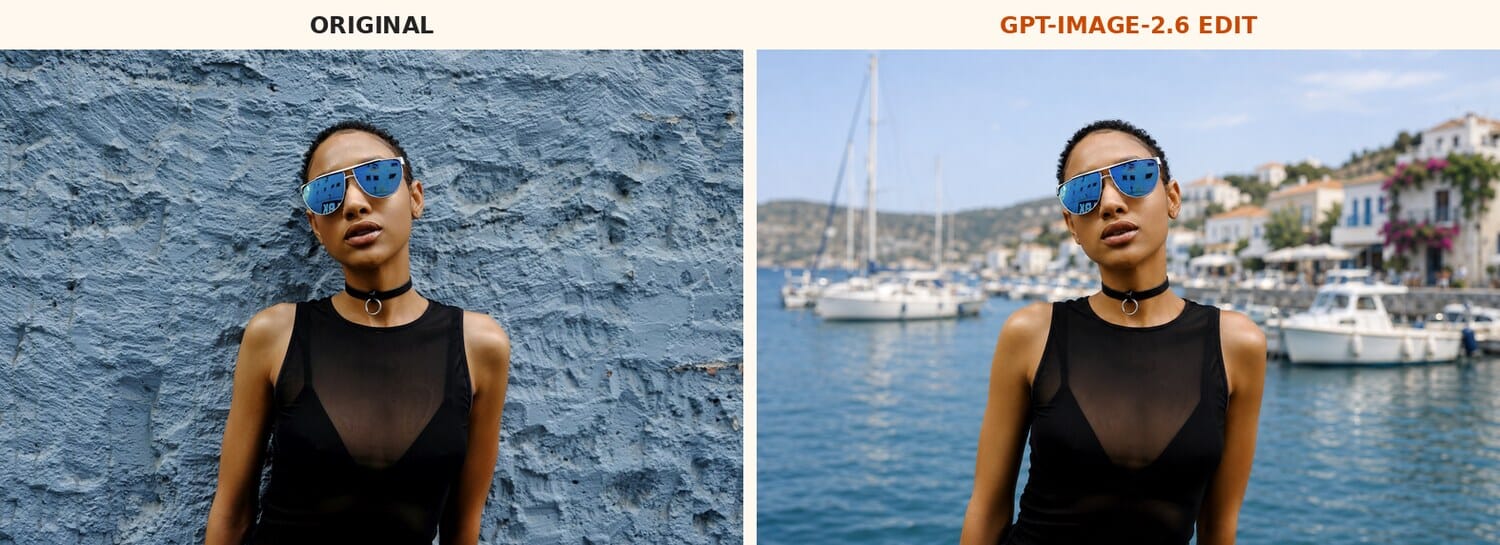
The first prompt asked to move a woman from a textured blue wall to a sunny Mediterranean harbor while keeping her face, sunglasses, choker and pose. At normal size the result is convincing: the harbor falls softly out of focus behind her, and the light on her face looks plausible for the new scene.
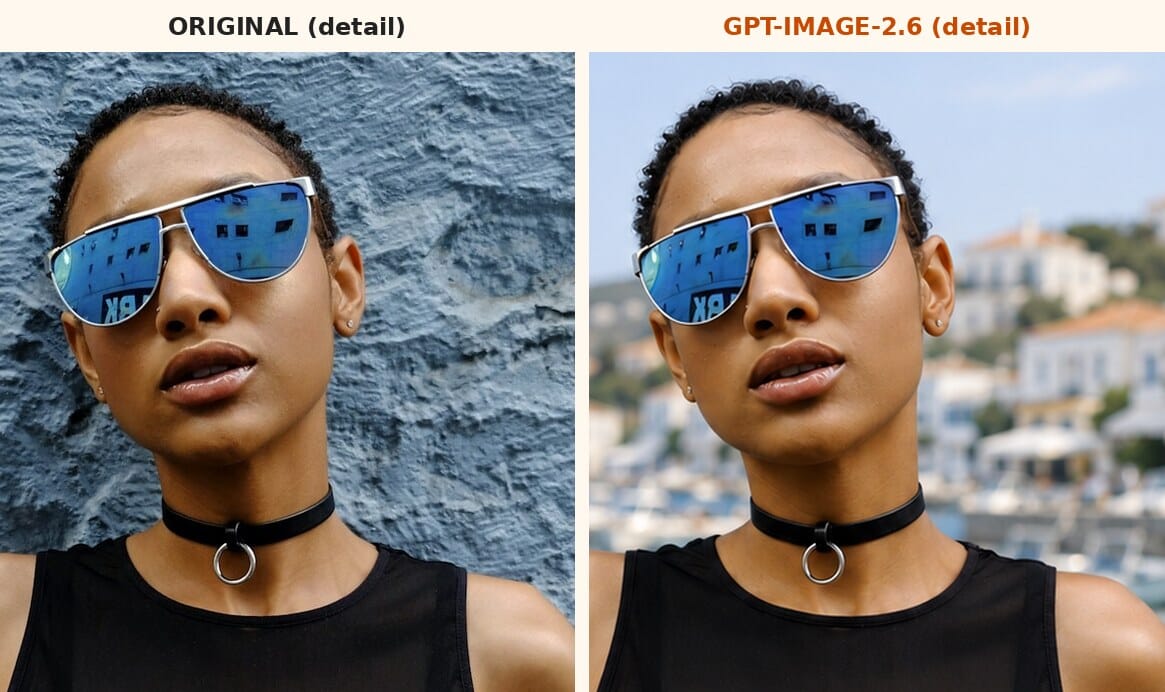
Up close, identity preservation is excellent. The face, the sunglasses and even the reflection in the lenses are essentially unchanged. The differences are subtle: the skin comes back a touch smoother and warmer, and the hairline is slightly cleaner than in the original.
Object removal: clean, but it rewrote the handwriting
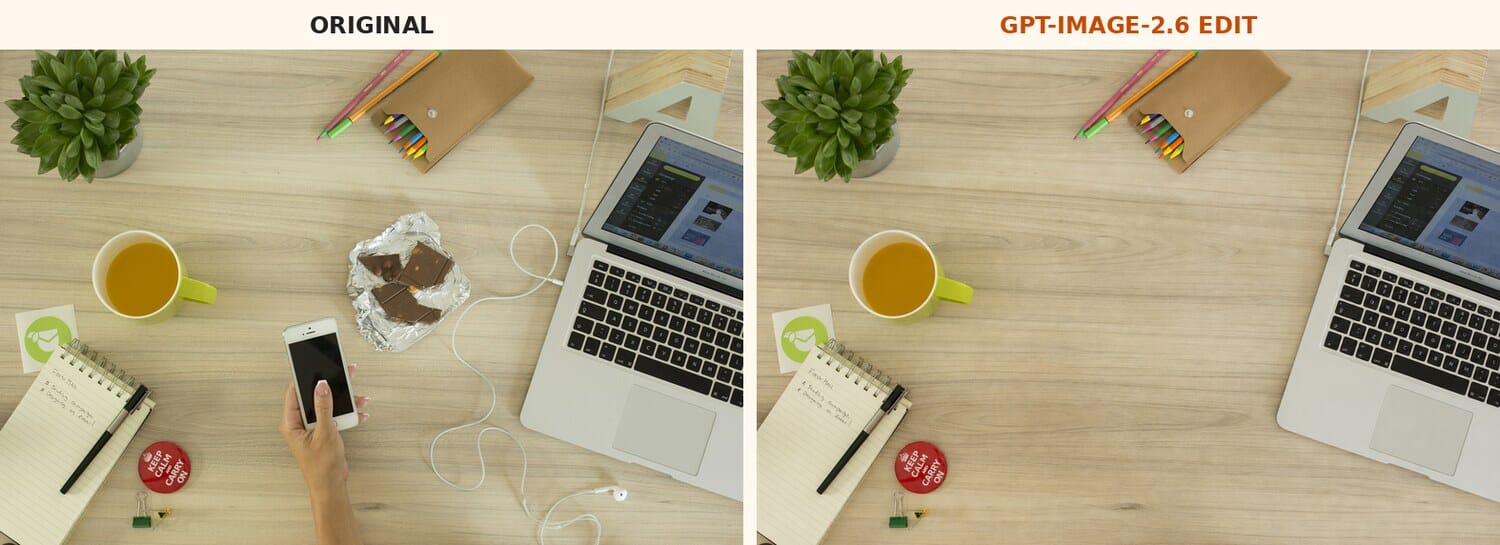
Next, the model had to remove a hand holding a phone, the earphone cable and a chocolate wrapper from an overhead desk shot, and keep everything else. The removal is excellent: the wood grain fills in seamlessly, and the laptop, mug, pencils and plant stay in place.
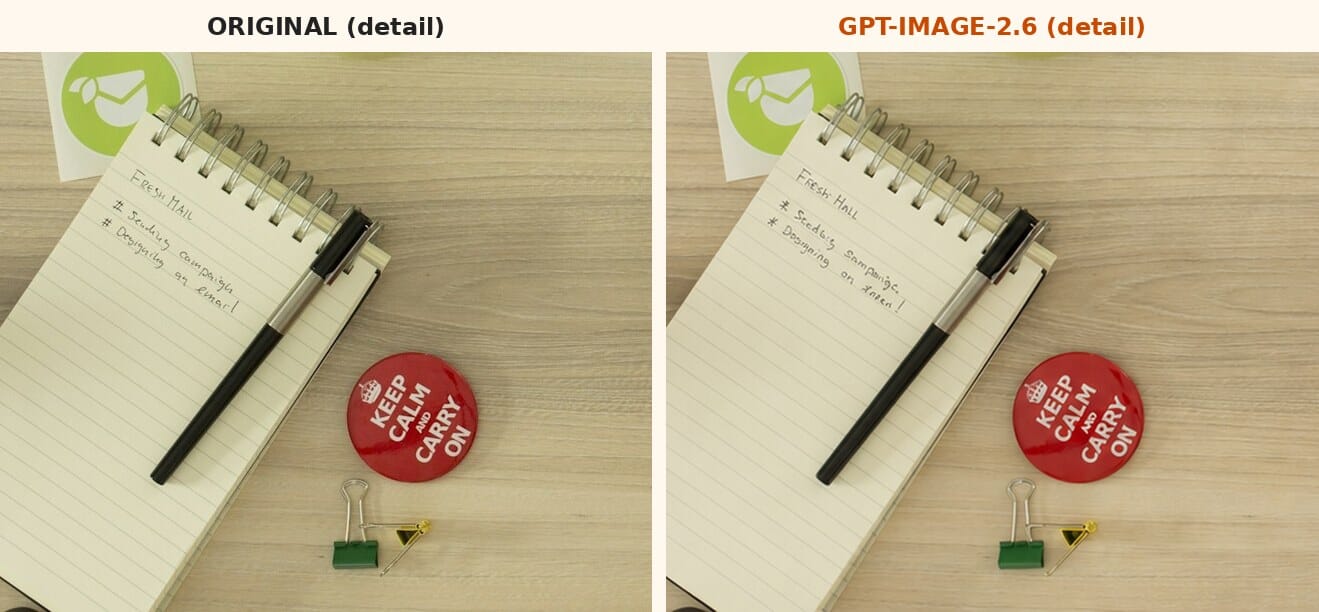
Then look at the notebook. The handwritten note reading Fresh Mail, Seeding campaigns and Designing an email came back as Fresh Hall, Seeding Sampaign and Designing on Katen. The model was told not to change anything else, and it rewrote the text anyway. The Keep Calm badge survived, but the binder clip changed shape. This is the best illustration of how these edits work: the whole frame is regenerated, and small text is the first thing to go.
Relighting: the most faithful edit
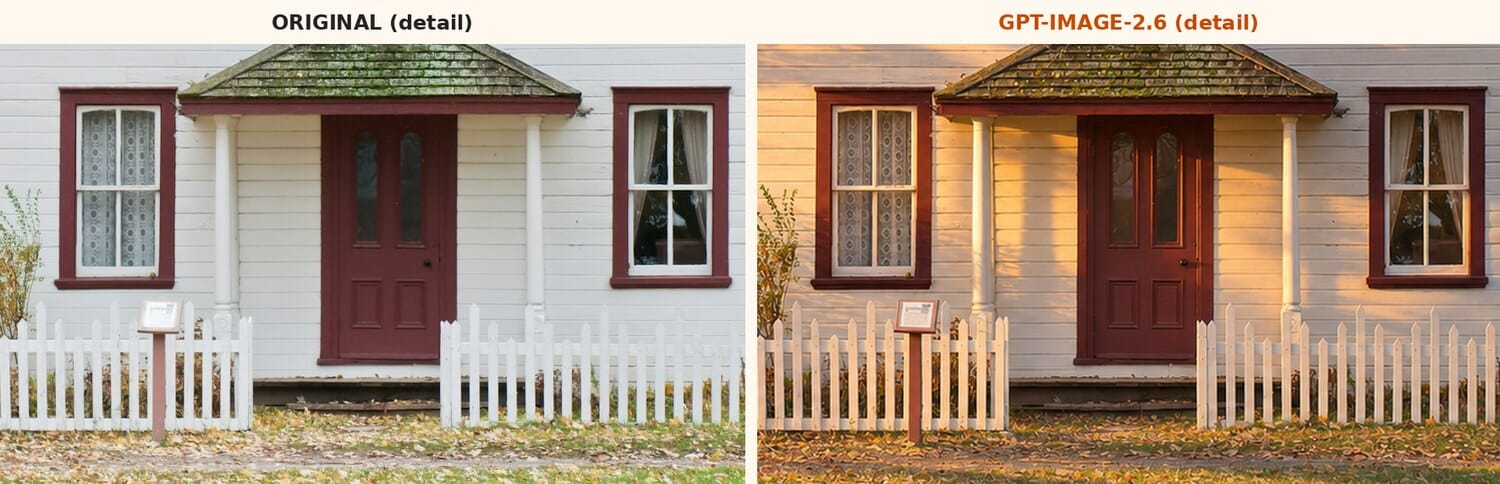
The third test asked for golden hour, about 20 minutes before sunset, on an autumn photo of a white house with a picket fence. The result is warm, directional light across the walls and long shadows over the lawn, and it is the most convincing edit of the batch.
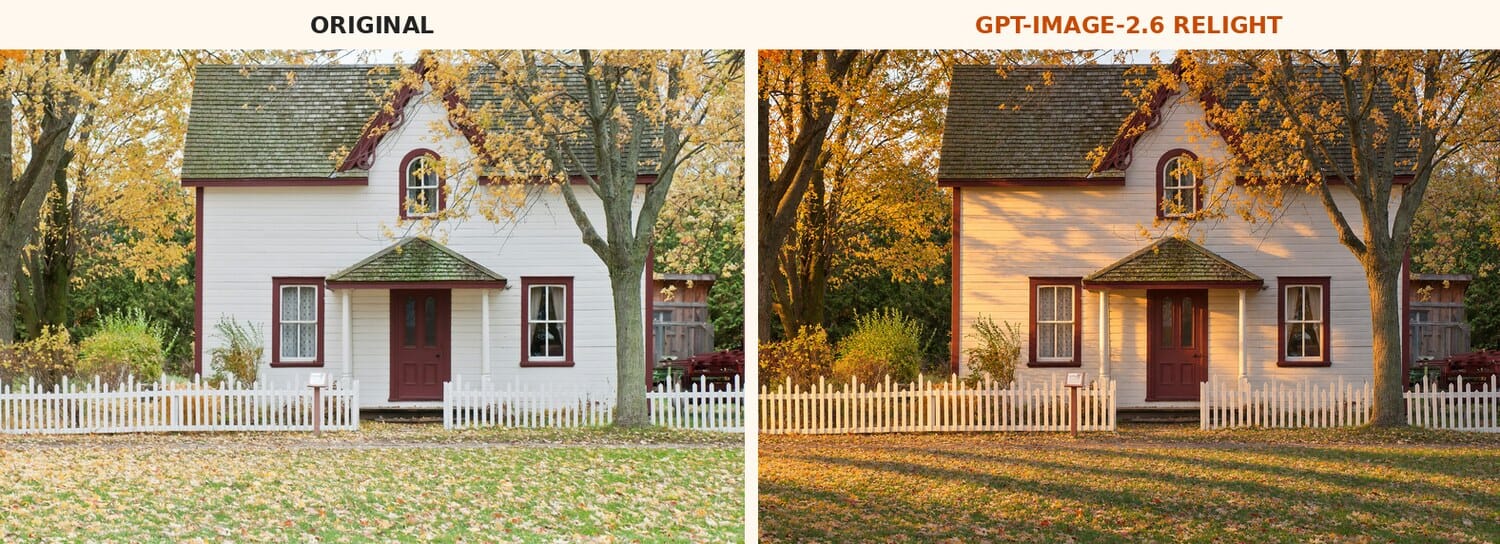
It is also the most faithful. At close range, the window panes, curtains, door panels, fence pickets and even the small sign in the yard match the original closely. Relighting is where 2.6 is most useful for photographers, for example to show a client what a location will look like at a different time of day.
Style change: a real watercolor this time
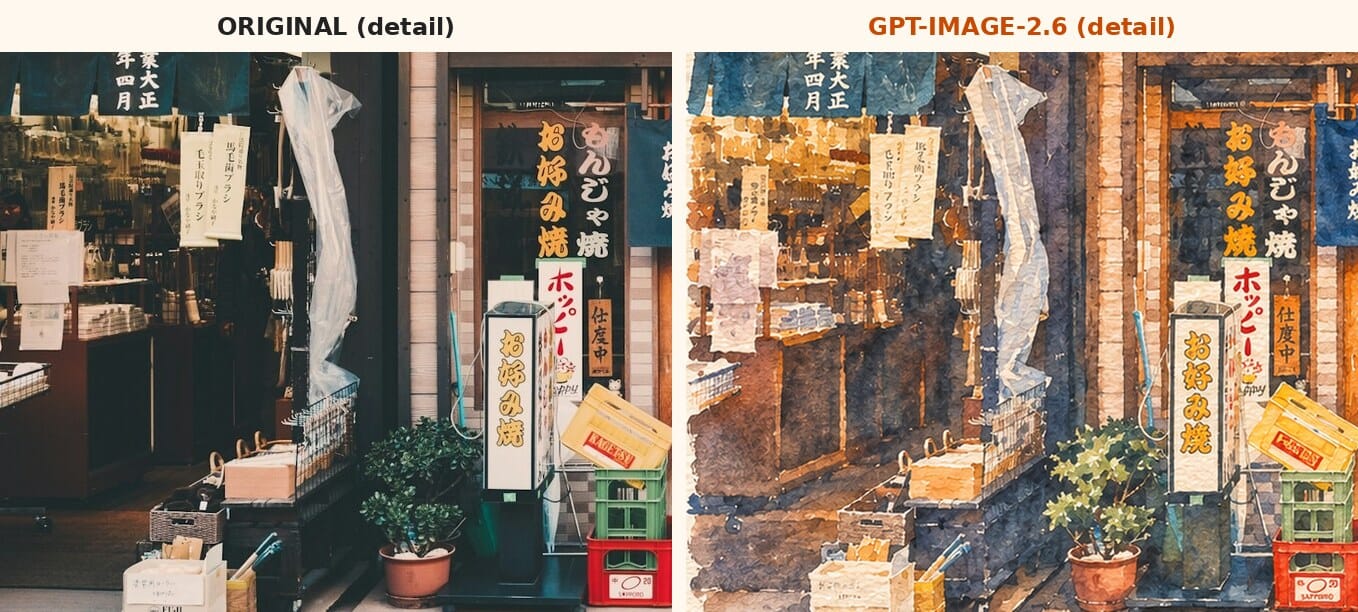
Finally, the model turned a Tokyo storefront into a loose watercolor on textured paper. This one is unmistakably a watercolor, with visible washes and paper texture. Results vary between runs, though: in an earlier test on a different photo, the same prompt produced something closer to an over-saturated HDR filter.
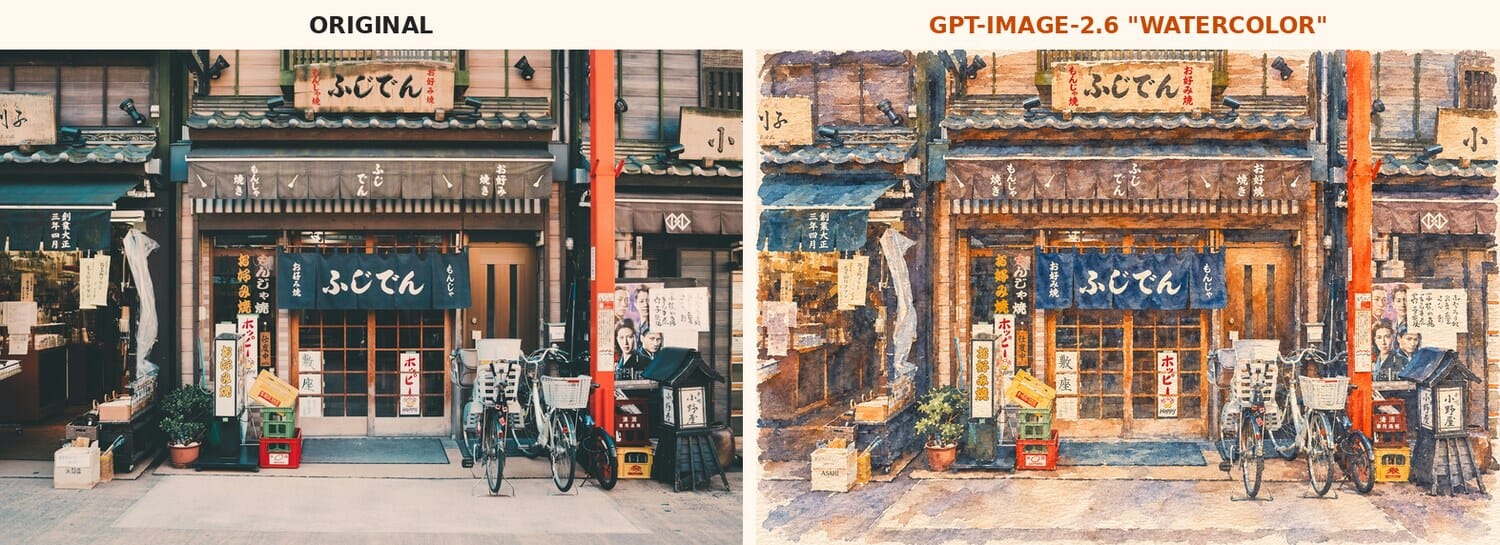
The large Japanese signs survived the style change, which older models routinely garbled. The small hanging notices dissolved into illegible strokes, which is acceptable in a painting but would not be in a photo edit.
Test 2: GPT-Image-2.6 vs 2.5
The same prompt went to both Sunburst models: a camera shop window on a rainy evening with a hand-painted sign reading FILM DEVELOPING 24H and a card reading Used lenses from $49. Both models rendered both signs perfectly. Side by side, the differences are mostly taste, with 2.6 producing a slightly busier sign and more glints on the wet glass.
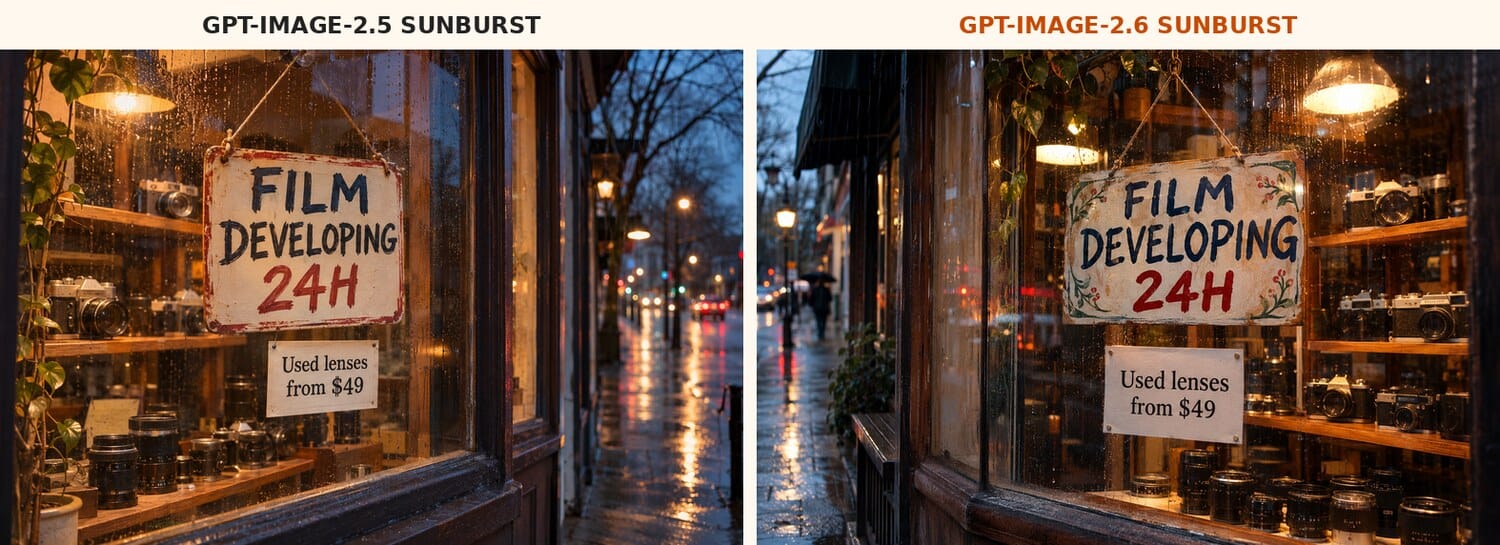
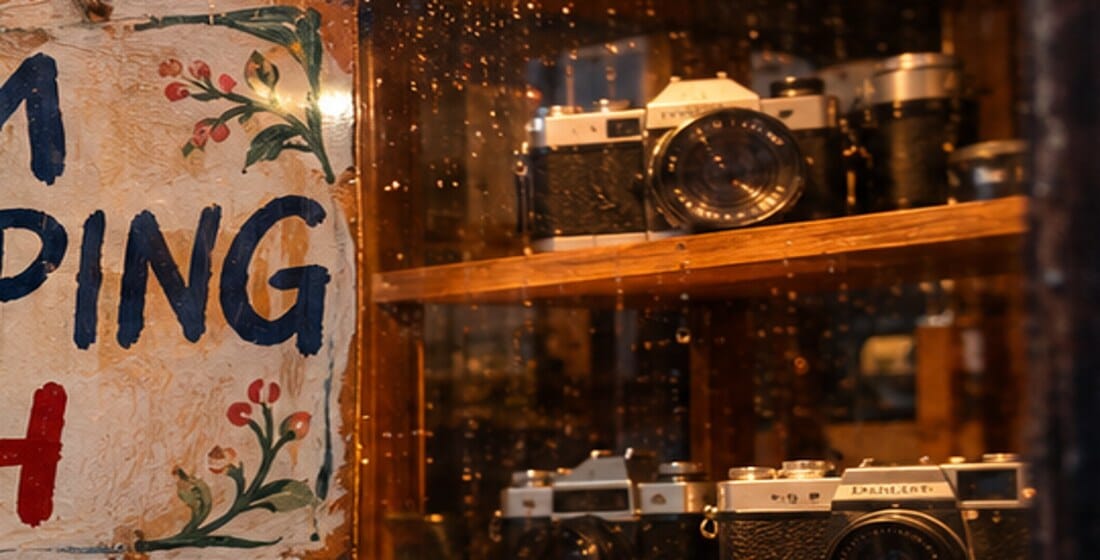
Both models share one old weakness: small text the prompt did not specify. The camera bodies in the window carry invented brand names that look plausible from a distance and turn into gibberish up close.
Speed: no 50% gain in this test
Then the timing. Each model generated the same 1024×1024 photo three times, back to back, through the same OpenClaw and ChatGPT-login setup that PhotoWorkout uses for its own images. 2.6 Sunburst at high quality averaged 30.1 seconds against 31.9 for 2.5, about 6% faster. Flare at low quality averaged 31.2 seconds on 2.6 and 29.3 on 2.5, nowhere near six seconds.
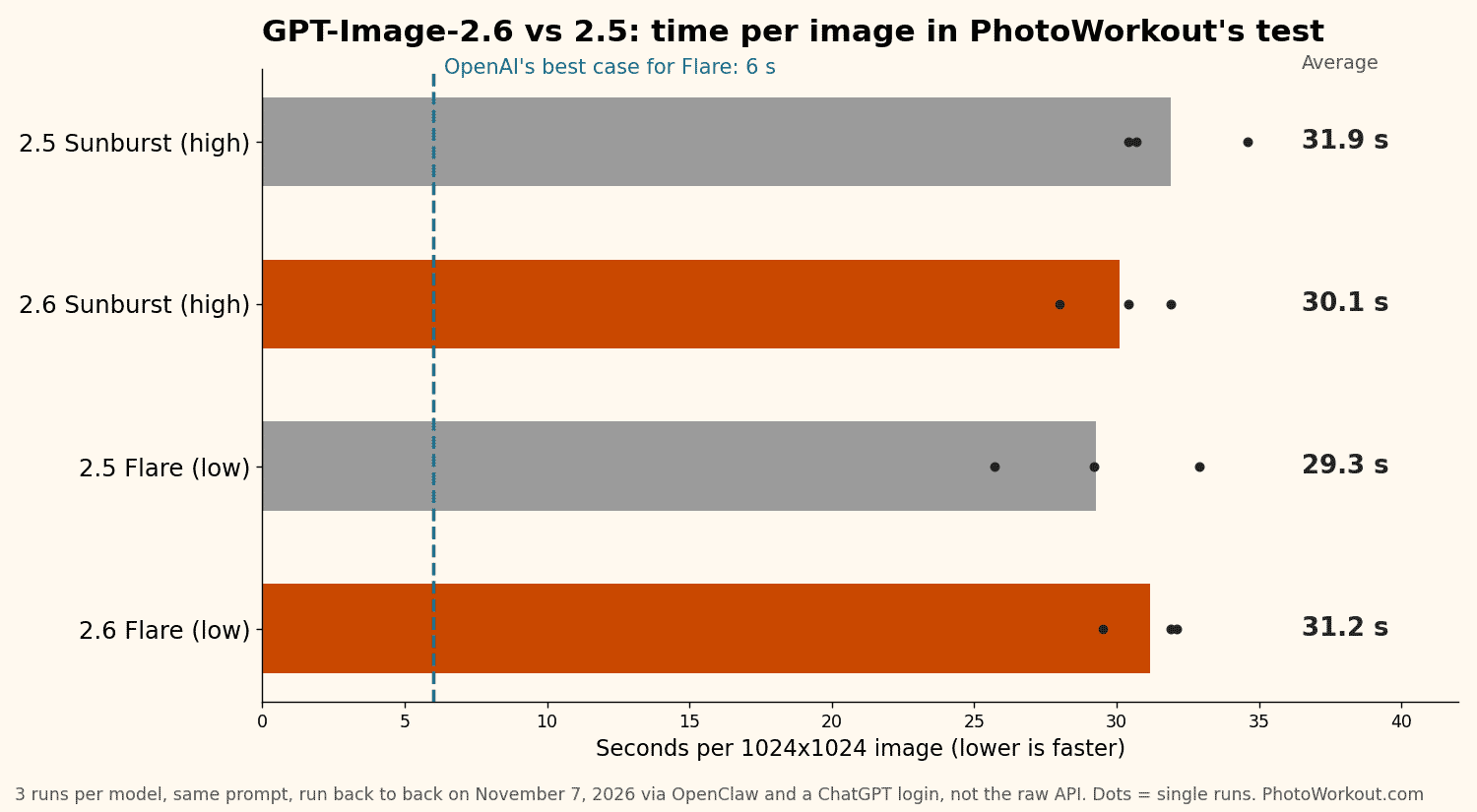
That does not prove OpenAI wrong. Its figures describe the API, and this route goes through a ChatGPT subscription with network overhead on every call. It does mean you should not expect 2.6 to feel twice as fast everywhere.
Test 3: Graphics and Text
Text in images used to be the giveaway for AI graphics. Not here. A classic exposure triangle infographic with 11 separate text strings came back with zero spelling or number errors.
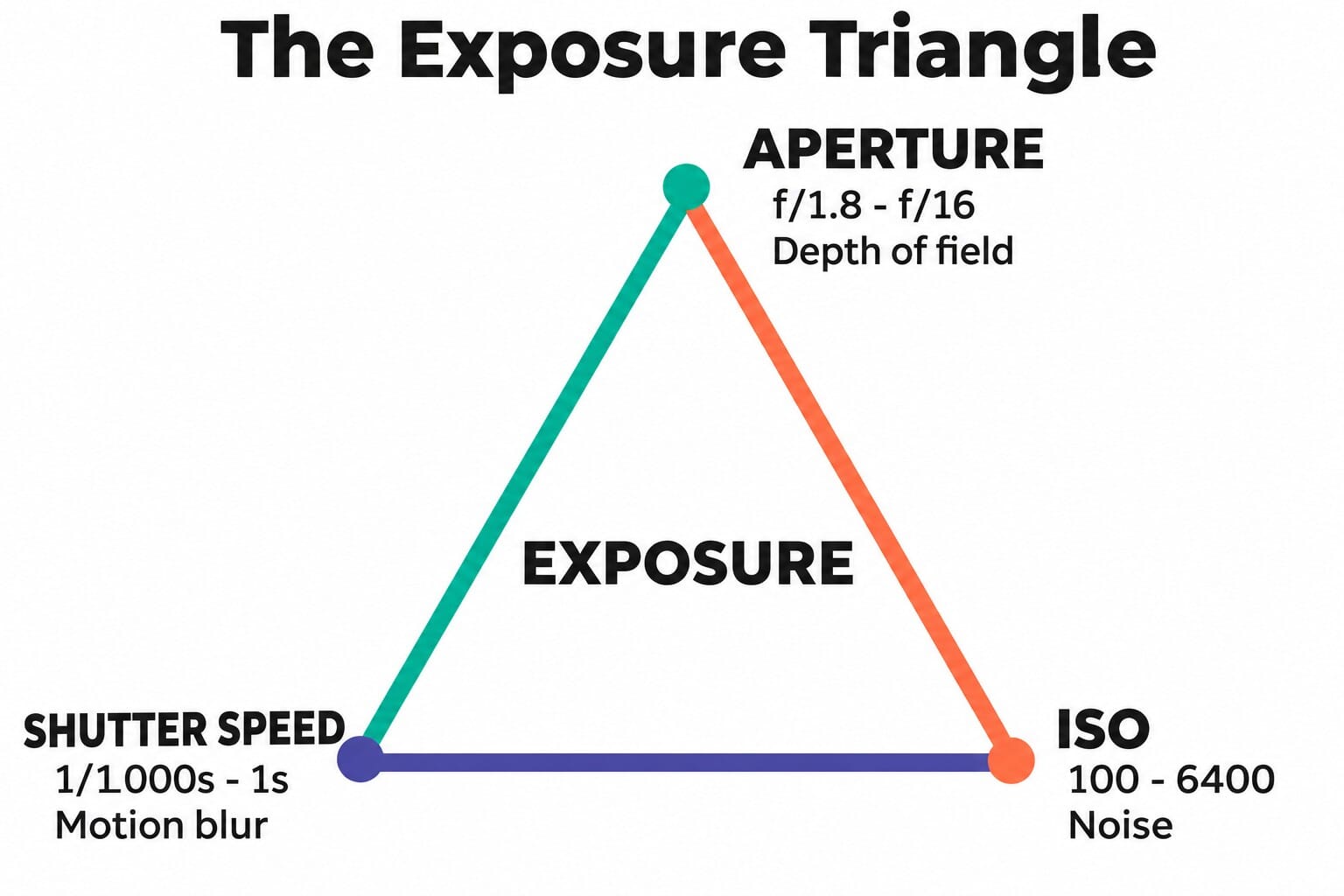
The harder test was a dense camera settings cheat sheet: a title, three column headers, 24 table cells with apertures, shutter speeds and ISO values, and a footer. That is 29 strings in total. 2.6 and 2.5 both got every one right, including fractions like 1/1000s and values like f/2.8.
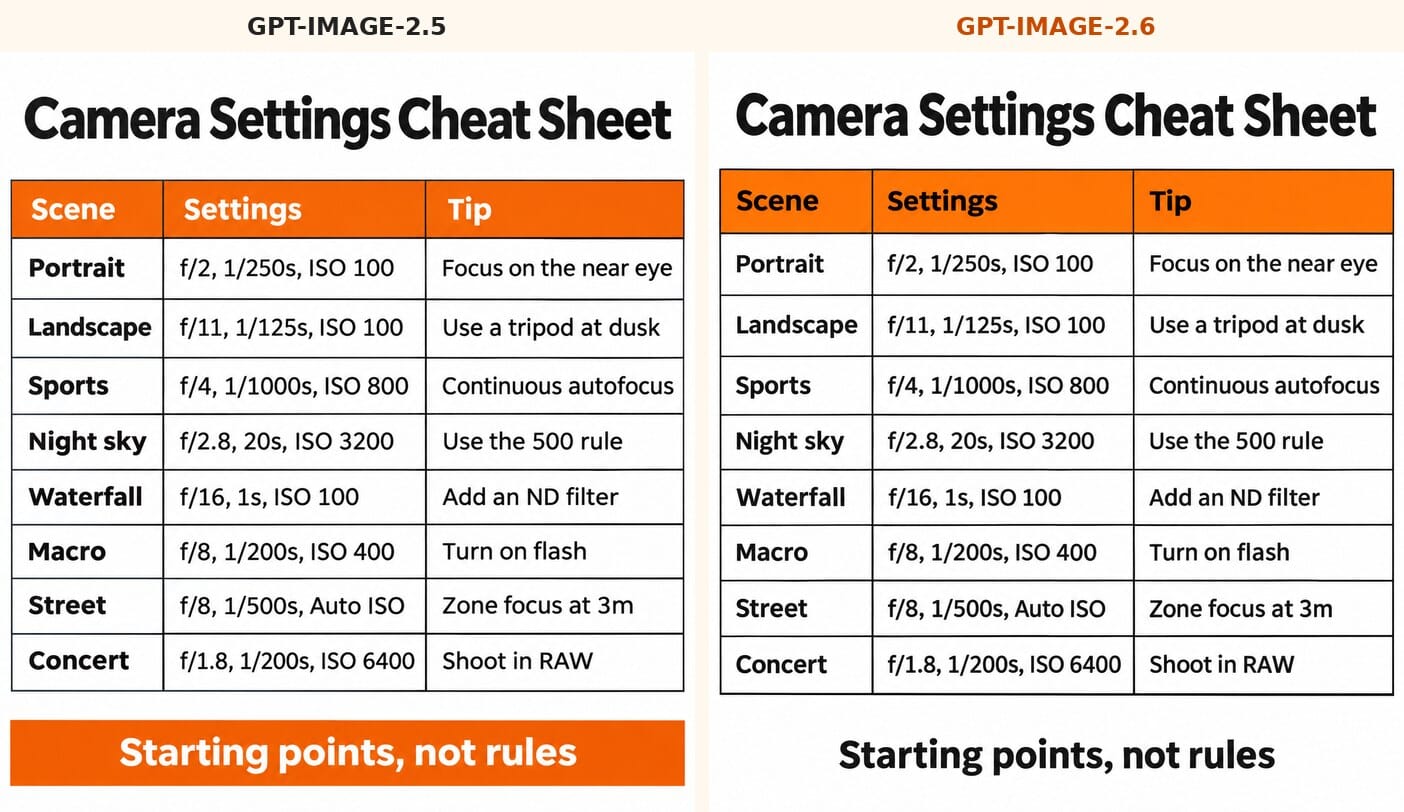
The flaws were all in the layout. Some cells are tight against the borders, and both models returned a 1199×1312 image instead of the requested 1024×1536 portrait format. Text accuracy has stopped being the problem. Checking the numbers still is, because the model will happily print whatever settings you give it, right or wrong.
Test 4: Flare vs Sunburst
Flare is sold as the fast model and Sunburst as the quality model. On the shop window prompt, Flare at low quality still spelled both signs correctly and produced a usable photo. Next to Sunburst at maximum quality, it is a little flatter, with less detail in the reflections and the shelf of cameras.
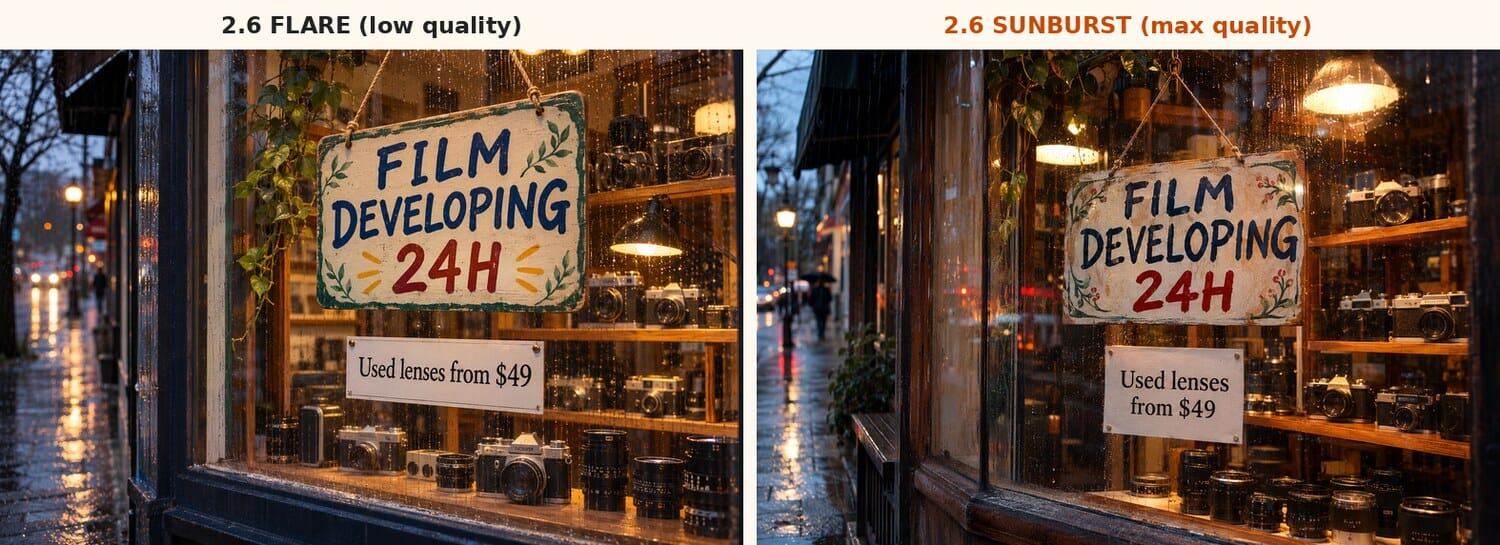
In single runs, Flare took 43.8 seconds at low quality and Sunburst 31.8 seconds at low and 44.8 seconds at maximum. With variation like that, Flare’s speed advantage did not show up in this setup. For quick drafts it is perfectly adequate. For anything you will publish, Sunburst is the safer choice.
Test 5: GIF and SVG in ChatGPT (and Grok)
PhotoWorkout’s own image pipeline could not run this test. It reaches GPT-Image-2.6 through OpenClaw 2026.10.3, which only outputs PNG, JPEG and WebP, and a request for SVG or GIF failed with the error: –output-format must be one of png, jpeg, or webp. So the test moved to ChatGPT itself, on a Mac, in both the Chat and the Work tab, with the same four prompts repeated in Grok for comparison.
One caveat first. ChatGPT does not say which image model it used. Asked directly, it replied that it could only confirm its built-in image tool. The C2PA provenance data in its PNG output names the creator as ChatGPT with the version simply listed as gpt-image. OpenAI says Images 2.6 has been the ChatGPT image model for all users since November 4, so these results very likely come from 2.6, but nothing in the files proves it.
A character GIF: the closest thing to native
The first prompt asked for the PhotoWorkout mascot to raise his camera, take a photo with a small flash, lower it and wave, looping back to the start. ChatGPT delivered exactly that: a real GIF of 12 frames, 345 by 810 pixels and 491 KB, set to loop forever. The frames show the hallmarks of the image model, and face, glasses, shirt and hands stayed consistent in every one. Twelve frames also sits within the API’s limit of 16.
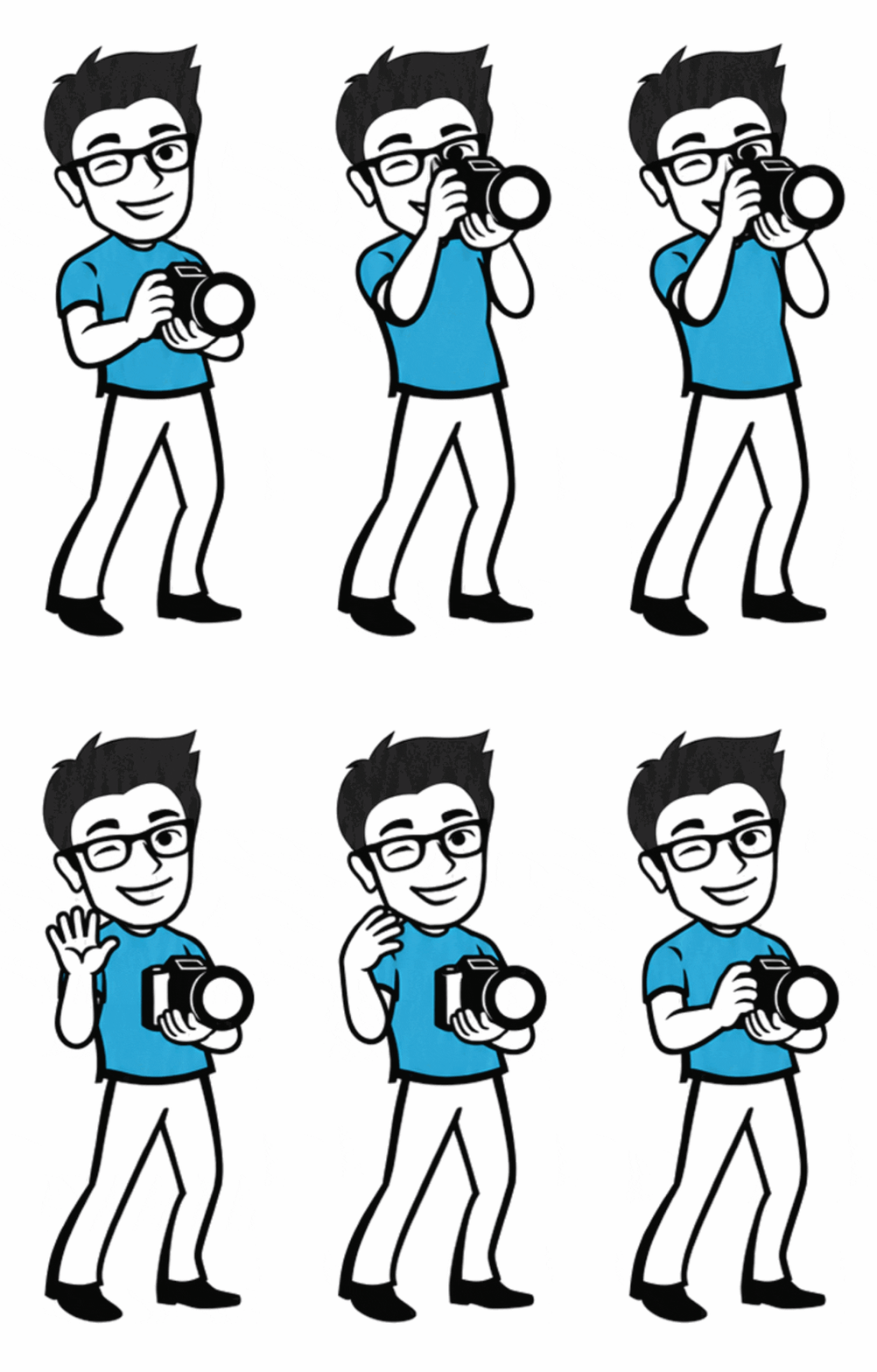
The timing is the interesting part. Instead of giving every frame the same length, the GIF holds the opening pose for 450 milliseconds, flashes for 90 and pauses at the end for 250, the way an animator would. The API only offers one delay value for all frames, so ChatGPT most likely retimed the frames itself after generating them. Even this result may have passed through a code step. Two weaknesses: the resolution is far lower than ChatGPT’s still images, and the GIF carries no C2PA label at all, because the format has nowhere to store it. Download an AI GIF and its provenance is gone. OpenAI’s follow-up tools for changing the speed and editing single frames were not part of this round of testing.
A real photo: animated by code, not by the model
The second prompt asked ChatGPT to animate the SampleShots cottage photo with drifting autumn leaves and slight movement in the grass, keeping everything else still. What came back looked right, but a frame-by-frame check showed how it was made. ChatGPT used the image model to draw six leaf cut-outs on a transparent background, then used code to slide them across the untouched original photo.
The numbers leave no doubt. The Work tab’s GIF had 240 frames at 1440 by 956 pixels and weighed 19.5 MB. Every frame matched the original photo apart from GIF color compression, and only 0.4% of the pixels changed between frames. The Chat tab did the same thing and said so, explaining that it used gpt-image leaf artwork. It kept the full 2,048-pixel width, but its reply claimed the grass moved subtly. In the frames, it did not.
For photographers this cuts both ways. The original pixels survive, which is better than a redrawn photo. But this is an overlay, not the image model bringing a scene to life, and anyone hoping for an AI cinemagraph tool should know the difference.
Text and SVG: code all the way
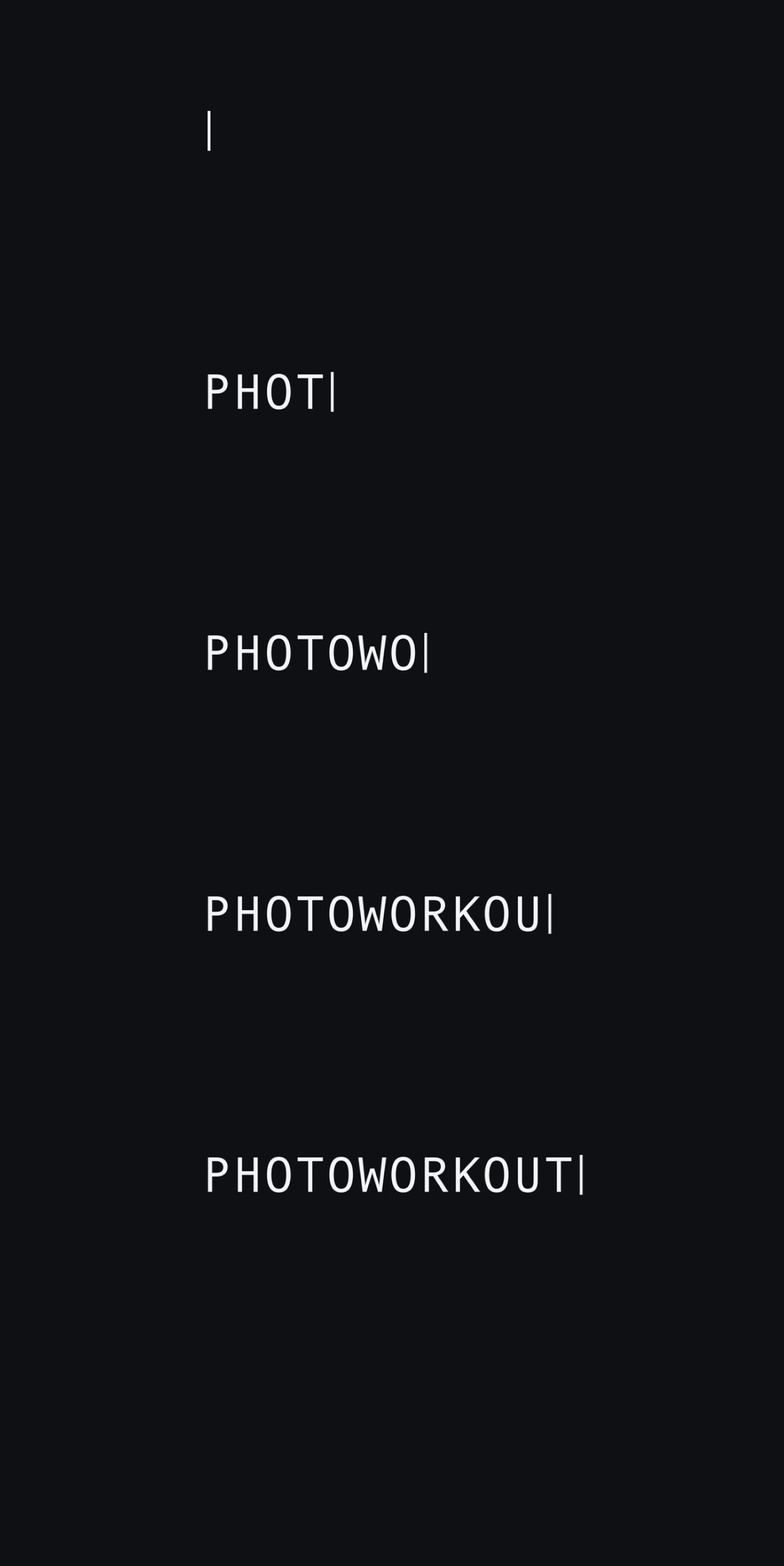
Asked for a GIF of the word PHOTOWORKOUT typing out letter by letter, the Work tab did not use the image model at all. In its own words, it made the GIF with Python and Pillow, an image and animation library, drawing each letter in a monospaced font for 110 milliseconds and adding a blinking cursor. The text is perfect because it is a computer font, not generated lettering.
The SVG test produced a real SVG from ChatGPT, even though OpenAI’s system card lists SVG output as an API feature. The 682-byte file is clean vector code: two navy rounded rectangles, an orange flash and two circles for the lens, in exactly the two requested colors. It scales to any size and is easy to edit, but it was written as code, not drawn by the image model.

The same prompts in Grok
Grok took the same route with less ceremony. Its typing GIF was a 23 KB coded animation. Its cottage GIF was 36 frames at 800 pixels and only 730 KB, with code-drawn leaves and a wave distortion that genuinely made the lawn sway, so it looked livelier than ChatGPT’s version. Its SVG was 586 bytes of hand-written shapes. The results were leaner and quicker, but none of them came from an image model either.
The verdict on GIFs and SVG: in practice, both assistants treat these requests as coding jobs. The only animation in this test with frames drawn by the image model was the cartoon character. ChatGPT itself later acknowledged that its chat tool exposes no model choice and no GIF controls, even though the API has them. If you want a real photo to move, today’s chatbots paste effects on top of it.
Limits Photographers Should Know
- Edits are re-renders. Every test regenerated the whole frame. Faces and buildings held up well, but small text such as handwriting was rewritten even when the prompt said to keep everything else the same.
- Resolution drops. Every edit came back at about 1.6 megapixels. That is fine for social media and too small for a print.
- Unrequested beautification. Skin came back slightly smoother and warmer in the portrait test. For portrait and documentary work, check every edit at 100%.
- Invented details. Text you ask for is reliable, but anything the model fills in itself, like brand names, can be gibberish.
- Provenance stays attached. C2PA metadata and SynthID mark still images as AI-made. GIFs carry no C2PA data, so a downloaded AI animation loses its label. In the EU, the rules around labeling are tightening, see the EU AI Act explainer.
Who Images 2.6 Is For
- Photographers pitching or planning: previsualizing golden-hour light, a different background or a cleaner set before a shoot is where it shines.
- Social media and quick product variations: background swaps and clean-ups at web size are fast and convincing.
- Educators and bloggers: text-heavy graphics such as cheat sheets and diagrams are now reliable enough to use, as long as you check the facts.
- Not for: anyone who needs the original pixels intact, such as photojournalists, contest entrants or clients paying for a real photograph. For actual retouching, a raw editor is still the right tool, and the GPT Image 2.5 test reached the same conclusion.
How to Try It in ChatGPT
Images 2.6 is available in ChatGPT and Codex on all tiers, on web, desktop and mobile. There is nothing to switch on: ask ChatGPT to create or edit an image, or upload a photo with an instruction. To make a GIF, ask for one from a prompt or an existing image. Expect a character or illustration to be truly animated, and a real photo to get effects layered on top by code. ChatGPT may not say which approach it took, so check whether your original pixels changed. The system card says ChatGPT users can also choose a reasoning effort in the model picker to trade speed against care. Officially, SVG export and the Flare and Sunburst choice are API features, so developers reach them through OpenAI’s image generation guide. In this test, ChatGPT still wrote a usable SVG file when asked.
Frequently Asked Questions
Is GPT-Image-2.6 free in ChatGPT?
OpenAI says Images 2.6 is available in ChatGPT and Codex across all subscription tiers. It has not published separate usage limits for the new model in its announcement.
Can ChatGPT export SVG files with Images 2.6?
OpenAI’s system card lists SVG output as an API feature. In PhotoWorkout’s test, ChatGPT still delivered a working 682-byte SVG camera icon, but it wrote the file as code rather than generating it with the image model.
Can ChatGPT turn my photo into an animated GIF?
Yes, but not the way you might expect. In PhotoWorkout’s test, ChatGPT drew leaf cut-outs with the image model and moved them over the unchanged original photo with code. A cartoon character, by contrast, came back with frames drawn by the image model.
Is GPT-Image-2.6 better than 2.5?
In PhotoWorkout’s test, the differences were small. Both rendered specified text perfectly, and 2.6 Sunburst was about 6% faster through PhotoWorkout’s setup. OpenAI’s own claims focus on speed and more consistent edits across rounds.
Does GPT-Image-2.6 change parts of a photo you didn’t ask it to?
Yes. The model regenerates the whole image. In PhotoWorkout’s test, faces and buildings stayed very close to the original, but handwriting on a notebook was rewritten and skin was subtly smoothed.
Are images from GPT-Image-2.6 labeled as AI?
Yes. OpenAI says it attaches C2PA metadata and embeds Google DeepMind’s SynthID invisible watermark through ChatGPT, Codex and the API.
What does GPT-Image-2.6 cost in the API?
OpenAI lists the same prices as 2.5: $8 per million image input tokens, $30 per million image output tokens and $5 per million text input tokens, for both Flare and Sunburst.
Bottom Line
Images 2.6 is an iteration, not a revolution. Its text rendering is now dependable, its relighting is genuinely faithful, and faces held up well. But it still rebuilds your photo rather than editing it, as the rewritten handwriting shows, and in this test the speed gain was modest. For photographers it is an excellent sketchpad, not a retoucher. The GIF and SVG features are real but narrower than they sound: character animations come from the image model, while animated photos, text and SVG icons turned out to be code.
All model claims were checked against OpenAI's own pages on November 7, 2026. All tests were run by PhotoWorkout the same day.
OpenAI Sources
- OpenAI: Introducing Images 2.6 – Announcement: speed, Flare and Sunburst, GIFs, SVG, markup, complexity, availability
- OpenAI: ChatGPT Images 2.6 System Card – SVG in the API, GIF and markup in ChatGPT and API, C2PA and SynthID provenance
- OpenAI API reference: Create image – GIF output: 2 to 16 frames, one frame delay, preview access required
- OpenAI: API pricing – GPT-Image-2.6 Flare and Sunburst token prices
- OpenAI Developer Community: Images, upgraded – GIF speed and frame editing, saved reference images
- OpenAI Developers on X – API launch post and markup guidance
Image Sources
- Mike Von via SampleShots – Original portrait used in the background replacement test
- Chris Adamus via SampleShots – Original desk photo used in the object removal test
- Scott Webb via SampleShots – Original house photo used in the relighting test and featured image
- Clay Banks via SampleShots – Original storefront photo used in the style change test
- AI edits and generations: created with GPT-Image-2.6 and 2.5 – All edited and generated images made by PhotoWorkout on November 7, 2026, each labeled with its model
- GIF and SVG tests: ChatGPT and Grok – Mascot GIF, cottage animation and SVG icons created in ChatGPT and Grok by PhotoWorkout on November 7, 2026; SVG preview rendered by PhotoWorkout
- Speed chart: PhotoWorkout – Built from PhotoWorkout's own timing data
- Featured image and pin: PhotoWorkout – Featured image combines Scott Webb's SampleShots photo with a GPT-Image-2.6 edit; pin illustration created with GPT-Image-2.6