


- OpenAI released GPT Image 2.5 (branded ChatGPT Images 2.5) on September 8, 2026, its new state-of-the-art image model, available in ChatGPT and in the API as two variants, Flare and Sunburst.
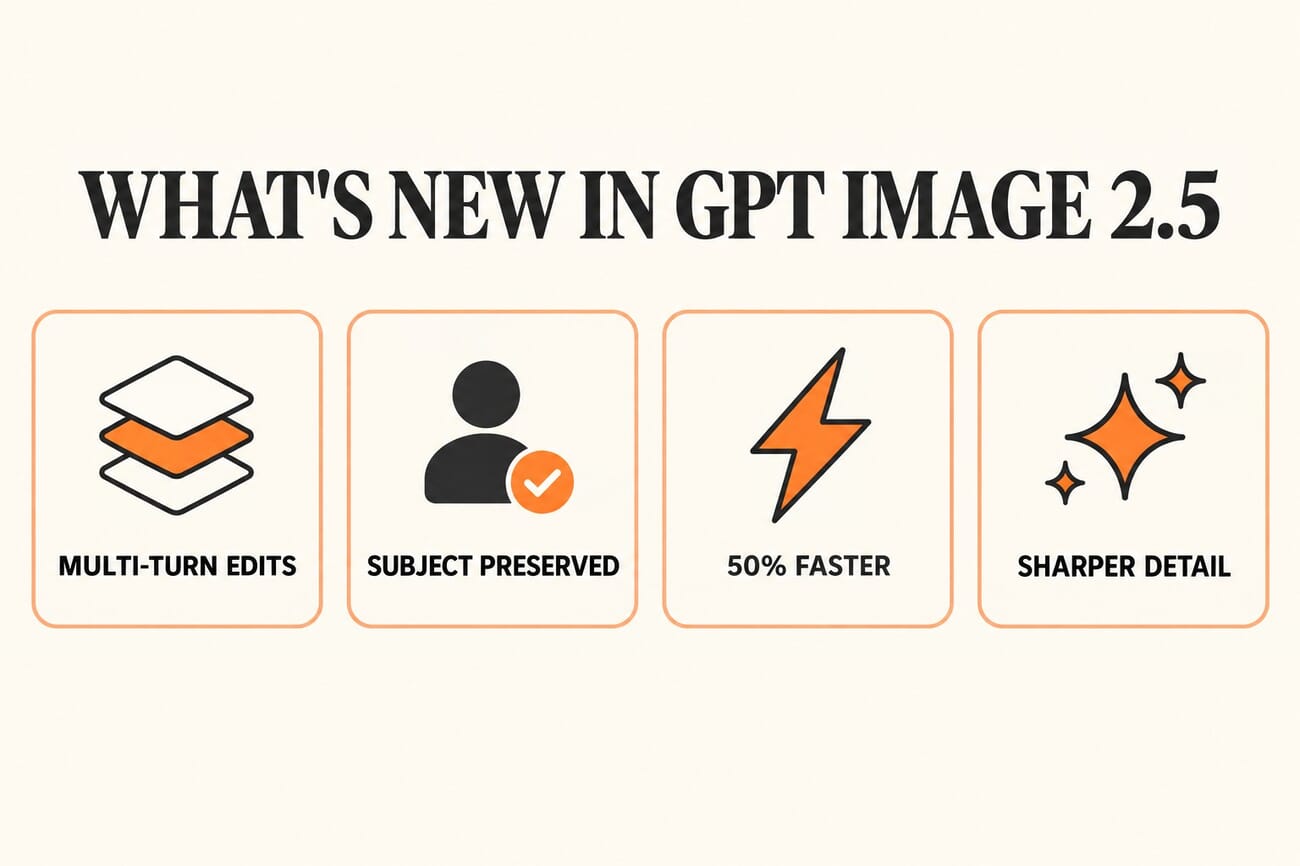
- The headline upgrade is editing, not generation: better subject preservation, sharper detail, and Multi-Turn Consistency that keeps faces, backgrounds, and layouts stable across repeated edits, with up to 50 percent lower latency.
- We ran it on real photographs from our SampleShots library. It handled a summer-to-winter conversion, a studio relight of a portrait, a midday-to-rainy-night transformation, and instant background isolation, all while preserving the original composition.
- The verdict: it is genuinely impressive for creative and conceptual edits, but it re-generates the whole frame rather than editing pixels, so it is not a truthful raw-editing tool, and it makes convincing photo manipulation easier than ever.
OpenAI has a new image model, and for once the interesting part is not what it can dream up from a text prompt. It is what it can do to a photograph you already have. GPT Image 2.5, announced on September 8 and branded in ChatGPT as ChatGPT Images 2.5, is pitched squarely at editing: preserving the subject in a reference photo, following instructions precisely, and keeping everything consistent across multiple rounds of changes.
That is a big claim, and the kind that is easy to demo with a cherry-picked robot and hard to trust on real work. So rather than take OpenAI’s word for it, we fed the model actual photographs from our SampleShots library and gave it real editing jobs a photographer might actually want. Here is what came back, and what it means for anyone who shoots.
What OpenAI actually launched
GPT Image 2.5 is the successor to the GPT Image 2 model we put through its paces earlier this year. OpenAI says it delivers more natural lighting, richer textures, and more reliable adherence to editing instructions, with generation latency cut by up to 50 percent compared with the previous generation. In the API it comes in two flavors, GPT Image 2.5 Flare and GPT Image 2.5 Sunburst, while ChatGPT users get it as ChatGPT Images 2.5.
The feature OpenAI is most eager to sell is Multi-Turn Consistency. The idea is to fix a long-standing frustration with AI editing, where changing one thing in an image quietly alters everything else, a face here, a background label there. GPT Image 2.5 is built to keep the approved parts of an image stable while you refine it over several edits. For anyone doing product shots, character work, or campaign variations, that stability is the whole ballgame.
We tested it on real photographs
Marketing demos are one thing. To see whether the preservation claims hold up, we picked four real photos spanning very different jobs, a portrait, a landscape, a cityscape, and a macro nature shot, and asked GPT Image 2.5 Sunburst for edits that would normally take a skilled retoucher real time. Every original below is an unmodified SampleShots photograph; every after is a single-prompt edit with no manual cleanup.
Summer to winter, in one prompt
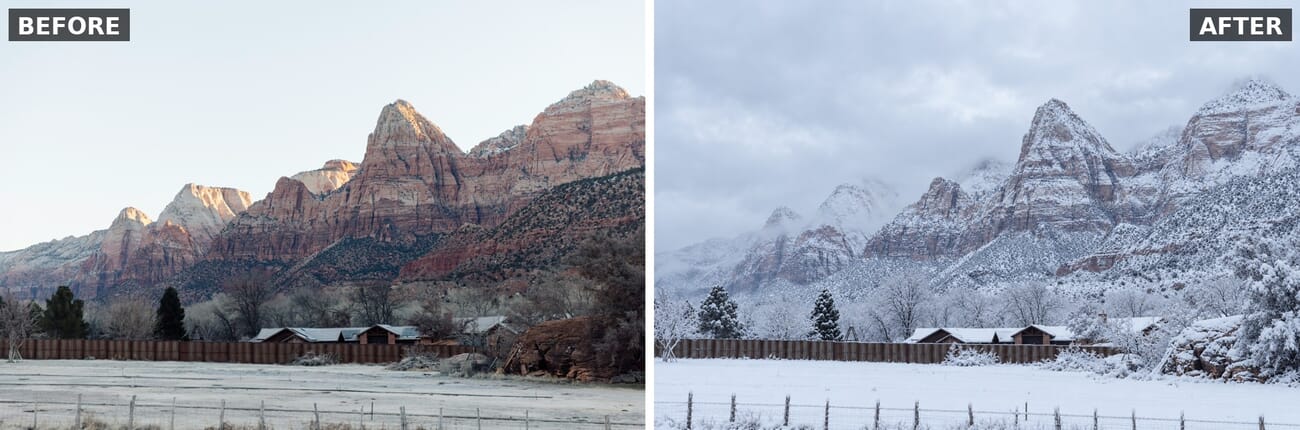
First, a landscape. We asked the model to turn a warm, red-rock mountain scene into a snowy winter version. The result blankets the peaks, trees, and foreground in convincing snow under an overcast sky, yet the exact ridge lines, the wooden fence, and the cabins in the mid-ground stay precisely where they were. This is the kind of seasonal change that would take a compositor hours, done in seconds.
A studio relight of a portrait
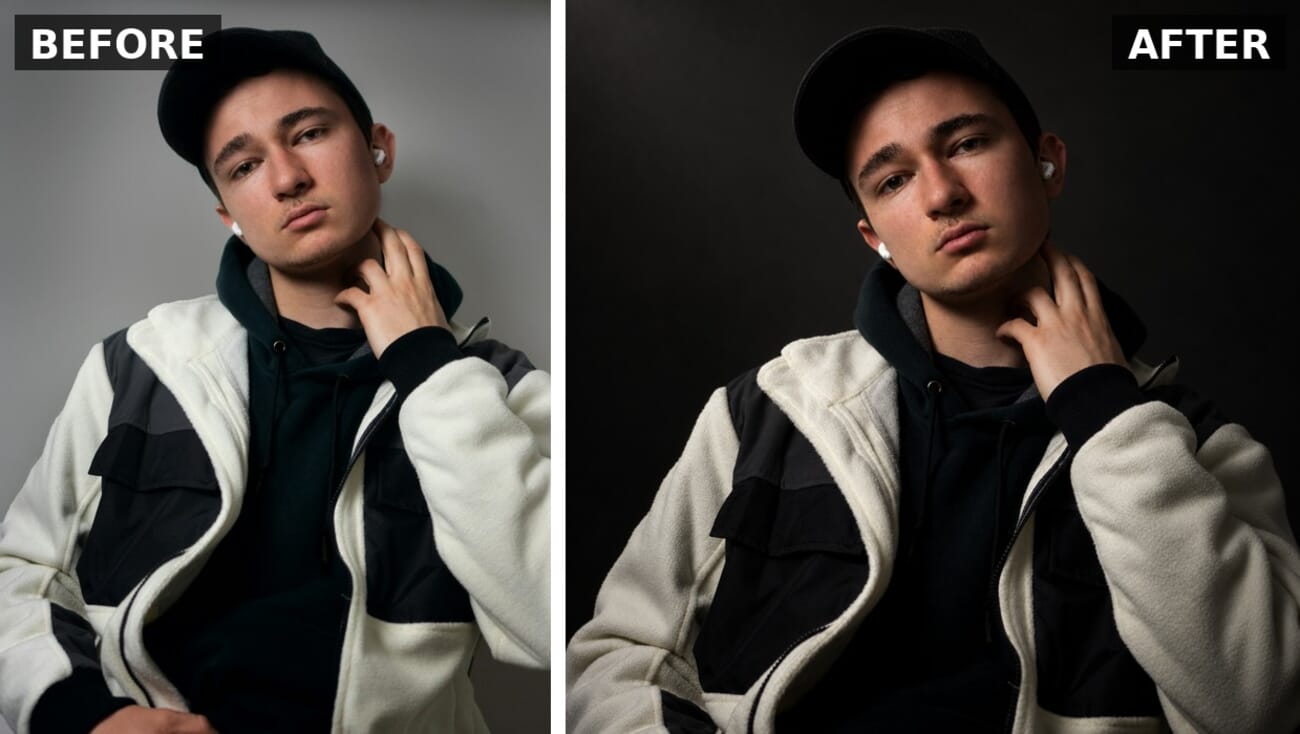
Portraits are where AI editing usually falls apart, because faces are unforgiving. We asked for a dramatic, low-key Rembrandt studio relight on a casual portrait shot against a plain wall. The model kept the subject’s face, expression, cap, jacket, and even the visible earbud intact, while convincingly relighting the scene with a directional key light and dropping the background to dark charcoal. Identity preservation was the pleasant surprise.
Midday turned into a rainy night
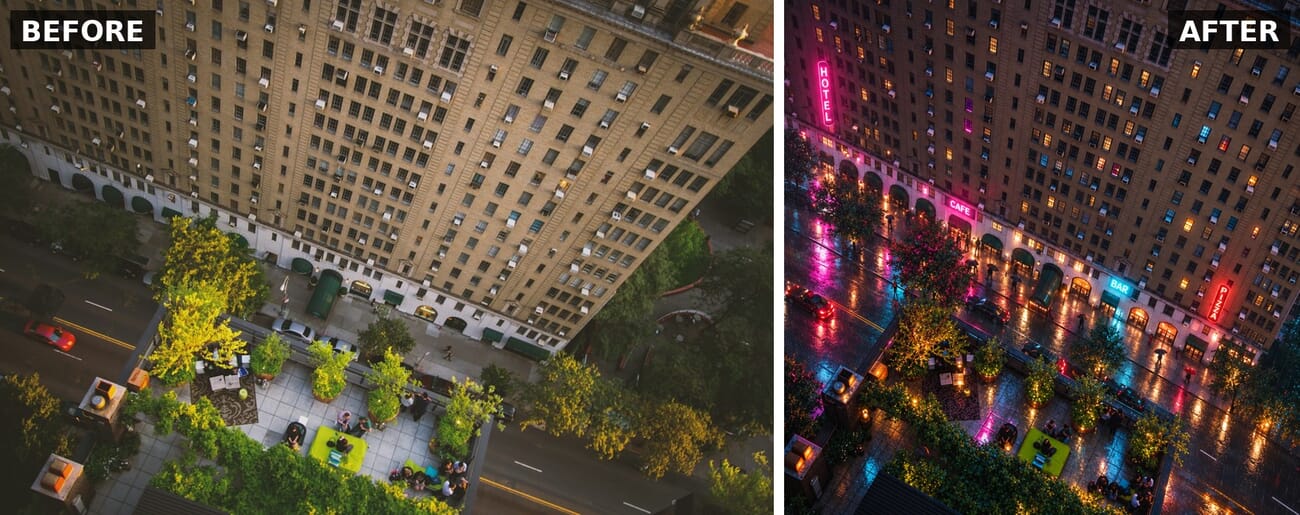
The most ambitious test: converting a flat, overhead midday street scene into a rainy night. Here the model did not just relight. It added glowing, readable neon signage, wet reflections on the pavement, and warm light in scattered windows, while holding the building facade, the trees, the planters, and the aerial perspective in place. It is the single most impressive edit of the batch, and the one that best shows why “consistency” is the headline.
Instant background isolation
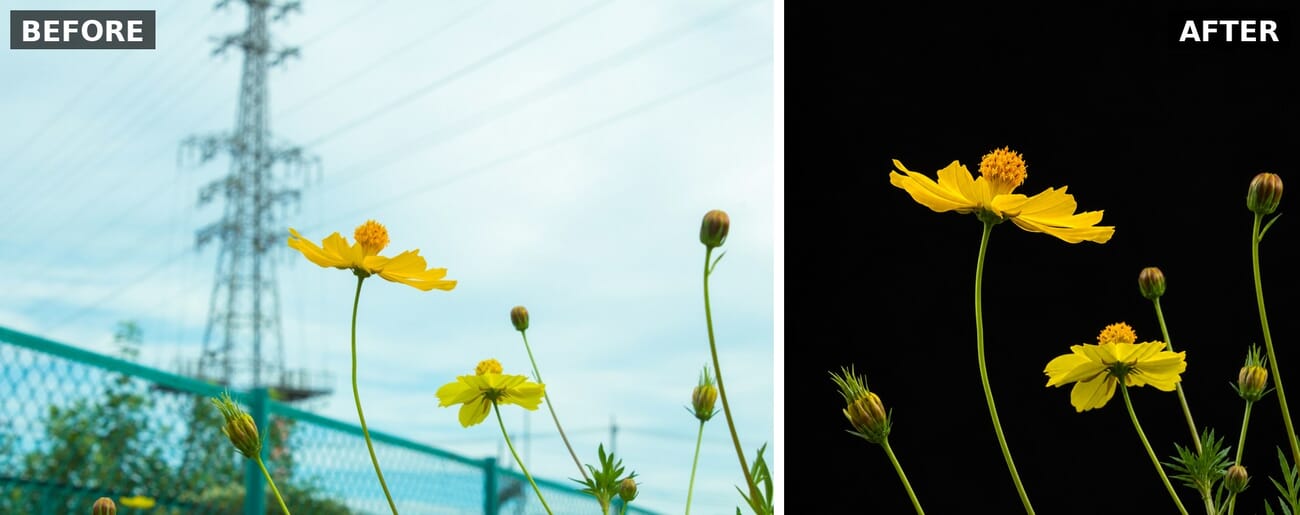
Finally, a practical one. We asked the model to drop a busy outdoor flower shot, complete with a power pylon and chain-link fence, onto a clean black studio backdrop. It isolated the yellow cosmos flowers, buds, and stems cleanly against pure black, preserving petal detail and the exact arrangement, producing a fine-art botanical look with no manual masking.
What it is genuinely good at
Across all four tests, the standout is exactly what OpenAI promised: preservation. Structures, faces, and layouts survived edits that changed lighting, weather, season, and background wholesale. For photographers, that maps neatly onto real needs, previsualizing a location in different conditions, mocking up a relight before a shoot, generating seasonal or day-to-night variants of a scene, or lifting a subject onto a clean backdrop without masking. As a fast concepting and creative tool, it is a clear step up from the last generation.
The catch photographers need to understand
Here is the crucial caveat. GPT Image 2.5 is not editing your photo in the way Lightroom or Photoshop does. It is re-generating the entire frame to match your instructions. The output looks like your image, but it is a new, AI-rendered picture, not your original pixels with adjustments layered on. Zoom in and fine textures, small text, and exact details will differ from the source. That makes it superb for concepting and unsuitable for any use where the image must remain a truthful record of what the camera captured.
That distinction matters more than ever. A model this good at photorealistic manipulation, available to anyone for pennies, sharpens the authenticity problem the whole industry is wrestling with. It is why provenance tools like Content Credentials, and moves like AI labs watermarking their own outputs and Apple building authentication into new iPhones, are becoming essential rather than optional. The easier convincing edits get, the more the proof of what is real has to live outside the pixels.
Frequently Asked Questions
What is GPT Image 2.5?
GPT Image 2.5 is OpenAI’s image generation and editing model, released September 8, 2026. It is available in ChatGPT as ChatGPT Images 2.5 and in the API as two variants, Flare and Sunburst. It emphasizes precise editing, subject preservation, and consistency across multiple edits, with up to 50 percent lower latency than the previous version.
Is GPT Image 2.5 good for editing real photos?
For creative and conceptual work, yes. In our tests it handled relighting, season changes, day-to-night conversion, and background isolation while preserving the original composition. But it re-generates the whole image rather than adjusting your actual pixels, so it is not a substitute for traditional raw editing when the photo must stay a faithful record.
How much does GPT Image 2.5 cost?
It is part of OpenAI’s paid API and is included in ChatGPT plans. API image edits at 1024-pixel high quality run in the range of a few cents each. OpenAI has not published complete pricing, but expect roughly $0.01 to $0.04 per edited image depending on size and quality.
Does GPT Image 2.5 replace Photoshop or Lightroom?
No. It is a different kind of tool. Photoshop and Lightroom make precise, non-destructive adjustments to your real image data. GPT Image 2.5 creates a new AI-rendered version that resembles your photo. It is excellent for concepts and creative variants, but not for authentic, pixel-accurate editing.
Can you tell if a photo was edited with GPT Image 2.5?
It can be difficult by eye, which is the concern. OpenAI attaches provenance metadata such as C2PA Content Credentials to its image outputs, and those signals, rather than visual inspection, are increasingly how edited and AI-generated images are identified.
The bottom line
GPT Image 2.5 is the most capable photo-editing AI we have tested, and our real-world results back up OpenAI’s preservation claims better than we expected. For photographers, it is a genuinely useful concepting tool: fast, cheap, and remarkably faithful to your composition. It is also a clear signal of where things are heading. When a machine can turn summer into winter, or midday into a neon-lit night, from a single sentence and keep everything else intact, the value of a photograph as proof shifts from the image itself to the provenance attached to it. That is the real story here, and it is worth getting excited and slightly uneasy about at the same time.
Based on OpenAI's official announcement and our own hands-on testing on September 10, 2026. Edited images were produced with GPT Image 2.5 from original SampleShots photographs.
Image Sources
- Original photographs via SampleShots – Featured and street: Benjamin Child. Landscape: Florian Schindler. Portrait: Pius Martin. Flower: Megu Hagiko. All via SampleShots.
- Edited and generated images – All before/after edits, the infographic, and the pin were produced by PhotoWorkout using OpenAI GPT Image 2.5.