

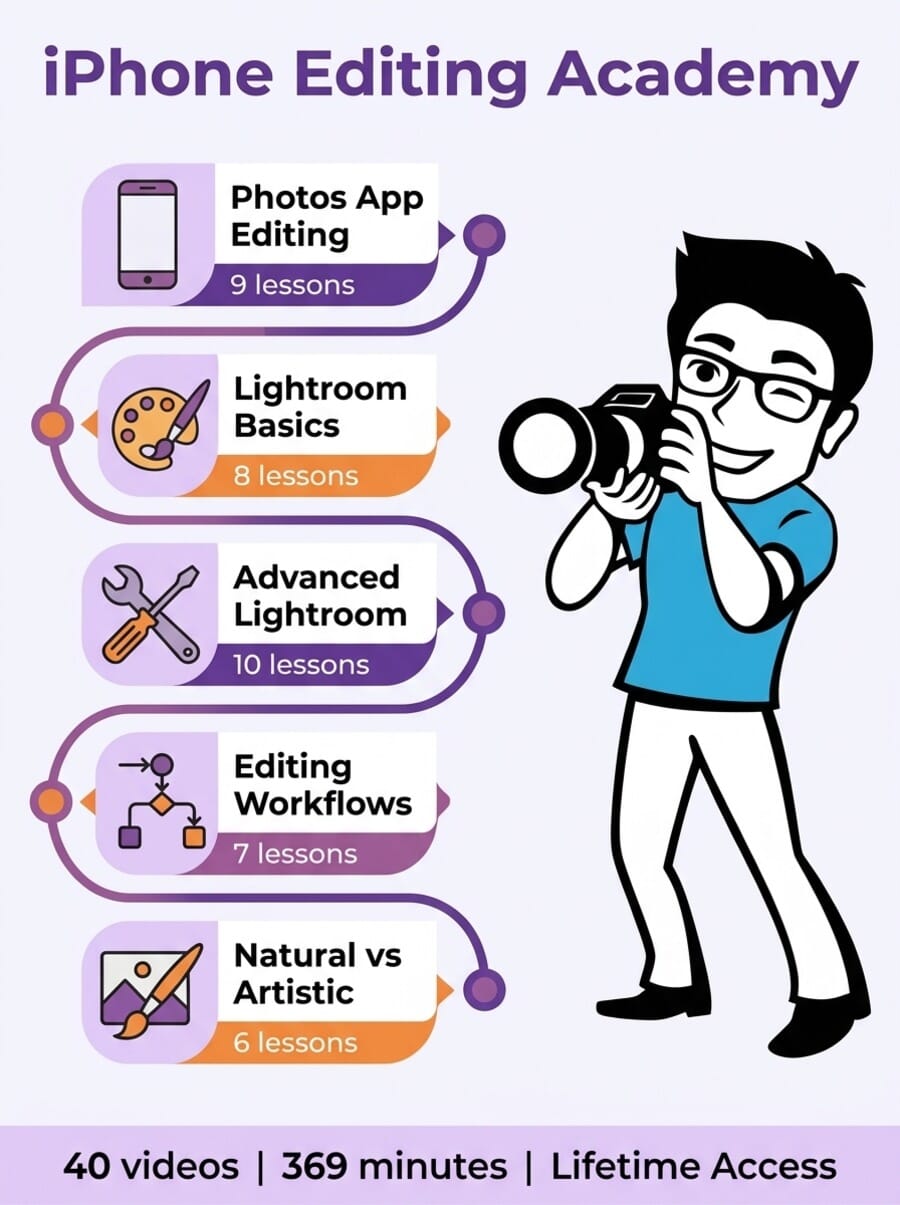
- The iPhone Editing Academy teaches mobile photo editing across 40 video lessons (369 minutes), starting with the native Photos app and progressing to Adobe Lightroom.
- Taught by Emil Pakarklis and guest instructor Mark Hemmings, covering everything from basic color correction to advanced selective editing with masks.
- Includes 6 bonuses: a preset collection, 19 step-by-step editing projects, video editing basics, landscape editing secrets, photo art techniques, and AI-powered photo feedback.
- Requires a Lightroom Premium subscription ($4.99/mo) for the second half of the course — important cost to factor in.
- Best suited for iPhone photographers who want to learn editing but feel overwhelmed by the number of apps and options available.
The iPhone Editing Academy is iPhone Photography School’s dedicated photo editing course. While its companion course (iPhone Photo Academy) teaches you how to capture better photos, this one picks up where the shutter click ends — transforming your raw captures into polished images using mobile editing apps.
We reviewed the full course to give you an honest breakdown of what is inside, how the teaching works, and whether it justifies the investment — especially when free YouTube editing tutorials exist.

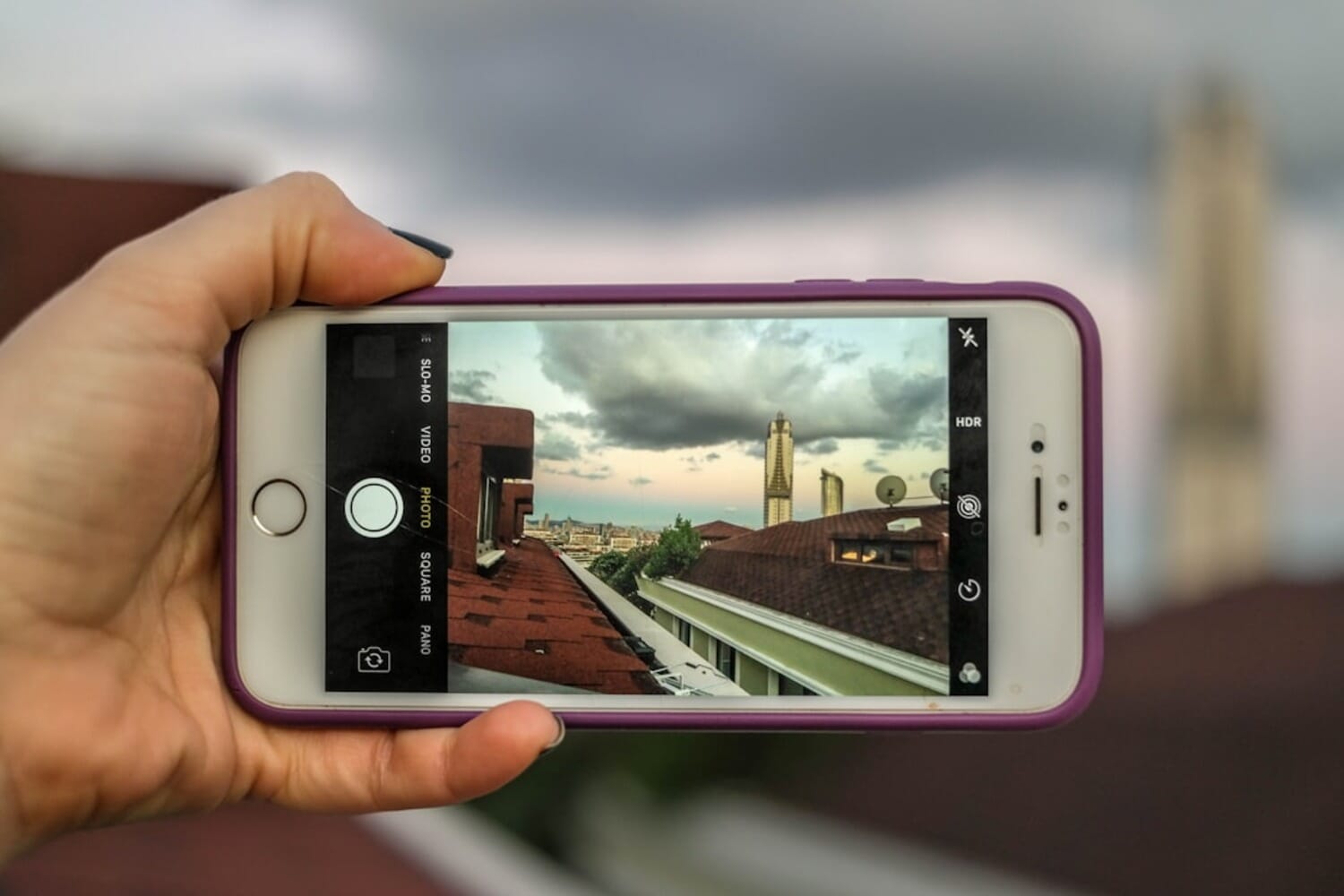
A mobile photo editing course covering the iPhone’s native Photos app and Adobe Lightroom. 40 video lessons (369 minutes) across 5 modules, teaching color correction, retouching, selective editing, masking, presets, and complete editing workflows. Includes 6 bonuses, downloadable practice files, and access to a private community. Available in 10 languages.
Normal Price: ~$299 Today Only: ~$49 USD- Excellent progression from basic Photos app edits to advanced Lightroom masking and tone curves.
- Downloadable practice photos let you follow along step by step with each lesson.
- The Visual Roadmap framework gives beginners a systematic approach to editing any photo.
- Lifetime access with 30-day money-back guarantee removes the financial risk.
- Requires a paid Lightroom Premium subscription ($4.99/mo) for the second half of the course.
- No coverage of Apple’s built-in editing improvements in iOS 26 (course still references older iOS features).
- Limited to Lightroom and Photos app — no coverage of popular alternatives like Snapseed or VSCO.
Course Overview: What You Get
iPhone Editing Academy is structured into 5 modules and 6 bonus sections. The 40 video lessons total 369 minutes (about 6 hours), with each lesson running 5-15 minutes. The course has been recently updated to start with Apple’s native Photos app before transitioning to Adobe Lightroom.
The course progression:
- Section 1: Editing In The Native Photos App (9 lessons)
- Module 1: All About Colors and Exposure (basics in Lightroom)
- Module 2: Tools for Retouching
- Module 3: Learn Selective Photo Editing (advanced Lightroom)
- Module 4: High-Quality Edits Workflow (genre-specific editing)
- Module 5: Natural vs Artistic Editing (with Mark Hemmings)
A key feature is that every lesson comes with downloadable practice photos — the exact same images Emil edits in the video. This means you can follow along step by step, matching your results to his, which is far more effective than just watching passively.
Section 1: Editing In The Native Photos App
The course now starts with Apple’s built-in Photos app rather than jumping straight into third-party apps. This is a smart design choice — the Photos app is free, already on every iPhone, and handles many basic edits competently.
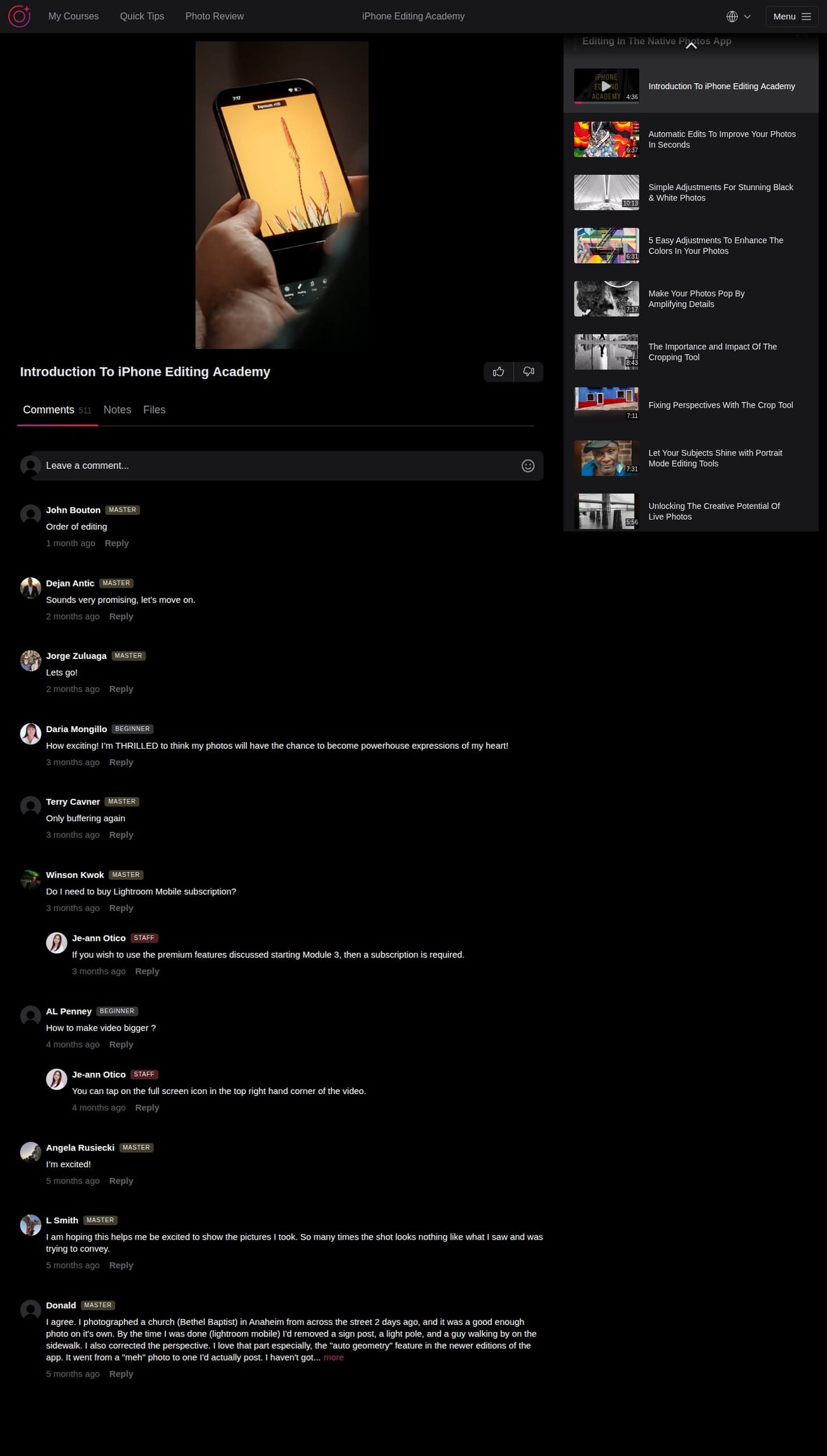
Lessons in this section cover:
- Automatic edits to improve photos in seconds (the magic wand tool)
- Simple adjustments for stunning black and white photos (10:13)
- 5 easy adjustments to enhance colors in your photos (13:13)
- Making photos pop by amplifying details
- The importance and impact of the cropping tool
- Fixing perspectives with the crop tool (7:11)
- Portrait Mode editing tools (7:31)
- Unlocking the creative potential of Live Photos (5:56)
The perspective correction lesson is particularly useful — it teaches you to fix the “falling buildings” problem where architecture looks tilted in photos, using nothing more than the built-in crop tool. The Portrait Mode editing lesson is another standout, showing how to adjust depth effect, lighting, and background blur after the photo is taken.
Module 1: All About Colors and Exposure
This is where the course transitions to Adobe Lightroom and starts building real editing skills. Emil covers the fundamentals that underpin all photo editing: color theory, exposure correction, white balance, histograms, and sharpening.
The teaching method works well here — Emil takes a sample photo and walks through each edit step by step, explaining not just what he is adjusting but why. For beginners, this “why” context is crucial. Knowing that you should increase exposure is useless unless you understand when and by how much.
Each lesson includes small assignments you can share in the community for feedback, creating a practice-and-review loop that reinforces learning.
Module 2: Tools for Retouching
Module 2 covers the cleanup and correction tools that turn good photos into polished ones:
- Cropping and uncropping techniques
- Straightening photos in different ways
- Removing unwanted objects from photos (using TouchRetouch and Lightroom)
- Fixing perspective mistakes for more natural-looking images
The object removal lesson is one of the most immediately practical in the entire course. We all have photos ruined by a trash can, a stranger walking through the frame, or a parked car in the background. Emil demonstrates how to cleanly remove these distractions using both the TouchRetouch app and Lightroom’s built-in healing tool.
Each of the six lessons runs about 15 minutes — short enough to complete in a coffee break, long enough to cover the topic properly.
Module 3: Learn Selective Photo Editing
This is the module that separates casual editors from people who produce genuinely impressive results. Selective editing means applying adjustments to specific parts of a photo rather than the entire image — and it is the technique that professional photographers use constantly.
The module covers:
- Vignettes — drawing attention to your subject
- Brush tools — painting edits onto specific areas
- 8 masking techniques for precise control
- Selective adjustments for color, exposure, and tone
Important note: The masking and selective editing features require Lightroom Premium ($4.99/month). This is an ongoing cost beyond the course price, and the course does not make this obvious enough upfront. That said, masking is genuinely the most powerful editing tool on mobile, and learning it properly is worth the subscription if you are serious about photo editing.
For more on what Lightroom can do, see our guide to mobile photo editing with Snapseed for a free alternative approach.
Module 4: High-Quality Edits Workflow
Module 4 is where you apply everything from the previous modules to real-world editing scenarios. Emil walks through complete editing workflows for different types of photos:
- Landscape editing — bringing out sky detail while preserving foreground
- Portrait editing — skin tones, background separation, and flattering light
- Architecture editing — correcting perspectives and enhancing textures
- Sunset editing — recovering blown highlights and intensifying colors
- Black and white conversion — going beyond simple desaturation
The Visual Roadmap framework Emil introduces here is one of the course’s most valuable concepts. It is a systematic approach to editing any photo: assess what needs improvement, decide on the mood you want, choose the right tools, and execute in a logical order. This framework eliminates the “I opened Lightroom and randomly moved sliders” problem that plagues self-taught editors.
Module 5: Natural vs Artistic Editing
The final module brings in guest instructor Mark Hemmings alongside Emil, and it introduces a philosophical dimension to editing: the difference between natural editing (making photos look realistic but polished) and artistic editing (pushing photos into creative territory).
This distinction matters more than most beginners realize. Understanding when to use natural editing (documentary, real estate, journalism) versus artistic editing (social media, fine art, creative projects) separates thoughtful editors from people who slap the same Instagram filter on everything.
Mark Hemmings brings a different perspective from Emil — his editing style is bolder and more experimental, which provides a useful contrast and shows students that there is no single “correct” way to edit a photo.
Bonus Content: 6 Extras
The 6 bonus sections add practical value:
Bonus 1: Signature Preset Collection — A set of professional Lightroom presets you can apply to your photos with one tap. Presets are like saved editing recipes — they apply a consistent look across multiple photos. This is particularly useful for maintaining a cohesive Instagram aesthetic.
Bonus 2: 19 Step-By-Step Editing Projects — Structured assignments with specific photos and target outcomes. This is the best bonus of the six — hands-on practice with guided feedback is how editing skills actually develop.
Bonus 3: Video Editing Made Easy — A brief introduction to video editing on iPhone. A nice teaser, but if you are serious about video, the dedicated Video Editing Academy goes much deeper.
Bonus 4: Secrets For Magical Landscape Photos — Landscape-specific editing techniques that complement Module 4.
Bonus 5: Powerful Photo Art Techniques — Creative compositing and artistic effects for iPhone photos.
Bonus 6: Personalized Photo Feedback — An AI-powered tool for getting instant feedback on your edited photos.
The Learning Platform
iPhone Editing Academy runs on the same custom platform as all iPhone Photography School courses. The dark-themed interface features a video player on the left with a course outline sidebar on the right.
Each lesson has tabs for Comments, Notes, and Files. The Files tab is particularly useful here — it is where you download the practice photos to edit alongside the video. The Notes tab lets you save per-lesson notes, which is handy for remembering specific slider values or workflow steps.
All video lessons feature a live screen recording of the instructor’s iPhone. You see exactly what buttons Emil presses, which sliders he moves, and in what order. This screen-recording approach is far more effective for editing tutorials than a talking-head format.
The course is available in 10 languages with subtitles: English, Spanish, German, French, Italian, Portuguese, Polish, Arabic, Russian, and Japanese.
Community and Support
The comments section is active, with the introduction lesson alone having 511 comments. Students share their editing attempts, ask questions about specific tools, and discuss alternative approaches to the same edit.
Staff member Je-ann Otico is consistently present, answering technical questions about Lightroom subscriptions, feature availability, and troubleshooting. The staff responses are specific and helpful rather than generic templates.
Students earn Beginner, Advanced, and Master badges based on their progress, which creates a visible sense of advancement through the course.
About the Instructor
Emil Pakarklis is the founder of iPhone Photography School and a self-taught photographer who built the platform into the world’s largest iPhone photography education company. He teaches the majority of the course in his trademark calm, methodical style.
Mark Hemmings joins as a guest instructor for Module 5. He is a professional photographer and co-founder of Photography Pro, bringing a different editing perspective that balances Emil’s more conservative approach.
The course is published through iPhone Photography School, one of the largest online photography education platforms with over 647,000 enrolled students.
Who Is This Course For?
iPhone Editing Academy is ideal for:
- iPhone Photo Academy graduates who want to complete the shooting-to-editing pipeline.
- Beginners overwhelmed by editing apps who want a structured introduction to mobile editing.
- Social media content creators who want their photos to stand out with professional editing.
- Anyone who takes good photos but is disappointed by the results — editing is often the missing piece.
It is not ideal for:
- Experienced Lightroom users who already understand masking, tone curves, and HSL adjustments.
- People who want to learn desktop editing (Photoshop, Lightroom Classic, Capture One).
- Anyone unwilling to pay for the Lightroom Premium subscription required for the advanced modules.
The Lightroom Cost Factor
This is important enough to warrant its own section. The first half of the course uses the free Photos app and the free version of Lightroom. But starting from Module 3, the course requires Lightroom Premium features (masking, selective editing, healing tool), which cost $4.99/month.
This means your total cost is not just the one-time course fee — it includes an ongoing Lightroom subscription if you want to use the advanced techniques you learn. At $60/year for Lightroom, this adds up. The course should be more transparent about this upfront.
That said, Lightroom Premium is the best mobile photo editing app available, and if you are going to invest in learning editing, you may as well learn the industry standard. For a free alternative, Snapseed covers many of the same capabilities at no cost.
Pricing and Value
iPhone Editing Academy has a list price of around $299, typically discounted to ~$49. A 3-payment installment option is available. The price includes:
- Lifetime access to all 40 lessons and 6 bonuses
- Downloadable practice photos for every lesson
- Signature preset collection for Lightroom
- Community access and staff support
- 30-day money-back guarantee
At $49, the value is solid — especially given the downloadable practice files and preset collection. Compare this to a single one-hour Lightroom tutorial session (typically $50-100), and the 6+ hours of structured content is a strong deal.
Check current pricing and enroll in iPhone Editing Academy →
What Could Be Better
The Lightroom subscription is not optional. Calling it “iPhone Editing Academy” when half the course requires a paid third-party app subscription feels misleading. The course should either include more content using free tools or be upfront about the additional cost.
No Snapseed coverage. Snapseed is Google’s free photo editor and is widely regarded as the best free editing app for mobile. Its omission is surprising — the original version of this course featured Snapseed prominently, but the updated version has moved entirely to Lightroom.
iOS 26 features are not yet covered. Apple has significantly improved the built-in Photos app editing tools in recent iOS updates. The course’s Photos app section could be more current with the latest iOS editing capabilities.
The sales page oversells. Claims of “world-class images” and comparisons to professional photo shoots set expectations higher than the course can realistically deliver. The course is good — it does not need the hyperbole.
Final Verdict
iPhone Editing Academy is a well-structured introduction to mobile photo editing that takes you from basic Photos app tweaks to advanced Lightroom techniques. The downloadable practice files, preset collection, and Visual Roadmap framework add genuine pedagogical value.
The key consideration is the Lightroom Premium subscription. If you are willing to invest $4.99/month in Lightroom (and honestly, you should if you are serious about mobile editing), this course will teach you how to use it effectively. If you want a completely free editing solution, the course’s value drops significantly after the first few modules.
For the best learning path, pair this with the iPhone Photo Academy for capturing, or consider the all-in-one Capture it All course if you want both shooting and editing in a single package.
Enroll in iPhone Editing Academy (30-day guarantee) →
Frequently Asked Questions
Which apps does this course use?
The course starts with Apple’s built-in Photos app, then transitions to Adobe Lightroom for the majority of the content. Some lessons also use the TouchRetouch and Lensa apps for specific tasks like object removal and portrait editing.
Do I need to pay for Lightroom?
The free version of Lightroom works for the first portion of the course. However, advanced features like masking and selective editing (covered from Module 3 onward) require Lightroom Premium at $4.99/month.
Can I follow this course on an Android phone?
Partially. The Photos app lessons are iPhone-specific, but the Lightroom portions work on any device since Lightroom is available on Android, iPad, Mac, and Windows. You would miss the first section but could follow the rest.
Do I need photography experience first?
No. The course starts from the absolute basics and assumes no prior editing or photography knowledge. That said, you will get more value if you already have photos you care about editing — pairing this with the iPhone Photo Academy for shooting skills is a natural combination.
What is the refund policy?
iPhone Photography School offers a 30-day money-back guarantee. Email [email protected] within 30 days for a full refund, no questions asked.
Disclosure: This article contains affiliate links. When you purchase through our links, we may earn a commission at no additional cost to you. We have hands-on access to the course platform and this review reflects our genuine assessment of the content.


