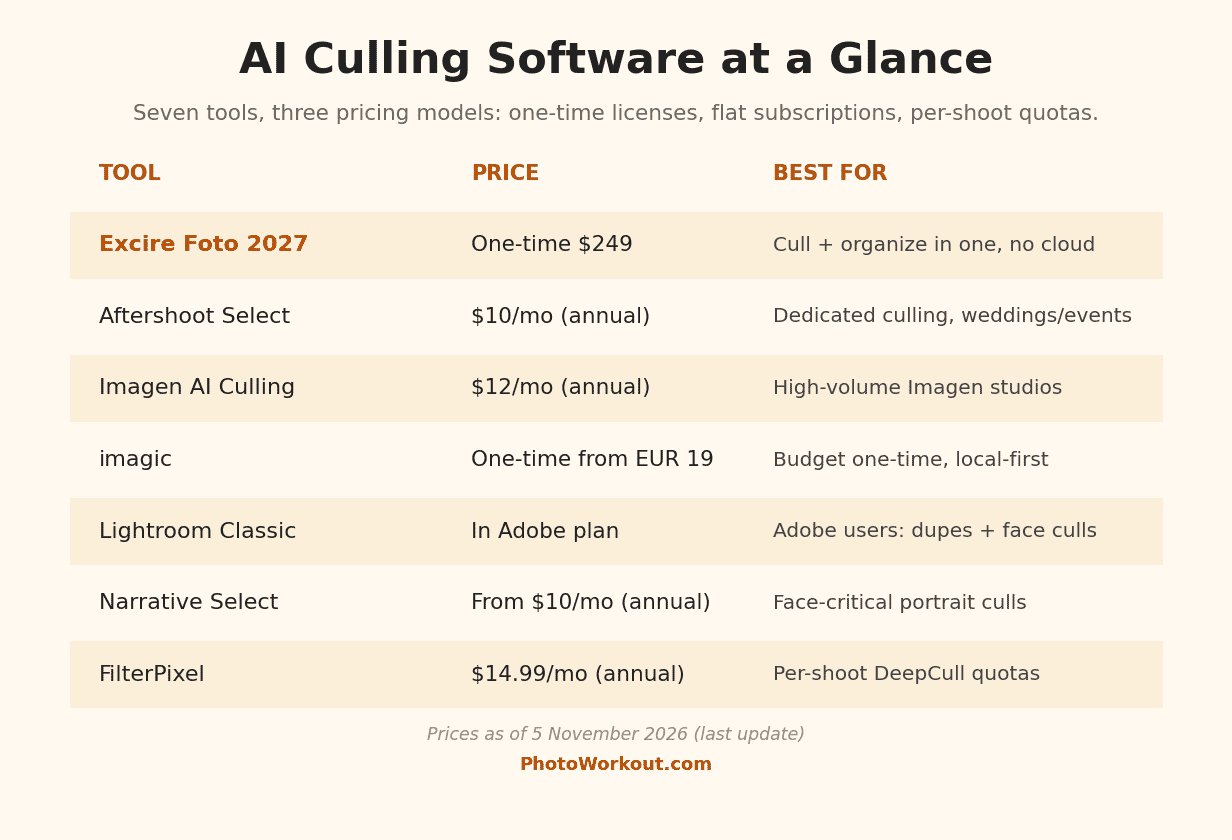

- Excire Foto 2027 is the pick for most photographers: real AI culling plus a full search-and-organize toolkit, one-time $249, no cloud, no subscription, and 15% off with code PHOTOWORKOUT.
- Aftershoot Select is the best dedicated culler for wedding and event pros: unlimited images at $10 a month billed annually, with the deepest burst and duplicate handling in the field.
- Imagen AI’s culling plan ($12 a month annual) makes the most sense for high-volume studios already using Imagen’s editing profiles.
- imagic is the budget pick: culling plus a capable editor for a one-time EUR 19, tested hands-on by PhotoWorkout on a 52-frame HDR set.
- Lightroom Classic 15.4 added duplicate detection and face-level culling at no extra cost; Adobe subscribers should try it before buying anything.
- AI culling reliably removes the unusable and thins near-duplicates. No tool judges taste; the final pick between two sharp frames is still yours.
Culling is the least loved job in photography: a thousand frames in, a few hundred keepers out, and an evening gone. AI culling software promises to hand that first pass to a machine that flags blur, closed eyes and duplicates in minutes, so the human decision starts at the shortlist instead of the memory card.
The category has matured fast. What used to be two specialist tools is now a crowded field of seven serious options spanning three pricing models: one-time licenses, flat subscriptions and per-shoot quotas. This guide compares all seven on culling quality, workflow fit, privacy and real cost, and names a best pick per type of photographer. All prices were verified on the vendors’ own pages on November 5, 2026.
When you buy through links on our site, we may earn a commission at no cost to you. We evaluate products independently. Commissions do not affect our evaluations.
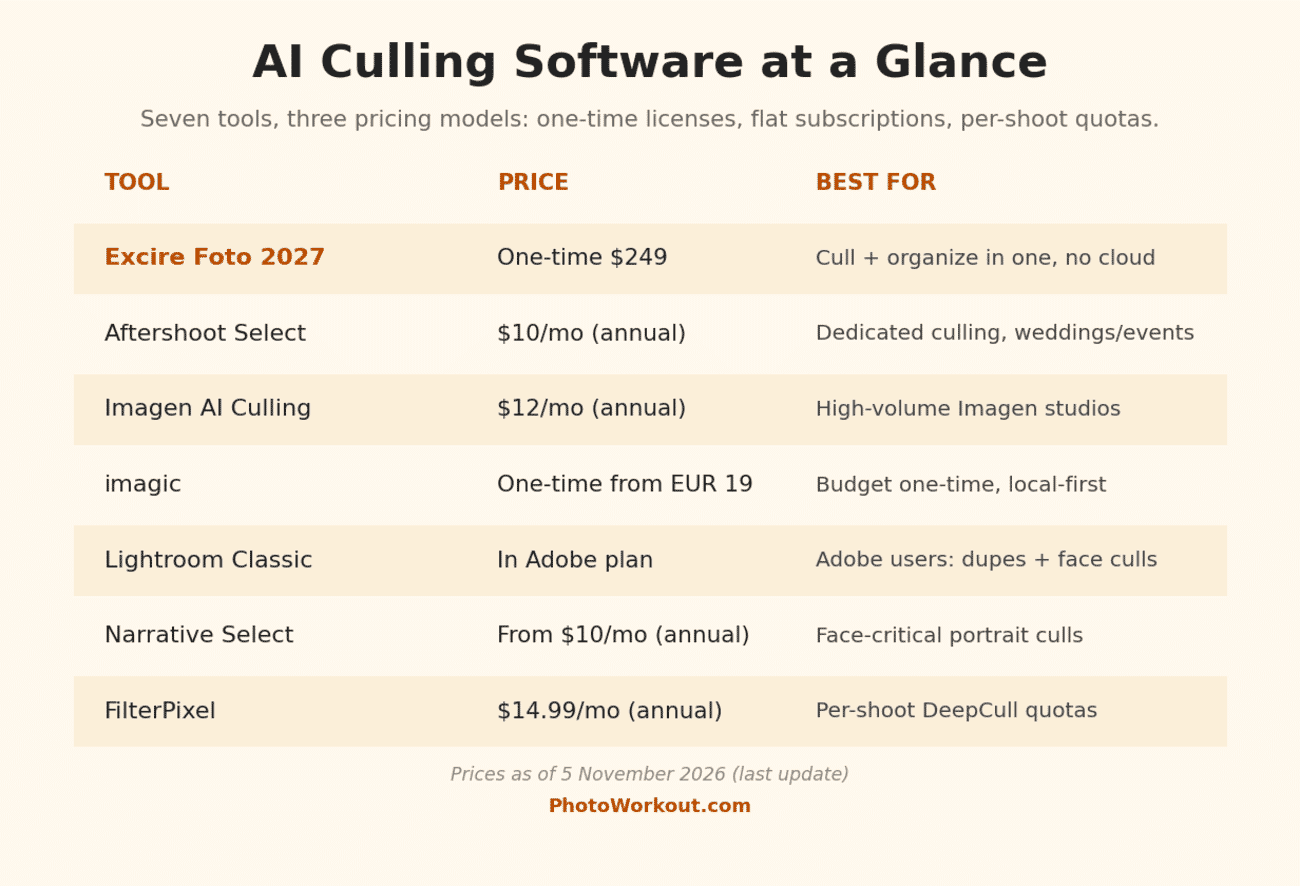
The Field at a Glance
1. Excire Foto 2027: Best for Most Photographers
Excire Foto 2027 wins the top slot for a simple reason: for a non-studio photographer, culling is never the whole job. The same library that needs a first pass also needs organizing, finding and resurfacing, and Excire is the only tool here that does all of it in one one-time purchase. The 2027 release added Survey Mode culling, focus peaking and photo quality scores to what was already the best no-cloud AI search on the market: it finds photos by text, by face, by GPS and even by text inside the image, all processed locally.
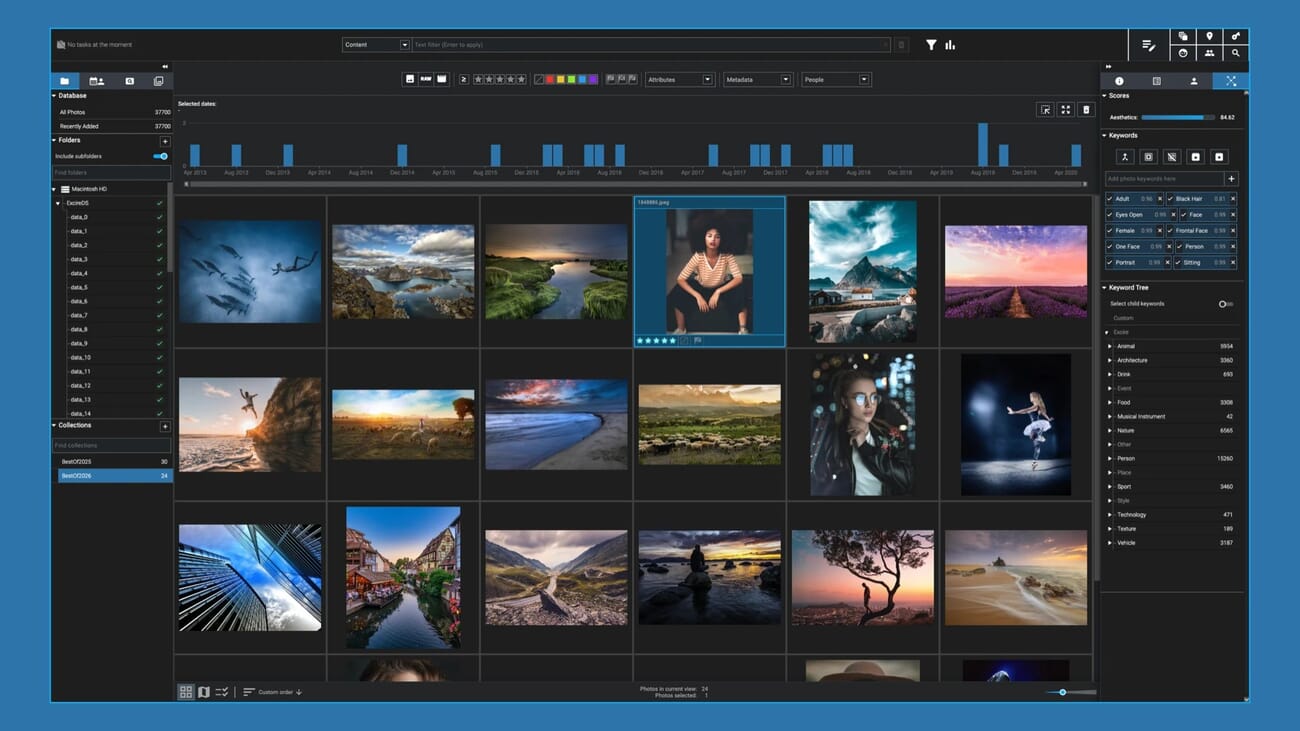
The honest caveat: Excire’s culling features are the newest in this roundup, first shipped in the 2027 release this October. A wedding shooter culling five thousand frames every weekend will find Aftershoot’s dedicated pipeline faster and deeper. For everyone else, one license covers the whole library workflow with nothing leaving the machine.
- Price: $249 one-time ($219 launch pricing at the time of writing), 14-day free trial. Code PHOTOWORKOUT takes 15% off.
- Platforms: Windows and macOS, fully local.
- Best for: enthusiasts and semi-pros who want culling plus a lifetime library tool without a subscription.
2. Aftershoot Select: Best Dedicated Culling
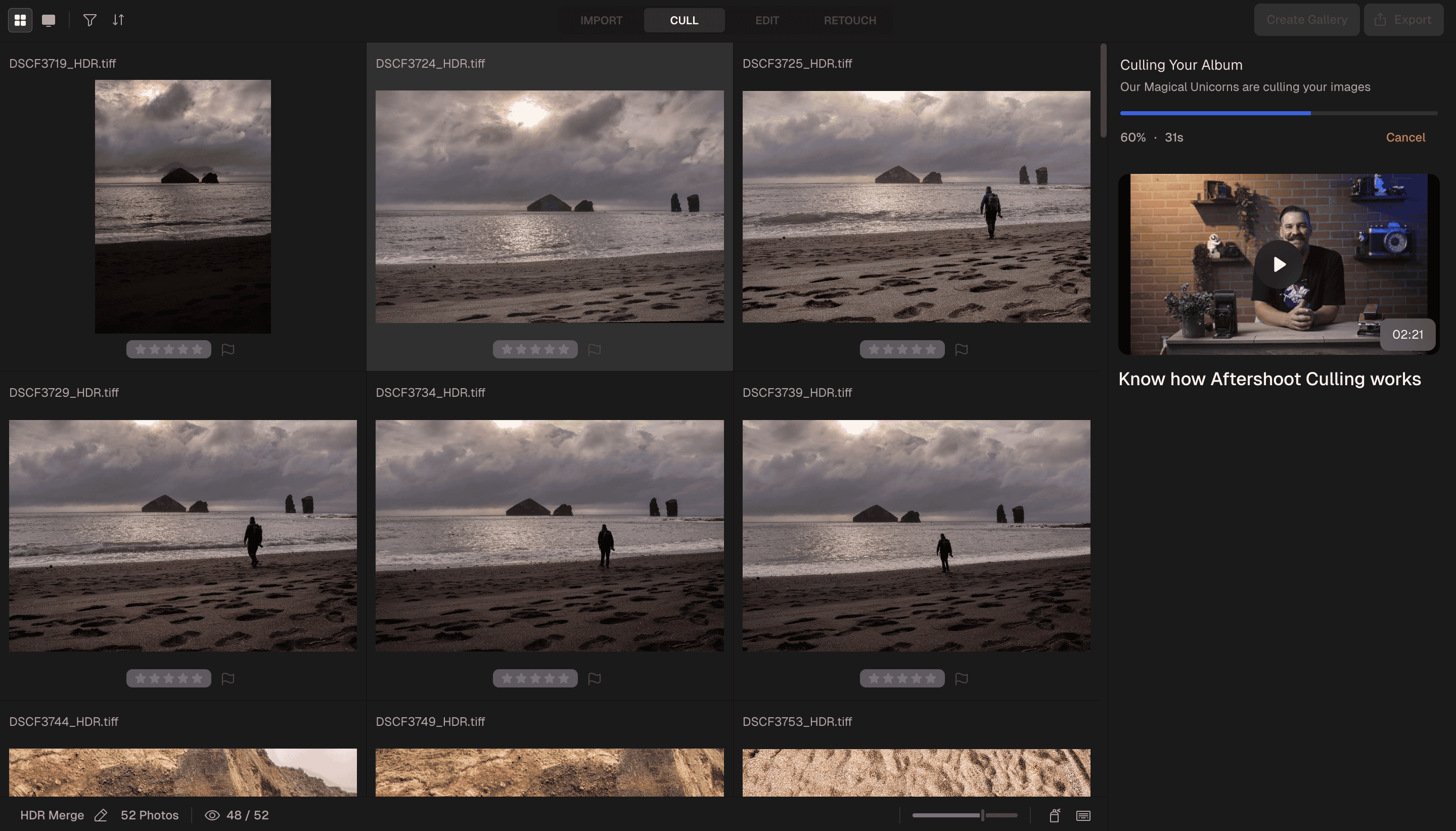
Aftershoot defined this category, and Select is still the deepest pure culler available: spray-and-pray burst grouping, duplicate stacks, closed-eye and blur detection, and selection profiles that learn a photographer’s taste over time. It runs on your machine, works offline, and ships selects straight into Lightroom or Capture One. Since the company expanded into a full RAW editor, Select is the entry point to a complete cull-edit-retouch pipeline.
- Price: Select is $10/month billed annually ($15 month to month), unlimited images, 30-day free trial. The Complete bundle with AI editing and retouching is $45/month annual.
- Platforms: Windows and macOS, local processing.
- Best for: wedding and event photographers culling thousands of frames per shoot, every week.
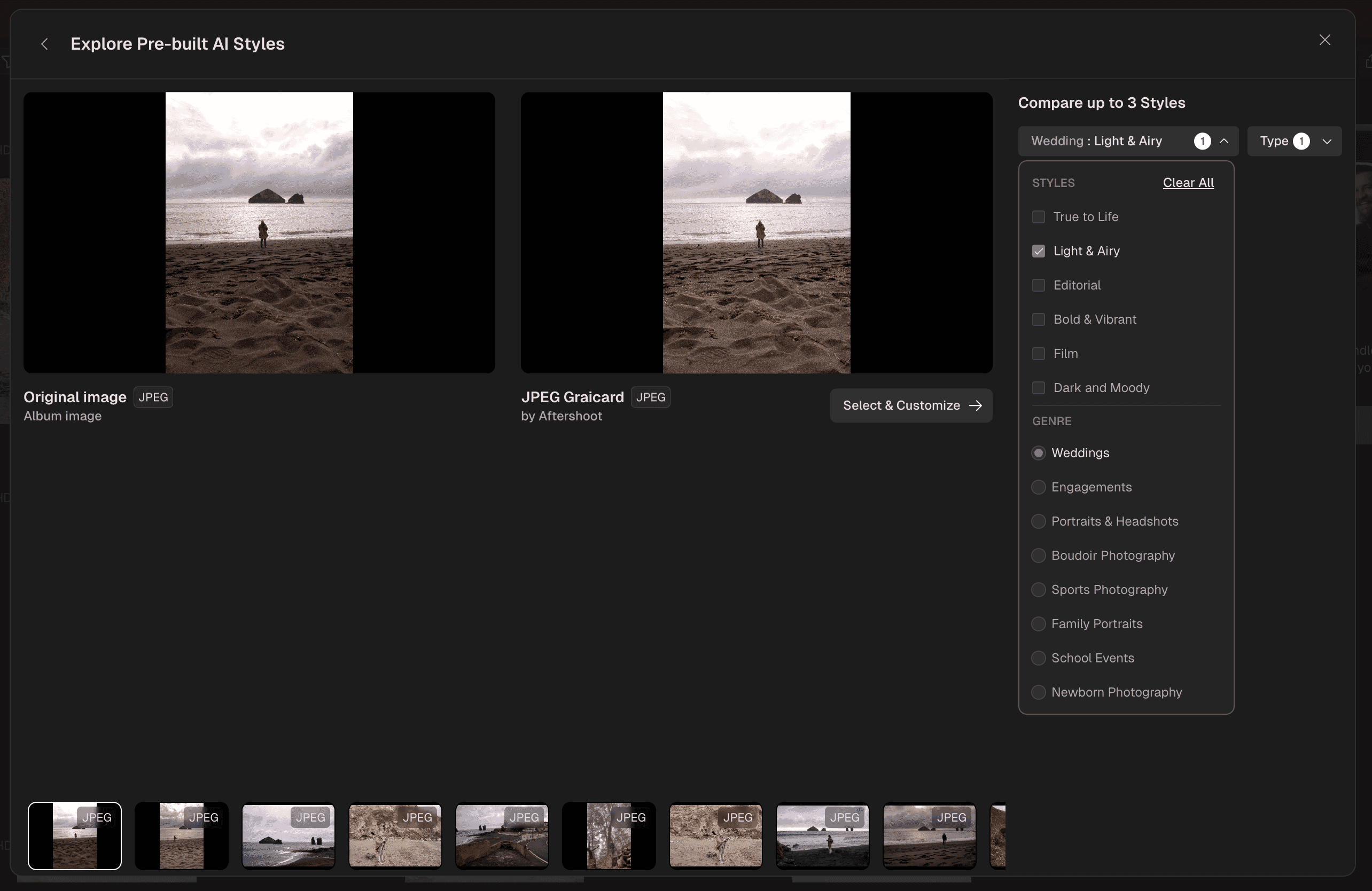
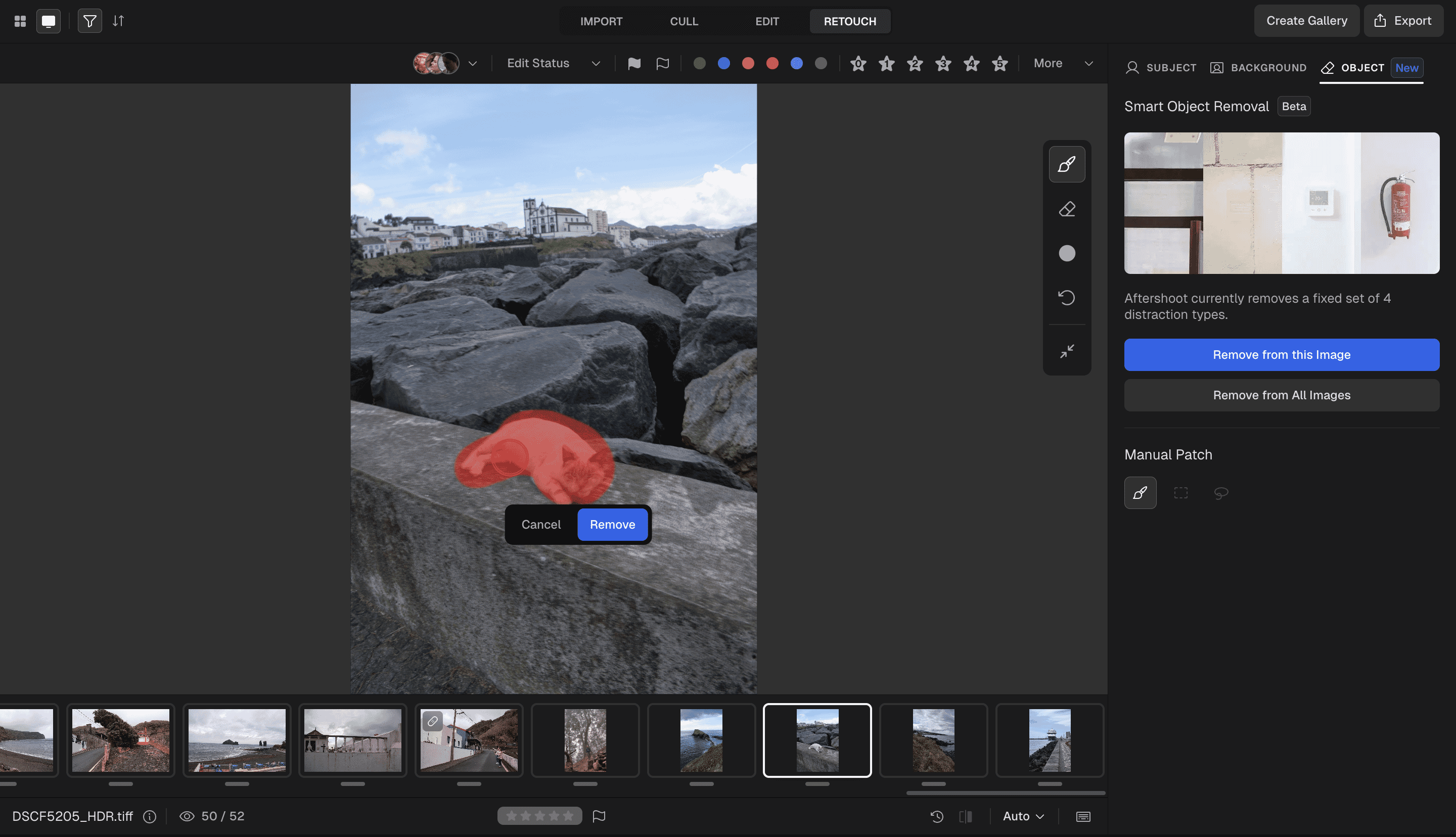
The Retouch tab is moving fast, too. In PhotoWorkout’s hands-on time with the app, two beta features stood out: Smart Object Removal, which masked a stray subject with one brush pass and patched it out, and AI background replacement for studio portraits. Aftershoot is clearly built around weddings and portraits first, but it handled a landscape travel set without complaint, and the editing side has grown far beyond what a “culling tool” label suggests.
3. Imagen AI Culling: Best for High-Volume Studios
Imagen built its name on AI editing profiles that learn a studio’s style, and its culling plan exists to feed that pipeline: cull, then edit with your trained profile, in one workflow. Culling is a flat $12/month billed annually ($18 monthly) with unlimited photos, and the editing side is pay-as-you-go at $0.05 per edited photo. For a studio already paying for Imagen edits, adding culling is the obvious move; as a standalone culler it is solid but not the specialist Aftershoot is.
- Price: culling at $12/month billed annually ($144/year) or $18 month to month; editing billed separately per photo.
- Best for: studios and high-volume pros who want culling and profile-based editing from one vendor.
4. imagic: Best Budget One-Time Pick
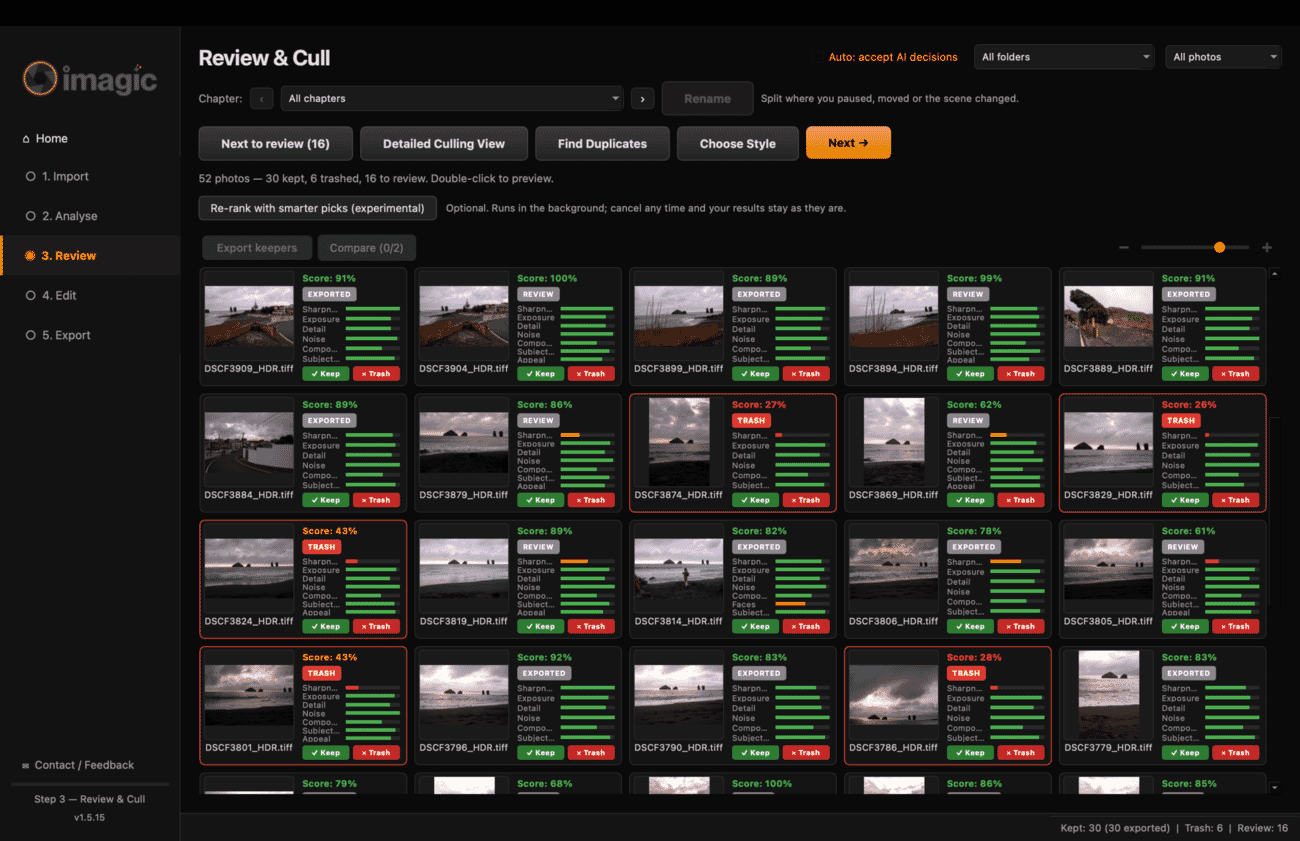
imagic is the newcomer, a one-developer app that PhotoWorkout tested hands-on on a 52-frame HDR set: analysis took 18 seconds, every reject was genuinely soft, and near-duplicates were parked for review rather than deleted. It bundles a usable editor and honest WYSIWYG export, runs entirely locally, and the Lite license costs less than two months of any subscription here. Version 1.5 still has rough edges, documented in the review, but at EUR 19 one-time it is the cheapest real AI culling on the market.
- Price: EUR 19 (Lite), EUR 49 (Plus), EUR 99 (Max), all one-time; 500-photo free trial.
- Platforms: Windows and macOS, fully local.
- Best for: hobbyists and event shooters who want the tedium gone without a subscription.
5. Lightroom Classic: Best if You Already Pay Adobe
Before buying anything, Adobe subscribers should check what they already own. Lightroom Classic 15.4 added automatic duplicate detection and a per-face culling panel with Eye Focus and Eyes Open scores, which covers the two most common culling chores at no extra cost. It does not group bursts or rank frames the way the dedicated tools do, but for portrait sessions and family work it may be enough.
- Price: included in Adobe photography plans; no separate purchase.
- Best for: existing Adobe subscribers with moderate volume.
6. Narrative Select: Best for Face-Critical Culls
Narrative Select approaches culling from the faces outward: its Close-Ups panel shows every face in a frame at 100% simultaneously, with eye and focus assessments per face, which is the fastest way to confirm that all eight family members blinked in different frames. Selects ship to Lightroom, Photoshop or Capture One. At the time of writing Narrative is running a 30%-off promotion on yearly billing: the Lite plan is $10/month (normally $15), Standard $20 and Premium with AI editing $40.
- Price: Lite from $10/month billed yearly (promo), Standard $20, Premium $40.
- Best for: portrait, family and wedding shooters whose cull decisions live and die on faces.
7. FilterPixel: The Per-Shoot Alternative
FilterPixel runs a quota model: the $14.99/month annual plan includes unlimited basic AI culling plus 20 “DeepCull” shoots a year, with extra shoots at $7.99. Basic cull filters blur, focus and expressions; DeepCull adds a score and a written reason for every photo. The per-shoot framing suits photographers with spiky, seasonal workloads, though heavy shooters will outgrow the quotas and be better served by Aftershoot’s flat unlimited pricing.
- Price: $14.99/month billed annually (20 DeepCull shoots/year), Pro $34.99, Studio $64.99; extra shoots $7.99.
- Best for: seasonal shooters who want per-shoot depth without weekly volume.
Which One Should You Buy?
- You shoot for fun and your library is a mess: Excire Foto 2027. One purchase fixes culling AND findability, and the 15% code brings it under $190.
- You cull thousands of frames weekly for clients: Aftershoot Select. Unlimited volume at $120 a year is the category benchmark.
- Your studio already edits with Imagen profiles: add Imagen Culling and keep one pipeline.
- You want to try AI culling for pocket money: imagic Lite at EUR 19, upgrade later if it sticks.
- You pay Adobe anyway: try Lightroom Classic 15.4’s duplicate and face tools first; buy only if they fall short.
What AI Culling Can and Cannot Do
Every tool in this list is excellent at the same two things: removing the technically unusable (blur, camera shake, closed eyes) and thinning bursts of near-identical frames. That covers most of the tedium in a typical cull. What no tool does reliably is judge taste. In PhotoWorkout’s own testing, three equally sharp frames of the same scene scored identically, and the software’s choice between them was effectively a coin toss. The realistic expectation: AI gets a 2,000-frame card down to a few hundred candidates, and the photographer still makes the calls that matter. Tools with experimental appeal scoring (imagic’s Smarter Picks, FilterPixel’s DeepCull reasons) are second opinions, not replacements.

Frequently Asked Questions
Is AI culling accurate enough for paid client work?
For the first pass, yes. The reject detection in mature tools is conservative and rarely throws away a sharp frame; the bigger risk is parked near-duplicates you never review. Professionals typically let the AI cut the card to candidates, then make final selects manually. No working pro should deliver an untouched AI cull.
Do these tools upload my photos to the cloud?
Excire, imagic and Aftershoot process photos locally on your machine. Narrative and FilterPixel run their culling in desktop apps as well. Imagen’s editing pipeline is cloud-based and its culling is designed around that workflow; photographers with strict client-privacy requirements should confirm current data handling with the vendor before committing.
Is Lightroom’s built-in culling good enough?
For duplicate cleanup and face checks, often yes since version 15.4. For burst-heavy event work it is not in the same league as Aftershoot or Imagen: it has no burst grouping, no learned selection profile, and no per-frame quality score. Treat it as the free baseline to beat.
One-time purchase or subscription, which is cheaper?
Volume decides. At hobbyist volume, a one-time license (Excire at $249, imagic from EUR 19) beats any subscription within two years. At professional volume, Aftershoot’s $120 a year unlimited is cheaper than per-shoot or per-photo models and the one-time tools lack the throughput features. The trap to avoid is paying monthly rates year-round for seasonal shooting; annual billing or quotas fit that pattern better.
Bottom Line
Excire Foto 2027 is the recommendation for most readers because it solves culling and the library problem behind it, once, for one payment. Aftershoot remains the pro-grade specialist, Imagen the studio pipeline, imagic the impulse-priced entry, and Lightroom the free baseline Adobe subscribers should test first. Whichever way you go, the evenings you get back are the same.
Pricing and Feature Sources
- Excire: Excire Foto 2027 – Pricing and feature set verified November 5, 2026.
- Aftershoot: official pricing guide – Plan structure and prices, updated by Aftershoot October 2026, verified November 5, 2026.
- Imagen: AI culling – Culling plan pricing verified November 5, 2026.
- imagic: desktop app – Tier pricing verified November 4, 2026; hands-on test data from the PhotoWorkout review.
- Narrative: pricing – Plans and current yearly-billing promotion verified November 5, 2026.
- FilterPixel: pricing – Plan quotas and prices verified November 5, 2026.
Image Sources
- Featured image and pin: stylized PhotoWorkout illustrations – AI-generated editorial illustrations; the pin features the PhotoWorkout mascot.
- Comparison table: PhotoWorkout – Original chart built from vendor pricing verified November 5, 2026.
- Excire Foto 2027 screenshot: Excire press kit – Official Excire press asset, used with permission as an affiliate partner.
- Aftershoot screenshots (cull grid, AI styles, object removal): PhotoWorkout – Captured by PhotoWorkout on November 5, 2026, while culling, style-editing and retouching the same 52-frame HDR test set.
- imagic screenshot: PhotoWorkout – Captured during the PhotoWorkout review session, November 4, 2026.
Disclosure: This article contains affiliate links. When you purchase through these links, we may earn a commission at no additional cost to you. This helps support our research and allows us to continue providing free buying guides. All opinions and recommendations are based on our independent research and analysis.