


- Since iOS 27.2, released October 26, 2026, Apple adds an invisible SynthID watermark to images made or changed with its own generative tools: Clean Up, Extend and Spatial Reframing in Photos, plus Image Playground and Image Wand.
- SynthID is Google DeepMind’s watermark, not Apple’s. There is no checker on the iPhone; Apple sends users to Google’s synthid.com to test an image.
- It marks only Apple’s own AI output. AI images from other apps are not marked, and in MacRumors’ tests small Clean Up edits got no watermark at all.
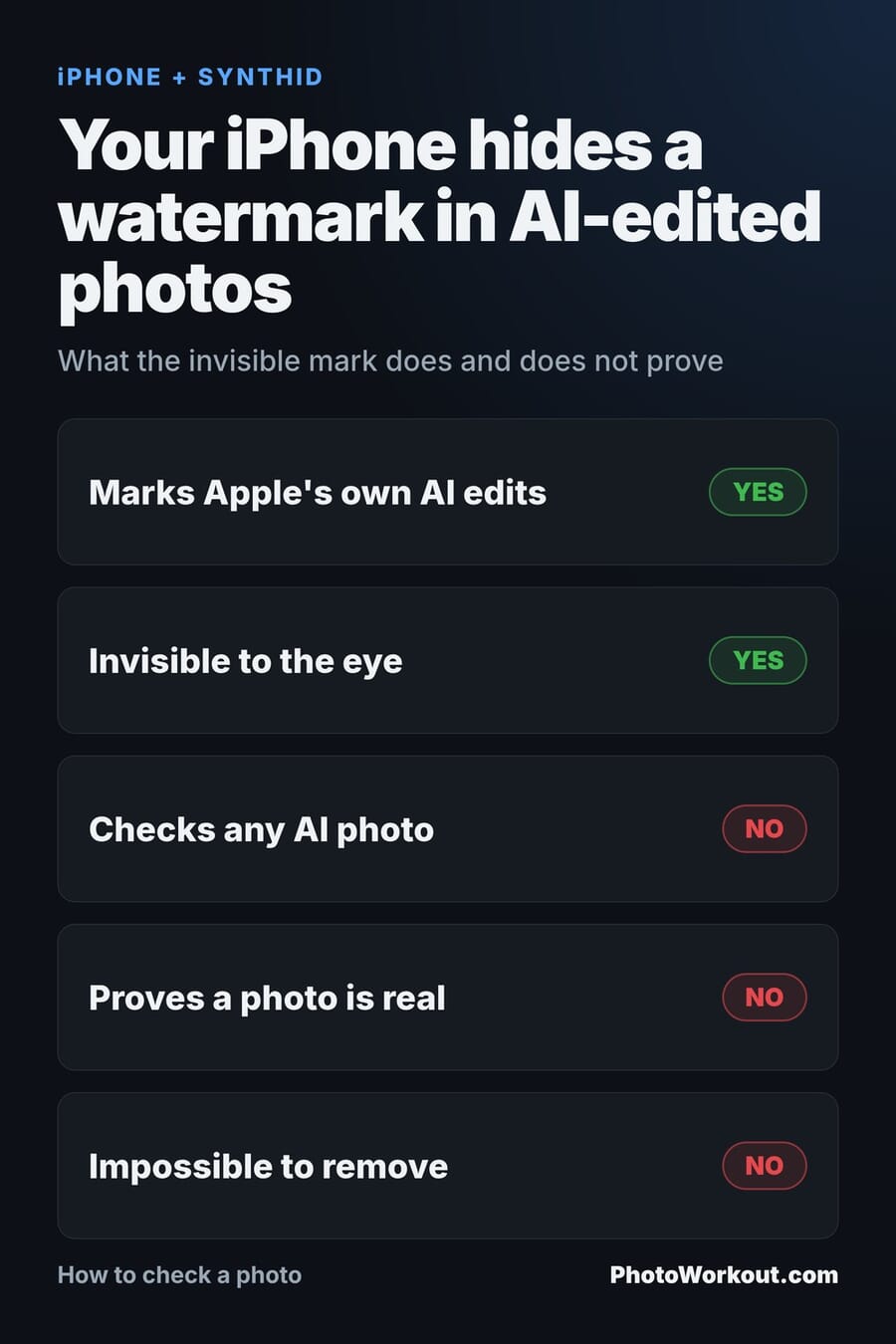
- A missing watermark does not prove a photo is real, and the mark is not unbreakable: Google calls it not foolproof, and researchers have shown removal attacks.
- Apple now runs two separate proof systems, SynthID for AI edits and Reference Image for real captures, and neither is the C2PA Content Credentials standard camera makers use.
If you have used Clean Up, Extend or Image Playground on an iPhone in the past month, the result almost certainly carries a hidden mark. Since iOS 27.2, Apple embeds an invisible watermark in images created or changed with its generative tools. The watermark is not Apple’s own. It is SynthID, the system Google DeepMind built for its own AI models and has since pushed as a cross-industry standard.
The change arrived quietly, as one line in a point update, and most iPhone owners will never notice it: nothing appears on screen, and the phone itself cannot read the mark. That makes it worth spelling out exactly what the iPhone is now stamping, how to check a photo for it, and where the limits are. It labels Apple’s own AI edits. It is not a detector for AI images in general, and it is not proof that an unmarked photo is real.
What changed in iOS 27.2
Apple released iOS 27.2 on October 26, 2026. Its release notes list the feature in a single line: “Support for SynthID watermarking to help identify whether an image was generated or modified with generative tools in Photos and Image Playground.” A separate Apple support page, published November 5, fills in the rest.
- Which tools: Clean Up, Extend and Spatial Reframing in Photos, plus Image Playground and Image Wand.
- Which devices: iOS 27.2, iPadOS 27.2, macOS 27.2 and visionOS 27.2.
- Older images: anything created or edited before the update has no watermark until it is edited again with one of the listed tools.
- What you see: nothing. Apple says the watermark is “imperceptible to people, and doesn’t change how the image looks.”
- Settings: Apple’s page describes the watermark as something the tools add. It does not describe a switch to turn it off.
Extend and Spatial Reframing are the generative edits Apple introduced at WWDC in June, covered in PhotoWorkout’s rundown of the new Photos AI tools. Apple said at the time that edited images would carry SynthID. iOS 27.2 is where that promise shipped.
What gets the watermark, and what it skips
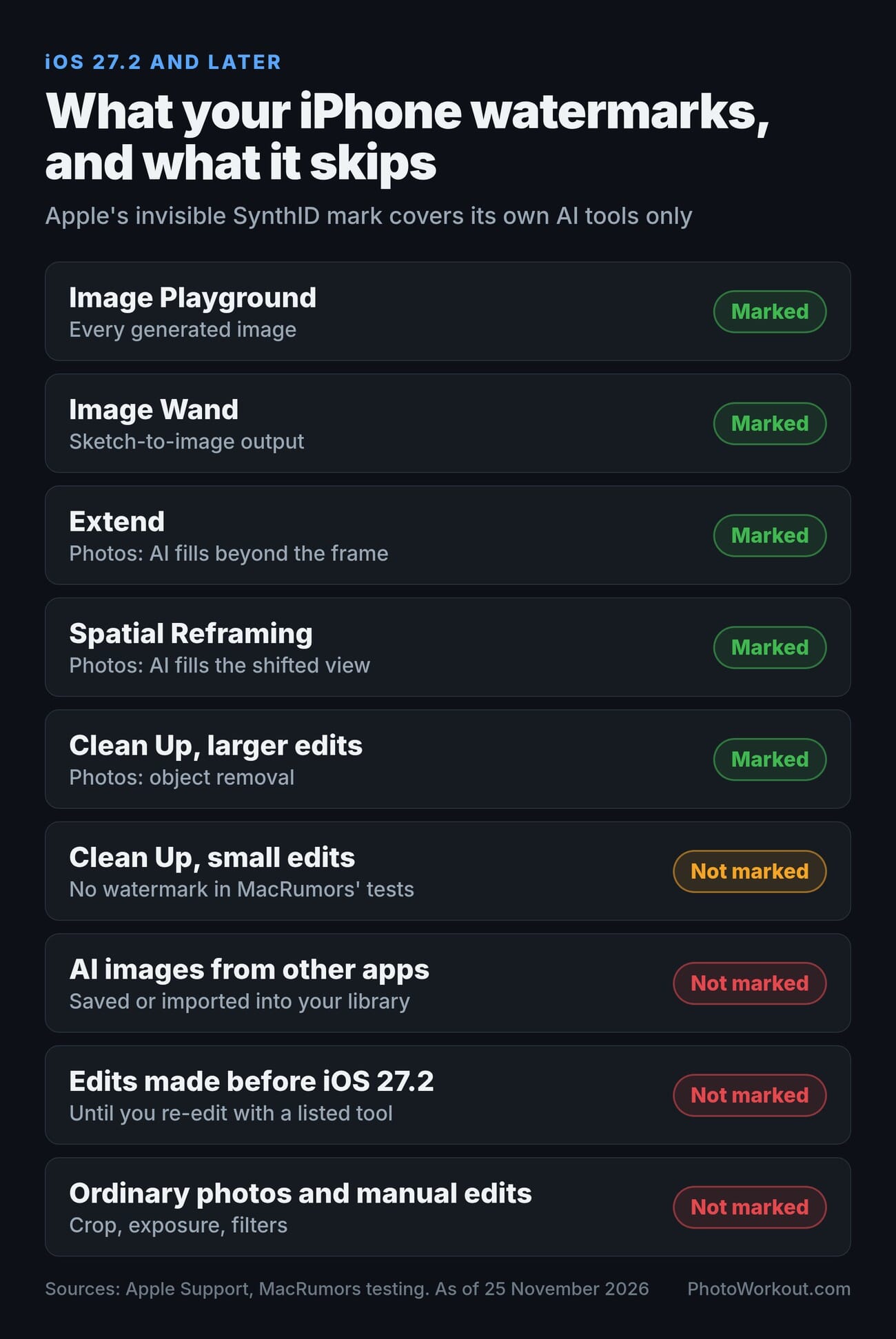
The scope is narrower than the headline feature suggests. MacRumors tested the tools after the update and found that every Image Playground image carried the watermark, as did photos changed with Extend and Reframe. Clean Up was different: “With small edits, no watermark was added. Larger Clean Up edits included a SynthID watermark.” Apple’s support page does not mention a size threshold, so treat that as one outlet’s testing, but it means a photo with a small object removed may carry no mark at all.
Three other gaps matter more for anyone judging a photo:
- Other apps are not covered. An image generated or edited in a third-party app and saved to Photos gets no watermark from Apple. It may carry one from its own maker, or none.
- Ordinary edits are not covered. Cropping, exposure, color and filters add nothing, which is the right call: those are not generative.
- No mark is not a verdict. The absence of SynthID says only that Apple’s listed tools did not make a large enough change. It says nothing about whether the scene is real.
How to check a photo for the watermark
The iPhone adds the mark but cannot read it. MacRumors put it plainly: “There is no option on the iPhone for detecting SynthID watermarks.” Apple’s instructions point to Google’s detector instead:
- Open synthid.com in a web browser.
- Upload the image you want to check.
- Follow the on-screen steps to see whether a SynthID watermark is found.
Google opened that detector to the public on October 7, 2026, and SynthID checks are also built into the Gemini app and Google Search tools such as Lens. PhotoWorkout has not yet run Apple-edited images through the detector, so the claim that it reads Apple’s marks rests on Apple’s own support page. One practical point: checking means uploading the photo to Google, which is worth knowing before testing private images.
Why an iPhone is using Google’s watermark
SynthID launched in August 2023 as Google DeepMind’s way of tagging output from its own image models. Instead of writing a label into the file’s metadata, where it can be stripped by a simple re-save, it hides a pattern in the pixels themselves. Google says the mark is designed to survive cropping, filters and lossy compression.
The bigger shift came in 2026, when Google began signing up other companies. At its I/O conference in May it named OpenAI, Kakao and ElevenLabs as adopters, with NVIDIA applying SynthID to video from its Cosmos models, and by October Google said more than 180 billion images and videos had been marked. PhotoWorkout covered the OpenAI half of that in OpenAI watermarks its fakes, Canon signs real photos. Apple joining means the two companies behind nearly every smartphone now label AI imagery from their own tools with the same watermark. That is the main reason this small release note matters: a single check at one detector covers a growing share of AI-made pictures.
What the watermark does not prove
- It is not an AI detector. SynthID finds SynthID. An AI image from a model that does not use it will come back clean. One-click verdicts fail in the other direction too, as in the case where a chatbot called an AI-generated snake photo authentic.
- It is not unbreakable. Google’s own launch post said SynthID “isn’t foolproof against extreme image manipulations.” In 2025, University of Waterloo researchers released a removal tool called UnMarker; one of them told The Register it cut SynthID detection from 100 percent to around 21 percent.
- It is not a signature. The mark says AI was involved. It does not say who edited the image, when, or what the original looked like.
- It does not travel with your intent. A photo with a stray cable removed and a fully generated picture both read as “contains SynthID.” The detector does not grade how much was changed.
None of that makes the watermark pointless. A label that survives re-saving and cropping better than metadata does, applied automatically at the source, is real progress. It is a signal to weigh, not a ruling.
Three proof systems that do not talk to each other
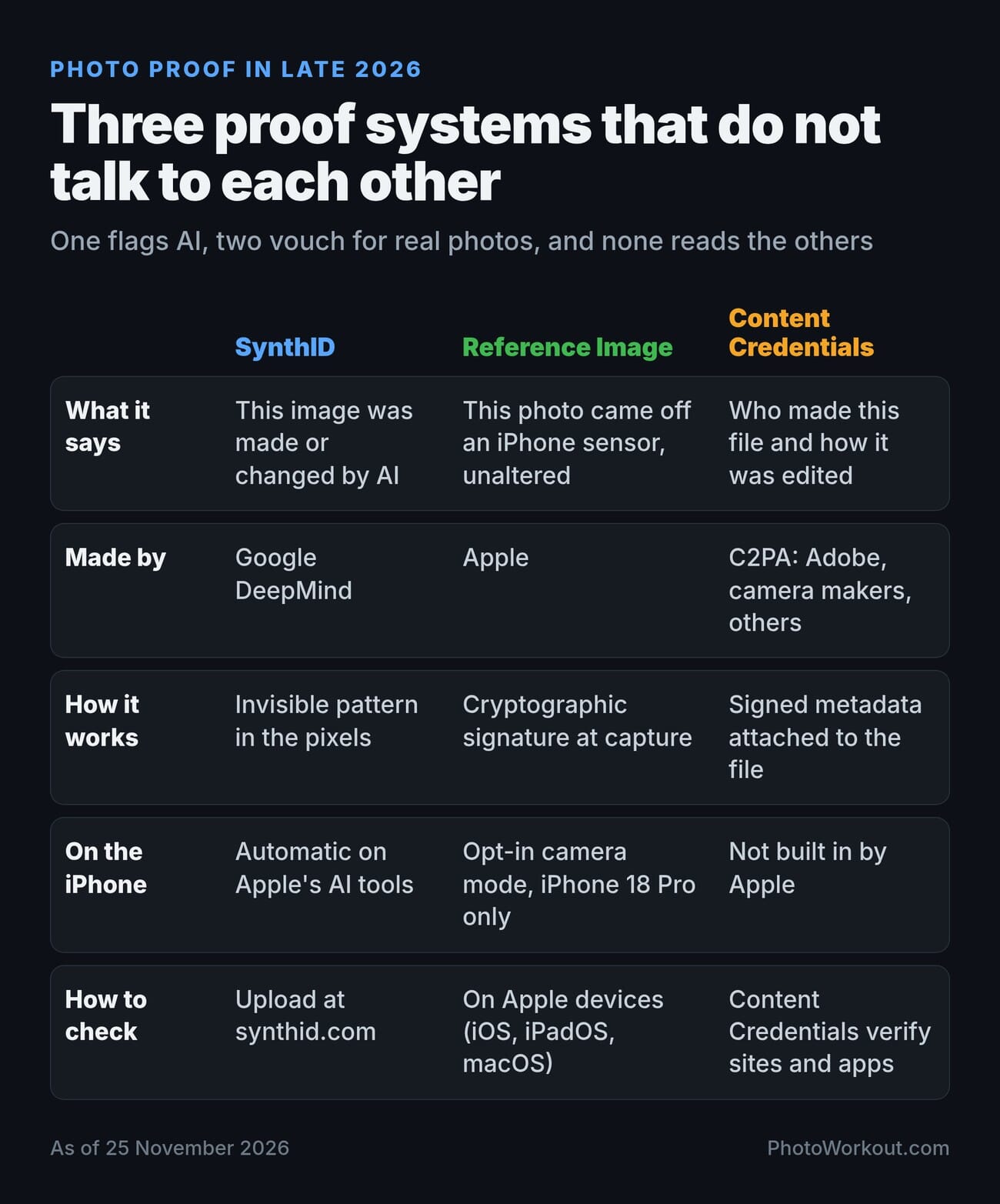
With iOS 27.2, Apple runs two separate authenticity systems, and neither is the one the camera industry settled on. For real photos there is Reference Image, the opt-in camera mode on the iPhone 18 Pro and Pro Max that cryptographically signs a capture from the main sensor, which PhotoWorkout first reported as the iPhone’s “this is real” button. For AI edits there is now SynthID.
The camera makers, Adobe and most newsrooms use a third system: C2PA Content Credentials, signed metadata that records who made a file and how it was edited. Apple’s SynthID page mentions neither C2PA nor Content Credentials, PetaPixel has described Apple as the one major exception among big tech companies that did not join the Content Authenticity Initiative, and its reporting on Reference Image notes the two systems cannot be used together directly. C2PA has its own problems, including a forged “verified” photo this autumn.
For a photographer, the result is fragmentation. Proving an image is AI-made, proving it is a real iPhone capture and proving it is a real camera capture now take three different checks on three different tools, and a clean result on one tells you nothing about the others.
The timing: this is not a post-McCormack turn
It is tempting to read the watermark against the news that Jon McCormack, Apple’s vice president of camera software and the executive who argued a photograph should be of something that actually happened, has reportedly retired. The dates do not support a cause-and-effect story. Apple committed to SynthID when it announced its generative Photos tools in June, and iOS 27.2 shipped on October 26, the same week McCormack is reported to have left. The watermark belongs to the approach he defended: narrow generative edits, labeled at the source. The open question from that report still stands, which is who holds that line on the next round of features.
What this means for your photos
- Assume your AI edits are labeled. If you use Extend, Reframe, a substantial Clean Up or Image Playground, anyone you send the file to can check it. Disclose up front where rules require it.
- Check contest and client rules before a generative fix. Many competitions and stock libraries bar generative edits. A watermarked file is now evidence one was made, and organizers do enforce those rules, as Nikon’s Small World disqualification showed.
- Do not treat a clean scan as clearance. Small Clean Up edits may carry no mark, and AI from other tools carries none of Apple’s.
- Keep your originals. An unedited original, or a Reference Image capture on a supported iPhone, is still the strongest proof that a scene was real.
One piece of calendar context: on December 2, 2026, the EU’s grace period ends for generative AI providers to mark their output in a machine-readable way, as explained in PhotoWorkout’s Article 50 guide. Apple has not tied the watermark to that deadline, but an invisible mark applied at creation is the kind of mechanism the rule asks for.
Frequently Asked Questions
Does the iPhone watermark every photo I take?
No. Only images created or changed with Apple’s listed generative tools get the SynthID watermark. Regular photos and standard edits such as cropping or exposure are not marked.
Can I see or remove the watermark?
It is invisible by design, and Apple’s support page describes no setting to turn it off. Google says SynthID is built to survive cropping, filters and compression, though it also says it is not foolproof.
How do I check whether a photo has a SynthID watermark?
Upload it at synthid.com, Google’s detector, which Apple’s support page recommends. The iPhone itself has no built-in way to read the mark.
Is SynthID the same as Content Credentials?
No. SynthID is a watermark hidden in the pixels that flags AI involvement. Content Credentials (C2PA) is signed metadata describing who made a file and how it was edited. Apple’s Reference Image is a third, separate system for proving an iPhone capture is real.
Does a photo without a watermark mean it is real?
No. It only means no SynthID mark was found. AI images from tools that do not use SynthID, small Clean Up edits and images with the mark removed can all come back clean.
Bottom line
Apple’s adoption of SynthID is a modest feature with a large footprint: every iPhone, iPad and Mac on the current software now labels its own generative edits with the same invisible watermark Google and OpenAI use. That is good for anyone trying to spot AI imagery at scale. It is less tidy for photographers, who now face three proof systems that do not read each other, and a watermark that proves AI was used but never that a photo is real. Know which of your edits carry it, check the rules before you submit, and keep the original.
Facts as of November 25, 2026.
Apple
- Apple Support: About iOS 27 Updates – iOS 27.2 release note on SynthID watermarking
- Apple Support: About SynthID watermarks in images created or edited with Apple Intelligence – Tools covered, platforms and how to check; published November 5, 2026
- 9to5Mac: Apple releases iOS 27.2 – Release date, October 26, 2026
- 9to5Mac: iOS 27.2 upgraded Apple Photos in two ways – Photos changes in iOS 27.2
- MacRumors: iPhone SynthID watermarks – Hands-on testing, including Clean Up behavior
- 9to5Mac: How the iPhone 18 Pro's Reference Image camera mode works – Reference Image details
- PetaPixel: Apple, content authenticity and the war to prove what's real – Apple's position outside C2PA
- PetaPixel: Apple's camera and photo software lead Jon McCormack has retired – Reported retirement and timing
SynthID
- Google DeepMind: SynthID – How the watermark works, partners and scale
- Google DeepMind: Identifying AI-generated images with SynthID – 2023 launch post and stated limits
- eWeek: Google's SynthID Detector goes public – Public detector launch, October 2026
- The Register: UnMarker tool nukes AI provenance tags – Watermark removal research
Image Sources
- Apple Newsroom: Image Playground on iPadOS 27 – Featured image, Apple press image
- Scope chart, comparison table and pin – Infographics by PhotoWorkout