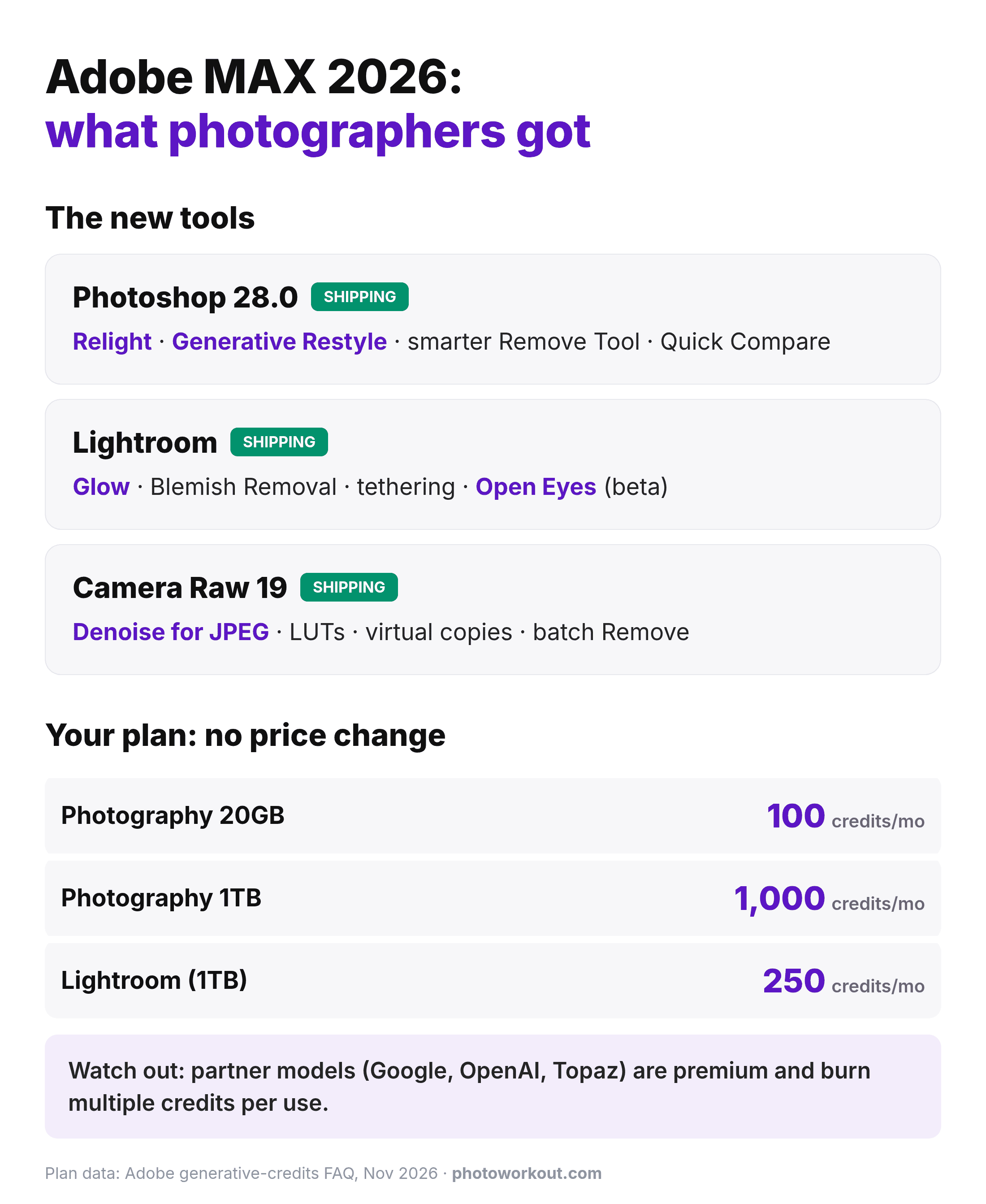

- Adobe MAX 2026 (Miami Beach, November 10) delivered the biggest photo-editing drop of the year: Relight and Generative Restyle in Photoshop 28.0, Glow, desktop Blemish Removal and tethered shooting in Lightroom, and a loaded Camera Raw 19, all inside existing Creative Cloud plans.
- No price changes were announced for the Photography plans, and generative credit caps stay where they were: 100/month on Photography 20GB, 1,000 on Photography 1TB, 250 on the Lightroom plan.
- The fine print to watch: partner AI models (Google, OpenAI, and now Topaz with Wonder 4 upscaling and Image HDR) run inside Creative Cloud as premium features that burn multiple credits per use.
- Some of the best new tools use no AI at all: Camera Raw 19 brings LUT support, virtual copies, burst stacking, and Denoise for JPEG and HEIF files; Photoshop’s beta Light Leak filter is proudly AI-free.
- The bigger shift: Adobe is rebuilding everything around AI agents, with a Creative Agent across its apps now and ChatGPT/Claude/Gemini working inside Photoshop in early 2027. Incoming CEO Anil Chakravarthy, who takes over December 1, fronted the push.
Adobe MAX 2026 wrapped in Miami Beach, and photographers came out of it with more than usual. The November 10 keynote delivered substantial updates across Photoshop, Lightroom, and Camera Raw: some AI showpieces, some long-requested basics, plus a strategic pivot toward AI agents that will shape what a Creative Cloud subscription means over the next few years.
Here’s what actually shipped and what’s in beta. And since the first question every subscriber asks is “what does this do to my plan,” here’s what it all means for Photography plan pricing and those generative credits.
Photoshop 28.0: Relight Is the Headliner
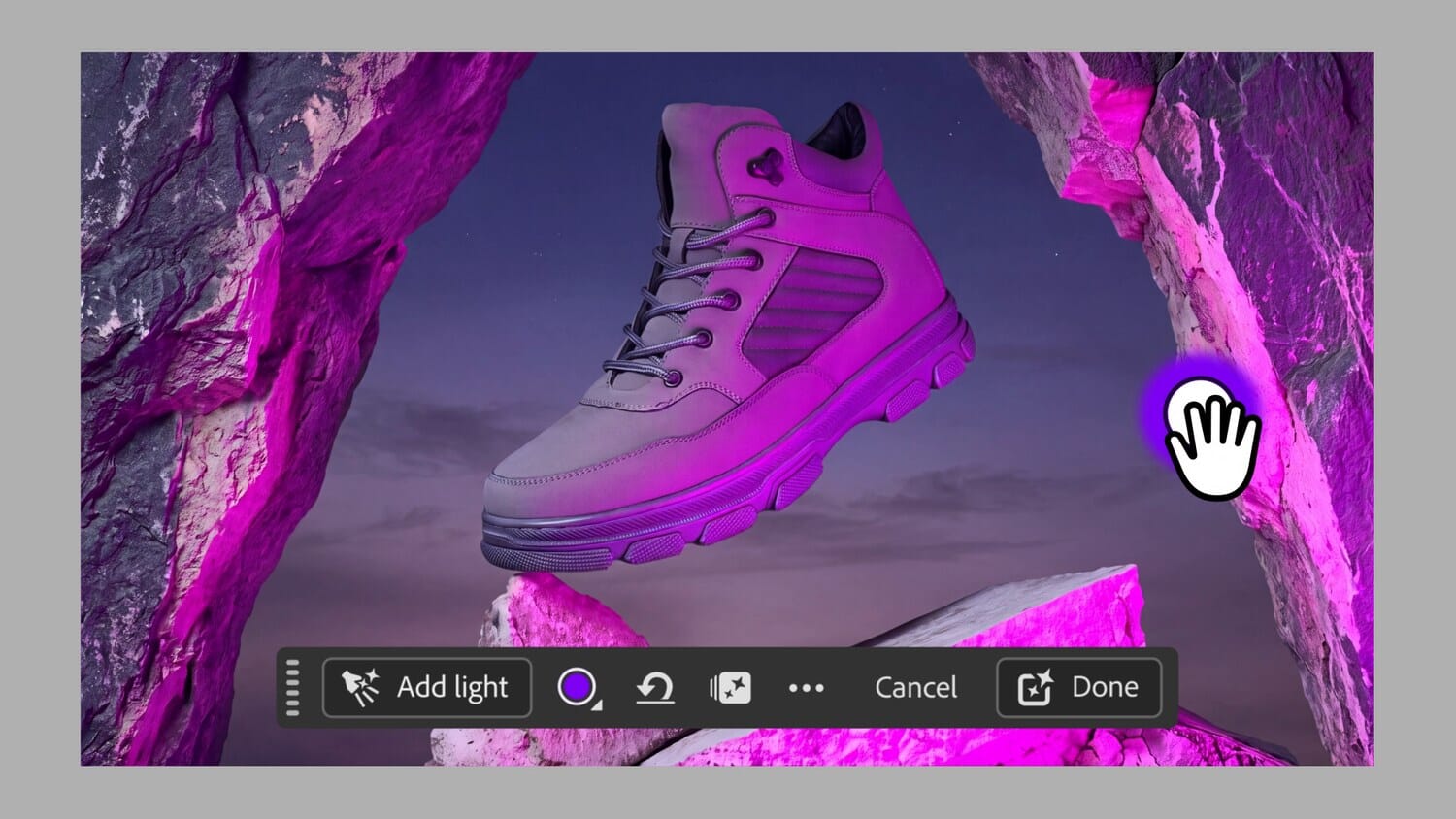
The marquee feature is Relight, which lets you add up to three new light sources to a finished photo and move them around the scene. Position, color, brightness, and diffusion are all adjustable, and Adobe says the generated light blends non-destructively with the existing exposure. Relighting tools have appeared in plugins before, but having it native in Photoshop, on adjustment-style controls rather than a one-shot filter, is the difference between a gimmick and a workflow tool.
Generative Restyle turns a text prompt into a new look applied as its own layer, with a slider controlling intensity: prompt-based editing, but kept inside Photoshop’s layer logic instead of replacing it. The Remove Tool gets a quietly important upgrade: it now detects “related elements,” so removing a person also catches their footprints, reflection, and shadow in one pass. A new Quick Compare finally makes before/after checks a one-click affair.
In the beta app, the AI Assisted Editor adds Camera Angles (explore new viewpoints of an image), Generative Recompose (refit a photo to a new aspect ratio while preserving composition), Convert to Text Layers (extract editable type from flattened images), and Remove Ambient Effect Only, which strips haze, flare, or reflections without touching objects. Photoshop also gets a darker UI refresh, an optional new performance engine in beta, and a Light Leak filter that Adobe’s Stephen Nielson pointedly noted uses no AI whatsoever.
Lightroom: Glow, Desktop Blemish Removal, and Real Tethering
Lightroom joins the halation craze with Glow, a soft cinematic-light effect with five styles including Bloom, Diffusion, and a retro film-style Halation, with fine-tuning controls rather than a single baked look. Blemish Removal graduates from mobile to desktop with controls Adobe pitches at professional retouching workflows: it distinguishes blemishes from permanent features like freckles.
The sleeper feature is tethered shooting coming to cloud-based Lightroom on desktop and iPad. Tethering was one of the last hard reasons studio shooters stayed on Lightroom Classic; this closes real ground. There’s also a fully customizable interface (color, contrast, element size, and a custom panel of your favorite edit controls, with presets for new, longtime, and power users), plus Assisted Culling, saveable Versions, and a wider white-balance range. Color Grading also works inside masks now, so shadows, midtones, and highlights can be tinted in just the selected area.
Open Eyes, arriving in public beta, replaces closed eyes using a reference photo of the same person that Lightroom finds automatically in your library. It is not generating eyes from scratch, which is exactly the right constraint for a portrait tool.
Lightroom Classic isn’t abandoned: Glow and Blemish Removal come to Classic too, version 16.0 adds import filtering by color label, file type, or lock status, plus the autofocus-point overlay from Camera Raw. Classic and cloud Lightroom both gain a vectorscope view, projection adjustment for wide-angle distortion, and Depth Range Masking that can now generate a depth map for photos that lack one.
Camera Raw 19: The Un-Flashy Update That Might Matter Most
Camera Raw 19 is the update working photographers may feel most. Denoise now works on JPEG, HEIF, PNG, and WebP files, not just Raw, and it’s available through the Camera Raw filter inside Photoshop. LUT support arrives for color grading, with up to three LUTs stackable with adjustable strength. The Glow tool gets a Camera Raw expansion of its own, adding Motion and Streak effects that stretch light directionally or mimic anamorphic flares, and the release adds support for new cameras and lenses. Virtual copies let you keep multiple edits of one photo without duplicating files, and automatic burst stacking groups rapid-fire sequences for recent Canon, Nikon, and DNG cameras.
Generative Remove gains a batch mode: mark an object across multiple photos and process them together, a real time-saver for event shooters cleaning a venue distraction out of a hundred frames. Notice how much of this list is not generative AI at all: LUTs, virtual copies, stacking, vectorscopes. As DPReview put it, Adobe’s best new photo features this year aren’t AI; they’re the workflow basics people have requested for years.
Hybrid shooters get movement too: Premiere’s new Color Mode is now generally available, joined by AI audio cleanup tools and a beta Generative Remove for video.
Your Plan: No Price Hike, Same Credits, One Catch
Now the money question. Adobe announced no changes to Photography plan pricing or generative credit allowances at MAX. Everything above ships inside existing subscriptions, and per Adobe’s own generative-credits documentation, the caps stand: 100 credits a month on the Creative Cloud Photography 20GB plan, 1,000 on Photography 1TB, 250 on the Lightroom plan, and 500 on single-app Photoshop. Standard generative features like Generative Fill still typically cost one credit per use.
The catch is where the credits now go. Firefly has become a hub for partner models: Google, OpenAI, ByteDance, Kling, ElevenLabs, and notably Topaz, whose Wonder 4 upscaling, denoise, and sharpening models plus Image HDR are now accessible inside Creative Cloud. Adobe classifies partner models as premium features: they consume multiple credits per use, with the exact burn depending on the model and output. A 20GB-plan subscriber playing with partner-model generations can empty a 100-credit month quickly. That’s the pressure point to watch, not the sticker price.
Worth noting for anyone comparing ecosystems: Topaz tools appearing inside Creative Cloud is a notable turn: the independent apps photographers bought specifically to escape subscriptions are now also metered features inside one.
The Bigger Shift: Agents Everywhere, New CEO Incoming
The keynote’s real theme wasn’t any single tool. It was agents. Adobe’s Creative Agent, in beta across Photoshop, Premiere, Illustrator, InDesign, and Frame.io, takes plain-language instructions and executes multi-step edits, including a Plan Mode that lays out what it intends to do before doing it. More striking: Adobe previewed local integrations that let ChatGPT, Claude, Gemini, and Copilot work directly inside Photoshop and Illustrator while preserving editable, layered files, with a private beta in early 2027.
The messenger mattered too. The keynote was fronted by Anil Chakravarthy, Adobe’s incoming CEO, who takes over from Shantanu Narayen on December 1 after Narayen’s 19-year run (he becomes executive chair). The leadership change lands amid investor anxiety about AI disruption, and MAX was effectively Chakravarthy’s answer: Adobe intends to be the place where all the AI models, its own and everyone else’s, get put to work. For photographers, that’s a double-edged pitch: more capability inside the apps you already pay for, and a subscription whose value increasingly gets metered in credits rather than features.

Frequently Asked Questions
Did Adobe raise Photography plan prices at MAX 2026?
No. No pricing changes were announced for the Photography plans, and generative credit allowances are unchanged: 100/month on the 20GB plan, 1,000/month on the 1TB plan, 250/month on the Lightroom plan. All the new Photoshop, Lightroom, and Camera Raw features ship within existing subscriptions.
Do the new features use generative credits?
The non-generative ones (LUTs, virtual copies, Glow, Quick Compare, tethering, Light Leak) don’t. Generative features (Generative Fill, Generative Remove and its new batch mode, Generative Restyle) draw on your monthly credits, with standard Firefly-powered generations typically costing one credit. Partner models from Google, OpenAI, and Topaz are premium features that consume multiple credits per use.
Is Lightroom Classic being phased out?
Not on this evidence. Classic 16.0 ships alongside this release with Glow, Blemish Removal, import filtering, and the autofocus-point overlay, and Adobe says more Classic and Camera Raw news is coming. But the direction of investment is clear: tethering arriving in cloud Lightroom removes one of Classic’s last exclusive advantages.
When can ChatGPT or Claude edit my photos inside Photoshop?
Adobe previewed local integrations that let external AI assistants work on Photoshop and Illustrator files while keeping layers editable. They enter private beta in early 2027, with no public release date yet.
The Bottom Line
This was a strong MAX for photographers: one genuine showpiece (Relight), one overdue migration (desktop Blemish Removal, cloud tethering), and a stack of unglamorous workflow wins in Camera Raw 19 that will outlast the demos. Your plan costs the same and the credits didn’t shrink. The thing to watch in 2027 is how hard the partner-model credit burn pulls subscribers toward higher tiers, and what an agent-first Adobe under new leadership decides a Photography plan is worth.
Sources for this article:
Primary Coverage
- DPReview — Adobe’s best new photo features aren’t AI after all – Camera Raw 19, Lightroom and Classic feature rundown
- PetaPixel — Photoshop Now Relights and Restyles Your Photos Using AI – Relight, Generative Restyle, AI Assisted Editor details
- Australian Photography — Adobe MAX 2026 Keynote: Highlights for Photographers – Feature availability status; Topaz Wonder 4 in Creative Cloud
- Variety — Adobe Is Adding AI Agent Features Across Its Product Lines – Creative Agent, partner models, keynote by incoming CEO
Adobe Documentation & Corporate
- Adobe — Generative credits FAQ – Credit allowances per plan; premium vs standard features; partner models
- Adobe — Anil Chakravarthy named President and CEO – CEO transition effective December 1, 2026; Narayen to executive chair
Image Sources
- Adobe — Photoshop Relight demonstration stills (featured image + in-body screenshot) – Frames from Adobe’s official MAX 2026 Relight demo
- Summary infographic — stylized PhotoWorkout graphic – Built from Adobe announcement and plan data
- Pinterest pin — stylized PhotoWorkout illustration – PhotoWorkout mascot illustration