


- The standard, everyday photo size is 4×6 inches (10×15 cm). It is the default at almost every lab, matches the 3:2 aspect ratio of most cameras with no cropping, and fits the cheapest frames and albums.
- Standard sizes (4×6, 5×7, 8×10, 11×14, 16×20) simplify everything. They fit off-the-shelf mats and frames, so stick to them unless your artistic vision demands otherwise.
- Aspect ratio decides cropping. A 3:2 camera image fits 4×6 and 8×12 perfectly, but needs cropping for 8×10 (5:4) or 5×7 (7:5). Crop before you order, not at the lab.
- Resolution sets your maximum size. Divide pixel dimensions by 300 to find the largest print at top quality (6000×4000 pixels = about 20×13 inches).
- Match the size to the subject and the space. Intimate portraits shine at 5×7 or 8×10; sweeping landscapes want 16×24 or larger, viewed from a few feet back.
When you buy through links on our site, we may earn a commission at no cost to you. We evaluate products independently. Commissions do not affect our evaluations.
What Is the Standard (Regular) Photo Size?
The short answer most people want first: the standard, regular photo size is 4×6 inches (about 10×15 cm). It is the default at nearly every photo lab, drugstore kiosk, and online printer, it matches the 3:2 aspect ratio of most cameras and phones so it prints with no cropping, and it fits the widest range of inexpensive frames and albums. When someone says a normal or regular photo print, they almost always mean 4×6.
Step up from there and the next everyday standards are 5×7 (a classic portrait and greeting-card size) and 8×10 (the go-to for a framed portrait on a desk or wall). Those three, 4×6, 5×7, and 8×10, cover the vast majority of prints people actually order. Everything below is the fuller picture: how the sizes relate, which ones fit your camera without cropping, and how large you can go.
What Are Photo Print Sizes?
Photo print sizes are standardized dimensions used across the printing industry. Measured in inches in the US and centimeters internationally, they keep prints, mats, and frames compatible and results consistent from one lab to the next. Sizes like 4×6, 5×7, and 8×10 have been industry standards for decades, originally set around traditional film formats, and today’s digital photographers inherit the same system.
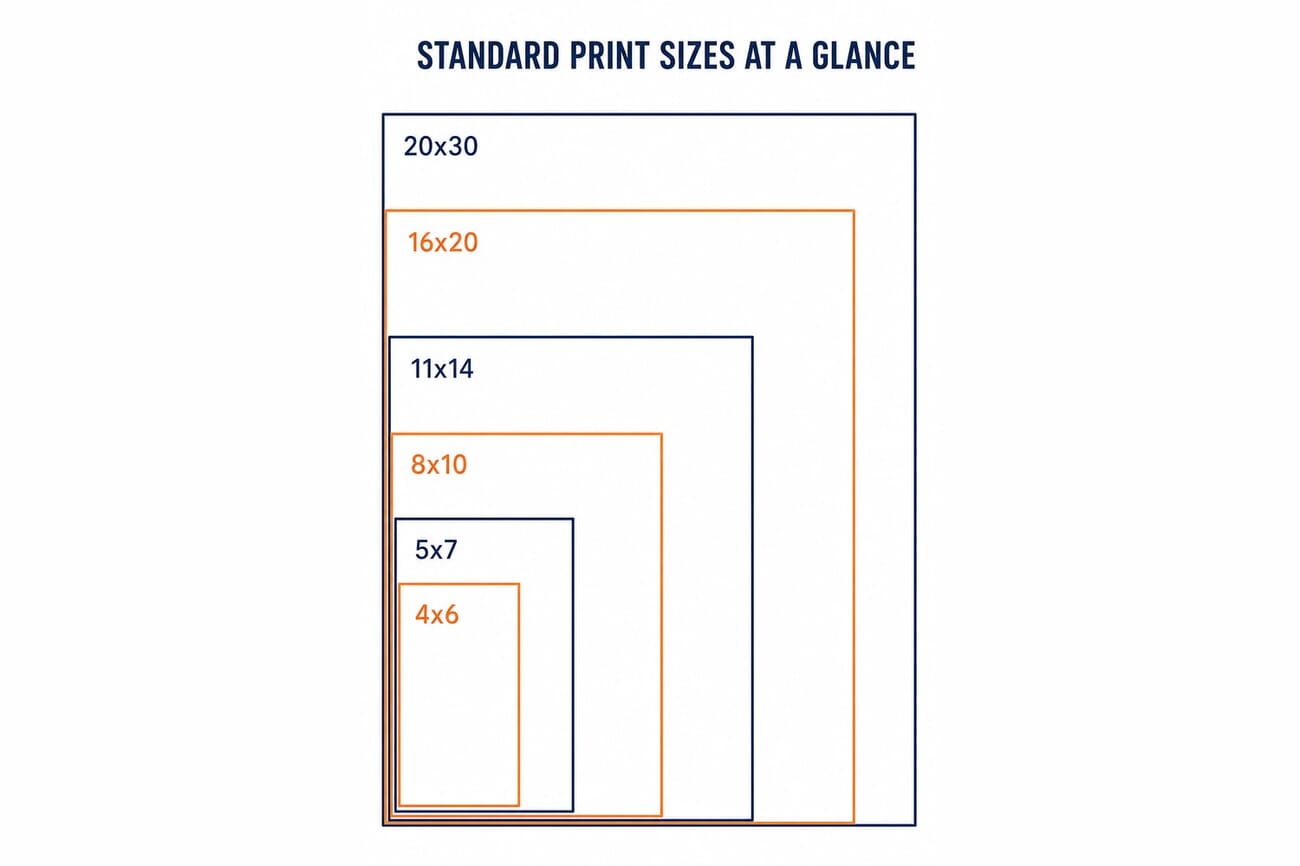
Print sizes are usually written with the shorter dimension first, so 8×10 means 8 inches on the short edge and 10 on the long edge. Orientation (landscape or portrait) just depends on how you rotate the image; the dimensions stay the same.
Why Print Sizes Matter
Choosing a standard size affects far more than how big the photo looks. Standard dimensions plug into the entire display ecosystem, and going off-menu gets expensive fast.
- Frame availability. An 8×10 print slides into thousands of off-the-shelf frames. An 8.5×11 print (a document size) has far fewer options and often needs custom work.
- Mat compatibility. Pre-cut mats are made for standard sizes. Non-standard dimensions require custom cutting, adding cost and time.
- Lab efficiency. Labs optimize paper stock and equipment for standard sizes, so custom dimensions usually cost more and take longer.
The practical upshot: compose with a standard print ratio in mind, or at least crop to a standard size before sending files to print.
Understanding Pixels, Inches, and Print Quality
A digital image is a grid of pixels. A 24-megapixel camera makes files around 6000×4000 pixels. Turning those pixels into inches comes down to one choice: print quality, measured in pixels per inch (PPI). The standard for a high-quality print is 300 PPI, the density at which individual pixels vanish at normal viewing distance.
- 6000 pixels divided by 300 PPI = 20 inches (long edge)
- 4000 pixels divided by 300 PPI = 13.3 inches (short edge)
So a standard 24MP file makes a beautiful 13×20 inch print at top quality. Smaller prints have even higher pixel density; larger ones mean accepting a lower PPI or using AI upscaling software. For the full breakdown of resolution and quality, see our companion print resolution guide.
Understanding Aspect Ratios
Aspect ratio is the proportional relationship between an image’s width and height, and it decides which print sizes fit without cropping. This is the single most common source of unexpected cropping at the lab.
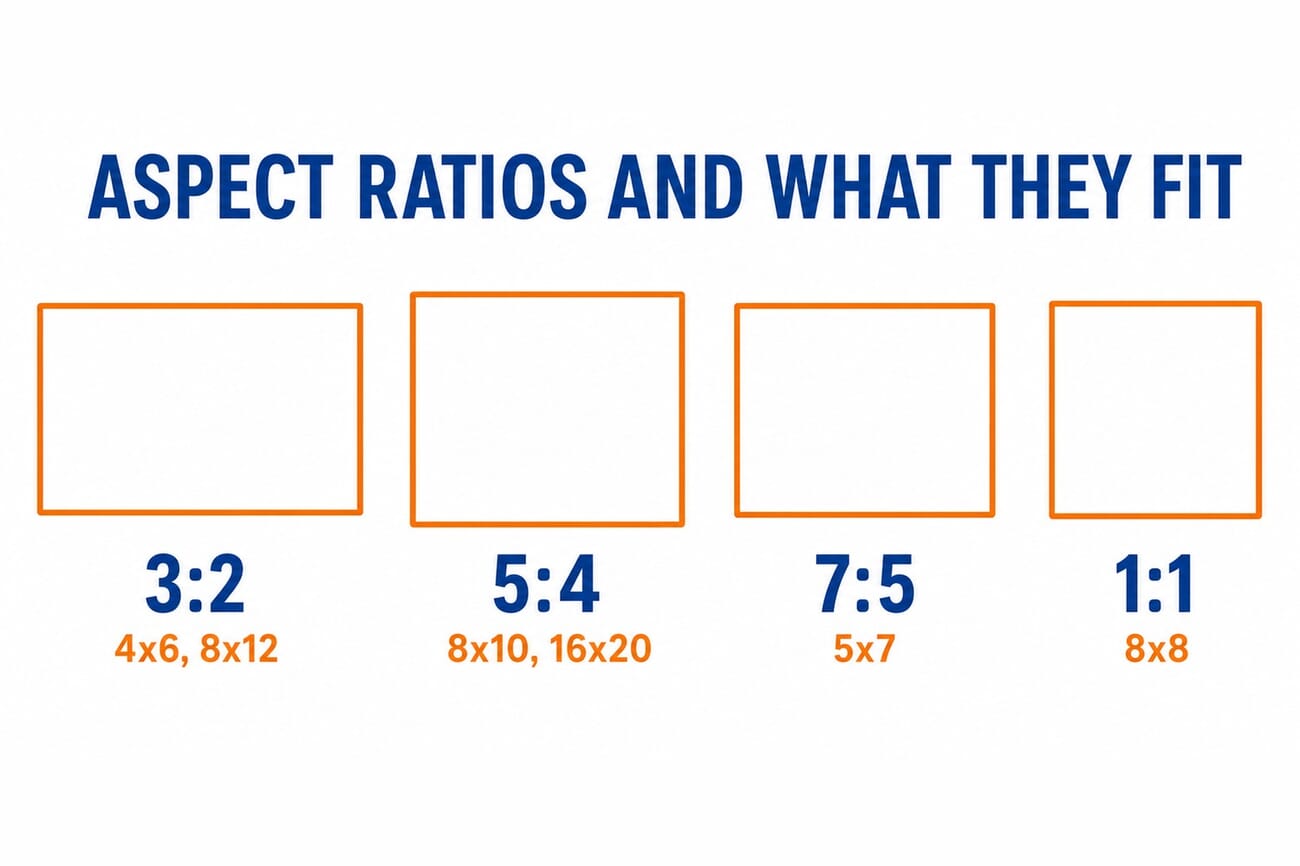
- 3:2 cameras (full-frame and APS-C) fit 4×6, 8×12, 12×18, and 20×30 with no cropping.
- 4:3 (Micro Four Thirds, most phones) sits between print ratios and usually needs a small crop.
- 5:4 prints (8×10, 16×20) crop about 17% off a 3:2 image.
- 7:5 prints (5×7) and 1:1 prints (8×8, 10×10) each need their own crop.
When camera and print ratios do not match, cropping is unavoidable. A 3:2 image printed at 8×10 loses roughly 17% of the frame, which is worth planning for when you compose a shot destined for a specific size.
How Big Can You Print Your Photos?
Maximum print size depends on two things: the pixel dimensions of your file and the lowest PPI you will accept. Here is what current cameras deliver at the standard 300 PPI.
| Camera Resolution | Pixel Dimensions | Max Print @ 300 PPI |
|---|---|---|
| 12 MP (older DSLRs, phones) | 4000 x 3000 | 13 x 10 inches |
| 24 MP (entry mirrorless) | 6000 x 4000 | 20 x 13 inches |
| 33 MP (Sony A7 IV) | 7008 x 4672 | 23 x 15 inches |
| 45 MP (Canon R5, Nikon Z8) | 8192 x 5464 | 27 x 18 inches |
| 48 MP (iPhone 17 Pro) | 8064 x 6048 | 27 x 20 inches |
| 61 MP (Sony A7R V) | 9504 x 6336 | 32 x 21 inches |
For prints larger than these, you either accept a lower PPI (usually fine for wall art viewed from a distance) or upscale first. Big prints are more forgiving than people expect, because you view them from farther away.
The Complete List of Standard Print Sizes
These sizes are offered by virtually every lab and have readily available frames and mats.
| Size (inches) | Approx. cm | Aspect Ratio | Common Uses |
|---|---|---|---|
| 4×6 | 10×15 | 3:2 | Snapshots, albums, gifts (the regular size) |
| 5×7 | 13×18 | 7:5 | Portraits, greeting cards |
| 8×8 | 20×20 | 1:1 | Instagram prints, modern displays |
| 8×10 | 20×25 | 5:4 | Portraits, desk frames, matted displays |
| 8×12 | 20×30 | 3:2 | Full-frame prints, photo books |
| 11×14 | 28×36 | ~5:4 | Wall displays, matted prints |
| 12×18 | 30×45 | 3:2 | Large wall prints, posters |
| 16×20 | 40×50 | 5:4 | Statement wall art, gallery displays |
| 16×24 | 40×60 | 3:2 | Large format, living-room displays |
| 20×30 | 50×75 | 3:2 | Major wall installations |
| 24×36 | 60×90 | 3:2 | Gallery prints, large canvases |
Should You Stick to Standard Sizes?
In most cases, yes. The practical advantages usually outweigh the freedom of custom dimensions.
- Cost. Standard sizes use pre-cut paper and automated processing, cutting lab costs meaningfully versus custom dimensions.
- Framing. Ready-made frames for 8×10 or 11×14 run roughly $15 to $40; custom framing for odd sizes often starts north of $100.
- Flexibility. Standard prints can be reframed, grouped, or swapped out easily down the line.
The exception is when your artistic vision genuinely needs a specific ratio, a sweeping panorama or a tall vertical, in which case custom printing is worth it. Just budget for custom framing too. For big pieces, our guides to the best canvas printing services and best online printing services cover where to order.
Choosing the Right Print Size
The best size depends on the image, the wall, and how close people stand.
- Intimate subjects (portraits, details, macro): 5×7 or 8×10 suit close viewing and keep the subject personal.
- Sweeping scenes (landscapes, cityscapes): 16×24 or 20×30 capture the scale that small prints flatten.
- Gallery walls: anchor with one large print (16×20 or bigger) and surround it with smaller complementary images.
- Gifts: 4×6 and 5×7 stay universally easy, they fit any frame, ship cheaply, and sit on any shelf.
Frequently Asked Questions
What is the regular or standard photo size?
The regular, standard photo size is 4×6 inches (about 10×15 cm). It is the default everyday print, matches most cameras’ 3:2 ratio with no cropping, and fits the cheapest frames and albums. The next standard steps up are 5×7 and 8×10.
What are the most common photo print sizes?
The most common are 4×6, 5×7, 8×10, and 11×14 inches. These fit standard frames and mats, making them economical to print and display. Larger standard sizes include 16×20, 16×24, 20×30, and 24×36 inches.
What is the most popular print size?
4×6 inches is the most commonly ordered size, thanks to its low cost and album compatibility. For framed wall displays, 8×10 is the most popular; for statement pieces, 16×20 and 24×36 are common.
Do I need to print in a standard size?
For framed displays, effectively yes, standard sizes dramatically simplify framing and cut costs. For unframed prints, canvas wraps, or metal prints, custom sizes are more practical since they do not need mats or frames.
How do I crop photos for a specific print size?
Set your crop tool to the target aspect ratio (for example 5:4 for an 8×10) in Lightroom, Photoshop, or your editor, adjust the composition inside the crop frame, then export. This stops the lab from auto-cropping and cutting something important.
The Bottom Line
Print sizes stop being confusing once you hold two ideas together: 4×6 is the regular standard, and aspect ratio decides what fits without cropping. Match your camera’s ratio to a print size in the same ratio, check your resolution against the size you want, and pick dimensions that suit both the subject and the space. When in doubt, crop to a standard ratio in your editor before uploading, so the final print matches what you actually shot.
Featured image and all diagrams: stylized illustrations created by PhotoWorkout.
Further Reading
- PhotoWorkout – Print Resolution Guide – How PPI and pixel dimensions set your maximum print size.
- PhotoWorkout – Best Online Printing Services – Where to order standard and custom prints.
Image Sources
- Standard-sizes chart, aspect-ratio diagram, featured image, and pin, created by PhotoWorkout – Editorial illustrations.