- Google’s Personal Intelligence, powered by the Gemini app and its Nano Banana 2 image model, can now generate AI pictures built from the photos in your own Google Photos library.
- It went live for paid US users on April 16, 2026 and became free for all US users on June 29. It is opt-in and off by default, connecting Photos, Gmail, YouTube and Search.
- The consent gap: the faces it can draw on include family and friends, kids included, who never personally agreed to be raw material for AI image generation.
- The tell is geographic. Google disabled it by default in the EU, the UK and Japan under stricter privacy law, a choice US users never got.
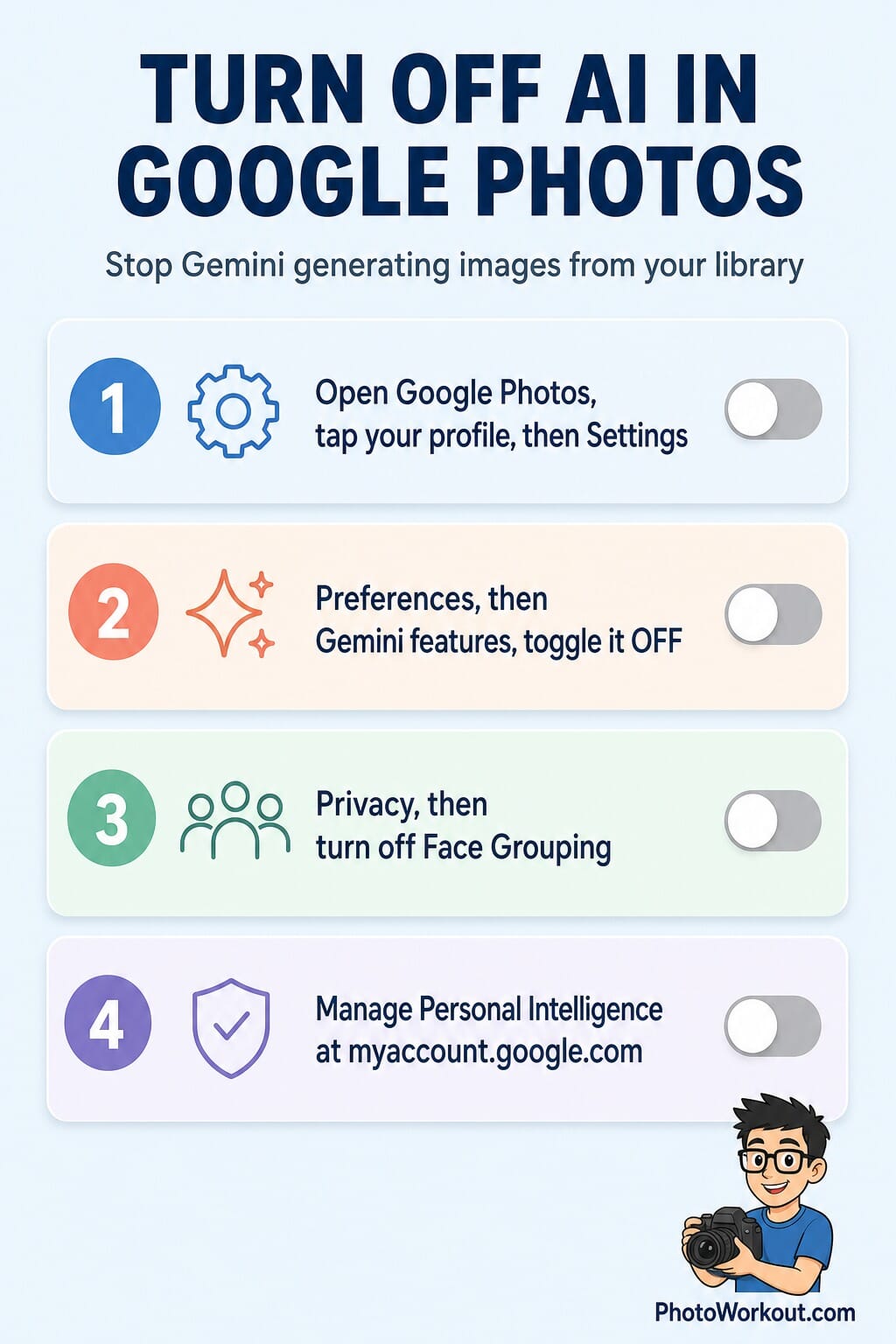
- You can limit it: turn off Gemini features in Photos, disable Face Grouping, and manage Personal Intelligence in your Google Account. Full steps below.
Google has quietly turned your photo library into raw material for AI. Its Personal Intelligence system, running through the Gemini app, can now reach into your Google Photos, read the faces and scenes it finds there, and generate brand-new AI images personalized to you and the people you photograph.
For a company that also sells the tools to detect fake images, it is an awkward move. And it lands squarely on a question photographers and parents keep asking in 2026: who actually consented to this?
The short version is that you might have, by opting in, but the other people in your library did not. Here is what the feature does, why Europe was handled differently, and exactly how to switch it off.
What Google’s Personal Intelligence actually does
Personal Intelligence is Google’s name for connecting the Gemini assistant to your own Google data: Photos, Gmail, YouTube and Search. Once connected, Gemini can answer questions and, more notably, create images that are “personalized to you.” The image side runs on Nano Banana 2, the latest version of Google’s Nano Banana image model.
The rollout has been fast. Google added Nano Banana-powered image generation to Personal Intelligence for paid subscribers on April 16, 2026, and on June 29 it made the personalized image generation free for all US users. That free expansion is what pushed the feature from a niche add-on into something millions of accounts can now use.
In practice, it means you can ask Gemini for an image and it will pull on what it knows about you from your library, no detailed prompt required. The convenience is real. So is the catch.
The consent gap: the faces in your library are not only yours
Here is the part that has photographers uneasy. A personal photo library is not a collection of one consenting adult. It is full of other people: partners, friends, and above all children, all of them labeled and grouped by Google’s face-recognition system so they can be found and, now, drawn upon.
The account holder can opt in to Personal Intelligence. A four-year-old cannot. Neither can the friend who was simply in the frame at a birthday party. When the system uses that face graph as source material for AI generation, it is using images of people who never agreed to become raw material, and in most cases were never asked.
The backlash is already visible. On the r/GooglePixel forum, a widely upvoted post titled “Google Photos keeps showing me AI photos of my kids, I never consented to that” drew hundreds of comments from parents describing the same unease. It is the emotional core of the story, and it is exactly the kind of authenticity-and-consent problem we have tracked in the wider fight over what counts as a real photo.
Why the EU, the UK and Japan got a choice
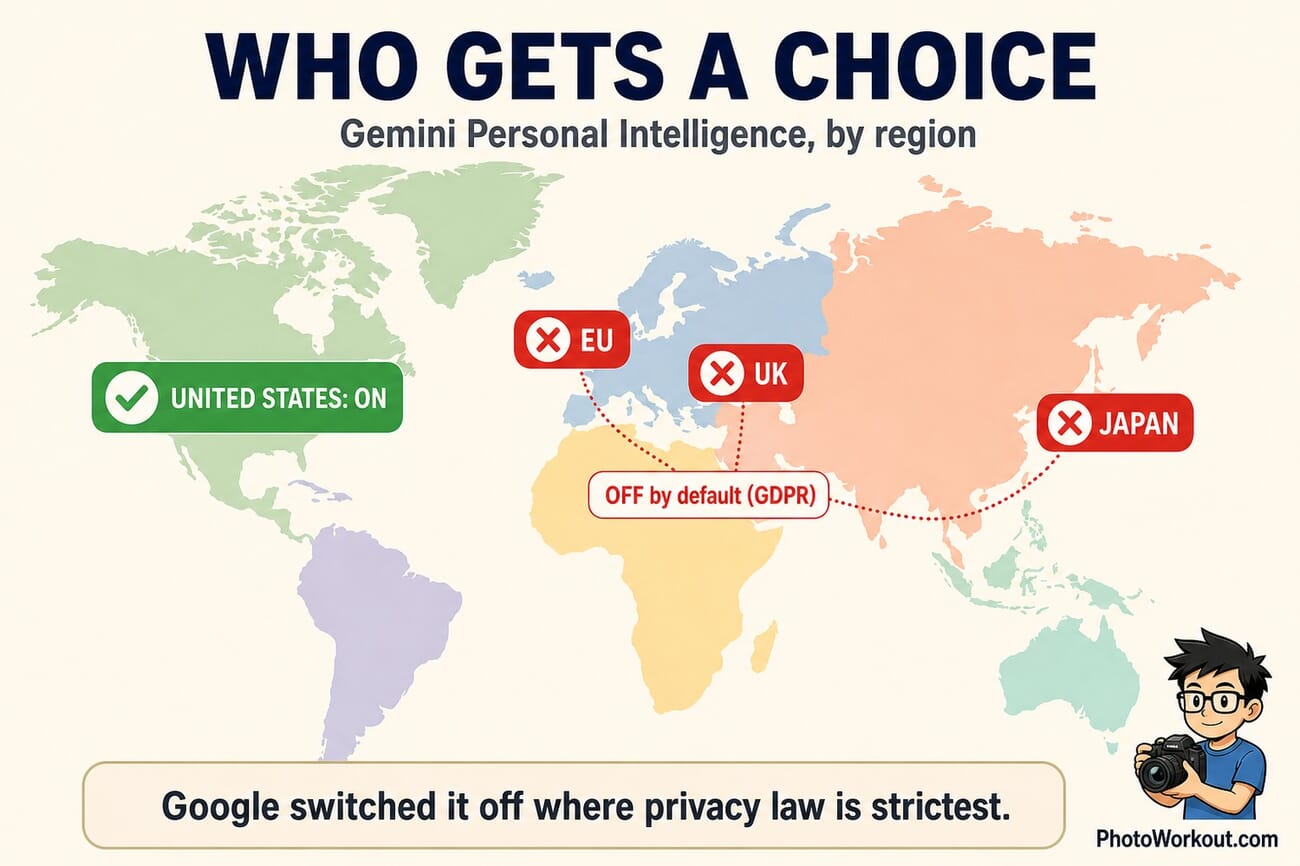
The most revealing detail is not what Google built, but where it chose not to switch it on. In the European Union, the United Kingdom and Japan, Personal Intelligence is disabled by default, held back by the stricter consent and data-protection rules those regions enforce, GDPR chief among them.
That geographic split is a tell. When a company voluntarily turns a feature off in the markets with the toughest privacy law, it is effectively admitting the feature carries consent risk. US users, with far weaker federal privacy protection, were handed the on switch instead. The choice European users got by default is one Americans have to make for themselves, if they even know the setting exists.
How to turn it off in Google Photos
You cannot strip every trace of Gemini out of Google Photos, but you can shut down the parts that feed AI generation from your library. It takes about two minutes.
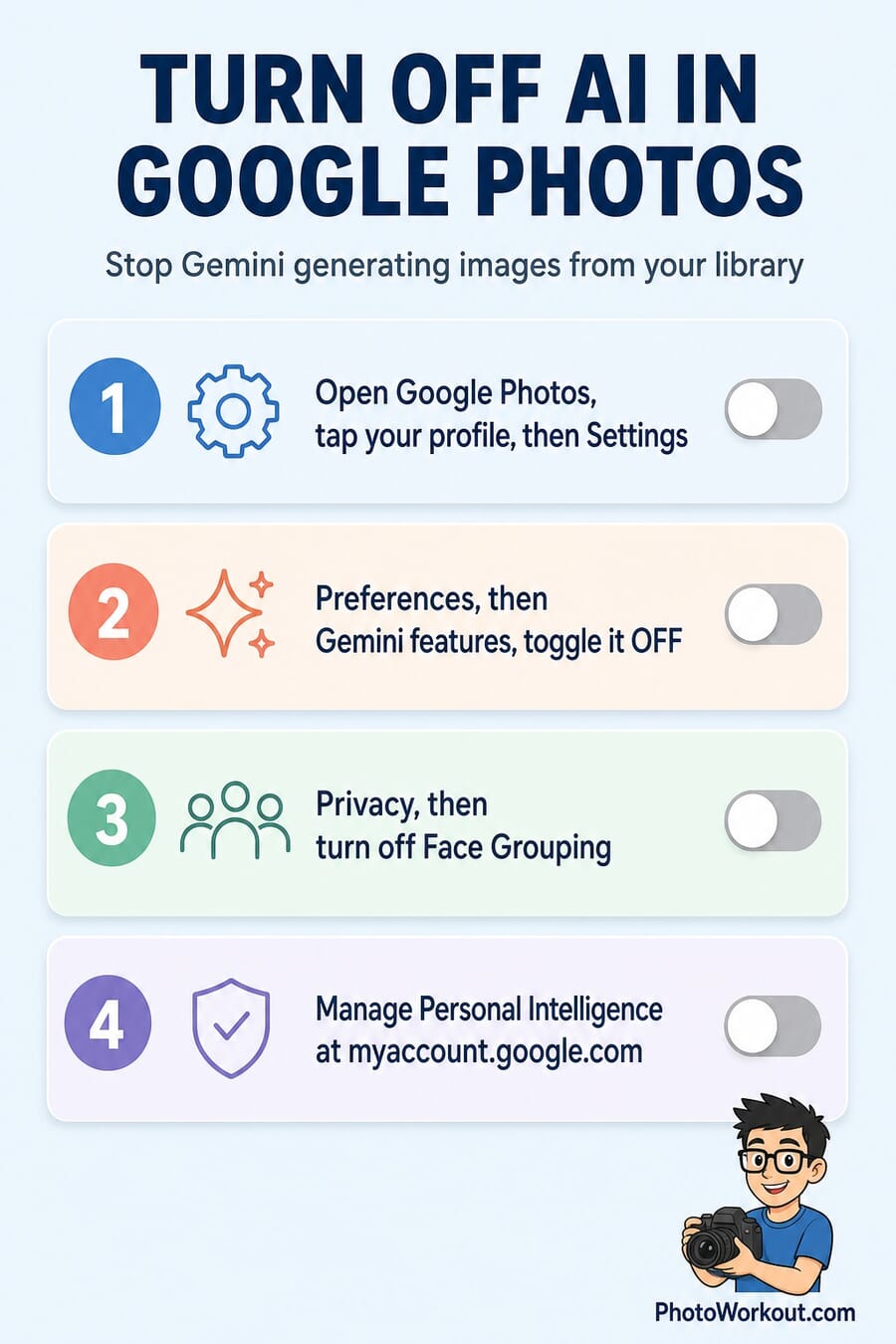
- Open Google Photos, tap your profile picture, and go to Settings. This is the hub for everything below.
- Open Preferences, find Gemini features, and toggle them off. This stops Photos from using Gemini on your library.
- Under Privacy, turn off Face Grouping. This dismantles the labeled face graph that AI generation draws on, so your kids and friends stop being sorted into recognizable sets.
- Manage Personal Intelligence in your Google Account. Go to myaccount.google.com, open Data & privacy, and switch off the Personal Intelligence connection so Gemini stops linking Photos, Gmail, YouTube and Search.
One honest caveat: Google does not currently offer a single master switch that removes all Gemini functionality from Photos. The steps above cut off the generation-from-your-library pathway, which is the one that matters here, but expect some Gemini tools to remain in the app.
What it means for photographers and parents
For working photographers, this is another reason to be deliberate about where client and family images live. A gallery synced to Google Photos is now, by default in the US, a potential training-adjacent source for on-device AI generation, and that is worth a line in a client conversation about how their photos are stored and used.
For parents, the practical move is simpler: turn Face Grouping off and keep it off. It is the single setting that most directly stops a child’s labeled face from being pulled into AI features, and it costs you nothing but the convenience of automatic people albums. Given the alternative, that is a trade most parents will happily make.
Want the steps on one card? Save this and pull it up when you are in the settings menu.
Frequently Asked Questions
Is Google really making AI images of my kids?
Not out of nowhere, but the risk is real. Personal Intelligence is opt-in, so an account holder has to enable it. Once it is on, the AI can draw on the labeled faces in your library, which include children who never consented. Users on r/GooglePixel have reported seeing AI images of their kids in Photos, which is why turning off Face Grouping and Gemini features is the safe move.
Is Personal Intelligence on by default?
It is off by default and opt-in in the US, but Google has been steadily surfacing and promoting it, and made the image generation free for all US users on June 29, 2026. In the EU, the UK and Japan it is disabled by default under stricter privacy law.
How do I stop Google Photos using my library for AI?
Turn off Gemini features under Photos Settings and Preferences, turn off Face Grouping under Privacy, and switch off the Personal Intelligence connection in your Google Account at myaccount.google.com. That closes the main pathway, though some Gemini tools stay in the app.
Does this use my photos to train Google’s AI models?
Google says Personal Intelligence personalizes outputs to you rather than training its public models on your private library. The concern here is narrower and more immediate: it generates new imagery from your own photos and the identifiable people in them, without those people’s consent.
Is the feature available outside the US?
Not by default. The EU, the UK and Japan have it switched off out of the box because of GDPR and comparable privacy rules, which is the clearest sign of the consent questions it raises.
The bottom line
Personal Intelligence is a genuinely clever feature wrapped around a genuinely unresolved question. Google built a system that turns your photo library into a source for AI imagery, then quietly withheld it from the regions with the strongest consent laws.
If you are in the US, the setting is on the table and the choice is yours to make. Take two minutes, turn off Gemini features and Face Grouping, and decide for your own family what Europe had decided for it by default.
Primary Coverage
- TechCrunch, Google adds Nano Banana image generation to Personal Intelligence (Apr 16, 2026) – The launch of image generation from your library for paid users.
- TechCrunch, Gemini personalized AI image generation now free for US users (Jun 29, 2026) – The free US expansion, and the note that it is off by default.
- Ars Technica, Gemini can now create personalized AI images from Google Photos – How the feature pulls from your library, and the privacy questions.
- Mashable, Nano Banana can now make AI images based on your Photos library – Hands-on overview of the Nano Banana 2 image behavior.
- Google, Personal Intelligence and Nano Banana US expansion (official blog) – Google’s own announcement of the expansion.
Turning it off
- ZDNet, You can turn off Gemini in Gmail, Photos, Chrome and more – Step-by-step opt-out guidance across Google apps.
Image Sources
- Featured concept, regional map and opt-out guide, stylized PhotoWorkout illustrations – Original PhotoWorkout graphics.