


- Excire Foto 2027 (launched June 2026) is the best all-around AI photo organizer for most working photographers — a standalone Mac and Windows app with a one-time license ($249 / €229, no subscription), now adding text-in-photo search (OCR) and a Map View to its AI search, face recognition, and duplicate detection. PhotoWorkout readers get 15% off with code PHOTOWORKOUT.
- ON1 Photo Keyword AI (now part of ON1 Photo RAW 2026) is the right pick for Lightroom Classic and Capture One users who want AI keywording without changing their cataloging app.
- Mylio Photos wins for cross-device sync — same catalog on Mac, Windows, iPhone, and iPad with face recognition and no mandatory cloud upload.
- Immich is the free self-hosted Google Photos replacement. Install it on a Raspberry Pi or home server and get face recognition, smart search, and mobile apps without paying a cloud provider.
- Ente offers the same convenience as Google Photos with end-to-end encryption — the privacy-first choice for photographers who do not want a tech company scanning their images.
- Peakto is the new Mac-native contender — it unifies libraries across Apple Photos, Lightroom Classic, Capture One, and folders into a single AI-searchable catalog without migrating any files.
- Google Photos remains the default free option for casual users. Limited AI, strong search, one-click backup.
- Eden Photos and PhotoPrism round out the niche picks — Eden for Mac users who want something simpler and cheaper than Mylio, PhotoPrism for teams and businesses that need multi-user self-hosting.
- Luminar Neo is the honorable mention — it has cataloging features but leads with editing, so it makes sense only for photographers who want one tool to edit and loosely organize.
AI photo organizers solve a problem every photographer runs into at scale: a hard drive full of images with no keywords, no face tags, and no reliable way to find the one photo from a 2019 client shoot three years later. Manual organization does not scale. A good AI organizer analyzes every image once, extracts subjects, faces, locations, and visual content, and makes the whole library instantly searchable with natural-language queries.
This guide compares nine AI photo organizers in 2026 — desktop apps, cloud services, self-hosted servers, and Mac-native unifiers. Each pick is matched to a specific photographer profile. Start with the comparison chart below, then jump to the app that fits the setup.
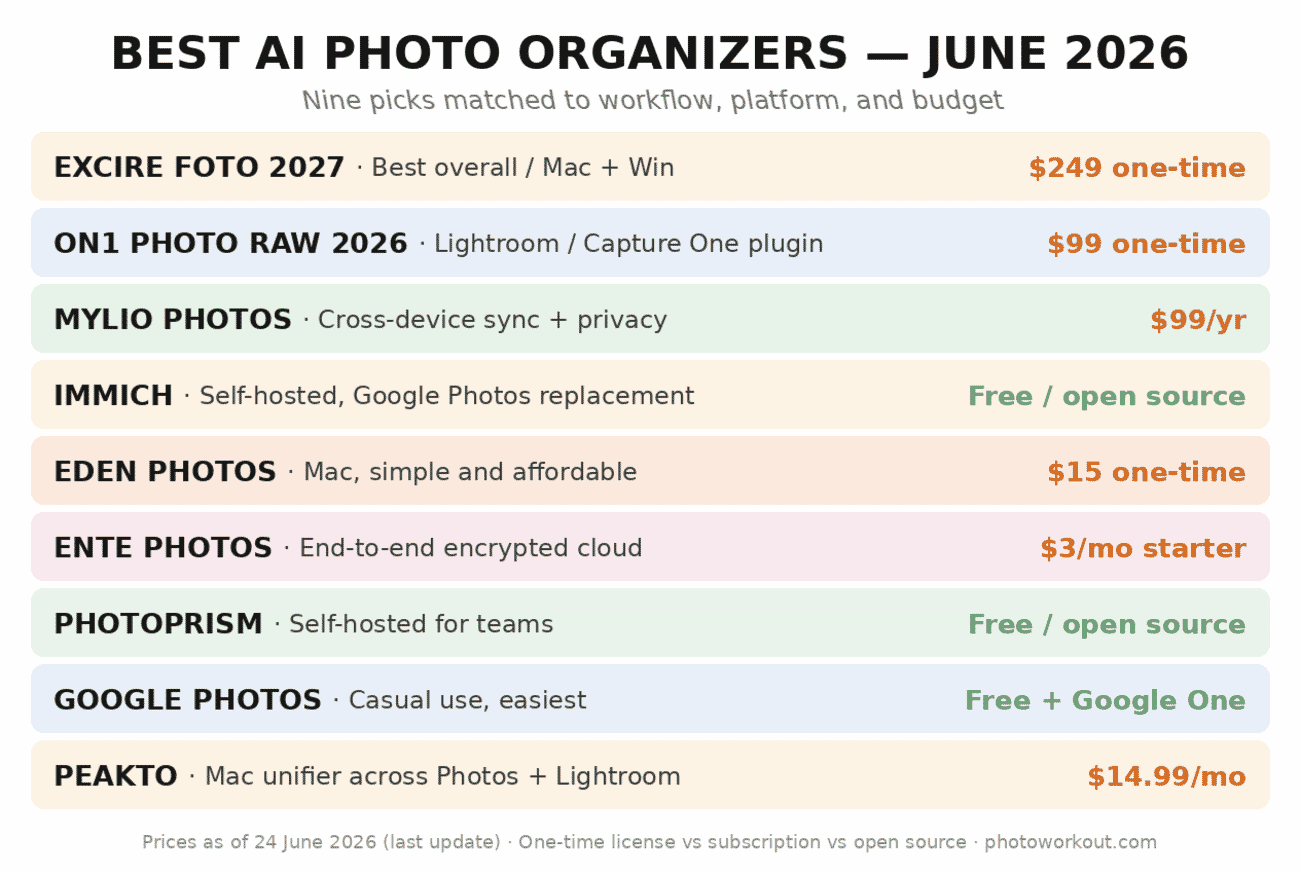
The timing matters this summer. With Amazon Prime Day and the seasonal software sales landing in late June, it is the best window of the year to buy a perpetual-license organizer like Excire, ON1, or Eden — a one-time purchase you keep forever, frequently discounted right now, rather than a subscription that bills every month. The category’s biggest 2026 update also just shipped: Excire Foto 2027 launched in June with text-in-photo search and a new Map View, which is why it holds our top spot. (Mac users weighing a dedicated app can also see our guide to the best photo organizing software for Mac.)
When you buy through links on our site, we may earn a commission at no cost to you. We evaluate products independently. Commissions do not affect our evaluations.
How to Choose the Right AI Photo Organizer
Three questions settle the choice for most photographers:
- Where do the photos already live? Lightroom Classic catalog → ON1 Photo Keyword AI plugin. Apple Photos library → Eden Photos or Peakto. Cloud-only → Ente or Google Photos. Self-hosted NAS → Immich or PhotoPrism. Standalone catalog needed → Excire Foto.
- One-time payment or subscription? Excire Foto, ON1 Photo RAW, and Eden Photos offer perpetual licenses. Mylio, Peakto, and Ente run on annual or monthly subscriptions. Immich and PhotoPrism are free and open-source.
- How strict is the privacy requirement? Sensitive commercial work or personal archives where cloud upload is off the table: self-hosted (Immich, PhotoPrism) or end-to-end encrypted cloud (Ente). Everything else: any of the desktop apps.
1. Excire Foto 2027
Excire Foto 2027 is the most capable standalone AI photo organizer on Mac and Windows, and the June 2026 release is a real step up rather than a version-number bump. It keeps everything that made Excire the top pick — offline AI keywording, natural-language search, face recognition, RAW support, and a one-time license with no subscription — and adds three genuinely useful tools: intelligent text recognition, a Map View, and Smart Filters.
Exclusive Coupon: 15% Off Excire Foto 2027
Use code PHOTOWORKOUT at checkout for 15% off. One-time purchase, no subscription.
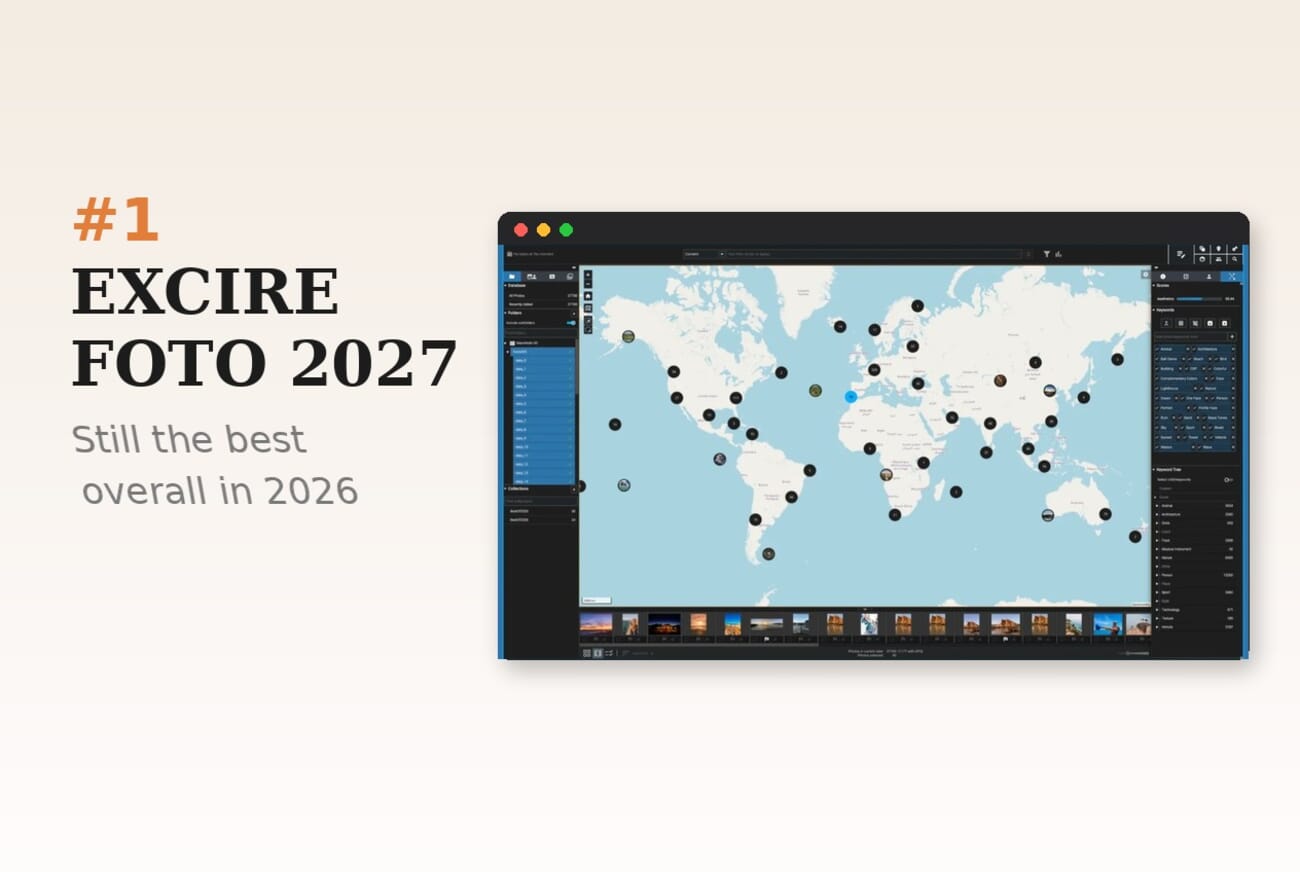
What’s new in Excire Foto 2027
- Intelligent text recognition (OCR): Excire now detects and indexes text inside your photos — street signs, storefronts, posters, documents, business cards — so you can search for words that appear in an image, not just its subjects or metadata. Matches are highlighted right in the preview.
- Map View: browse and filter the whole library by location — a fast way to pull every shot from a city or a trip.
- Smart Filters and faster culling: refined filtering and selection tools to cut a big shoot down to keepers more quickly.
What sets Excire apart in 2026 is the combination: it runs locally, uses a one-time license, reads RAW files directly without conversion, and now searches by keyword, color, face, visual similarity, in-image text, and metadata in parallel. Video support means the same catalog indexes MP4, MOV, and ProRes alongside RAW stills — increasingly useful for hybrid shooters.
Excire also integrates with Lightroom Classic via the separate Excire Search 2026 plugin. The standalone Foto app and the Lightroom plugin share the same AI engine but maintain separate catalogs. For photographers who already live in Lightroom, Excire Search is often the better entry point; the standalone app is the right pick for photographers without an existing catalog.
Pricing
Excire Foto 2027 is a one-time license — regular price $249 / €229 (Mac + Windows), with a launch promotion running around $219 / €199 right now, and still no subscription. Existing owners upgrade at a discount: about $79 from Foto 2025 or $99 from Foto 2024. PhotoWorkout readers also get 15% off with code PHOTOWORKOUT, and a free trial is available. The Excire Search Lightroom plugin and a bundled Foto + Search license are offered at a discount.
For a deeper look, see the PhotoWorkout Excire Foto review.
1. Excire Foto 2027
Excire Foto 2027 is the most capable standalone AI photo organizer on Mac and Windows. The 2025 version added video support, improved smart culling, and a better duplicate finder to the existing strengths — AI keywording, natural-language search, and face recognition that works entirely offline.
Exclusive Coupon: 15% Off Excire Foto 2027
Use code PHOTOWORKOUT at checkout for 15% off. One-time purchase, no subscription.
What sets Excire apart in 2026 is the combination: it runs locally, uses a one-time license, reads RAW files directly without conversion, and searches by keyword, color, face, visual similarity, and metadata in parallel. The new video support means the same catalog now indexes MP4, MOV, and ProRes alongside RAW stills — increasingly useful for hybrid shooters.
Excire also integrates with Lightroom Classic via the separate Excire Search 2026 plugin. The standalone Foto app and the Lightroom plugin share the same AI engine but maintain separate catalogs. For photographers who already live in Lightroom, Excire Search 2026 is often the better entry point; the standalone app is the right pick for photographers without an existing catalog.
Pricing
Excire Foto 2027: one-time license, around €149 (Mac + Windows). Excire Search 2026 Lightroom Classic plugin: similar pricing. A bundled Foto + Search license offers a discount. A free trial is available for both.
For a deeper look, see the PhotoWorkout Excire Foto review.
2. ON1 Photo Keyword AI (in ON1 Photo RAW 2026)
ON1 Photo Keyword AI is the budget pick for photographers already invested in Lightroom Classic or Capture One. It automatically writes AI-generated keywords into each image’s metadata — not into a proprietary catalog — so the keywords travel with the file and appear in Lightroom, Capture One, Bridge, Apple Photos, or any other app that reads XMP.

In 2026, ON1’s keyword AI is now bundled into the larger ON1 Photo RAW 2026 package, alongside Super Select AI for masking, Resize AI for upscaling, and NoNoise AI. A standalone Photo Keyword AI license is still available for photographers who only need the organizing function.
Pricing
ON1 Photo Keyword AI: one-time license around $99. ON1 Photo RAW 2026 (full suite including Keyword AI): around $99-$169 depending on edition. Both are Mac and Windows compatible and include a 30-day free trial.
3. Mylio Photos
Mylio Photos solves a problem none of the desktop-only apps solve: the same photo catalog on every device. Mac, Windows, iPhone, iPad, and Android all see the same library with the same keywords, face tags, and album structure — synced either through Mylio’s cloud or peer-to-peer across devices on the same network.

The AI feature set covers face recognition, smart search, automatic album creation (by event, location, and date), and duplicate detection. Cloud sync is optional — photographers who prefer the self-hosted model can sync peer-to-peer with no files ever leaving the device network.
Mylio is the natural pick for photographers who shoot on multiple devices (a DSLR for work, an iPhone for family, a drone for hobby) and want one catalog that reaches all of them.
Pricing
Mylio Photos+ (the AI-featured tier): around $99 per year for up to 5 devices. A free tier is available with reduced features and device limits.
4. Immich
Immich is the self-hosted Google Photos replacement and the most popular free AI photo organizer in 2026. Install it on a NAS, home server, or Raspberry Pi; point the iPhone or Android Immich app at it; get automatic backup, face recognition, smart search, and the full Google Photos interface — with zero subscription fees and total data ownership.

The Immich project has matured significantly through 2025 and 2026 — release 1.100+ ships with reliable face recognition, CLIP-based semantic search (“photos of a red car”), automatic backup with duplicate detection, shared albums, and an active community that ships weekly updates.
Requirements
Immich runs in Docker. Minimum spec for smooth face recognition: 8GB RAM, a reasonably modern CPU, and enough storage to hold the library plus ~15% overhead. A Synology DS423+ or a mini-PC running Linux is the typical deployment. Installation takes about an hour for anyone familiar with Docker, longer for beginners — but the Immich documentation is excellent.
5. Eden Photos
Eden Photos is the Mac-only pick for photographers who want something simpler and cheaper than Mylio. The app sits alongside Apple Photos, scans the library, and adds AI keywords, face tags, and visual search — without taking over or migrating any files. Runs entirely on-device.

Eden is not as powerful as Excire or Mylio, but the one-time price and the zero-setup install make it the right pick for Mac users who want AI organization without committing to a new cataloging app. The user interface borrows heavily from Apple Photos, so the learning curve is close to none.
Pricing
Eden Photos: one-time license around $15 on the Mac App Store. Free trial available.
6. Ente Photos
Ente Photos is end-to-end encrypted cloud photo storage with AI search built on top. Files are encrypted on the device before upload; Ente’s servers cannot read them; the AI tagging happens locally on the device and only the encrypted index is synced. The result is Google Photos convenience with a privacy model Google cannot offer.
For photographers with sensitive commercial work, legal clients, or simply a preference against big-tech image scanning, Ente is the straightforward choice. The mobile apps (iOS and Android), desktop app (Mac, Windows, Linux), and web app are all polished, fast, and support up to 5TB. Face recognition and semantic search work as well as any commercial alternative.

Pricing
Ente: free tier up to 10GB. Paid plans start around $3/month for 100GB, $12/month for 2TB. Annual billing cuts around 20% off monthly prices.
7. PhotoPrism
PhotoPrism is the other major self-hosted option alongside Immich. PhotoPrism differs by leading with multi-user support and a more traditional cataloging interface — closer to Adobe Lightroom in feel than to Google Photos. For photography teams, studios, and small businesses that want multiple users to access the same library with different permissions, PhotoPrism is the clear pick.

Pricing
PhotoPrism is free and open-source under the AGPL license. A paid “Essentials” or “Plus” edition adds features like advanced face recognition and priority support — typically $5-$10 per month — but the free edition is fully functional and handles most use cases.
8. Google Photos
Google Photos is the casual user’s default — free up to 15GB, seamless iPhone and Android backup, and search that has quietly become the best in the consumer space. Type “birthday cake” or “Grand Canyon” and the right photos appear instantly. Face grouping works without setup. Albums generate themselves.

The limitations matter for professional workflows: no RAW support beyond basic preview, no catalog structure for client work, no export of face tags or keywords, and a privacy model where Google scans every uploaded image. For casual snapshots and phone photography, it is the default pick. For professional photography, it is complement — not primary — storage.
Pricing
Free up to 15GB (shared across Gmail and Drive). Google One paid plans: 100GB for around $2/month, 2TB for around $10/month. Annual billing cuts 15-20% off monthly prices.
9. Peakto
Peakto (by Cyme) is the Mac-native unifier: a single AI-searchable catalog that spans Apple Photos, Lightroom Classic, Capture One, Luminar, DxO PhotoLab, and plain folders — without migrating any files. The source apps keep ownership of the originals; Peakto indexes thumbnails, metadata, and AI-generated tags on top.
This solves a real problem for photographers with fragmented libraries: a Lightroom catalog for client work, Apple Photos for family, and a Capture One catalog for personal — all invisible to each other. Peakto treats the whole mess as a single searchable pool. Natural-language search (“mountain, foggy, 2023”) returns results from every indexed library at once.
Peakto is Mac-only and subscription-priced. For photographers who only use one cataloging app, it is overkill; the native AI inside Excire or Mylio will serve better. For photographers whose libraries are scattered across three or more apps, Peakto is the only tool on this list that connects them.

Pricing
Peakto: approximately $14.99/month or $149/year. 7-day free trial. Mac only (macOS 12+).
Honorable Mention: Luminar Neo
Luminar Neo is primarily an AI photo editor, but the app includes catalog, search, and face tagging features that qualify it as a light-duty organizer. The organizing is not as deep as Excire or Mylio; the editing features (Sky AI, Relight AI, Structure AI, generative tools) are the main draw.
Luminar Neo is the right pick for photographers who want one tool to edit and loosely organize a small library — not for photographers managing 50,000+ images where dedicated organization matters. The 2026 Luminar Neo update added GenExpand and improved Relight AI; catalog features stayed roughly unchanged from 2025.
Frequently Asked Questions
What is an AI photo organizer?
An AI photo organizer is software that uses machine learning to analyze each image and extract keywords, faces, locations, and visual content — then indexes the results so the entire library can be searched with natural-language queries. It replaces the manual work of tagging and keywording that used to take hundreds of hours on a mature photography archive.
Does AI photo organization work offline?
Yes, for several of the apps on this list. Excire Foto, ON1 Photo Keyword AI, Mylio Photos, Eden Photos, Peakto, Immich, and PhotoPrism all run their AI models locally — no cloud upload or internet connection required after installation. Google Photos, Ente, and cloud-only services require an internet connection for indexing.
Will an AI photo organizer work with Lightroom Classic?
Yes. ON1 Photo Keyword AI writes standard XMP metadata that Lightroom reads natively. Excire Search 2026 is a direct Lightroom Classic plugin. Mylio can sync with Lightroom folders. Peakto indexes Lightroom catalogs without touching the original files. Lightroom’s own native AI search (since 2023) is useful but more limited than any dedicated organizer.
Is it worth organizing photos with AI if the library is under 10,000 photos?
For small libraries, the benefit is marginal — manual album creation and keyword tagging are manageable up to a few thousand images. The value scales with library size. At 50,000+ images, AI organization is the only realistic way to find anything; at 10,000-50,000, it is a strong convenience; below 10,000, it is a nice-to-have.
Can an AI photo organizer find duplicates?
Yes — duplicate detection is a standard feature across Excire Foto, Mylio, Immich, and PhotoPrism. The detection uses visual similarity rather than file hashes, so near-duplicates (same scene, different crop or compression) are caught. For a dedicated duplicate workflow without the rest of the organizer, Excire Foto’s duplicate finder is among the strongest.
Is Google Photos AI enough for a professional photographer?
No. Google Photos handles consumer photography well but misses on professional essentials: no proper RAW support, no catalog structure, no export of AI-generated keywords to other apps, no multi-user permissions, and a privacy model that conflicts with many commercial contracts. Use it for phone backup; use a dedicated organizer for working archives.
What is the best AI photo organizer for Mac?
Excire Foto 2027 for serious photographers who want a dedicated catalog. Peakto for photographers with photos scattered across Apple Photos, Lightroom, and Capture One. Eden Photos for casual Mac users who want something simple on top of Apple Photos.
Manage Photos with an AI Photo Organizer
The right AI photo organizer depends on three things: where the photos live now, whether a subscription is acceptable, and how strict the privacy requirement is. For most photographers who want a desktop catalog, Excire Foto 2027 is the safest all-around pick. For Lightroom Classic loyalists, ON1 Photo Keyword AI. For cross-device sync, Mylio Photos. For self-hosted privacy, Immich. For fragmented Mac libraries, Peakto.
Every app on this list offers a free trial — the recommended approach is to pick two candidates based on the three questions above, run both for a week against a real photo library, and commit to the one that handles the hardest searches fastest.
Disclosure: This article contains affiliate links to Excire, ON1, Mylio, and Skylum. PhotoWorkout may earn a commission from purchases made through these links at no extra cost to the reader. This does not influence which products are recommended.
All app information verified on April 24, 2026. Pricing is in USD unless noted and may vary by region.
App homepages and official documentation
- Excire — Foto and Search product pages – Official Excire website with current Foto 2027 and Search 2026 specs, features, and pricing.
- ON1 Photo RAW 2026 with Keyword AI – ON1's Photo RAW 2026 product page — includes Keyword AI as one of the AI-driven modules.
- Mylio Photos – Mylio Photos official page — cross-device sync, AI keywording, privacy-first architecture.
- Immich — self-hosted photo and video management – Official Immich site with installation docs, features, and the active GitHub project.
- Eden Photos — Mac App Store page – Eden Photos developer site with current feature list and Mac App Store link.
- Ente — end-to-end encrypted photo storage – Ente official site with E2EE architecture explanation and pricing tiers.
- PhotoPrism — self-hosted photo management – PhotoPrism official site with deployment guides and feature comparison across free and paid editions.
- Google Photos – Google Photos product page and Google One storage pricing.
- Peakto by Cyme — Mac App Store page – Peakto on the Mac App Store with current pricing and compatibility list.
- Skylum Luminar Neo – Luminar Neo product page — primarily an AI editor with cataloging as a secondary feature.
Third-party reviews and context
- Cyme — Best photo organizer software for Mac – Comparison of Mac photo organizers from the Peakto development team — useful for Mac-specific workflow context.
- PetaPixel — Peakto is a universal photo organizer that syncs across Mac apps – PetaPixel coverage of the Peakto unified-library concept — useful background on the Mac fragmented-library problem.
Image Sources
- Comparison chart & per-app editorial mockups — PhotoWorkout – Original stylized PhotoWorkout illustrations (laptop/app mockups for each pick).
- Vertical pin graphic — PhotoWorkout – Original PhotoWorkout illustration.
This article contains affiliate links to Excire, ON1, Mylio, and Skylum. PhotoWorkout may earn a commission from purchases made through these links at no extra cost to the reader.




Comments are closed.