


- DxO PhotoLab 10, released in early September 2026, adds the Lightroom-grade AI masking that its rivals have had for years: AI Depth Masks, per-person masking, and per-feature face masking down to eyes, teeth, hair and lips.
- It stays true to DxO’s model: a one-time perpetual licence, no subscription. It is $249.99 for new users and $129.99 to upgrade from version 8 or 9, with a full 30-day trial that needs no payment details.
- The timing is pointed. It lands as Adobe piles on subscription price, forced AI features, and app-stability complaints, making PhotoLab 10 a credible pay-once exit that no longer trails on AI selection tools.
- It is near-parity, not total parity. There is still no Lightroom preset import, noise reduction is unchanged, and the new dust removal is not actually AI. But the biggest gap, AI masking, is now closed.
For years, the pitch for a subscription-free RAW editor came with an asterisk. You could own your software outright, pay once, and never rent your photo library back from Adobe, but you gave up the clever AI selection tools that make modern editing fast. That asterisk is the reason a lot of photographers who wanted out of Creative Cloud stayed put. This month, DxO erased it.
DxO PhotoLab 10, released in early September 2026, is the first version of DxO’s flagship RAW editor to ship genuinely competitive AI masking: automatic depth-based selections, masking that treats each person in a frame separately, and face masking granular enough to isolate an iris or a set of lips. It does all of this on the same terms DxO has always offered, a one-time perpetual licence with no subscription. For anyone eyeing the exit from Adobe, the most-cited reason to hesitate just got a lot weaker.
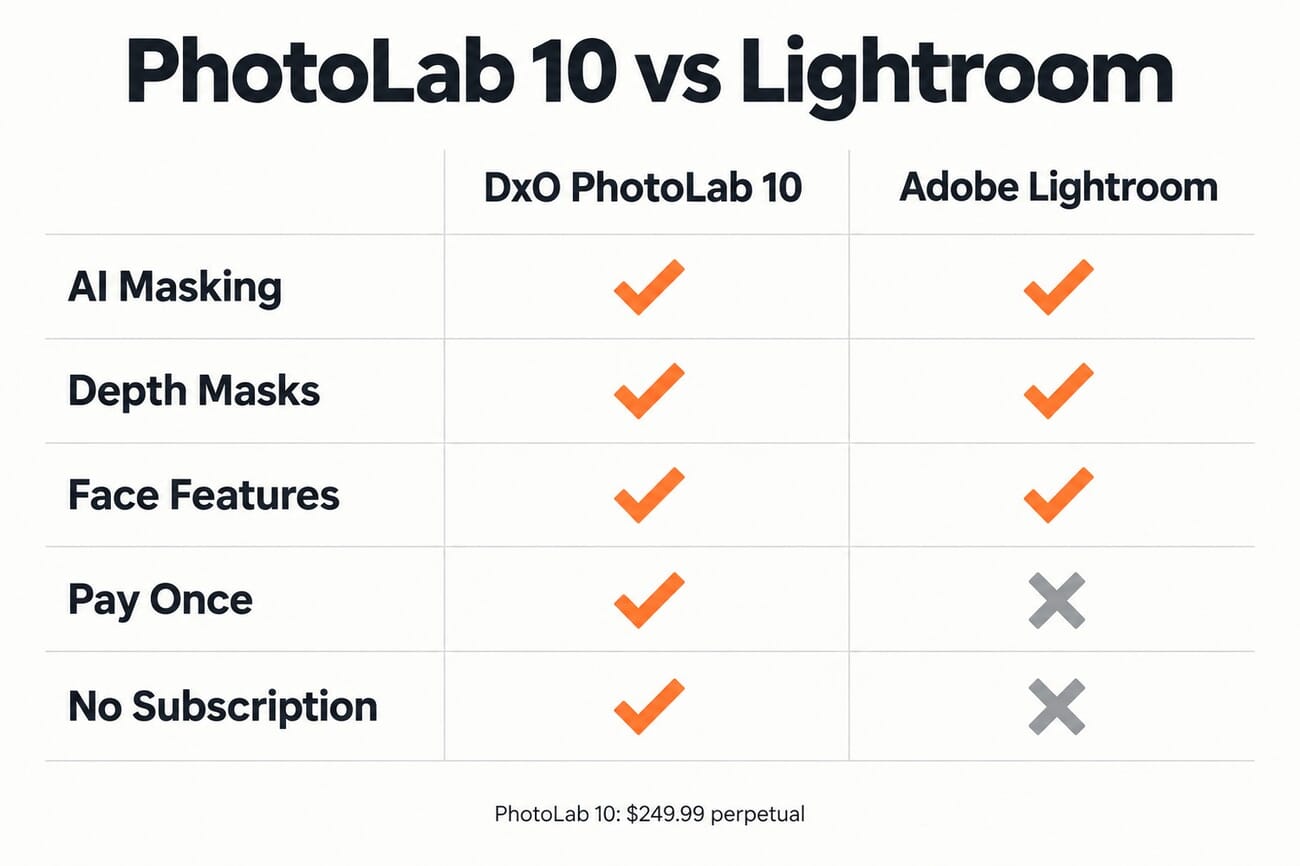
What DxO added, and why it matters
The headline of PhotoLab 10 is a rebuilt masking engine. In previous versions, DxO’s selection tools were competent but blunt next to Lightroom’s AI masks and Capture One’s newer selections. Version 10 adds three things that specifically close that gap: an AI Depth Mask, individual per-person masking, and per-feature face masking. Together they cover the great majority of everyday selection work, portraits, landscapes, and scenes where you want to treat foreground and background differently, without hand-painting a mask.
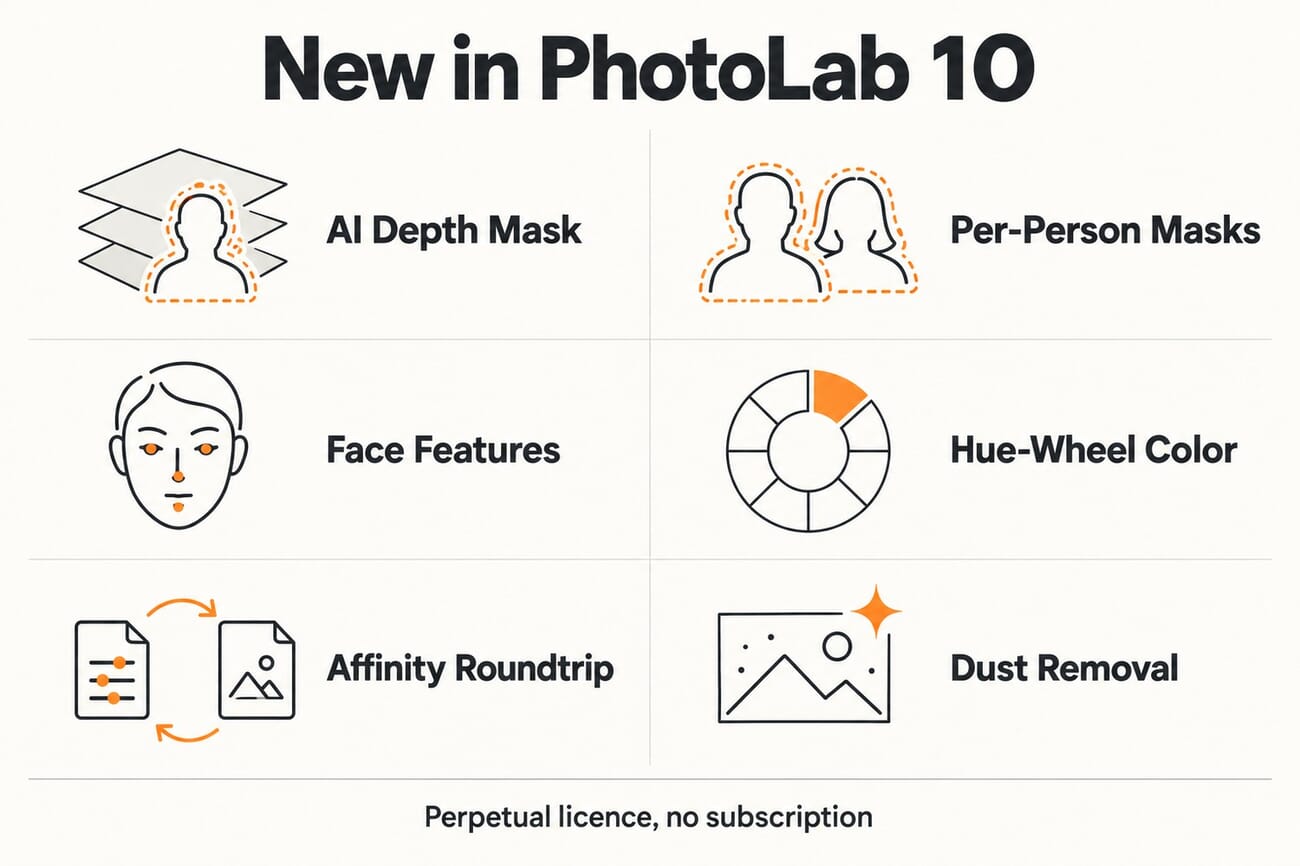
The masking, in detail
The AI Depth Mask is the most novel of the three. Activating it builds a depth map of the scene, and a slider lets you isolate a band of distance, tight enough to grab a single plane or broad enough to select everything behind a set point. A feathering control smooths the transition, so you can, for example, lift only the sunlit midground of a landscape. The AI handles the initial depth estimate; refining it past that is a manual step.
The per-person change is subtler but arguably more useful day to day. Older versions masked everyone in a frame as a single group; PhotoLab 10 now recognizes individuals as separate subjects, so you can dodge one person, burn another, and leave a third alone. And face masking finally gets real granularity: you can isolate eyes (down to iris, pupil and sclera), teeth, facial hair, face skin and lips, on top of the existing sky, subject, background, people, animals, flowers and vehicle categories. Processing is no longer deferred, and DxO retains the AI data once computed so later masks do not re-crunch the image.
The honest caveats: near-parity, not total
This is where an honest write-up has to slow down. PhotoLab 10 closes the masking gap, but it does not make the switch from Lightroom frictionless. Face segmentation only works on human faces, so pet and wildlife eyes still need a manual selection box. DxO itself notes that long beards can trip the mask and that color blends between foreground and background can cause some bleed. More importantly for switchers, there is still no direct Lightroom preset import, DxO says a conversion project is only “underway”, and noise reduction is unchanged, using the same engine as PureRAW 6.
One clarification worth making, because the marketing language invites confusion: the new AI Sensor Dust Removal is, by DxO’s own description, not an AI feature. It analyzes the image offline and fills flagged dust spots with context-aware content, closer to Photoshop’s healing brush than to a neural model. It is a genuinely useful addition, but calling it “AI” oversells it, and we would rather tell you that than repeat the label.
Why the timing lands: Adobe’s subscription, AI, and stability pressure
PhotoLab 10 did not arrive in a vacuum. It lands in the middle of a steady migration conversation we have been tracking all year, from the free stack that now covers a full Adobe exit to the price war breaking out across AI editors. Adobe has kept raising subscription prices, pushing AI features some photographers did not ask for, and fielding complaints about app stability, while also absorbing independent tools like Topaz Labs into its orbit. Every one of those pressures makes a pay-once alternative more attractive, and the standing knock on those alternatives was always that they lagged on AI. DxO just removed that knock from its own product.
Pricing: the whole point
The pricing is not a footnote here; it is the entire argument. PhotoLab 10 is a perpetual licence at $249.99 for new users, or $129.99 to upgrade from version 8 or 9. There is a genuine 30-day trial with no feature restrictions and no payment details required, which is a fairer try-before-you-buy than most subscription tools offer. Buy it once and it keeps working; there is no monthly clock, and no risk of losing access to your edits if you stop paying. DxO also added a roundtrip export to Affinity for pixel-level retouching, giving subscription-free photographers a non-Adobe path for the compositing work PhotoLab does not do. You can try it directly from DxO’s site.

Frequently Asked Questions
Does DxO PhotoLab 10 require a subscription?
No. PhotoLab 10 is sold as a one-time perpetual licence, $249.99 for new users and $129.99 as an upgrade from version 8 or 9. You own the version you buy, with no recurring fee.
Does PhotoLab 10 now match Lightroom’s AI masking?
On the core selection tools, largely yes. It adds AI depth masks, per-person masking and per-feature face masking (eyes, teeth, hair, lips). It still lacks a few Lightroom conveniences, notably direct preset import, so it is best described as near-parity rather than a total match.
Can I import my Lightroom presets into PhotoLab 10?
Not yet. DxO says a project to convert Lightroom presets into PhotoLab presets is underway, but there is no direct import at launch. Custom keyboard shortcuts, including Lightroom-style mapping, are also said to be on the roadmap.
Is the new dust removal an AI feature?
No, despite the name. DxO says the AI Sensor Dust Removal uses offline image analysis and context-aware fill, similar to a healing brush, rather than a neural AI model. It is still a handy automatic cleanup, just not machine learning.
The bottom line
PhotoLab 10 is the most consequential DxO release in years, not because any single feature is revolutionary, but because it removes the one honest objection to leaving Adobe on a pay-once editor. The AI masking is here, it is good enough for the work most photographers actually do, and it costs a flat fee instead of a monthly one. It is not a flawless one-for-one Lightroom replacement, the missing preset import and unchanged noise reduction keep it from that, but the exit ramp finally has AI parity where it counts. For anyone who stayed with Adobe purely for the masks, that is the news.
Primary Coverage
- DxO: PhotoLab 10 product page and release – Official feature set, editions and perpetual-licence pricing.
- PetaPixel: DxO Releases PhotoLab 10 With AI Add-Ons, Masking, and Color Grading Updates – Detailed hands-on breakdown of the new masking, color and integration features.
Image Sources
- Concept illustration, comparison chart, feature infographic and Pinterest pin: PhotoWorkout – Original PhotoWorkout editorial graphics.