


- Apple’s new Mac mini arrived on August 25, 2026 with the all-new M6 chip (from $899) and a step-up M5 Pro (from $1,699). Pre-orders are open now, with units shipping September 22.
- For most photographers, the base M6 is more than enough: it flies through Lightroom, Photoshop, and Capture One, and its new Neural Accelerators speed up AI tools like denoise and Topaz upscaling.
- For serious video editors, the M5 Pro is the one to want: up to an 18-core CPU, 64GB of memory, Thunderbolt 5, and ProRes RAW editing for heavy 4K, 6K, and multicam timelines.
- Two real catches: the 256GB base storage is small for photo and video libraries, and both models are $100 pricier than before, a knock-on effect of the ongoing memory crunch.
- If you already own an M4 mini, the upgrade is real but not urgent for pure photo work. Video and AI-heavy users will feel it most.
Apple just gave its smallest desktop its biggest brain transplant in nearly two years. The new Mac mini, announced on August 25, arrives with the all-new M6 chip in the base model and a punchy M5 Pro option above it, and Apple pointedly showed it running Photoshop, Final Cut Pro, and Topaz on stage. Pre-orders are open now, with machines landing September 22. The question for creatives is simple: is this the desktop you have been waiting for, and if so, which one?
What Apple Actually Launched
Two Mac minis, same tiny aluminum body. The base model steps up to the M6, Apple’s first 2nm chip, with a 12-core CPU, a 12-core GPU, and, for the first time on the base mini, Neural Accelerators built into every GPU core. Apple claims up to 4x faster AI performance and 2x faster graphics than the M4 model it replaces. It starts with 16GB of unified memory (configurable to 32GB) and 256GB of storage. Above it sits the Mac mini with M5 Pro, which scales up to an 18-core CPU, a 20-core GPU, and 64GB of memory for genuinely demanding work.
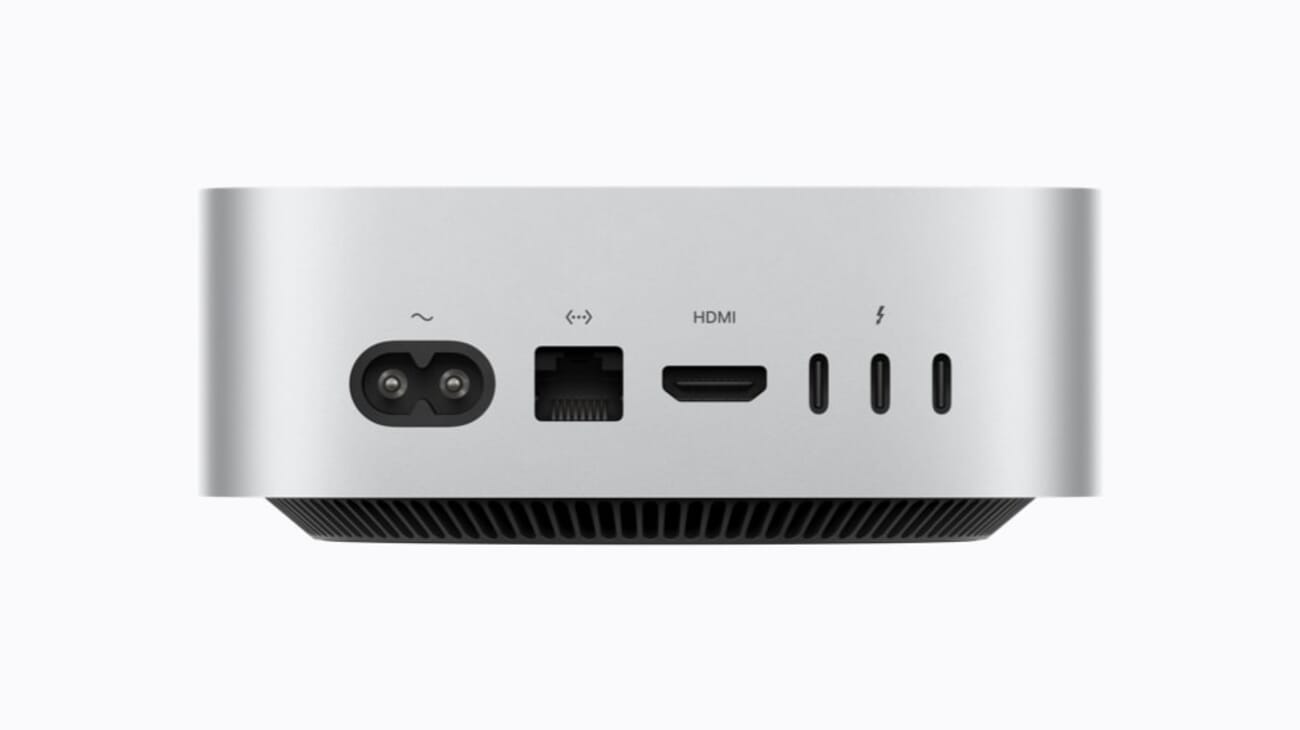
Connectivity got a real bump. Both models add Wi-Fi 7, Bluetooth 6, and 2.5Gb Ethernet as standard, with a 10Gb option. The M6 mini has three Thunderbolt 4 ports on the back, while the M5 Pro moves up to three Thunderbolt 5 ports, which matter a lot if you run fast external SSDs or RAID arrays. There is even genlock support over USB-C for syncing a display with a camera, a niche but genuine perk for video shooters.
M6 vs M5 Pro: The Two Minis at a Glance
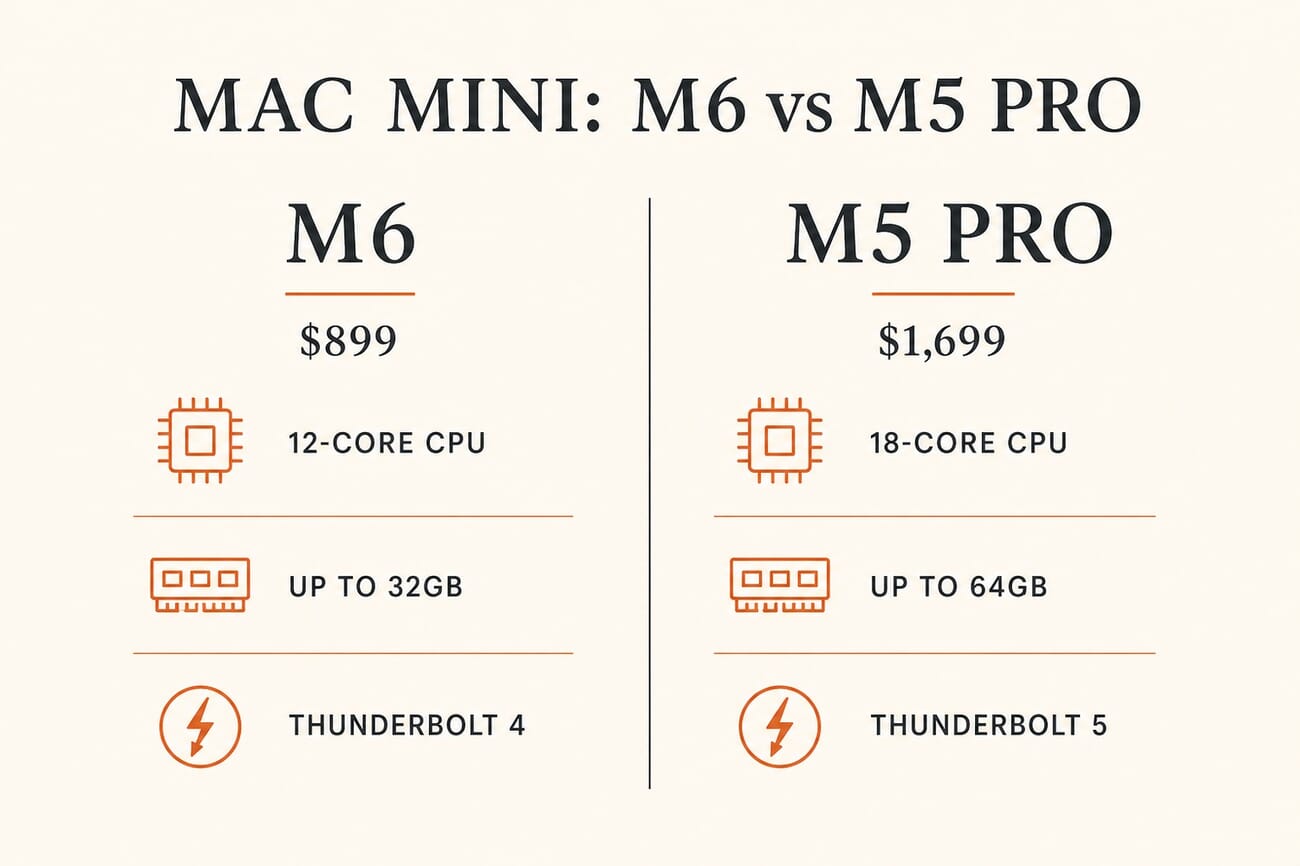
The gap between them is mostly about memory ceiling, GPU muscle, and I/O. The M6 tops out at 32GB and Thunderbolt 4; the M5 Pro reaches 64GB, a faster 307GB/s memory bandwidth, and Thunderbolt 5. For a lot of photographers that difference will never show up. For video editors working in high-resolution codecs, it shows up constantly.
For Photographers: The M6 Base Is Plenty
Here is the honest truth: still photography has not been a serious challenge for Apple silicon since the M1. Lightroom, Photoshop, Capture One, and Affinity all run beautifully on the base chip, and the M6’s class-leading single-threaded speed makes culling, sliders, and brush work feel instant. Where the new chip genuinely earns its keep is AI. The Neural Accelerators and faster Neural Engine speed up exactly the tasks that used to make you wait: denoise, super-resolution, generative fill, subject and sky masking, and third-party tools like Topaz upscaling.
For the vast majority of photographers, the $899 M6 mini is the right buy, with one tweak: configure it to 32GB of memory if you run big Lightroom catalogs or keep a stack of apps open. You do not need the M5 Pro. What you should not skimp on is storage, which brings us to the catch later on.
For Video Editors: It Depends on Your Footage
Video is where the two minis pull apart. If you cut 1080p or light 4K, edit social clips, or work in H.264 and HEVC, the base M6 will handle it comfortably and quietly. It runs Final Cut Pro, Premiere Pro, and DaVinci Resolve without drama, and Apple demoed Final Cut on the M6 for a reason.
Push into demanding territory, though, and the M5 Pro becomes the obvious pick. Heavy 4K and 6K timelines, multicam edits, aggressive color grading, and ProRes RAW all lean on GPU cores, memory, and fast storage, which is exactly what the M5 Pro adds. Its 64GB ceiling keeps big projects fluid, Thunderbolt 5 feeds fast media drives, and Apple specifically calls out ProRes RAW editing as an M5 Pro strength. If video is how you earn a living, the $1,699 M5 Pro (or a Mac Studio for the heaviest 8K work) is the safer investment.
The Catches: Storage, Memory, and Price Creep
The 256GB base storage is the single biggest trap. A serious Lightroom library or a few weeks of 4K footage will swallow that instantly, and Apple’s internal storage upgrades are famously expensive. The smart move for most creatives is to buy modest internal storage and add a fast external Thunderbolt SSD, which is cheaper per terabyte and portable between machines.
Then there is the price. Both models cost about $100 more than the outgoing generation, and that is not random. As we covered in why Macs just got more expensive, the industry-wide memory and NAND squeeze is pushing up the cost of the RAM and storage inside nearly every device, cameras included. Buy the memory you need now, because upgrading later is not an option on these sealed machines.
Should You Upgrade From an M4 Mini?
If you bought an M4 or M4 Pro mini in the last two years, hold off unless you have a specific reason. For pure photo editing, the jump will be nice but not transformative. The people who should upgrade are those doing heavy AI processing, running local models, or editing high-resolution video, where the 4x AI gains and the M5 Pro’s extra memory and Thunderbolt 5 change the day-to-day. Coming from an Intel Mac or an M1, on the other hand, the leap is enormous and easy to justify.
Frequently Asked Questions
How much does the new Mac mini cost, and when does it ship?
The M6 Mac mini starts at $899 and the M5 Pro model starts at $1,699 (education pricing is $799 and $1,599). Both are available to pre-order now, with deliveries starting September 22, 2026. You can configure both at Apple’s Mac mini page.
Is the base M6 mini enough for photo editing?
Yes, easily. Lightroom, Photoshop, Capture One, and Affinity all run smoothly on the M6, and its Neural Accelerators speed up AI features like denoise and upscaling. Adding 32GB of memory is the only upgrade most photographers should consider.
Can the M6 mini handle 4K video editing?
For most 4K work, yes. The base M6 comfortably edits 1080p and standard 4K in Final Cut, Premiere, and Resolve. For heavy 4K and 6K, multicam, or ProRes RAW, step up to the M5 Pro with its extra GPU cores, 64GB memory, and Thunderbolt 5.
Is 16GB of memory enough, or should I upgrade?
16GB is workable for lighter editing, but 32GB is the sweet spot for large Lightroom catalogs, layered Photoshop files, or running several apps at once. Memory cannot be upgraded later, so choose carefully at checkout.
Should I upgrade the internal storage?
Only modestly. Apple’s internal storage is pricey, so most photographers and video editors are better off buying a reasonable internal size and adding a fast external Thunderbolt SSD for libraries and footage.
The Bottom Line
The new Mac mini is one of the easiest recommendations Apple makes, as long as you match the model to the work. Most photographers should buy the $899 M6, bump it to 32GB, and pair it with an external SSD and a good editing display. Serious video editors should reach for the M5 Pro. Everyone else considering the wider Apple lineup can weigh it against our rundown of Apple’s late-2026 products for photographers. For a machine this small and this quiet, that is a remarkable amount of creative power for the money.
Sources and further reading:
Reference
Image Sources
- Mac mini with M6 (featured) – Apple product image
- Mac mini rear ports, Thunderbolt and HDMI – Apple product image
- Mac mini M6 vs M5 Pro comparison (infographic) – PhotoWorkout illustration
- Should you buy the new Mac mini? (pin graphic) – Stylized PhotoWorkout illustration