

- The iPhone Photo Academy is iPhone Photography School’s beginner flagship course — 44 video lessons across 5 modules + bonus content.
- Taught by Emil Pakarklis, founder of IPS, in a clear, jargon-free style that works for complete beginners.
- Covers everything from basic camera controls to genre-specific techniques for landscape, street, portrait, and night photography.
- At ~$49 (normally ~$249), it includes lifetime access, a private community, 8 bonuses, and a 30-day money-back guarantee.
- Best suited for iPhone owners who want to stop guessing and start taking consistently better photos.
The iPhone Photo Academy is the entry-level course from iPhone Photography School, designed to take complete beginners from “I just point and tap” to genuinely understanding how to use their iPhone camera. With 647,000+ enrolled students, it is the platform’s bestselling course by a wide margin.
We got hands-on access to the full course platform to write this review. Here is what is inside, how the teaching works, what the community looks like, and whether it is worth your money.

A beginner-focused iPhone photography course by Emil Pakarklis covering camera basics, composition, lighting, and genre-specific techniques across 44 video lessons (625 minutes). Includes 8 bonus sections, an AI photo review tool, private community access, and lifetime updates. Updated for iOS 26 and iPhone 17.
Normal Price: ~$249 Today Only: ~$49 USD- Clear, jargon-free teaching style perfect for absolute beginners.
- Comprehensive coverage from camera basics through genre-specific techniques.
- Active community with staff support and student badges for motivation.
- Lifetime access with free updates for new iPhone models and iOS versions.
- Too basic for experienced iPhone photographers who already understand composition and exposure.
- Some lessons feel padded — the 625-minute runtime includes repetitive introductions and conclusions.
- No editing content — you will need the separate iPhone Editing Academy for post-processing.
Course Overview: What You Get
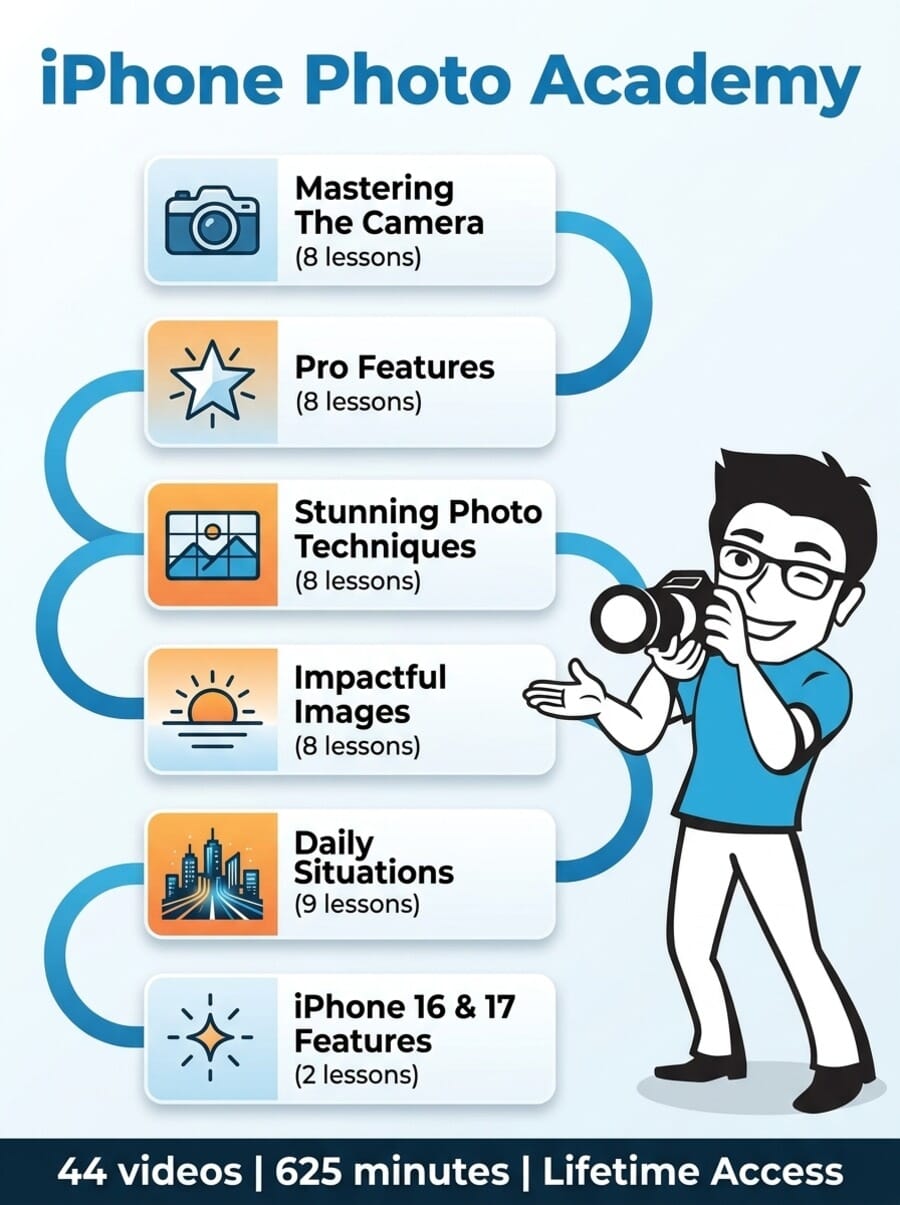
iPhone Photo Academy is structured into 5 core modules and 8 bonus sections. The 44 video lessons total 625 minutes (about 10.5 hours), making it the most substantial beginner course on the platform.
The course follows a logical progression:
- Module 1: Mastering The Camera In Your Pocket (8 lessons)
- Module 2: Pro Features Of The iPhone Camera (8 lessons)
- Module 3: Simple Techniques For Stunning Photos (8 lessons)
- Module 4: Proven Ways To Capture Impactful Images (8 lessons)
- Module 5: Stunning iPhone Photos In Daily Situations (9 lessons + conclusion)
- Bonus: The New Camera Features Of iPhone 16 and 17 (2 lessons)
It starts with the fundamentals (what each camera button does) and gradually builds to genre-specific shooting techniques. This is not a course that assumes you know anything — and that is precisely its strength for the right audience.
Module 1: Mastering The Camera In Your Pocket
The first module is all about getting comfortable with the iPhone camera app itself. Emil starts with a 5-minute introduction explaining his philosophy — that the iPhone is a legitimate photography tool, not a compromise — then dives into the practical stuff.
The standout lessons here are the Camera app walkthrough (19:48) and the Secrets for choosing the right iPhone camera lens (20:24). The camera walkthrough covers every function in the native camera app, including features most people never discover. The lens selection lesson is particularly useful for iPhone Pro owners who have 3+ camera lenses but default to the main one out of habit.
Other lessons cover:
- The key to breathtaking photos (10:23) — a foundational mindset lesson
- Correct iPhone camera settings for perfect photos (18:33)
- How to hold your iPhone like a seasoned photographer (9:47)
- 3 quick ways to open the Camera app (7:28)
- 5 unique ways to release the shutter (22:27)
If you have been using your iPhone camera for years, some of this will feel elementary. But for genuine beginners — people who have never explored beyond the default camera mode — this module fills real knowledge gaps. The lesson on holding your iPhone properly, for example, addresses a problem that causes more blurry photos than most people realize.
Module 2: Pro Features Of The iPhone Camera
Module 2 steps beyond the basics into features that many iPhone owners never discover on their own. The focus and exposure lock lesson (15:20) is a game-changer for beginners — once you learn AE/AF Lock, your hit rate on good photos improves dramatically. For a deeper dive into how exposure works on mobile, see our smartphone exposure guide.
The module also covers:
- Avoiding images that are too dark or too bright (15:17) — practical exposure correction
- 7 tips for preserving memories with Live Photos (17:54)
- Using Long Exposure for breathtaking photos of water (11:19)
- How to never miss the perfect shot using Burst Mode (19:25)
- 9 secrets for capturing outstanding Panoramic photos (9:42)
The Long Exposure lesson is surprisingly practical. Most people do not know the iPhone can simulate long exposure effects through Live Photos — Emil walks through the entire process step by step, showing how to get silky water effects without a tripod or ND filter.
There is also an optional photography project (11:47) that encourages you to put what you have learned into practice before moving on. It is a nice touch that separates this from passive video watching.
Module 3: Simple Techniques For Stunning Photos
This is the composition module, and for many students it will be the most transformative. Emil covers the fundamentals of what makes a photo visually compelling — and unlike many photography courses, he keeps it grounded in iPhone-specific examples rather than DSLR theory.
Key lessons include:
- 10 mindset hacks to skyrocket your creativity (15:05)
- Where to shoot from to get the best photos (16:34) — the power of angles
- The #1 composition rule and when to break it (9:21) — yes, it is the rule of thirds
- 7 composition guidelines for incredible photos (23:07) — the longest lesson in this module
- How to involve friends to enhance your images (17:45)
The 7 composition guidelines lesson (23:07) is the module’s centerpiece. It covers leading lines, symmetry, framing, negative space, and other principles with real iPhone examples. Emil demonstrates each concept by shooting on location, which makes the techniques easier to internalize than reading about them in a textbook.
One clever inclusion is “The missing ingredient for taking exceptional images” (19:33), which focuses on the emotional component of photography — something most technical courses overlook entirely.
Module 4: Proven Ways To Capture Impactful Images
Module 4 is all about light. If Module 3 teaches you where to point the camera, Module 4 teaches you when.
The lighting lessons are the strongest part of the entire course:
- “This secret makes or breaks every photo you take” (14:41) — understanding light direction
- Early morning techniques for incredible sunrise photos (13:30)
- Pro lighting hack for crafting highly creative compositions (16:52)
- Planning: The secret behind all successful sunset shoots (21:01)
- Simple lighting trick that helps you tell powerful stories (10:41)
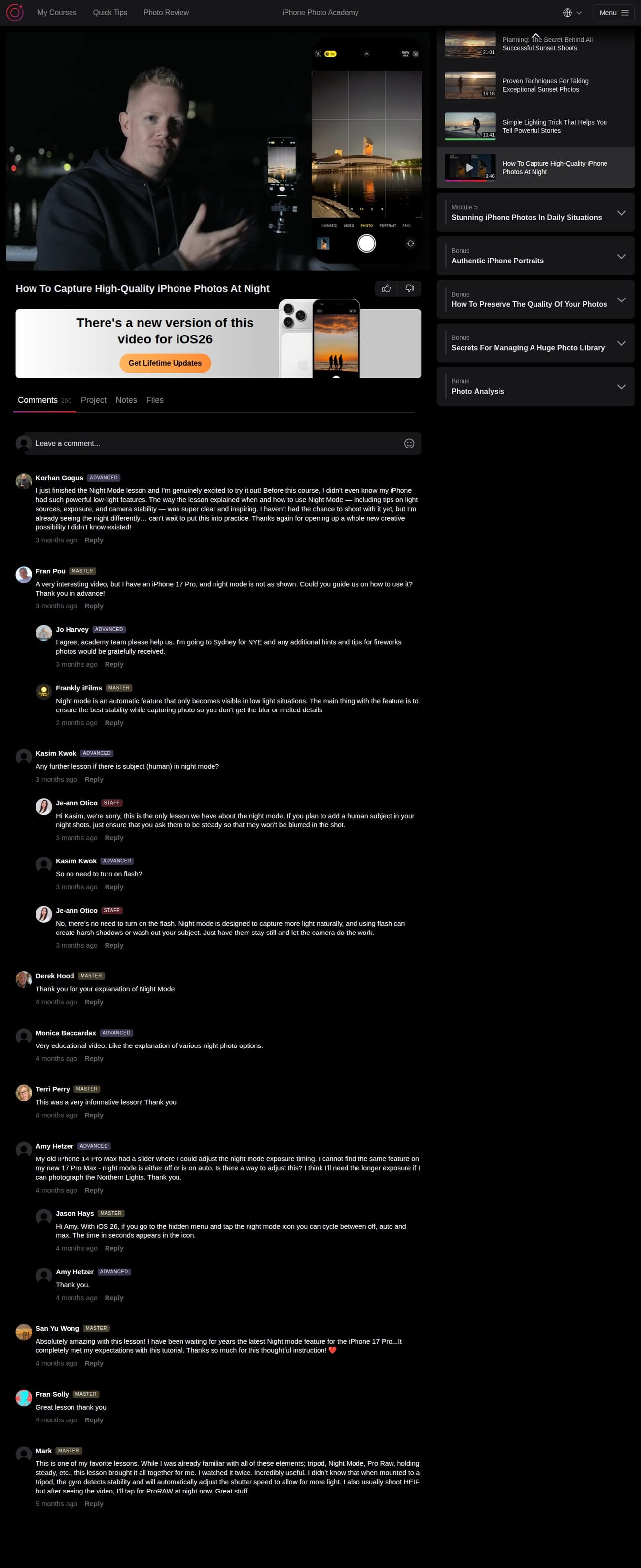
- How to capture high-quality iPhone photos at night (9:46)
The sunrise and sunset lessons are particularly well-done. Rather than just saying “shoot during golden hour,” Emil breaks down exactly how to plan a sunrise shoot — from checking weather apps the night before to positioning yourself for the best light angles. The sunset planning lesson (21:01) is the longest in the module and covers app recommendations, location scouting, and timing strategies.
The night photography lesson is brief at under 10 minutes, but it covers Night Mode effectively. Students in the comments section mentioned learning about the hidden Night Mode controls that let you adjust exposure time — a feature many iPhone owners never discover. For more on night shooting, see our complete night photography guide.
Module 5: Stunning iPhone Photos In Daily Situations
The final core module applies everything you have learned to specific photography genres. This is where the course transitions from theory to practice, covering 8 different shooting scenarios:
- 11 techniques for exceptional landscape photos (18:25)
- 3 secrets for taking incredible travel photos (14:44)
- How to catch the perfect moment in street photography (20:06)
- 10 powerful techniques for amazing architecture photos (20:40)
- Tips for capturing beautiful portrait photos (10:57)
- 9 tricks for taking meaningful photos of your children (11:25)
- Secrets for capturing stunning macro photos (8:20)
- Advanced Long Exposure hacks for stunning images (18:31)
The genre-specific lessons are where the course shows its real value. The street photography lesson (20:06) is one of the best in the entire course — Emil discusses timing, anticipation, and ethical considerations for photographing strangers, all from the perspective of using a phone (which is far less intimidating than a large camera).
The architecture lesson (20:40) is another highlight. It covers converging verticals (when buildings look like they are falling backwards), reflections, details, and how to use the iPhone’s ultra-wide lens for dramatic interior shots.
The children photography lesson (11:25) is a smart inclusion that many photography courses overlook. It addresses the specific challenges of photographing kids — their unpredictability, the importance of getting at their eye level, and how to capture genuine emotions rather than forced smiles.
Bonus Content: 8 Extras Included
The 8 bonus sections add genuine utility beyond the core modules:
Bonus 1: iPhone 16 and 17 Features — Two lessons covering the Camera Control button and Photographic Styles. This bonus keeps the course relevant as Apple releases new hardware, and it is updated with each major iPhone launch.
Bonus 2: How To Preserve Photo Quality — Covers the 5 most common ways people unknowingly degrade their image quality (compression through messaging apps, incorrect export settings, etc.).
Bonus 3: AI Photo Feedback — A unique feature where you can submit your photos and receive automated feedback on composition, lighting, and technical execution. Not a replacement for human critique, but a useful tool for solo learners.
Bonus 4: Photo Library Management — How to organize, back up, and find photos in a large library. Practical advice most photographers need but few courses teach.
Bonus 5: 17 Creative Photo Projects — Structured assignments to practice specific techniques. Great for motivation and for getting feedback from the community.
Bonus 6: Analysis of 459 iPhone Photos — Emil reviews hundreds of student photos, pointing out common mistakes and explaining how to fix them. This is like sitting in on a photo critique class.
Bonus 7: Daily Photo Tips — Ongoing tips delivered to keep your skills sharp after completing the main course.
Bonus 8: Authentic iPhone Portraits — A focused mini-course on taking meaningful portrait photos with your iPhone. Covers posing, expressions, and using natural light for flattering results.
The Learning Platform
The course lives on iPhone Photography School’s custom platform at courses.iphonephotographyschool.com. It uses a clean, dark-themed interface with the video player front and center and a collapsible course outline in the sidebar.
Each lesson has tabs below the video for Comments, Project, Notes, and Files. The Comments tab is where community interaction happens. The Notes tab lets you save personal notes per lesson — a useful feature for remembering key takeaways. The Project tab provides structured assignments for hands-on practice.
Navigation is straightforward. You can jump between lessons via the sidebar, and completed lessons get marked automatically. The platform works on both desktop and mobile, and there is also a dedicated iOS app for learning on the go.
The course is available in 15 languages, which is notably more than most online photography courses offer. Subtitles and translations cover English, Spanish, German, French, Portuguese, Italian, Polish, Arabic, Indonesian, Japanese, Korean, Romanian, Russian, Turkish, and Dutch.
One thoughtful feature is the “skip points” navigation within longer lessons. If you already know the basics of a topic, you can jump to the advanced section without watching the entire video. It shows respect for the learner’s time.
Community and Support
The community aspect is one of iPhone Photo Academy’s underrated strengths. Each lesson has a comments section where students ask questions, share their attempts at applying the techniques, and give each other feedback.
Students earn badges based on their progress — Beginner, Advanced, and Master levels. It is a simple gamification system, but it works as motivation to complete the course rather than abandoning it after Module 2 (as happens with most online courses).
The staff presence is notable. Je-ann Otico from the IPS team regularly responds to technical questions with detailed, helpful answers. We saw responses covering specific camera settings, Night Mode controls, and device-specific tips for various iPhone models. The staff responses are not generic templates — they address each student’s specific question with practical advice.
Comment counts vary by lesson, with some popular lessons (like the night photography one) having 269+ comments. The engagement level suggests an active, ongoing student base rather than a ghost town.
About the Instructor: Emil Pakarklis
Emil Pakarklis founded iPhone Photography School and built it into what is arguably the largest iPhone photography education platform in the world. The company’s Instagram following exceeds 4 million, and over 647,000 students have enrolled in iPhone Photo Academy alone.
His teaching style is calm, methodical, and genuinely beginner-friendly. He avoids technical jargon, explains concepts with real-world analogies, and demonstrates techniques by shooting on location rather than lecturing from a studio.
What sets Emil apart from many photography instructors is his self-taught background. He was not trained at a photography school — he learned through years of trial and error with his iPhone. This means his teaching focuses on practical techniques that work rather than academic theory that sounds impressive but does not translate to better photos.
The course is published through iPhone Photography School, one of the largest online photography education platforms. They have been producing courses for over a decade, and the production values reflect that experience.
Who Is This Course For?
iPhone Photo Academy works best for:
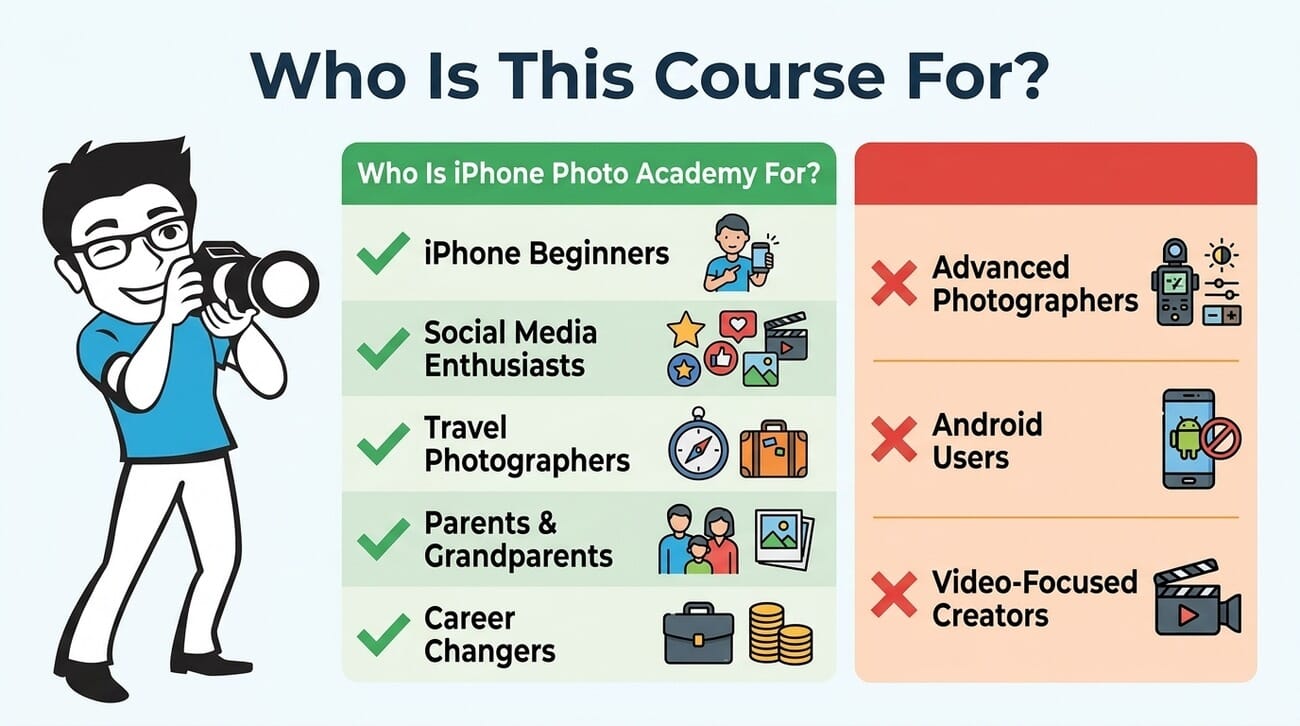
- Complete beginners who just use the default camera mode and have never explored their iPhone’s full capabilities.
- Social media enthusiasts who want to post better photos on Instagram and get more engagement.
- Travel photographers who want to capture better vacation memories without carrying a dedicated camera.
- Parents and grandparents who want to preserve family moments with higher quality photos.
- Anyone considering a photography side hustle who wants to build foundational skills affordably.
It is not ideal for:
- Experienced iPhone photographers who already understand composition, exposure, and lighting basics.
- Android users — the camera app walkthroughs and settings are iPhone-specific.
- Anyone looking for photo editing training — this course covers shooting only, not post-processing. For editing, see the separate iPhone Editing Academy.
- Video creators — for iPhone video, there is a separate iPhone Video Academy.
If you want a broader comparison of what is available, our roundup of the best iPhone photography courses compares this course against alternatives.
Pricing and Value
iPhone Photo Academy has a list price of around $249, but it is consistently available for ~$49 (an 80% discount). A 3-payment installment plan is also available. That price includes:
- Lifetime access to all 44 lessons and 8 bonuses
- Free updates for new iPhone models and iOS versions
- Access to the private community and staff support
- AI-powered photo feedback tool
- A 30-day money-back guarantee
At $49, the value proposition is strong. Compare it to a single in-person photography workshop (typically $100-300 for a few hours), and the 10+ hours of structured video content with lifetime access looks like a solid deal. The updates for new iPhone models mean the course does not become obsolete when you upgrade your phone.
The course is also rated 4.9 out of 5 on Trustpilot, which suggests genuine student satisfaction rather than marketing hype.
Check current pricing and enroll in iPhone Photo Academy →
What Could Be Better
No course is perfect. Here is where iPhone Photo Academy falls short:
It is genuinely basic. If you have been taking iPhone photos for a few years and already know about exposure lock, the rule of thirds, and golden hour, you will find much of this material redundant. The course does not pretend to be intermediate or advanced — it is a beginner course through and through.
Some lessons are padded. The 625-minute total runtime sounds impressive, but each module starts with an introduction and ends with a conclusion that could be trimmed. A tighter edit would bring the essential content down to about 7-8 hours without losing anything valuable.
No editing coverage. The course is entirely about capturing photos — there is zero content on editing or post-processing. For a beginner who wants the complete picture (pun intended), you would need to pair this with the iPhone Editing Academy or learn Snapseed editing separately.
iPhone-only applicability. While the composition and lighting principles apply to any camera, the camera settings, app walkthroughs, and feature demonstrations are specific to iPhone. Samsung Galaxy, Pixel, and other Android users will not get full value.
The sales page is aggressive. The landing page uses classic direct-response marketing tactics — countdown timers, inflated “normal” prices, value stacking for bonuses. The course itself is solid, but the marketing can feel like it is overselling what is, at its core, a well-made beginner photography course.
Final Verdict
iPhone Photo Academy is a well-structured, beginner-focused course that delivers exactly what it promises: a clear path from “I just point and shoot” to understanding how to take consistently better photos with your iPhone.
Emil Pakarklis’s teaching style is genuinely beginner-friendly without being condescending. The course progresses logically from camera basics through composition, lighting, and genre-specific techniques. The community is active, the staff is responsive, and the lifetime updates mean the course stays relevant as Apple releases new devices.
The key question is whether you are in the target audience. If you are a complete beginner, this course will noticeably improve your photos. If you already know your way around the iPhone camera, you would be better served by the more advanced Capture it All course or the genre-specific iPhone Landscape Mastery.
At ~$49 with a 30-day money-back guarantee, the risk is minimal. If you own an iPhone and want to take better photos, this is a smart starting point.
Enroll in iPhone Photo Academy (80% off, 30-day guarantee) →
Frequently Asked Questions
Do I need a specific iPhone model to take this course?
No. The course works with any iPhone model, though some features (like the Camera Control button) are only available on newer models. The core photography principles apply regardless of which iPhone you own. The course is updated for iOS 26 and includes bonus lessons specifically for iPhone 16 and 17 features.
Is this course suitable for someone with zero photography experience?
Yes — that is precisely who it is designed for. Emil starts from the absolute basics (how to hold your phone, what each button does) and builds up gradually. No prior knowledge is assumed or required.
How long does it take to complete the course?
The course includes 625 minutes (about 10.5 hours) of video content across 44 lessons. Most students work through it over 3-6 weeks, practicing techniques between lessons. Since you get lifetime access, there is no pressure to finish quickly.
Does iPhone Photo Academy cover photo editing?
No. This course focuses entirely on capturing photos. For editing training, you would need the separate iPhone Editing Academy, which covers Snapseed and other mobile editing apps in depth.
What is the refund policy?
iPhone Photography School offers a 30-day money-back guarantee. If you are not satisfied with the course, you can request a full refund within 30 days of purchase — no questions asked.
Is iPhone Photo Academy better than free YouTube tutorials?
The advantage of the course over YouTube is structure. YouTube has excellent individual tutorials, but you have to piece together your own learning path and hope you do not miss fundamental concepts. iPhone Photo Academy gives you a logical progression from basics to advanced techniques, plus community support and assignments for practice. If you are disciplined enough to build your own curriculum from free content, you can learn the same skills — but most people benefit from the guided structure.
Disclosure: This article contains affiliate links. When you purchase through our links, we may earn a commission at no additional cost to you. We have hands-on access to the course platform and this review reflects our genuine assessment of the content.


