


- Google is shutting down Pixel Studio, its Pixel-exclusive AI image app, in June 2026 — less than two years after it launched with the Pixel 9. Users are being pushed to Gemini instead.
- It’s a reminder that AI photo tools churn fast: free, platform-locked apps are the first to be killed or folded into a bigger product.
- Before you invest time learning an AI tool, check the durability signals: a real paid business model, a standalone (not platform-locked) app, exportable work, a large user base, and a track record.
- The most durable AI photo tools in 2026 are the ones people pay for and that run anywhere — Lightroom and Photoshop, Topaz, Luminar, DxO, Capture One — not bundled phone freebies.
- Protect yourself regardless: keep your RAW originals, don’t lock your whole workflow into one app, and prefer tools that export to open formats.
Google is shutting down Pixel Studio, the AI image-generation app it built into Pixel phones, with the shutdown rolling out in June 2026. The app launched in 2024 alongside the Pixel 9 — which means it lived for less than two years before Google folded its capabilities into Gemini and started showing users an “Open Gemini” button instead. If you’d built a habit (or a workflow) around it, that habit just evaporated. It’s a small story with a big lesson for photographers: AI tools come and go fast, so it’s worth knowing how to pick the ones that will still be here next year.
What Happened to Pixel Studio
Pixel Studio was a Pixel-exclusive app that generated images from text prompts and turned photos into stickers. It arrived with the Pixel 9 in 2024 and even got a substantial update last year — but Google has been quietly deprecating it for months, stripping AI tools out of the photo editor before announcing the full shutdown in February 2026. Now it’s being retired entirely, with users redirected to Gemini’s image features (branded “Nano Banana”). Nothing nefarious happened here; this is just how big platforms operate — they consolidate. But for the people who used it, the result is the same as if it had failed: the tool is gone.
Why This Keeps Happening
AI imaging is moving faster than any software category in memory, and that speed has a cost: tools are launched, merged, rebranded, and killed at a dizzying pace. Three patterns drive most of the churn. First, platform freebies are disposable — an app a phone maker bundles for free exists to sell hardware, not to survive on its own, so it’s the first thing cut when strategy shifts. Second, consolidation — companies fold standalone apps into one flagship AI product (here, everything rolls into Gemini). Third, venture-funded startups burn cash chasing growth and get acquired or shut down. None of this means you should avoid AI tools — it means you should choose them with their longevity in mind.
How to Pick AI Photo Tools That Will Last
Before you sink hours into learning an AI editor, run it through these five durability checks. None is a guarantee, but together they separate the tools likely to stick around from the ones likely to vanish.
1. Does someone pay for it?
A tool with a real revenue model — a subscription or a paid license — has a reason to keep existing. Free, ad-free apps with no obvious business model are usually a feature funded by something else (a phone, a growth round), and that funding can disappear. Paying a fair price is, ironically, one of the best signals of longevity.
2. Is it standalone, or locked to a platform?
Pixel Studio only ran on Pixel phones, which made it trivial to kill. A tool that runs across devices and operating systems — desktop and mobile, Mac and Windows — has a broader base and isn’t hostage to one company’s hardware strategy.
3. Can you get your work out?
Favor tools that export to open, standard formats (JPEG, TIFF, DNG) and don’t trap your edits in a proprietary library you can’t move. If a tool dies, you want your images — and ideally your edits — to come with you.
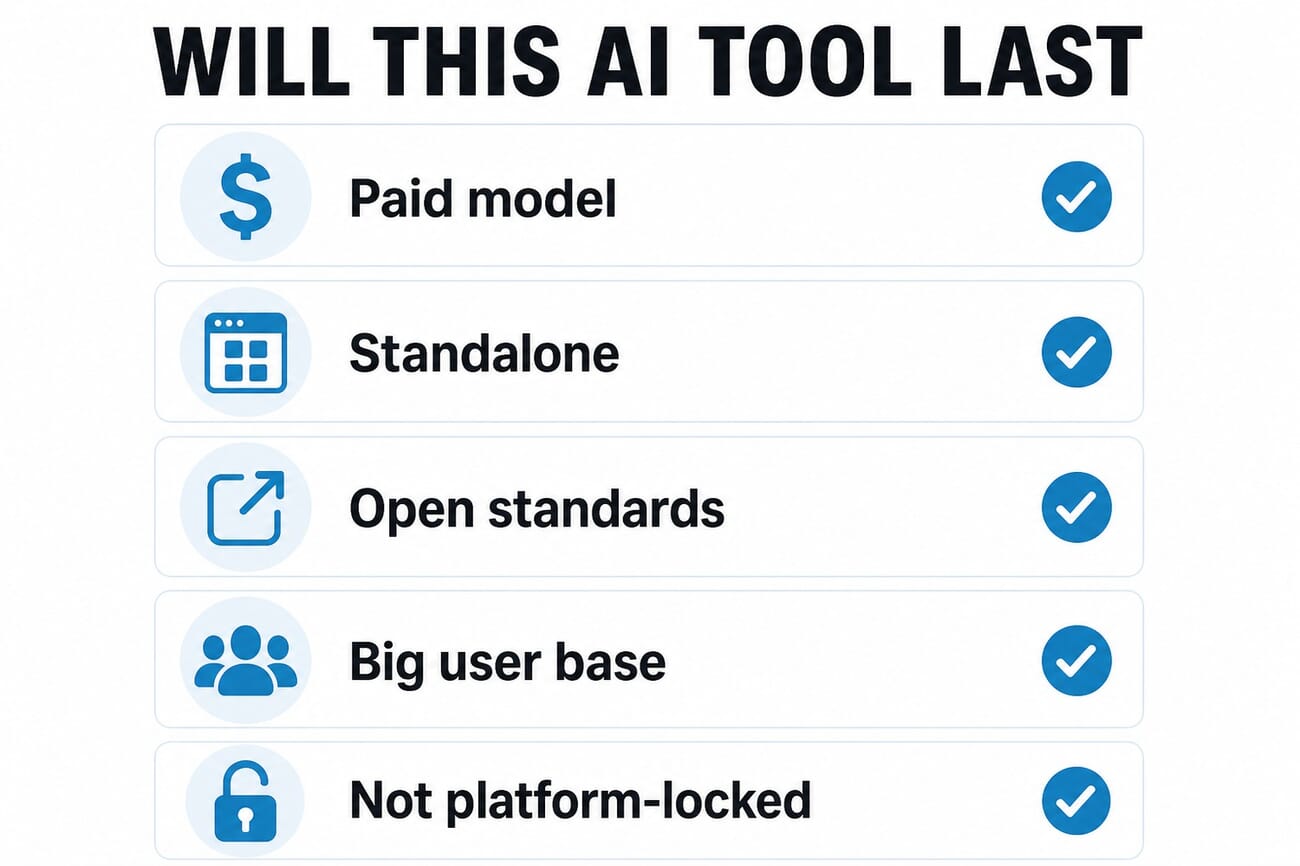
4. Does it have a real user base and track record?
Software that’s been around for years, with a large active community and a steady update cadence, is far less likely to vanish overnight than a six-month-old app riding a hype cycle. Forums, tutorials, and a back catalog of versions are all good signs.
5. Is the AI a feature, or the whole company?
A bundled AI gimmick inside a free app is easy to cut. AI that is the product — where the company’s entire business depends on it working — is far more likely to be maintained and improved.
Which AI Tools Look Durable in 2026
By those measures, the safest AI photo tools to learn right now are the ones people actually pay for and that run anywhere. Adobe’s Lightroom and Photoshop (subscription, cross-platform, enormous base) lead the list. Topaz Photo AI is a paid standalone whose entire business is AI enhancement. Luminar Neo, DxO, and Capture One are established paid editors with growing AI features. And for specific jobs like HDR, the durable picks are again the paid, cross-platform tools — not whatever ships free on this year’s phone. The pattern is consistent: pay for it, run it anywhere, own your files.
How to Protect Yourself Either Way
Even the best tool can be discontinued, so build a workflow that survives it:
- Always keep your RAW originals. If a tool dies, you can re-edit from scratch in another — as long as you have the source files.
- Don’t lock your whole workflow into one app. Treat any single tool as replaceable; know what you’d switch to.
- Export finished work to open formats (JPEG, TIFF, DNG) rather than leaving everything inside a proprietary catalog.
- Learn the underlying skills, not just one app’s buttons. Dynamic range, masking, and color don’t expire when an app does.
Frequently Asked Questions
Why is Google shutting down Pixel Studio?
Google is consolidating its image-generation features into Gemini (the “Nano Banana” tools), so it’s retiring the standalone Pixel Studio app rather than maintaining two products. The app launched in 2024 with the Pixel 9 and is being shut down in June 2026.
What replaces Pixel Studio?
Google is directing users to Gemini for AI image generation. Pixel Studio now shows an “Open Gemini” button pointing to the Play Store.
Should I stop using AI photo tools because they get discontinued?
No — just choose them wisely. Favor tools with a real paid business model that run across platforms and let you export your work, keep your RAW originals, and don’t build your entire workflow around a single app you can’t replace.
Which AI photo tools are most likely to stick around?
The ones people pay for and that run anywhere: Adobe Lightroom and Photoshop, Topaz Photo AI, Luminar Neo, DxO, and Capture One. Free apps bundled with a specific phone are the most at risk of being cut.
Pixel Studio won’t be the last AI photo tool to disappear — the pace of this space guarantees more shutdowns ahead. The fix isn’t to avoid AI; it’s to pick tools built to last, keep your files portable, and invest in skills that outlive any single app.
Featured image and infographic are stylized PhotoWorkout illustrations. Shutdown details via Engadget.
Primary Coverage
- Engadget — Google shuts down the AI image app Pixel Studio – Report on the Pixel Studio shutdown
Image Sources
- PhotoWorkout illustrations – The featured image, the checklist infographic, and the pin are stylized PhotoWorkout illustrations



