


- The New York Times has told contributing photographers to avoid Photoshop 2027 (version 28.0 and later) when working on assignment, saying some functions use generative AI in ways that may not be apparent to users.
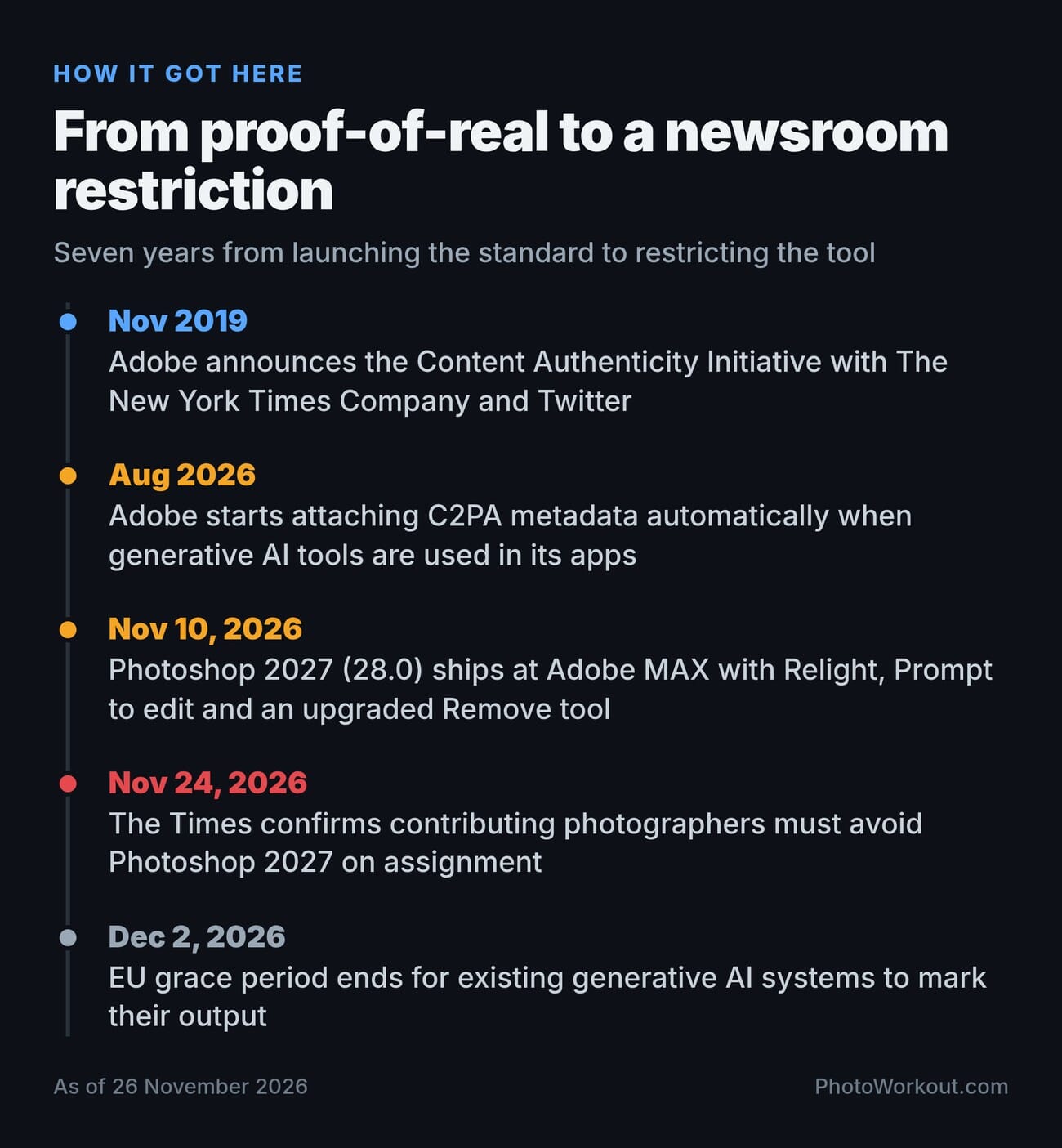
- It is a restriction on one software version for assignment work, not a break with Adobe. The Times helped launch Adobe’s Content Authenticity Initiative in 2019 and still requires disclosure of generative AI.
- Adobe’s own rule: when a generative AI tool creates or modifies content, C2PA metadata is attached automatically and cannot be disabled. It says this does not apply to traditional AI-powered features.
- Adobe publishes no tool-by-tool list, and nobody has published a test of which Photoshop 2027 actions write the label. The upgraded Remove tool and Relight are the open questions.
- Rolling back to Photoshop 2026 avoids the new tools, but the automatic labeling of generative edits is not specific to version 28. Checking your exported file is the only way to know.
One of the world’s most influential photo desks has told its freelancers not to use the newest version of the world’s most used photo editor. The New York Times is requiring contributing photographers to avoid Adobe Photoshop 2027 when working on assignment, because the paper says some of its functions use generative AI in ways a photographer may not notice.
That would be awkward for any news organization. It is stranger for this one: the Times stood next to Adobe in 2019 when the company launched the initiative behind Content Credentials, the metadata system meant to show how a picture was made. Seven years later, that same system can mark a working photographer’s file as AI-edited, and the Times does not want to find out the hard way which button does it.
For everyone who does not shoot for the Times, the useful question is the practical one. Which edits in Photoshop 2027 actually write an AI label into a file, how do you check a file you are about to send, and does rolling back help? Here is what is confirmed, what Adobe’s own documentation says, and what nobody has tested yet.
What the Times told its photographers
The instruction came in an email from two of the paper’s photography leaders, Meaghan Looram and Josh Haner. It surfaced on November 24, 2026, when a photographer posted it on Threads, and The Verge reported it the same day. The key sentence, as quoted by The Verge: “At this time, we are requiring that all contributing photographers avoid using Adobe Photoshop 2027 (release 28.0.0 and subsequent updates) when working on assignment for The Times.”
A Times spokesperson, Graham James, confirmed it to PetaPixel: “It has come to our attention that certain functions in Adobe Photoshop 2027 utilize generative AI in ways that may not be apparent to users of the software. At this time we are requiring that all contributing photographers avoid using this new version when working on assignment for The Times.”
- Who it covers: contributing, meaning freelance, photographers working on Times assignments. None of the reporting says it extends to staff, or to a photographer’s other work.
- What it covers: Photoshop 2027, release 28.0.0 and later. Earlier versions are not named.
- What it does not say: the Times has not told anyone to leave Adobe, and it names no replacement. Advice to stay on the previous version comes from commentators, not from the paper.
- Adobe’s side: Adobe had not responded to The Verge, PetaPixel or Creative Bloq as of November 26.
Why: hidden generative AI first, metadata second
Two worries are tangled together in this story, and they are worth separating. The first, and the only one in the Times’s public statement, is that a photographer could use generative AI without realizing it. That would collide with one of the strictest rulebooks in journalism. The paper’s ethics handbook says published images of real events “must be genuine in every way,” and that “no people or objects may be added, rearranged, reversed, blurred, distorted or removed from a scene.” Freelancers are bound by the same guidelines.
The second worry is the label. According to The Verge’s account of the email, it also warns that using those functions can lead to metadata that marks photographs as AI-generated. The email excerpts do not name Content Credentials or C2PA. Connecting the restriction to Adobe’s automatic tagging is The Verge’s reading, though it is the obvious one, because Adobe’s software is what writes that metadata.
What Adobe actually labels, in its own words
Adobe’s generative AI content labeling FAQ, last updated August 25, 2026, sets out the rule. It cites “the California AI Transparency Act and the EU AI Act” as the reason, and the wording is unusually blunt:
- “When qualifying generative AI tools are used to create or modify content in Adobe apps, C2PA metadata will be automatically attached to the file.”
- “This applies only to generative AI tools, not traditional AI-powered features.”
- “Under the new laws, this metadata cannot be disabled for qualifying content.”
- “Adobe does not automatically add visible AI labels to content.” The mark is in the file’s metadata, not on the picture.
The metadata can record the application, the generative model, the date and time, and whether the content was “wholly generated with generative AI or modified using generative AI.” That last distinction exists in the data. Whether a platform, a photo editor or a contest judge reads past the word “AI” is another matter, and it is the heart of the anxiety: a small generative touch-up and a fully synthetic image can both end up described as AI.
Two things in that FAQ matter for the Times story. The automatic labeling is not a Photoshop 2027 feature; it applies across Adobe’s apps and predates the release. And Adobe does not publish a list of which tools count as “qualifying generative AI tools” and which are “traditional AI-powered features.”
Which Photoshop 2027 edits are in question
Photoshop 2027 shipped on November 10 at Adobe MAX, and its release notes show why a photo desk would get nervous. PhotoWorkout covered the launch in the Adobe MAX recap. Sorting the features against Adobe’s rule gives three groups.
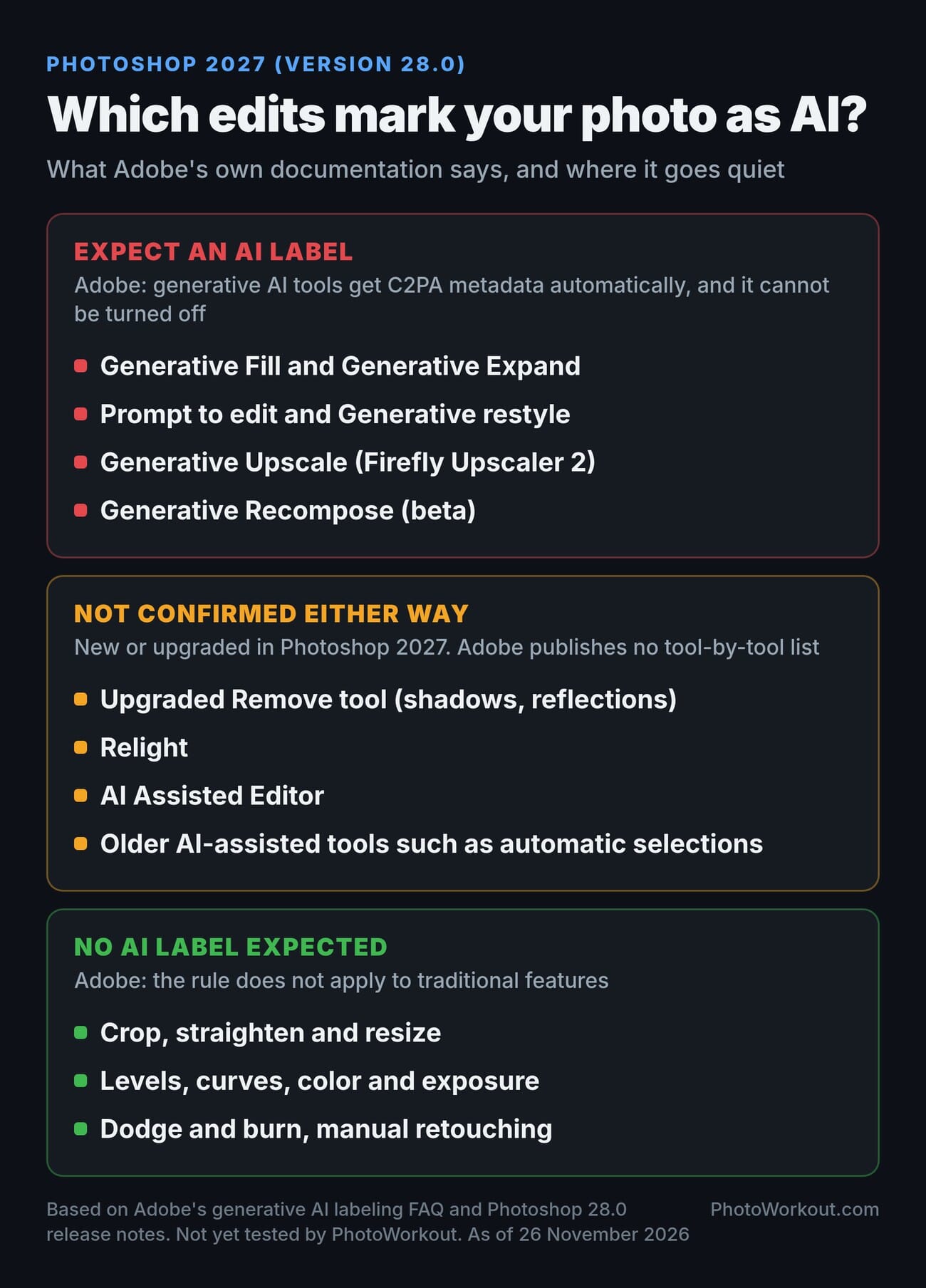
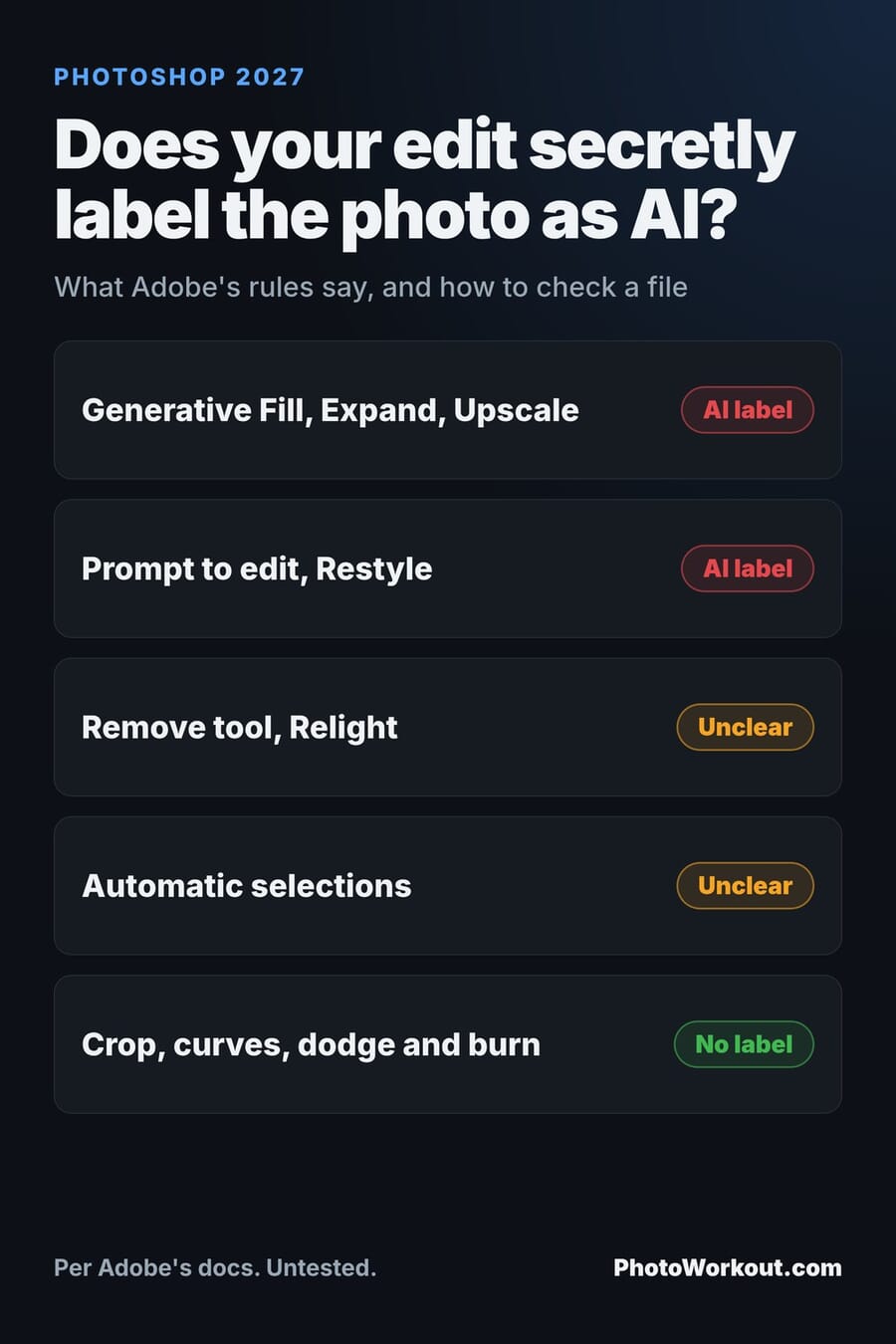
Expect a label. Anything Adobe itself calls generative: Generative Fill, Generative Expand, Prompt to edit and Generative restyle, Generative Upscale with the new Firefly Upscaler 2, and Generative Recompose (which Adobe reportedly says is still beta-only). These create or replace pixels with a generative model, which is exactly what the FAQ describes.
Not confirmed either way. This is where the Times’s phrase “may not be apparent to users” lands. The Remove tool, which many photographers think of as a smarter healing brush, was upgraded in 28.0: Adobe says it “now detects and removes shadows, reflections, ripples, and other contextually related effects.” Relight adds and reshapes light after the shot. The new AI Assisted Editor makes quick adjustments from a simplified interface. Adobe’s documentation does not say whether each of these counts as a qualifying generative tool, and The Verge notes it is “still not clear which specific Photoshop features the NYT is referring to,” adding that older tools such as automated selection may now be treated as part of the AI suite.
No label expected. Cropping, levels, curves, color correction and manual dodging and burning are not generative AI, and Adobe says the rule “applies only to generative AI tools.” No report shows a conventional edit being tagged as AI.
That last point deserves emphasis, because the story is spreading as “Photoshop tags everything as AI.” Nothing published so far demonstrates that. Equally, nobody has published a clean tool-by-tool test of version 28, PhotoWorkout included. In the Hacker News thread that pushed the story to more than 300 points, the recurring complaint was the blurred boundary, with one commenter writing that “Photoshop will use A.I. for things as simple as cropping, if you click the right button,” most likely a reference to Generative Expand, which sits inside the Crop tool. The Times is not claiming every edit is marked. It is declining to gamble on the ones nobody can vouch for.
Does rolling back to Photoshop 2026 fix it?
Partly. Installing the previous version takes away the tools that are new or upgraded in 28.0, which removes the “I did not know that was generative” risk for those features. PetaPixel reports that users can currently roll back to Photoshop 27.0; Adobe’s release notes list 27.11.1 as the current long-term-support build of Photoshop 2026. The route is the Creative Cloud desktop app, under the app’s “Other versions” menu.
What rolling back does not do is switch off the labeling. Adobe’s automatic C2PA metadata applies to generative tools across its apps, so Generative Fill in an older version falls under the same rule. An older Photoshop is a way to avoid surprises, not a way to use generative AI without a trace.
How to check whether your file says AI
Until someone publishes a full test, the reliable method is to inspect the file you are about to deliver. It takes a minute.
- Export the final file the way you normally would for the client or publication.
- Open Adobe’s Inspect tool at contentauthenticity.adobe.com/inspect, or the Content Authenticity Initiative’s Verify site, and drop the file in.
- Read what it reports. If Content Credentials are present, the tool shows the app used and whether generative AI was involved. If nothing is found, no C2PA metadata is attached.
- If you see an AI entry you did not expect, go back to an earlier saved version and redo the edit with a manual tool, then check again.
Two cautions. A clean result means no Content Credentials were found, not that the file is proven authentic, the same limit that applies to Apple’s SynthID watermark. And Content Credentials can be lost when a file passes through software or platforms that strip metadata, so the check is only meaningful on the file you actually send. For the wider toolkit, see PhotoWorkout’s guide to EXIF data and Content Credentials.
What it means if you do not shoot for the Times
- News and wire work: other agencies already bar generative edits. The Associated Press says it does “not allow the use of generative AI to add or subtract any elements.” No similar Photoshop 2027 guidance from AP, Reuters, Getty or AFP has surfaced, but the Times’s caution is a reasonable default for any assignment with a no-manipulation rule.
- Contests: organizers do check, as Nikon’s Small World disqualification showed. Read the rules on generative tools before using Remove or Relight on an entry.
- Clients and stock: if a contract says no AI, treat the middle band of the chart above as AI until Adobe says otherwise.
- Personal work: the label is information, not an accusation. It matters most when someone later asks whether a photo is real, a problem covered in “Is This Real?”.
The irony, and the context
Adobe announced the Content Authenticity Initiative in November 2019 “in collaboration with The New York Times Company and Twitter.” The Times is also a general member of C2PA, the standards body behind Content Credentials, though it does not sit on its steering committee. So this is not an outside critic rejecting provenance metadata. It is an early partner discovering that honest labeling cuts both ways: a system that records AI use faithfully will also record it when the photographer did not mean to use it.
The timing is not a coincidence either. Adobe’s FAQ ties the automatic labeling to new transparency laws, and December 2, 2026 is when the EU’s grace period ends for existing generative AI systems to mark their output in a machine-readable way, as explained in PhotoWorkout’s Article 50 guide. Software makers are turning labeling on by default and removing the off switch because the law tells them to. The provenance layer is also still maturing; a researcher recently forged a “verified” camera photo. Expect more collisions like this one as mandatory labels meet workflows that were built on trust.
What would resolve it is simple to describe: a published list from Adobe of exactly which tools write an AI entry, and a clear way for photographers to work with generative features switched off. Several commentators have called for the second. Adobe has announced neither.
Frequently Asked Questions
Did The New York Times ban Photoshop?
No. It told contributing photographers to avoid one version, Photoshop 2027 (28.0 and later), when working on assignment for the paper. Earlier versions are not covered by the instruction.
Does Photoshop 2027 label every edit as AI?
Nothing published shows that. Adobe says C2PA metadata is attached automatically only when generative AI tools are used, not for traditional AI-powered features. Which tools fall on which side is not fully documented.
Can I turn the AI metadata off?
Not for generative edits. Adobe’s FAQ says “this metadata cannot be disabled for qualifying content.” The separate, optional Content Credentials panel for attaching your own credentials remains under your control.
Is the AI label visible on the photo?
No. Adobe says it does not add visible AI labels automatically. The information is in the file’s metadata and shows up when the file is inspected, or when a platform chooses to display it.
How do I go back to the previous Photoshop?
In the Creative Cloud desktop app, open the menu next to Photoshop and choose Other versions, then install Photoshop 2026.
Bottom line
The Times has not turned on Adobe or on provenance metadata. It has decided that, on assignment, it cannot accept software where a familiar tool might quietly be generative and say so in the file. Until Adobe publishes exactly which Photoshop 2027 tools trigger the label, that is a sensible rule for any photographer whose work has to be provably unmanipulated: keep generative tools out of delivery files, stay on Photoshop 2026 for assignment work if in doubt, and inspect the final export before it leaves your machine.
Facts as of November 26, 2026. Adobe had not commented publicly at the time of writing.
Reporting
- The Verge: The New York Times warns photographers not to update Photoshop over AI features – First report, November 24, 2026; the email text
- PetaPixel: New York Times Prohibits Photographers From Using Photoshop 2027 – Spokesperson statement; rollback note
- Hacker News discussion – Community reaction, 300+ points
- CG Channel: Adobe releases Photoshop 28.0 – Release date; Generative Recompose beta note
Adobe and standards
- Adobe: Generative AI content labeling FAQ – The automatic C2PA labeling rule, last updated August 25, 2026
- Adobe: Photoshop on desktop release notes – Version 28.0 features and the 27.11.1 long-term-support build
- Adobe: Install previous versions of Creative Cloud apps – Rollback steps
- Adobe blog: Content Authenticity Initiative announcement – 2019 launch with The New York Times Company and Twitter
- C2PA: Membership – Steering committee and general members
Policies and law
- The New York Times: Ethical Journalism handbook – Photo integrity rules
- Associated Press: Standards around generative AI – AP's rule on generative edits
- Cuatrecasas: Digital Omnibus on AI published – December 2, 2026 transition date for Article 50(2)
Image Sources
- Featured image: Famartin / Wikimedia Commons, CC BY-SA 4.0 – The New York Times Building, Manhattan, June 2024; cropped
- Timeline, chart and pin – Infographics by PhotoWorkout