


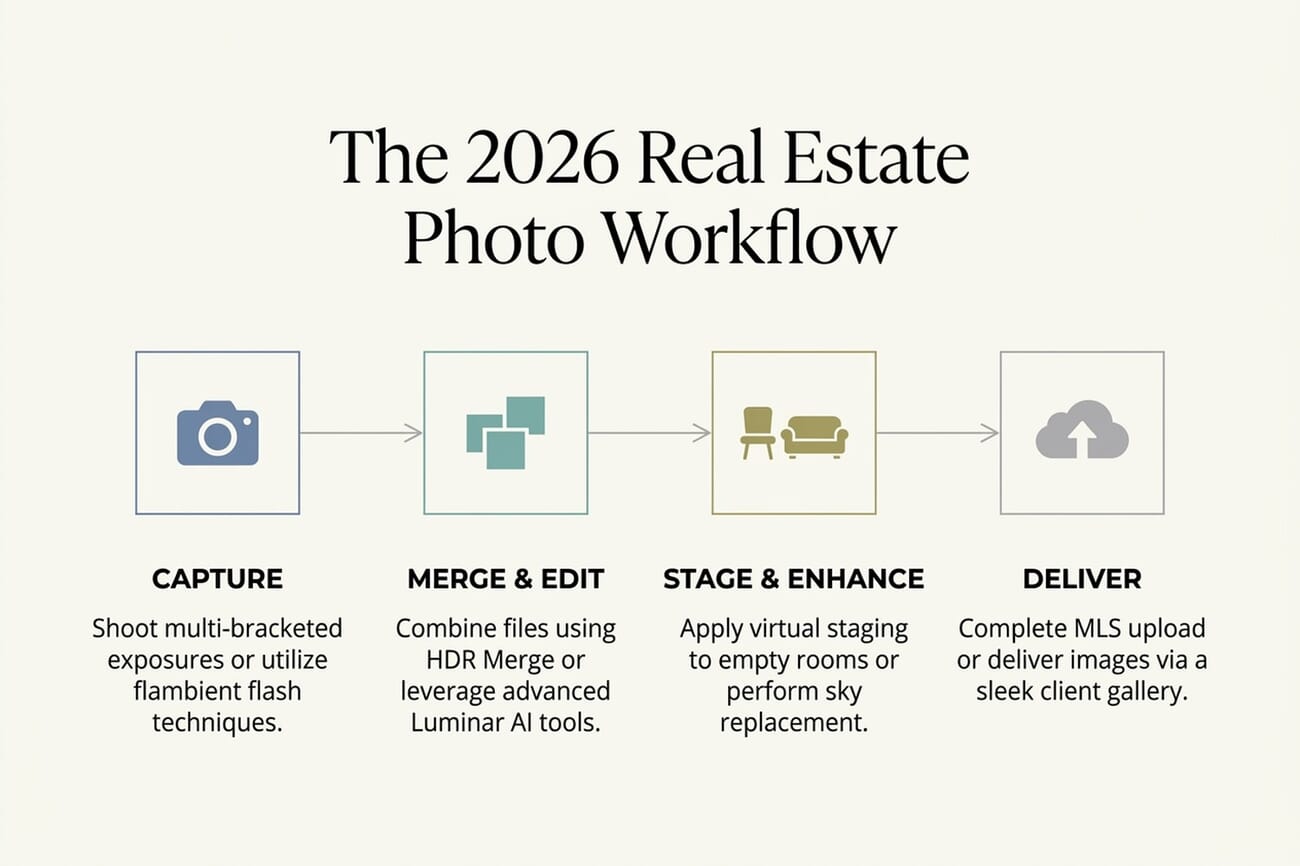
- In 2026 the “best real estate photography software” is no longer a single HDR app — it’s a workflow stack: capture, merge/edit, virtual stage, deliver.
- Adobe Lightroom Classic is the new default. Built-in HDR Merge, AI Denoise, Generative Remove, and integration with the rest of the Adobe stack make it the workhorse for working real estate photographers.
- Luminar Neo replaces Photomatix as the dedicated HDR + AI editor of choice. The HDR Merge module (which absorbed the old Aurora HDR) handles bracketed exposures in one click; AI sky replacement and relight cover the most common real estate edits.
- Virtual staging is now a separate category. BoxBrownie ($30/room, human-reviewed AI) and Styldod ($16-23/image, designer-led) are the two most-used services among working photographers.
- Photomatix Pro 7 still wins on deep tone-mapping control, but it’s no longer the default for most real estate workflows. Reasons covered below.
When you buy through links on our site, we may earn a commission at no cost to you. We evaluate products independently. Commissions do not affect our evaluations.
Why the “Best Real Estate Software” Question Has Changed
Five years ago, “best software for real estate photography” meant one thing: which HDR merge app produces the cleanest result from a bracketed shoot. The answer was almost always Photomatix, the dedicated HDR specialist that real estate photographers had used since 2008.
That question is now obsolete. Real estate photography in 2026 is a four-stage workflow (capture, merge & edit, stage & enhance, deliver), and no single tool covers all four well. Working photographers maintain a stack: a primary editor for catalog and basic edits, an HDR/AI tool for difficult scenes, a virtual staging service for empty rooms, and a delivery platform for the agent. The choice of stack determines speed, quality, and margin.
This guide covers the six tools that matter most in 2026: what each one does well, where each falls short, and which combination makes sense for which kind of photographer. The Photomatix-only era is over; the workflow-stack era is here.
Why Photomatix Isn’t #1 Anymore
Photomatix Pro 7 is still excellent at what it does: deep manual tone-mapping for bracketed exposures. It still has the most precise control over highlight recovery, shadow detail, and micro-contrast in the category, and for a particular kind of photographer who wants to dial in every parameter, Photomatix remains unmatched. The reason it’s no longer the default real estate pick is that the category has moved, in three shifts:
- Lightroom’s HDR Merge has caught up. Adobe’s built-in HDR Merge in Lightroom Classic is now competent for 90% of real estate scenes. Real estate photographers who already pay for Adobe (most do) get HDR for free, with the bonus of AI Denoise, Generative Remove, and Adaptive Presets in the same workflow.
- Flambient is overtaking HDR. The 2026 premium real estate technique is flambient — one ambient exposure plus several flash exposures, blended in Photoshop. Flambient produces cleaner, more natural-looking interiors and avoids the “HDR halo” that often telegraphs amateur work. Photomatix doesn’t help with flambient — it’s a pure HDR tool.
- AI tools collapsed the time advantage. Luminar Neo’s HDR Merge module (which absorbed the discontinued Aurora HDR), ON1 Photo RAW 2026, and Imagen all produce one-click results that rival Photomatix’s manual workflow at 1/10th the time. For real estate photographers shooting 100+ listings a year, that math is hard to argue with.
Photomatix isn’t broken. The category around it is different. Photographers who specifically want manual HDR control should still consider it (covered below). For everyone else, the 2026 stack starts with Lightroom plus an AI editor, with virtual staging layered on top.
The Six Real Estate Photography Tools That Matter in 2026
Each entry below covers what the tool does, what it costs, where it fits in the 2026 real estate workflow, and the honest pros and cons. The list runs in approximate order of how essential each one is for a working photographer, though most working photographers use 2–3 of these in combination, not just one.
1. Adobe Lightroom Classic — The 2026 Default

The default workhorse for real estate photographers in 2026. Built-in HDR Merge handles bracketed exposures, AI Denoise cleans high-ISO interiors, Generative Remove takes out clutter (light switches, wires, agent reflections), and the catalog system scales from one shoot to several hundred a year.
7-day free trial available.
The single biggest argument for Lightroom Classic in 2026 is that it does enough. Real estate photographers who already use it for catalog management and basic edits don’t need to leave it for the HDR step, and that consolidation matters more than any individual tool’s edge case. Every minute spent moving files between apps is a minute that doesn’t go into the next shoot.
Adobe’s recent AI updates close most of the gaps that used to send real estate shooters elsewhere. Generative Remove takes out unwanted reflections, lit lamps in daytime shots, and the photographer’s own shadow on hardwood floors with one click. AI Denoise cleans up the high-ISO frames that come out of bracketed shoots in dim interiors. Adaptive Presets adjust automatically to scene type (interior vs exterior, dim vs bright) without manual tweaks.
The honest weakness: when an HDR scene is genuinely difficult, with strong window blowout, mixed colour temperatures, or deep shadows in furniture, Lightroom’s HDR Merge produces a flat, slightly muddy result that needs significant tonal work to recover. For 90% of real estate scenes that’s a non-issue. For the other 10%, that’s where Luminar Neo or Photomatix earn their keep.
2. Luminar Neo — The Photomatix Successor

Skylum’s Luminar Neo absorbed the discontinued Aurora HDR in 2022 and now includes a dedicated HDR Merge module. For real estate photographers, it’s the cleanest single-purchase alternative to Lightroom — one-click HDR, AI sky replacement (huge for exterior shots), interior relight, and noise reduction.
Free trial available on Mac and Windows.
Luminar Neo is the tool most working real estate photographers reach for when Lightroom’s HDR Merge produces a flat result. The HDR Merge module, which absorbed the standalone Aurora HDR product when Skylum discontinued it in 2022, applies the tone-mapping logic Aurora was known for, in a one-click flow that takes 5-10 seconds per merge. The output is consistently cleaner than Lightroom’s and avoids the slightly painterly look that the older Photomatix algorithm sometimes produced.
Where Luminar Neo really pulls ahead for real estate work is the AI feature set beyond HDR. Sky Replacement saves entire exterior shoots when the weather is uncooperative: the algorithm correctly handles the building’s edge, foreground trees, and reflective surfaces in a way that traditionally required Photoshop work. Interior Relight rebalances rooms where the photographer didn’t have time or gear to set up flash. Atmosphere AI adds subtle window light or rim light to interiors that look slightly flat after merging. Each of these is a 30-minute Photoshop task collapsed into a single slider.
The pricing model takes some work to understand. Skylum sells perpetual licenses from $119 (desktop) to $179 (the Max tier with mobile and the creative library) that include all current features, but major new AI tools sometimes ship as paid add-ons or as part of an annual upgrade pass. Photographers buying Luminar Neo in 2026 get more than enough functionality for the price, but should expect to pay for additional AI tools that ship in 2027-28. Compared to Adobe’s subscription model, the long-term cost is competitive but harder to predict.
3. BoxBrownie — Best Virtual Staging Service

The most-used virtual staging service among working real estate photographers in 2026. BoxBrownie runs AI-generated staging through professional photo editing teams before delivery — which catches the small artifacts that pure-AI services often miss (warped perspective, weird furniture proportions, shadows pointing the wrong direction).
No PhotoWorkout affiliate program — direct link.
BoxBrownie’s market position rests on one decision Australia-based founders made in 2016: every AI-generated staging passes through a human reviewer before delivery. That reviewer catches the artifacts that fully-automated services routinely miss, such as sofas that don’t quite sit on the floor, shadows pointing the wrong direction, and mirrors that reflect the wrong room. The result is staging that holds up under MLS-compliant scrutiny, which matters when buyers cross-reference listings against photos.
For working photographers, BoxBrownie’s economics are straightforward. At a flat US$30 per room, pay-as-you-go, buying staging and reselling it to agents at $40-75 per room nets $10-45 of margin per room with zero hands-on work. A photographer shooting 30 listings a month, with an average of 3 staged rooms each, can add $900-4,050/month to revenue from staging alone. That’s frequently more than the photography itself nets per listing.
The limitations are also worth knowing. The 24-48-hour turnaround is reliable, but it means BoxBrownie is poor for live client presentations: agents who want to show three staging variants on a phone during a listing appointment need a different tool (one of the pure-AI services like Apply Design or Staging AI). The customization is menu-driven rather than free-form, so unconventional staging requests (modernist furniture in a Victorian, for example) require either custom briefing or a different provider.
4. Styldod — Designer-Led Premium Staging

The premium alternative to BoxBrownie for photographers serving luxury and high-end residential listings. Styldod’s work is done by professional designers (not photo retouchers) familiar with real estate aesthetics — the staging reads as more deliberate and editorial than fully-automated services.
No PhotoWorkout affiliate program — direct link.
Styldod competes with BoxBrownie on the high end. Where BoxBrownie’s value proposition is “AI staging with human QA at scale,” Styldod’s is “designer-led staging that holds up against luxury listing photography.” The work is genuinely different. Styldod’s designer team makes deliberate choices about where the eye lands, how furniture conversation groups, and what scale of art piece sits above the fireplace: choices that read as composed, not algorithmic.
For luxury listing photographers ($1M+ properties), the difference is visible. Buyers at this price point are sophisticated viewers who notice when staging is generic, and listings with generic staging tend to sit longer. Styldod’s standard tier ($23/image, $16/image on bulk orders of 8+) approaches the quality of traditional human staging at a fraction of the cost, which is hard to ignore.
The subscription model is where Styldod’s economics get interesting for high-volume photographers. The all-in-one platform bundles virtual staging, 3D rendering, and floor plan services. For a listing photographer who’s already serving clients with photo packages, adding 3D rendering and floor plans as upsells using the same vendor is significant additional revenue without adding a new supplier relationship. The ROI calculation only makes sense above a certain volume threshold, but for working photographers serving 20+ luxury listings/month, the bundling pays.
5. ON1 Photo RAW 2026 — The Adobe-Free Alternative

The strongest single-purchase alternative to the Adobe stack for real estate photographers who want to escape the subscription. Built-in HDR merge, AI sky replacement, AI noise reduction, and a catalog system that’s good enough for most working photographers shooting under ~200 listings a year.
30-day free trial available.
ON1 Photo RAW is the fork in the road for real estate photographers tired of Adobe’s subscription model. The all-in-one app covers RAW processing, catalog management, HDR merge, AI sky replacement, and noise reduction: most of the Lightroom + Photoshop combination, in a single perpetual-license purchase. For a photographer shooting under 200 listings a year, the math is straightforward: $99 once vs. roughly $240/year ongoing for Adobe’s Photography Plan, plus the freedom from Adobe’s tier escalation.
The interface borrows familiar conventions from Lightroom (module-based layout, develop-and-organize workflow, similar adjustment panels), which keeps the switching cost low. Lightroom users can move to ON1 over a weekend without retraining muscle memory. The catalog system isn’t quite as polished at very large scale (50,000+ images), but for working real estate photographers managing 5,000-15,000 images per year, it’s effectively equivalent.
The honest weaknesses are in the long tail. ON1’s third-party plugin ecosystem is much smaller than Adobe’s. If a workflow depends on specific Lightroom plugins (Imagen, Aftershoot, certain preset packs), those may not have ON1 equivalents. AI features lag a generation behind Adobe’s, mostly because ON1 has fewer engineering resources to compete on every front. And the support community is thinner: Lightroom problems get answered on Reddit in minutes, while ON1 problems sometimes wait days. None of these are deal-breakers, but they’re worth knowing before switching.
6. Photomatix Pro 7 — Still the Deepest HDR Control
The dedicated HDR specialist that real estate photographers used as their default for over a decade. Photomatix Pro 7 still has the most precise tone-mapping control in the category — six HDR styles including Exposure Fusion (unbeatable for natural-looking results), batch processing for high-volume shoots, and 32-bit DNG output that round-trips cleanly to Lightroom and Photoshop.
Free trial · $29 upgrade from prior versions.
Photomatix Pro 7’s reason to exist in 2026 is the same as it was in 2008: nobody else gives this much manual control over the HDR tone-mapping process. The six HDR styles range from highly artistic (Painterly, Vibrant) to deliberately neutral (Exposure Fusion, Tone Mapping Compressor), and within each, sliders for highlights, shadows, micro-contrast, lighting effects, and detail let a photographer dial in a look that’s genuinely impossible to replicate in one-click tools. For HDR enthusiasts who treat tone-mapping as part of their craft, that depth still matters.
The Exposure Fusion mode deserves special mention. While most HDR tools start by reconstructing a 32-bit-per-channel scene-referred file and then tone-mapping it down to 16-bit, Exposure Fusion takes a fundamentally different approach: it blends the bracketed source files directly, weighted by which exposure has the best detail in each region. The result is HDR that looks like a single well-exposed photograph, with no halos, no over-cooked midtones, and none of the “HDR look.” For real estate, that’s often exactly what’s needed.
Why it isn’t the default in 2026 comes down to the trade-off between depth and breadth. Photomatix doesn’t help with virtual staging, sky replacement, AI relight, or flambient compositing, which are the four edits real estate photographers do most often after the HDR merge step. A photographer using Photomatix needs to bring all those edits to other tools (Photoshop, BoxBrownie, Luminar Neo). For someone who wants a single tool that covers most of the workflow, Photomatix is now an addition rather than a starting point.
Also Worth Knowing About
Three more tools that didn’t make the top six but are worth knowing about for specific use cases:
- Topaz Photo AI — best-in-class noise reduction and upscaling. Useful as a single-pass pre-processor before Lightroom or Luminar Neo, especially for high-ISO interiors shot without flash. Topaz Photo AI on the Topaz site.
- Imagen — AI editing assistant that learns your style and applies it to a full shoot in one batch. Particularly useful for high-volume real estate photographers who want consistent edits without sitting at the computer.
- Fotello — real-estate-specific cloud platform with $30/listing pricing that bundles white-label branding, virtual staging, twilight edits, and priority support. Designed for property photographers who don’t want to manage multiple service providers.
Which Stack to Pick — by Photographer Type
The right stack depends on shooting volume, listing tier, and how much time is available for editing:
- Entry-level real estate photographer (under 5 listings/month): Lightroom Classic alone. Add BoxBrownie or Styldod when a listing is empty.
- Working real estate photographer (5-30 listings/month): Lightroom Classic + Luminar Neo for difficult HDR scenes + BoxBrownie for staging. Photomatix optional if deep tone-mapping is your style.
- High-volume operator (30+ listings/month): Lightroom Classic + Imagen for batch consistency + BoxBrownie volume pricing for staging. Add Topaz Photo AI for noise on indoor shoots.
- Luxury and high-end residential: Lightroom Classic + Photoshop for flambient compositing + Styldod for designer-led staging. Skip HDR — flambient produces better results at this tier.
- Anti-Adobe operator: ON1 Photo RAW 2026 + Affinity Photo for flambient + BoxBrownie. Roughly equivalent results, no subscription.
Frequently Asked Questions
Is Lightroom enough for real estate photography in 2026?
For most working photographers, yes. Lightroom Classic’s HDR Merge handles bracketed exposures, AI Denoise cleans high-ISO interiors, Generative Remove takes out clutter, and the catalog system scales from one shoot to several hundred. The cases where Lightroom alone isn’t enough are virtual staging (use BoxBrownie or Styldod) and creative tone mapping for difficult scenes (use Luminar Neo or Photomatix).
Why isn’t Photomatix the top pick anymore?
There are three reasons. First, Lightroom’s built-in HDR Merge is now competent enough that most real estate photographers don’t need a dedicated HDR app. Second, flambient (multi-flash plus ambient blend) has overtaken HDR as the technique that wins listing photos in 2026, and Photomatix doesn’t help with flambient. Third, Photomatix Pro 7’s interface and AI features lag behind Luminar Neo and ON1 Photo RAW, both of which now offer one-click HDR plus broader editing tools.
HDR or flambient for real estate listings?
It depends on volume. HDR (bracketed exposures merged in software) is faster and cheaper for high-volume listings: five rooms in 30 minutes is realistic. Flambient (one ambient frame plus several flash frames blended in Photoshop) takes longer per shoot but produces cleaner, more natural-looking interiors that win more listings at the high end. Most working real estate photographers in 2026 use HDR for entry-level listings and flambient for premium ones.
Is virtual staging worth it?
For empty or sparsely-furnished listings, the answer is yes, by a large margin. Virtually staged listings sell faster and at higher prices than empty ones. At $16-30 per room, services like BoxBrownie and Styldod pay back within the first listing if they accelerate the sale by even a few days. Photographers who offer virtual staging as an add-on typically charge $40-75 per room and pocket the margin.
Is ON1 Photo RAW a real Lightroom alternative?
For real estate photographers, the answer is increasingly yes. ON1 Photo RAW 2026 has built-in HDR merge, AI sky replacement, AI noise reduction, and a one-time-purchase pricing model that escapes Adobe’s subscription. The catalog system isn’t quite as polished as Lightroom’s, but for photographers shooting a manageable volume (under ~200 shoots/year), the cost savings add up fast.
What about iPhone real estate photography?
iPhones now produce listing-acceptable images for entry-level listings, especially on recent iPhone Pro models running iOS 26. They aren’t a substitute for a full-frame body on premium listings, but for under-$300K homes or rental listings, an iPhone Pro plus a small tripod plus the apps above (Lightroom Mobile, Luminar Mobile) can produce work that rivals 2018-era DSLR output. See our iPhone real estate photo guide for the full setup.
The Bottom Line
The shortest version: start with Lightroom Classic, add Luminar Neo for difficult HDR scenes, and use BoxBrownie for any empty rooms. That stack covers 90% of real estate photography work in 2026 at a manageable cost: $19.99/month for Adobe, from $119 one-time for Luminar Neo, and $30 per virtually-staged room.
Photomatix Pro 7 still has its place for photographers who want manual tone-mapping control or a perpetual-license HDR specialist. It just isn’t the right answer to the “best real estate software” question for most photographers any more, because the question itself has changed.
Image credits: Featured image, 2026 workflow infographic, software thumbnail tiles, and Pinterest pin generated in-house by PhotoWorkout. Software thumbnails are stylized editorial illustrations, not the actual brand logos.
Research and pricing data behind this guide:
2026 software landscape
- Imagen — 10 Best HDR for Real Estate in 2026 – Industry overview of AI-driven HDR tools and their real estate use cases.
- AI Home Design — Flambient Real Estate Photography 2026 Guide – Why flambient is overtaking HDR as the dominant 2026 technique for premium listings.
- Photo and Video Edits — Best HDR Software for Real Estate – Side-by-side comparison of the major HDR tools used by working real estate editors.
- DIY Photography — 2026 Trend: AI Meets Film Aesthetics – Context on AI photo tools converging with traditional aesthetics in 2026.
Virtual staging pricing & reviews
- Amerisave — 10 Best Virtual Staging Apps for 2026 – Roundup of the leading virtual staging platforms and their pricing tiers.
- Edensign — Best AI Virtual Staging Software for 2026 – Comparison of speed, quality, and scalability across major staging tools.
- Bella Virtual Staging — 10 Best Virtual Staging Software 2026 – Independent review of staging tools with a focus on photographer-friendly features.
Photomatix & Lightroom HDR background
- HDRsoft — Photomatix Pro 7 Reviewer's Guide – Official documentation on Photomatix Pro 7's tone-mapping features and batch processing.
- Skylum — HDR Merge inside Luminar Neo – Skylum's HDR module page (the technical successor to Aurora HDR).
- ON1 — Real Estate Photo Editing – ON1 Photo RAW's real-estate-specific feature page.
Image Sources
- PhotoWorkout editorial illustrations – Featured image, 2026 workflow infographic, software thumbnail tiles, and Pinterest pin generated in-house. Software thumbnails are stylized editorial illustrations — not the actual brand logos.
This guide contains affiliate links to Adobe, Skylum (Luminar Neo), Topaz Labs, and HDRsoft (Photomatix). PhotoWorkout earns a commission on qualifying purchases at no extra cost to you. Recommendations are based on current product capabilities, not affiliate revenue.



