


Key Takeaways: Best AI Photo Editors in 2026

AI photo editing has transformed from a novelty into an essential workflow tool. Here’s what matters in 2026:
- Best overall: Adobe Photoshop — Generative Fill, Firefly integration, and the new voice-controlled AI Assistant set the standard
- Best for beginners: Luminar Neo — One-click AI enhancements with intuitive interface
- Best for enhancement: Topaz Photo — Industry-leading noise reduction and sharpening
- Best free option: Pixlr – AI-powered editing in your browser, phone, or desktop at no cost
- Best for batch editing: Imagen AI — Learns your style and applies it automatically
When you buy through links on our site, we may earn a commission at no cost to you. We evaluate products independently. Commissions do not affect our evaluations.
Introduction
AI has fundamentally changed photo editing. What once required hours of manual work — removing objects, enhancing details, fixing exposure — now happens in seconds with a single click. The technology has matured beyond gimmicks into genuinely useful tools that professional photographers rely on daily.
The challenge now isn’t finding AI photo editors — they’re everywhere. It’s finding the right one for your workflow. Some excel at enhancement (noise reduction, sharpening), others at generative tasks (removing objects, extending backgrounds), and still others at batch processing thousands of images.
This guide covers the best AI photo editing software in 2026, from professional desktop applications to accessible online tools.
1. Adobe Photoshop

The industry standard, now supercharged with Firefly AI. Generative Fill, Generative Expand, and AI-powered selection tools make complex edits effortless.
$22.99/month (Photography Plan)
Adobe Photoshop remains the benchmark for professional photo editing, and its AI capabilities now lead the industry. The integration of Adobe Firefly has transformed what’s possible:
Generative Fill lets you select any area and describe what you want — “add a mountain range,” “remove the person,” “extend this background” — and Photoshop creates photorealistic results. It’s not perfect every time, but when it works (which is often), it’s indistinguishable from manual editing.
Generative Expand extends images beyond their original borders, useful for changing aspect ratios or creating more breathing room in compositions.
AI-powered selection tools (Select Subject, Object Selection, Remove Background) now work with remarkable accuracy. What once took minutes of careful masking now happens in seconds.
Neural Filters offer one-click enhancements: skin smoothing, style transfer, colorization of black-and-white photos, and more.
The Photography Plan ($22.99/month) includes Photoshop, Lightroom, and Lightroom Classic — making it excellent value for serious photographers.
2. Luminar Neo

AI-first photo editor designed for photographers who want powerful results without the complexity. One-click enhancements that actually work.
From $99 (lifetime) or $9.95/month
Luminar Neo (now often just “Luminar”) takes a different approach than Photoshop: it’s built from the ground up around AI, making advanced edits accessible to everyone.
Key AI features:
- Enhance AI — One slider adjusts exposure, contrast, shadows, and highlights intelligently
- Sky AI — Replace skies with realistic lighting matching and reflection adjustments
- GenErase — Remove unwanted objects with AI-powered content-aware fill
- GenExpand — Extend image boundaries with generated content
- Portrait AI — Face and body enhancements with natural results
- Denoise and Sharpen — AI-powered noise reduction and detail recovery
- Upscale AI — Enlarge images without quality loss
The lifetime purchase option (around $99 on sale) makes Luminar attractive for photographers avoiding subscriptions. It also works as a plugin for Lightroom and Photoshop.
3. Topaz Photo
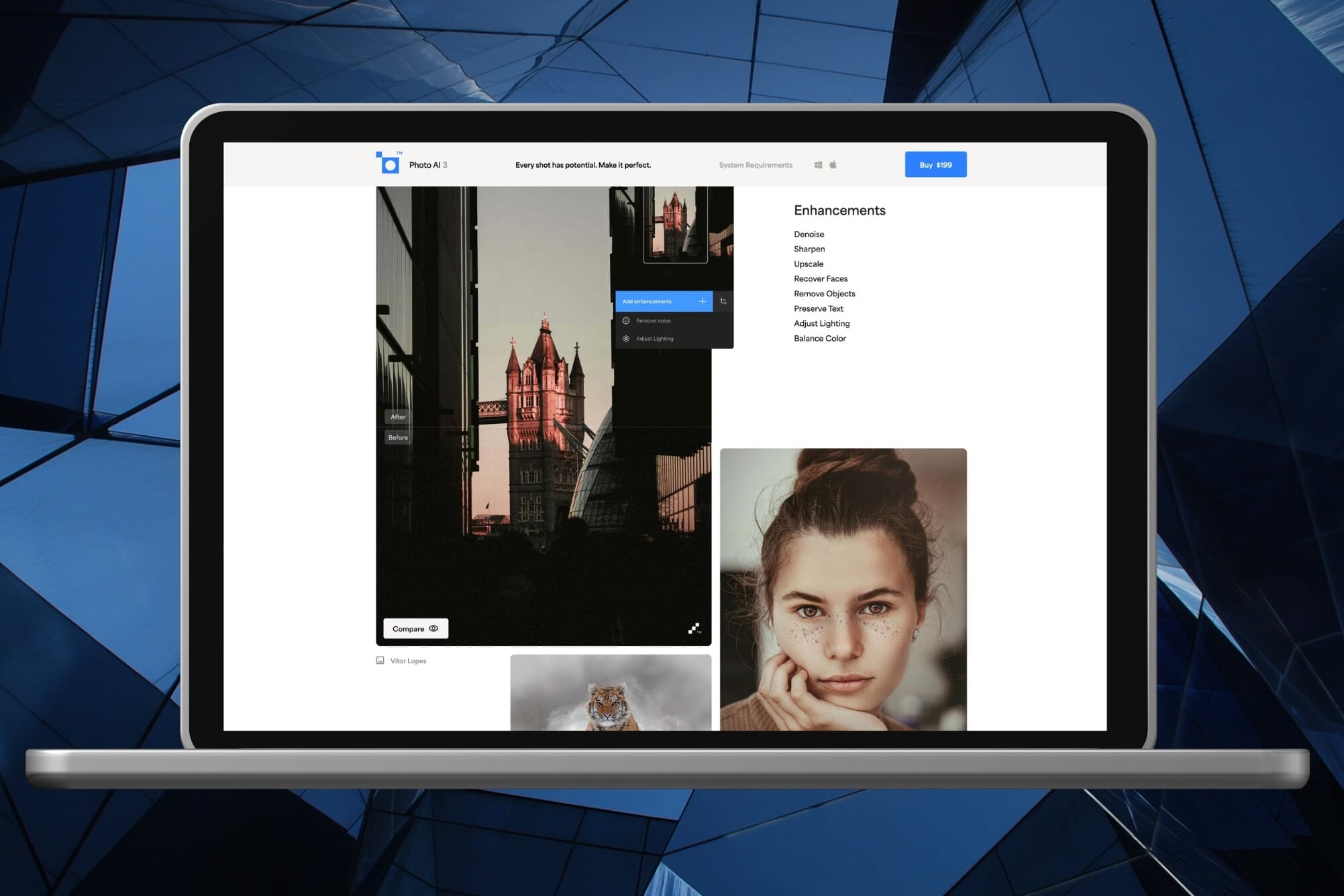
The specialist in AI enhancement — noise reduction, sharpening, and upscaling that outperforms everything else on the market.
From $17/month
Topaz Photo (formerly Topaz Photo AI) specializes in image enhancement rather than creative editing. If you need to rescue noisy high-ISO shots, sharpen slightly soft images, or upscale for large prints, nothing beats it.
What sets it apart:
- Noise reduction that preserves texture while eliminating grain
- Sharpening that recovers detail from motion blur and soft focus
- Face Recovery with “Realistic” and “Creative” modes
- Upscaling via Wonder Model and Standard MAX
- Cloud rendering for faster processing
The shift to subscription pricing ($17-21/month) is the main drawback. But for photographers who regularly push their gear to its limits — wildlife, sports, events — Topaz Photo is indispensable.
Related: Topaz Photo Review
4. DxO PhotoLab

RAW processor with exceptional AI noise reduction (DeepPRIME XD) and lens correction profiles for technically perfect images.
$229 (one-time)
DxO PhotoLab takes a more technical approach to AI. Its DeepPRIME XD noise reduction is arguably the best available for RAW files, and its lens correction profiles are unmatched in accuracy.
The one-time purchase model ($229) appeals to photographers who prefer ownership over subscriptions. PhotoLab integrates with Lightroom as an external editor, making it easy to add DeepPRIME processing to existing workflows.
5. Imagen AI

AI that learns YOUR editing style and applies it to thousands of photos. Built specifically for high-volume photographers.
From $7/month (pay per edit available)
Imagen AI solves a specific problem: batch editing large shoots consistently. It learns from your previous Lightroom edits, then applies your style to new photos automatically.
Wedding and event photographers editing thousands of images find Imagen transformative. Instead of applying presets and tweaking each image, Imagen analyzes your editing patterns and makes intelligent adjustments that match your style.
The pay-per-edit model makes it accessible for occasional use, while subscription plans work better for high-volume shooters.
6. ON1 Photo RAW

Complete photo editor with AI tools, cataloging, and effects — all in one application with no subscription required.
$99.99 (one-time)
ON1 Photo RAW combines cataloging, RAW processing, and creative editing with AI assistance. The one-time purchase ($99.99) includes a year of updates.
AI features include:
- AI Match for automatic tone and color matching
- Sky Swap with AI-powered sky replacement
- AI Masking for intelligent selections
- NoNoise AI for noise reduction
- Resize AI for upscaling
For photographers who want one application that does everything without subscriptions, ON1 is a strong Lightroom alternative.
7. Pixlr

AI-powered photo editor available in your browser, on your phone, and as a desktop app. Generous free tier with professional-grade tools including batch editing and templates.
Free tier available | Plus from $1.99/mo | Pro from $7.99/mo
Pixlr has evolved from a simple browser editor into a full-featured AI photo editing platform. It runs everywhere – in your browser, as a mobile app, or as a desktop application – making it the most accessible editor on this list. The free tier is surprisingly capable, offering tools that rival paid software.
Key AI features:
- AI Background Removal – One-click cutouts with clean edges
- AI Object Removal – Remove unwanted elements from photos seamlessly
- AI Image Generator – Create images from text prompts
- Batch Editor – Process multiple photos at once with consistent edits
- Templates – Thousands of design templates for social media, marketing, and more
- Layer-based editing – Full layer support comparable to Photoshop
Pixlr offers three pricing tiers: a free plan with ads, Pixlr Plus ($1.99/month) for casual users, and Pixlr Pro ($7.99/month) for professionals who need batch processing, premium templates, and priority AI processing. For photographers who need quick edits on the go or want to avoid hefty software subscriptions, Pixlr delivers remarkable value.
8. Remini

Mobile-first AI enhancer that excels at restoring old photos and improving low-resolution images.
Free (Pro from $9.99/week)
Remini focuses on one thing: making low-quality images look better. It’s particularly effective for:
- Restoring old family photos
- Enhancing faces in low-resolution images
- Improving heavily compressed images
The results can be impressive, though the weekly subscription ($9.99) is expensive for what’s essentially a one-trick pony. Good for occasional restoration projects.
9. Photoroom

AI-powered background removal and product photography tool. Perfect for e-commerce and social media content.
Free (Pro from $9.99/month)
Photoroom has become essential for e-commerce sellers and content creators. Its AI background removal is remarkably accurate, even with complex edges like hair.
Key features:
- One-tap background removal
- AI-generated studio backgrounds
- Batch processing for product catalogs
- Templates sized for marketplaces (Amazon, Etsy, eBay)
If you sell products online or create social media content with clean backgrounds, Photoroom is purpose-built for you.
Which AI Photo Editor Should You Choose?
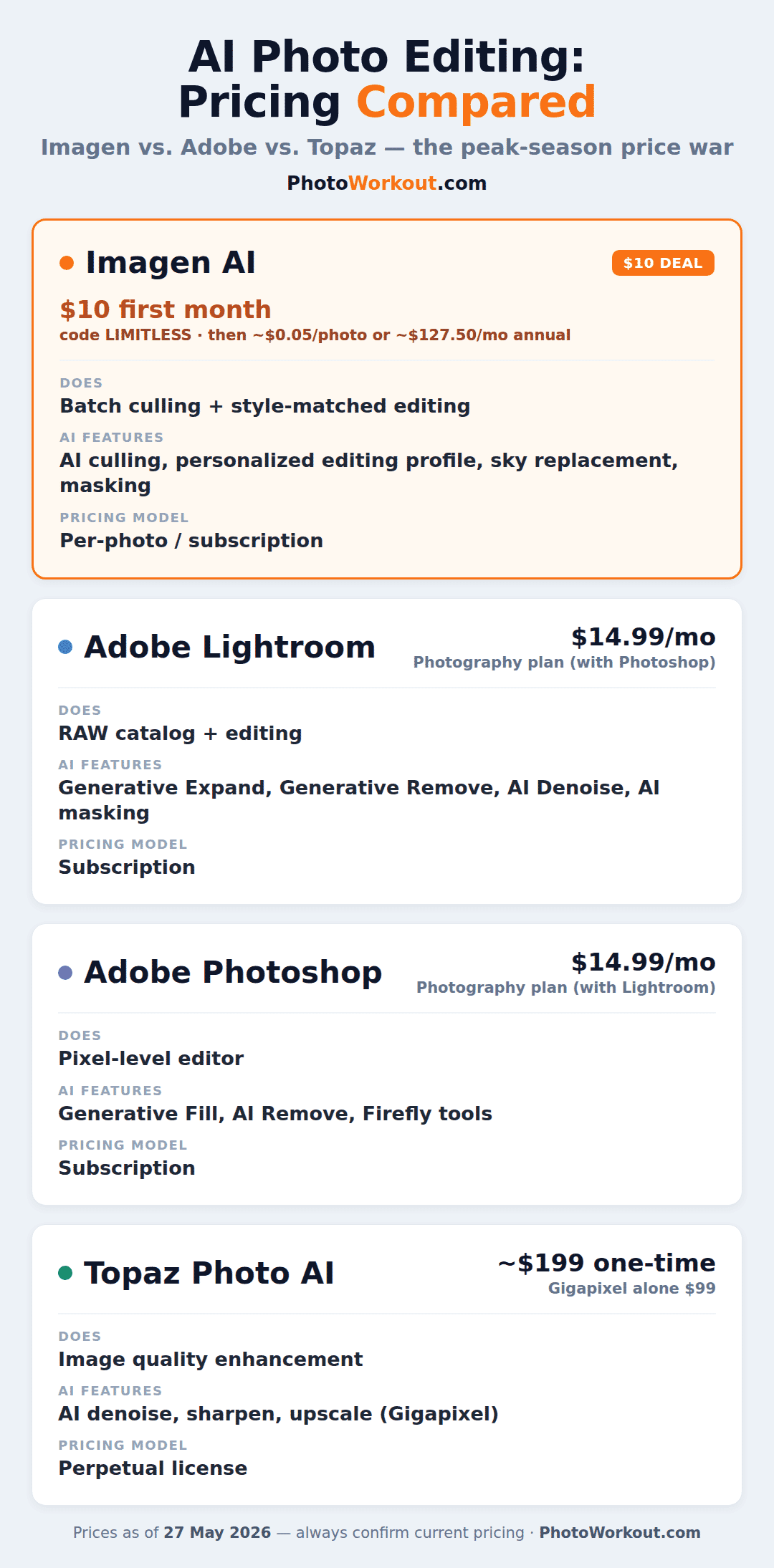
Pricing is often the deciding factor. For a deeper breakdown of how these tools compare on cost — including Imagen’s $10 first-month deal — see our AI photo editing pricing comparison.
The right choice depends on your needs:
- Professional photographers: Adobe Photoshop remains the most capable, especially with Generative Fill
- Beginners: Luminar Neo offers the easiest path to impressive results
- Enhancement specialists: Topaz Photo for noise reduction and sharpening
- High-volume shooters: Imagen AI for batch editing thousands of images
- Budget-conscious: Pixlr (free) or ON1 Photo RAW (one-time purchase)
- E-commerce/social: Photoroom for background removal and product shots
- Photo restoration: Remini for old and low-quality images
Many photographers use multiple tools: Lightroom for organization and basic editing, Topaz Photo for enhancement, and Photoshop for complex creative work. The best workflow combines the strengths of different applications.
Google Gemini is another option worth exploring – it lets you edit photos using text prompts for free, handling relighting, season swaps, and creative transformations directly in your browser.



