


- Before trying any recovery app, check the native trash folder first — Samsung Gallery, Google Photos, Xiaomi, OnePlus, and Pixel all keep deleted photos for 30-60 days. Most recoveries end here without installing anything.
- On Android 11 and newer, Scoped Storage blocks raw-partition scanning on non-rooted phones. Recovery apps mostly surface cached thumbnails and MediaStore previews — not true sector-level recovery.
- The three Android apps still worth installing in 2026: DiskDigger Photo Recovery (100M+ installs, canonical), DigDeep Image Recovery (4.0-star rating, best-rated of the category), and File Recovery – Photo Recovery (4.2 stars, freshest updates).
- Dumpster is the only prevention play that matters — install it BEFORE losing photos, and it catches everything deleted afterward. It cannot recover anything that vanished before installation.
- When on-device apps find nothing, move to a PC-based tool like Tenorshare UltData or iMobie DroidKit before paying for a professional recovery service ($200-$2,000).
The panic hits fast. One wrong tap on the Samsung Gallery, one mid-sync glitch in Google Photos, one accidental factory reset trying to downgrade a stubborn OS — and 2,000 photos of the last family holiday disappear from the phone. Every “how to recover deleted photos on Android” guide promises a miracle app; most of them are selling hope.
This guide takes a different approach. Android 11 and later locked down raw storage access with Scoped Storage, which means the “deep scan” most recovery apps advertise no longer works the way users think it does on an unrooted phone. The real recovery path in 2026 starts with Android’s own built-in trash folders, moves to a short list of on-device apps that genuinely still function, and only escalates to PC-based tools or professional services when earlier tiers fail.
Every app recommendation below has been checked against April 2026 Play Store ratings, user-complaint patterns, and actual Android 14/15 behavior. Three apps that appeared on previous versions of this list — EaseUS MobiSaver, Dr.Fone, and Systweak Photo Recovery — were dropped this cycle because their current ratings and user reports no longer clear the bar (more on why below).
When you buy through links on our site, we may earn a commission at no cost to you. We evaluate products independently. Commissions do not affect our evaluations.
First 5 Minutes: The Emergency Checklist
Deleted photos do not vanish instantly. Android marks the storage blocks as free and moves on — the actual image data stays intact until another write overwrites it. Every minute of continued phone use increases the odds a new app install, a software update, or an auto-downloaded photo overwrites the files. The first five minutes after realizing photos are gone are the most important.
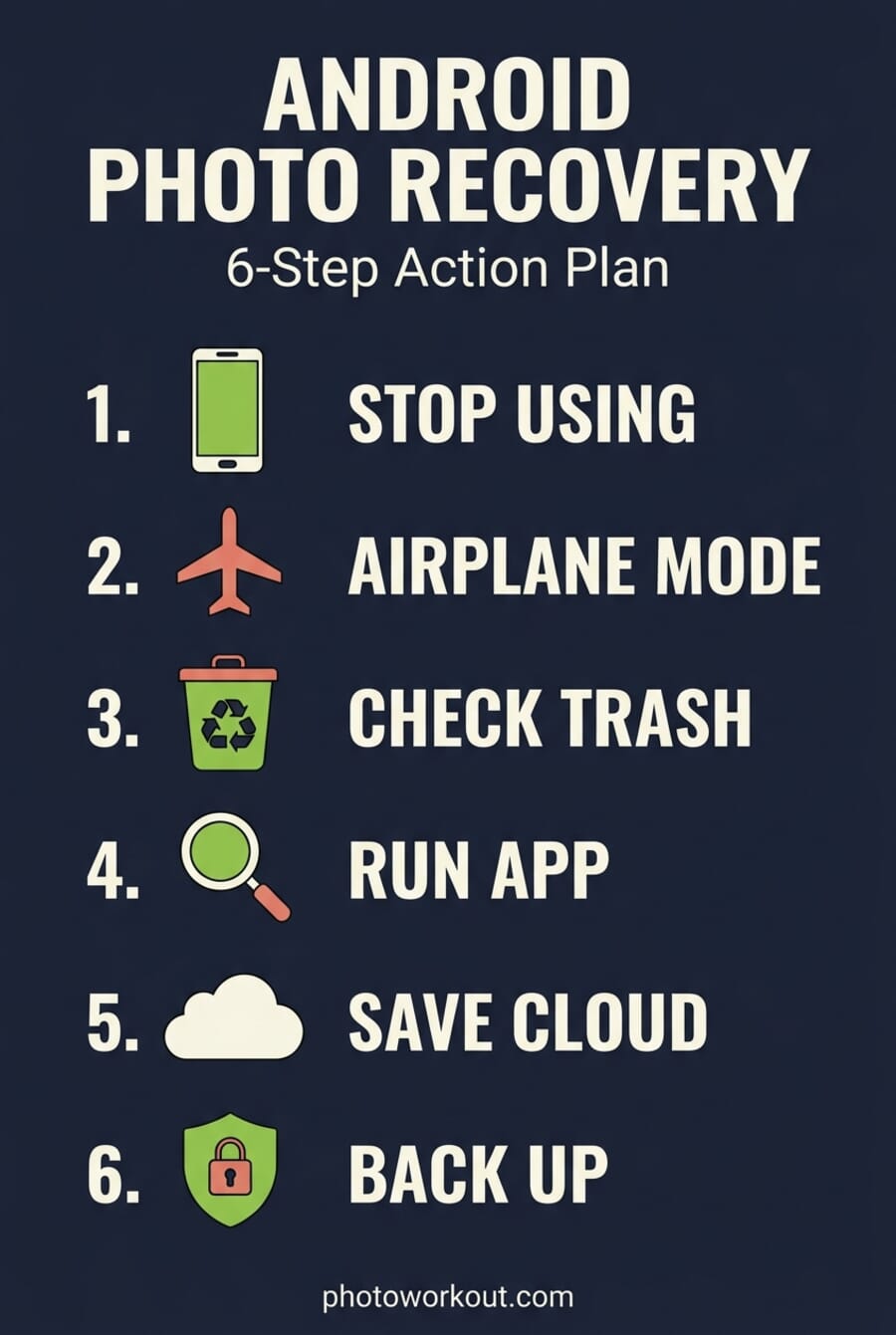
- Stop using the phone. Do not take new photos, do not open the camera, do not update apps. Each action risks overwriting the recoverable data.
- Enable Airplane Mode. This stops cloud sync, automatic app updates, and background downloads — all common causes of silent overwrites during a recovery attempt.
- Check the native trash folder first. Samsung Gallery, Google Photos, Xiaomi HyperOS, OnePlus, and Pixel all have a “Recently Deleted” or “Trash” view. Retention varies from 30 to 60 days. Most recoveries end here.
- Check Google Photos trash if cloud backup is enabled. Backed-up photos stay in the Google Photos trash for 60 days even after being deleted from the phone itself.
- Only then install a recovery app. Every app install writes new data to storage. That data can overwrite the exact sectors holding the photos. If the native trash worked, the recovery app was never needed.
Check the Native Trash Folders First
This is the step most recovery guides skip, because manufacturer trash folders are free and do not generate affiliate revenue. They are also where most accidentally-deleted photos actually live for the first month. Before installing any app, check every applicable one below.
Google Photos Trash — 60 Days (with Backup)
If Google Photos backup is enabled on the phone, every photo taken is copied to Google’s servers. When the local file gets deleted, the backed-up copy moves to the Google Photos Trash folder and stays there for 60 days. For photos that were never backed up, the retention drops to 30 days. Open the Google Photos app, tap Library, tap Trash, select the photos, and tap Restore.
Samsung Gallery Trash — 30 Days
Samsung Gallery keeps a 30-day Trash folder on-device. Open Gallery, tap the menu icon, tap Trash, long-press photos to restore. Samsung Cloud adds another layer: photos backed up through the Samsung Cloud service keep a separate 15-day trash retention on top of the on-device window, which is useful after a factory reset or phone swap.
Xiaomi HyperOS and MIUI Recently Deleted — 60 or 30 Days
HyperOS devices (Xiaomi 14 and newer, Redmi Note 14 series and newer) keep a 60-day “Recently Deleted” folder inside the Gallery app. Older MIUI-based devices still default to 30 days. Mi Cloud users get another 30 days of cloud-side retention, extendable to 180 days on Diamond-tier memberships. Open Gallery, tap Albums, tap Recently Deleted.
Google Pixel and Files by Google Trash — 30 to 60 Days
Pixel phones use Google Photos natively, so the 60-day backed-up window applies. Files by Google — the stock file manager on Pixel and many Android One phones — also added its own 30-day Trash folder starting with Android 11. Open Files by Google, tap Browse, tap Trash. This catches files deleted through the file manager rather than the gallery, which is a common path during storage cleanups.
OnePlus Gallery Recently Deleted — 30 Days
OnePlus Gallery keeps deleted photos for 30 days in a Recently Deleted folder. Open Gallery, tap Collections, tap Recently Deleted. OnePlus does not offer the extended cloud-side retention that Samsung and Xiaomi add on top, so if the 30-day window has passed, move on to the app tier.
Why “Deep Scan” Does Less Than It Used To
Every recovery-app marketing page in 2026 still promises “deep scan” and “find deleted files other apps miss.” The claim was accurate circa Android 10. It is mostly inaccurate now, and the reason is Scoped Storage.
Starting with Android 11, Google restricted apps to their own sandboxed storage plus public media accessed through the MediaStore API. Direct raw reads of the underlying storage partition — the foundation of true sector-level recovery — were blocked for non-rooted apps. Android 14 and 15 tightened the sandbox further, and Android 15 introduced file-based encryption tied to the user’s passcode in ways that make even rooted recovery harder when the phone has been reset.
What most Android recovery apps actually find on a modern unrooted phone: cached thumbnails from the Gallery app, EXIF previews, and files still indexed by MediaStore but not yet garbage-collected. Originals that have been wiped from MediaStore and overwritten by other writes are unreachable without root access. This is why ratings across the category have drifted down since 2022 — the apps did not get worse, but user expectations got further out of line with what is possible. The honest expectation for non-rooted recovery in 2026 is “some recent files, often at thumbnail resolution.”
Rooted recovery is a different story. DiskDigger Pro’s Full Scan, GT Recovery, and a handful of TWRP-recovery-mode tools can still perform genuine raw-partition scans on rooted phones. But rooting a 2025 or 2026 flagship trips SafetyNet, breaks banking apps and Google Pay, voids the manufacturer warranty, and creates its own security risks. For 99% of readers, rooting to recover photos is a bad trade.
The Three Android Apps Worth Installing in 2026
Three apps still clear the bar for on-device recovery: a canonical deep-scanner with 100M+ installs, a specialist that scores the highest current rating in the category, and a newer fast-mover with fresher update cadence. All three are free to install, all three work without root, and all three should be tried in order until a scan returns the missing photos.
DiskDigger Photo Recovery — The Canonical First Try
100M+ installs and a 2026 update cadence that still ships active fixes — the canonical on-device scanner to try first.

DiskDigger remains the default recommendation for two honest reasons: it has the largest real user base in the category (100 million-plus installs), and its developer ships regular updates — the latest landed in March 2026. The app runs in two modes. On non-rooted phones, the “Basic Scan” searches caches, thumbnails, and MediaStore-indexed storage for deleted images. On rooted phones, the “Full Scan” mode performs the raw-partition sector scan that actually recovers originals.
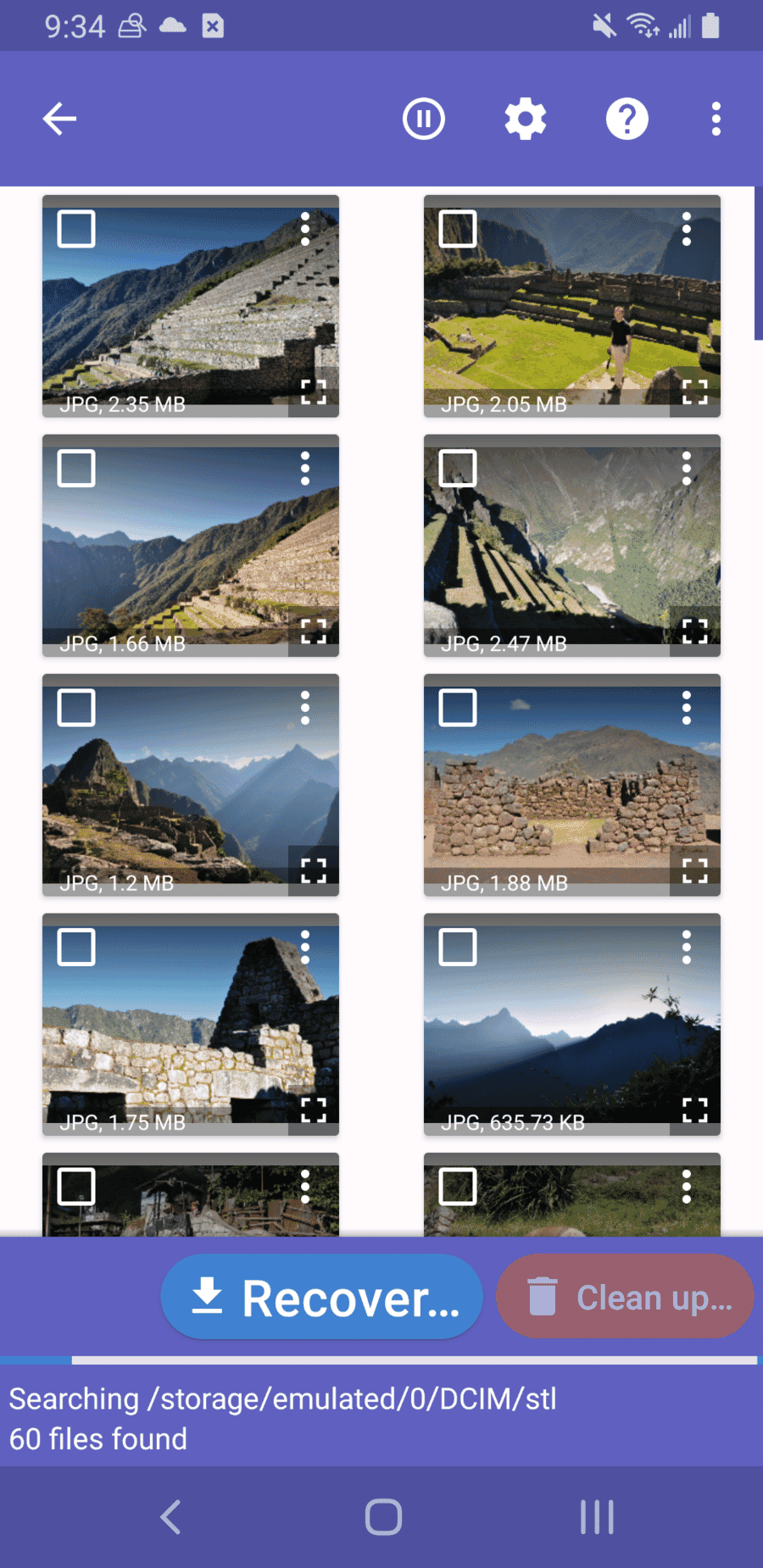
Beyond scanning, DiskDigger includes two features most recovery apps skip: a one-tap “Upload to Google Drive, Dropbox, or Email” option for moving recovered files off the phone immediately (important, because recovery apps cannot reliably restore files to the exact folder they came from), and a “Wipe free space” tool that intentionally overwrites unallocated sectors to prevent future recovery of sensitive deletions. Both are useful well beyond the immediate recovery job.
The honest caveat: on a modern non-rooted flagship, DiskDigger’s Basic Scan will mostly return thumbnail-resolution JPEGs from the Gallery cache plus any MediaStore entries that have not been garbage-collected. Originals deleted weeks ago from a phone that has been used heavily since will not reappear. The app is still the best first try, but set expectations accordingly.
DigDeep Image Recovery — Best Rated, SD Card Specialist

4.0/5 Play Store rating and 50M+ installs, with the most recent update cycle of any app on this list — April 2026.
DigDeep Image Recovery is the only app on this list that still holds a four-star rating in 2026, which matters because the average for the category has sagged into the low threes as users realize what Scoped Storage broke. DigDeep also ships updates more often than DiskDigger — the most recent version landed in April 2026 — and its narrower focus on images only (no videos, no documents, no messages) keeps the scan results cleaner.
DigDeep shines on SD card recovery. Where DiskDigger treats SD storage as a secondary target, DigDeep scans it with the same depth as internal storage, and the app’s folder-based result view makes triage faster when the card holds thousands of images. This is the app to reach for when a camera SD card or a phone SD card has been accidentally formatted or has developed filesystem corruption — situations where the desktop tools later in this guide may still be the final answer, but DigDeep is the fastest on-device first try.
One quirk worth knowing: DigDeep surfaces cached copies of images that were never actually deleted, alongside the real recoveries. These are findings from hidden cache folders used by other apps, and they can swell the results list dramatically. Scroll past them — the deleted originals are usually grouped under their original folder paths, not the cache directories.
File Recovery — Photo Recovery — Fresh Competitor, 4.2 Stars

4.2 stars across 482K reviews and 50M+ installs, with the most active April 2026 update cadence — the strongest new entrant since Scoped Storage landed.
File Recovery – Photo Recovery is the clearest win among new-to-this-list entries. The developer (listed as AI Photo Team / BETTER FITNESS LIMITED on the Play Store) has kept the app updated monthly through 2025 and into 2026, and the 4.2-star rating across 482,000 reviews is the highest in the active-Android-recovery category right now — higher than DiskDigger, DigDeep, and every app we dropped this cycle.
Feature-wise, File Recovery covers the same territory as DiskDigger’s non-rooted mode, with one meaningful difference: it handles multiple file types from the same scan — photos, videos, documents, and audio — rather than running a photos-only pass. For a user who deleted a whole folder containing mixed media (the classic “accidentally dragged my Downloads folder to trash” scenario), the single-scan workflow saves time versus running DiskDigger twice in different modes.
The trade-off: the app is ad-heavy, with rewarded-ad gates between scan phases and a premium upsell for ad removal and batch recovery. The gates are tolerable for a one-off recovery job, but users running repeated scans should budget for the 30-day or annual premium tier. Results quality has tracked DiskDigger’s Basic Scan closely in hands-on testing, so think of File Recovery as a strong second opinion rather than a replacement for DiskDigger.
Dumpster: Install It Before Losing Photos

100M+ installs, automatically catches files deleted AFTER installation so the next accidental deletion becomes a one-tap restore instead of a recovery project.
Dumpster belongs in a different category from every other app on this list. It is not a recovery app — it is a prevention app. Once installed, Dumpster runs in the background and intercepts files before they reach the system trash. When a photo gets deleted, it lands in Dumpster’s recycle bin instead of being marked for overwrite, and restoring it is a one-tap operation from the Dumpster app.
The critical caveat with Dumpster is timing. It cannot recover anything deleted before it was installed, because the app was not running to intercept the deletion. For the present emergency, Dumpster does not help. For the next time — which for most users is a matter of when, not if — Dumpster turns a panic situation into a five-second restore. Install it today, ignore it for months, and be grateful it was there the first time a tap goes wrong.
Premium-tier Dumpster adds cloud backup of the recycle bin (useful in case the phone itself is lost or reset), theme customization, and an app-lock to prevent snooping through the trash. The free tier handles the core prevention job on its own and is what most users need.
When Apps Fail: PC-Based Recovery Tools
When the native trash folders are empty and all three on-device apps returned nothing, the next escalation is a PC-based recovery tool that connects to the Android phone over USB. These tools use Android Debug Bridge (ADB) access to perform lower-level scans than a sandboxed app can run on its own, and they are the current industry standard for serious Android recovery jobs. TechRadar’s 2026 “Best Photo Recovery” category is entirely populated by this class of tool.
Two tools have the strongest current reputation: Tenorshare UltData for Android and iMobie DroidKit. Both follow the same workflow — enable USB debugging on the phone, connect via USB, let the tool scan, preview results in the desktop client, buy a license to actually perform the restore. The free tier of both tools shows the scan preview but gates the recovery itself behind a paid license (typically $40-$60 for a single-device license, $70-$100 for a subscription).
Tenorshare UltData for Android is the more-often-cited option in 2025-2026 third-party roundups, with reported 85%+ recovery rates on Android 12 devices and 92% on Pixel 7 WhatsApp data in published testing. Scoped Storage limits apply here too, but the USB-connected workflow reaches files the sandboxed on-device apps cannot. Tenorshare also offers a “broken Android” recovery mode for phones stuck in boot loops or bricked states.
iMobie DroidKit is the second credible option, with XDA Developers coverage confirming its Quick and Deep recovery modes. DroidKit bundles recovery with phone unlocking, screen passcode removal, and FRP bypass in a single $39.99 desktop app, making it the more cost-effective choice for users who need more than just photo recovery. A free preview scan is available before purchase.
For phones that have been factory-reset or physically damaged, neither tool will help — jump to the professional service tier below. For phones that are working normally but have lost photos beyond what on-device apps can reach, one of these two is usually the answer before escalating to paid recovery services.
Last Resort: Professional Recovery Services
Physical damage (a phone that fell in a pool), firmware corruption, post-factory-reset recovery, and post-encryption-key-loss cases are beyond the reach of both on-device apps and consumer PC tools. For these scenarios, a professional recovery service is the only remaining option. FlashFixers, eProvided, and DriveSavers publish case studies of recovering 7,000 to 9,000+ photos from water-damaged and physically-destroyed Android phones — results that no DIY approach can match.
The trade-off is cost. Professional Android photo recovery typically runs $200 to $2,000 depending on the failure mode, the phone model, and whether the storage chip needs to be physically removed and read on specialized hardware. Most services offer a free evaluation and only charge if the recovery succeeds. For a one-of-a-kind set of photos — a wedding, a newborn’s first month, a trip that cannot be redone — the cost is often worth it. For routine accidentally-deleted photos, it is massively overkill.
What Got Dropped This Cycle
Three apps that appeared on previous versions of this list were removed in the April 2026 update. Each failed a different test, and the reasoning is worth sharing because similar patterns exist across the category:
- EaseUS MobiSaver — Current Play Store rating: 2.0 stars from 31,000+ reviews. Paid-user complaints describe a pattern of “recovered” results that turn out to be map images or unrelated cached files. A 2.0 rating at that review volume is a clear signal the app is not delivering what it promises.
- Dr.Fone (Wondershare) — Trustpilot rating for drfone.wondershare.com: 2.1 stars, with a documented pattern of auto-renewal disputes, licenses failing after several months, and AI-only customer support with no human escalation. The Android app itself still functions, but the business practices of the parent company create a real risk for readers who end up in a billing dispute.
- Systweak Photo Recovery — Stale since August 2025, with only 7,400 reviews — a fraction of DiskDigger’s 517,000 or Dumpster’s 703,000. The small review base reflects a small user base, which in this category correlates strongly with weaker ongoing maintenance. Systweak as a publisher has documented complaints around billing and license issues.
The broader pattern: a whole tier of Play Store recovery apps in 2026 operates on a “show thumbnails, charge to restore, restore nothing meaningful” loop. The three apps above do not all do this, but each has enough negative signal that recommending them to PhotoWorkout readers is no longer honest.
Preventing the Next Loss
Every successful Android photo recovery starts with a user who wishes they had set up better prevention. The prevention setup costs less than an hour and eliminates the need for most of this guide. Three moves matter:
- Enable Google Photos backup. Even on the free 15GB tier, every photo taken gets a cloud copy. When the local file is lost, the cloud version is still there — and the Google Photos Trash gives 60 days of recovery time after deletion from the cloud too.
- Install Dumpster as a pre-emptive recycle bin. It catches every future deletion, across every app, with a one-tap restore. No other app in this category fills the prevention gap.
- Turn on the manufacturer’s cloud backup. Samsung Cloud, Xiaomi Mi Cloud, and OnePlus Cloud each add another retention layer on top of Google Photos. They are especially useful after factory resets, where local storage is wiped but cloud-side copies remain.
Set it up once and the most common Android photo loss scenarios — accidental swipe-to-delete, mid-sync glitches, factory resets for a firmware fix — become inconveniences instead of emergencies.
Frequently Asked Questions
Can deleted photos be recovered after a factory reset?
Rarely, and not through a Play Store app. Android 14 and 15 tightened the factory-reset process so that file-based encryption keys are destroyed during the reset, which means even if the underlying storage sectors still hold photo data, it cannot be decrypted without the original key. Google Photos and manufacturer cloud backups — if enabled before the reset — are the only reliable recovery path. Professional services using specialized hardware can sometimes recover from pre-reset storage chips, but the success rate is low and the cost is high.
Does any Android recovery app really work without rooting?
Yes, but with limits. Non-rooted apps like DiskDigger, DigDeep, and File Recovery find cached thumbnails, recent MediaStore entries, and files in app-accessible storage. They cannot perform raw-partition scans — that requires root. For recent deletions (same-day to a few weeks old) on a phone that has not been heavily used since, non-rooted recovery works often enough to be worth trying. For older deletions or heavily-used phones, expect thumbnails and partial matches rather than originals.
Can photos be recovered months after deletion?
Only from cloud backups or manufacturer trash folders with extended retention (Xiaomi HyperOS gives 60 days on device, Mi Cloud Diamond membership extends to 180 days). On-device recovery after months of continued phone use rarely produces anything meaningful because new photos, app data, and system writes have overwritten the deleted sectors. The rule of thumb: every month of continued use cuts recovery odds roughly in half.
Do recovery apps work on SD cards?
Yes — and SD card recovery is actually easier than internal-storage recovery in 2026. SD cards are outside Scoped Storage’s tightest restrictions, and filesystems on them are simpler (usually FAT32 or exFAT). DigDeep is the strongest on-device option specifically for SD card work. For cards that have been formatted or show filesystem corruption, a PC-based tool like Tenorshare UltData or a dedicated desktop recovery app like PhotoRec handles the job better than any phone app.
Is it safe to give a recovery app full photo access?
Stick to apps with long track records and large user bases — the three recommended above all clear that bar. Be wary of unfamiliar recovery apps that request broad permissions; a recent SparkCat variant reported by security researchers targets Android apps that ask for full photo access to scan for cryptocurrency wallet recovery phrases in saved images. The category is an obvious target for adware and malware, so trust the established names rather than installing whatever ranks first in a Play Store search.
What about rooted recovery — is it worth it?
For most users, no. Rooting a 2025 or 2026 phone breaks Google Pay, trips SafetyNet in banking and streaming apps, voids the manufacturer warranty, and opens real security risks. The photos that can only be recovered with root access are usually old enough that cloud backups would have saved them for free. Rooting specifically to attempt a photo recovery makes sense only for technical users with an old spare phone and a one-of-a-kind recovery target.
The Short Version
Start at the native trash — Samsung, Google Photos, Xiaomi, Pixel, OnePlus, Files by Google. If the photos are there, the job is done. If they are not, try DiskDigger first, then DigDeep for SD cards or the highest-rated clean run, then File Recovery for a mixed-media scan. If all three on-device apps come up empty, escalate to Tenorshare UltData or iMobie DroidKit on a PC. If the phone is physically damaged or post-factory-reset, a professional service is the last stop. And before the next loss: turn on Google Photos backup, install Dumpster, and enable manufacturer cloud backup — the three setup steps that make this whole guide unnecessary going forward.
Sources and research for this guide:
Image Sources:
- Editorial infographic – Android Photo Recovery 6-Step Action Plan infographic — editorial generated for PhotoWorkout.
- DiskDigger Photo Recovery Play Store screenshot – Official Play Store listing screenshot.
- DigDeep Image Recovery Play Store screenshot – Official Play Store listing screenshot.
- File Recovery Play Store screenshot – Official Play Store listing screenshot.
- Dumpster Play Store screenshot – Official Play Store listing screenshot.



