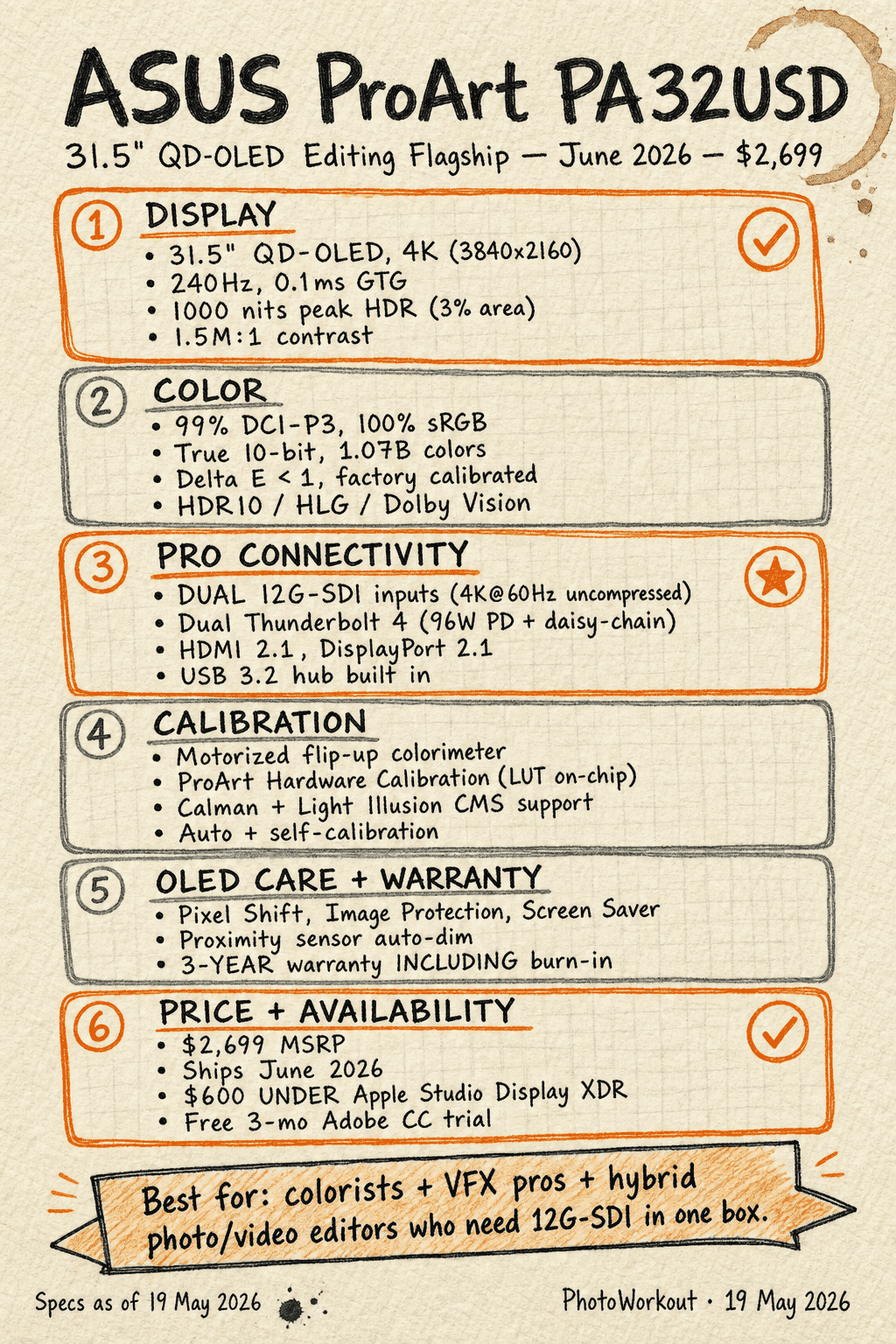

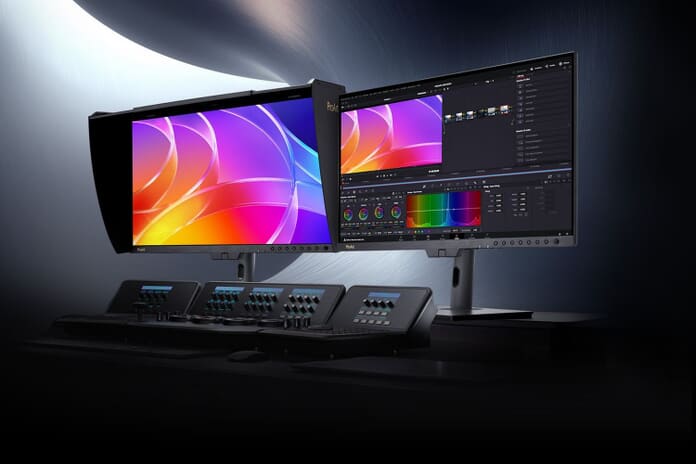
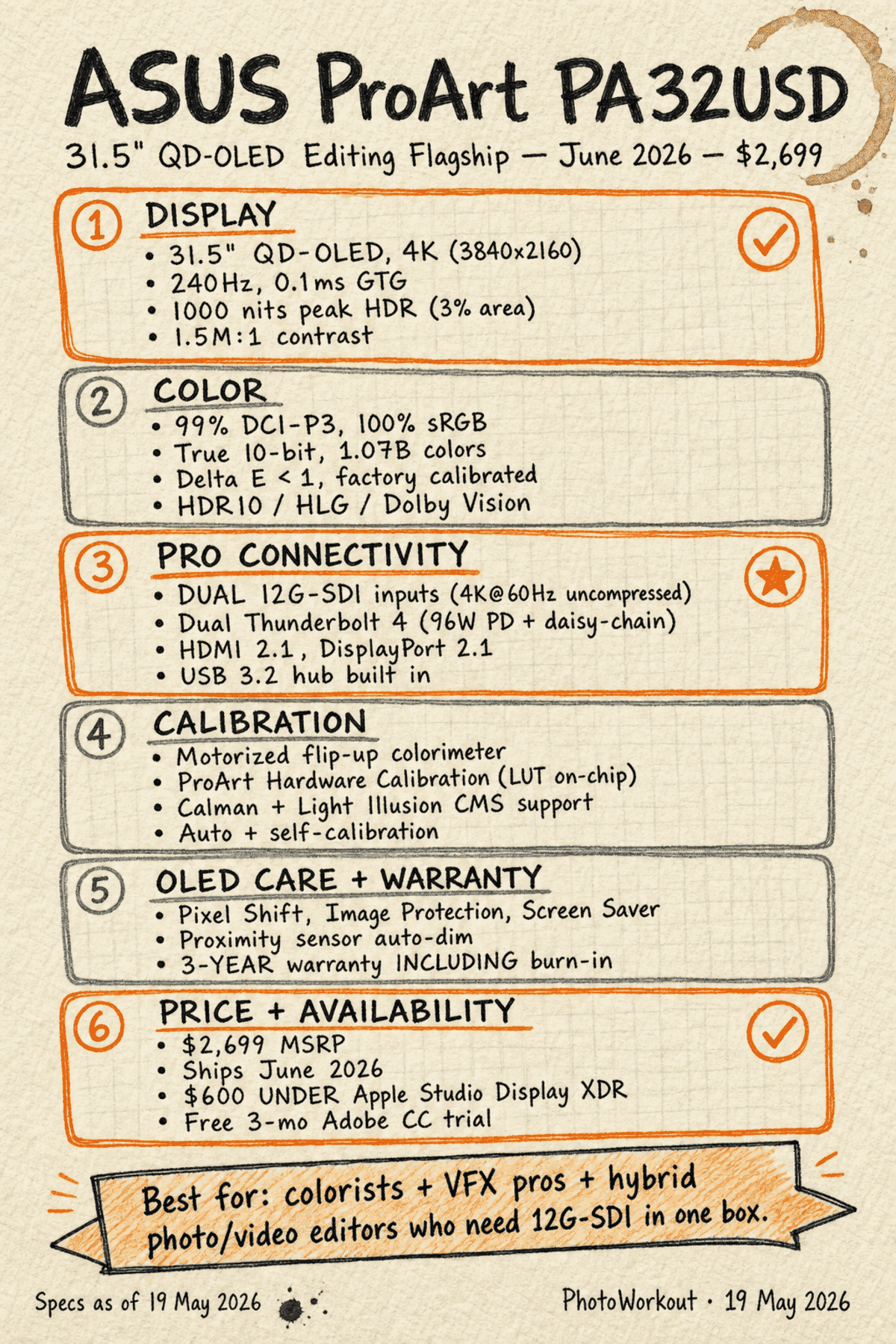
- ASUS announced the ProArt Display OLED PA32USD on May 11, 2026 — a 31.5-inch 4K QD-OLED editing monitor aimed squarely at pro video editors and colorists.
- Headline feature: dual 12G-SDI inputs — uncompressed 4K@60Hz signals from two camera sources (or recorder + monitor) at the same time. Doubles the SDI count of the 27-inch PA27USD sibling.
- QD-OLED panel: 1000-nit peak HDR (3% area), 1.5M:1 contrast, 99% DCI-P3, true 10-bit, factory-calibrated to Delta E<1, 240Hz refresh, 0.1ms GTG.
- Built-in motorized flip-up colorimeter — no external puck needed. Auto + self-calibration on a schedule, with Calman and Light Illusion ColourSpace support out of the box.
- OLED burn-in answered: ASUS OLED Care (Pixel Shift, Image Protection, Screen Saver, proximity-sensor dim) plus a 3-year warranty that explicitly covers panel burn-in.
- $2,699 MSRP, shipped June 2026 — $600 cheaper than Apple’s Studio Display XDR while delivering OLED contrast, 12G-SDI, and a built-in colorimeter Apple doesn’t offer.
- Free 3-month Adobe Creative Cloud trial bundled in select regions (~$800 value).
ASUS announced the ProArt Display OLED PA32USD on May 11, 2026 — a 31.5-inch 4K QD-OLED editing monitor that sits a tier above the also-new 26.5-inch PA27USD. The headline differentiator is mundane on paper and significant in practice: dual 12G-SDI inputs, double the SDI count of the smaller sibling, in a panel format colorists have been asking for since QD-OLED hit the market.
The PA32USD shipped in June 2026 at $2,699 MSRP and is available now — $500 above the PA27USD and $600 below Apple’s Studio Display XDR. For pro photo + video editors on a hybrid workflow, that’s an interesting price band.
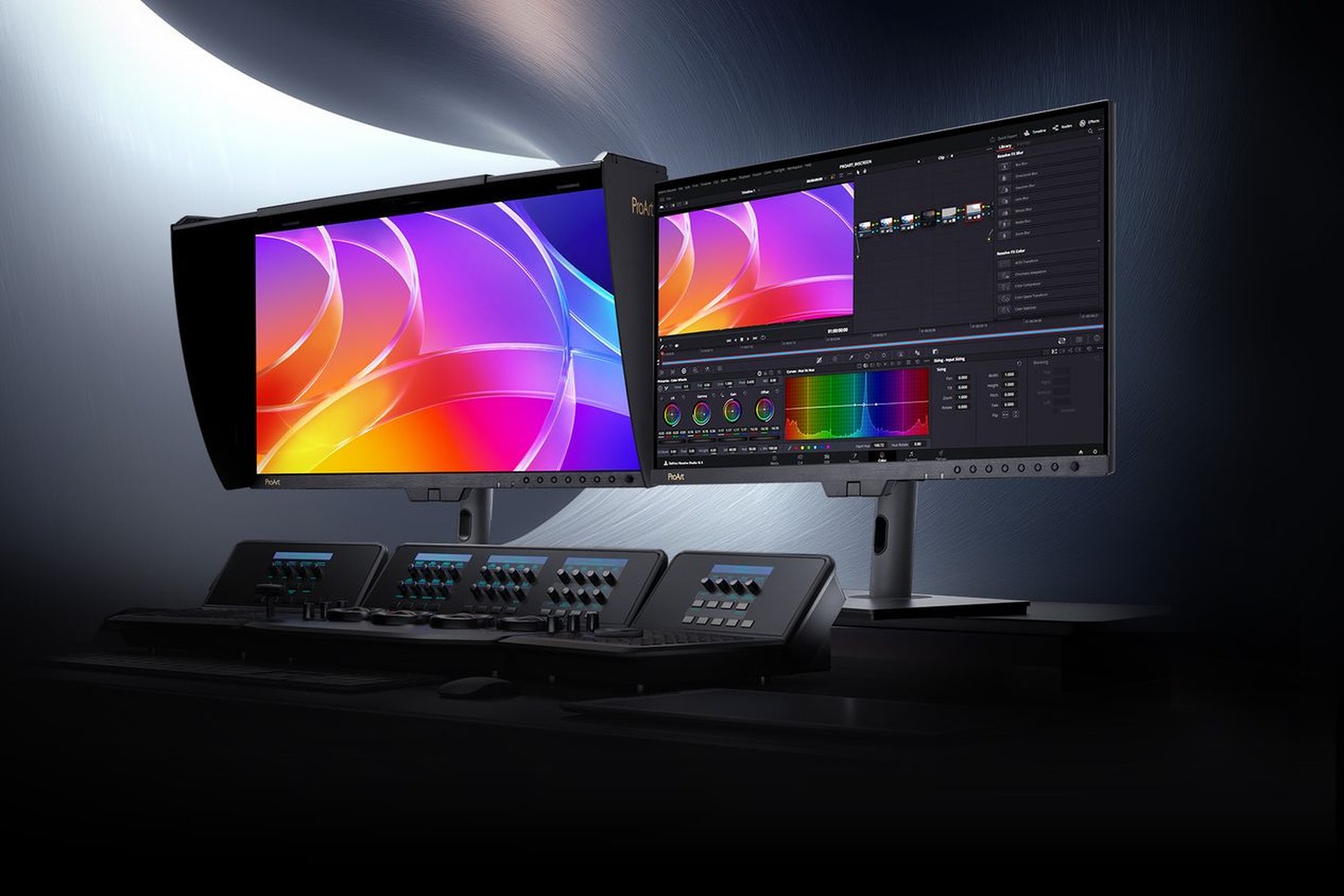
Why Dual 12G-SDI Matters (And Why It Justifies the Step Up From the PA27USD)
A single 12G-SDI cable carries an uncompressed 4K@60Hz video signal — that’s the entire reason it exists. For a colorist or VFX artist, having SDI on the monitor means the workstation isn’t the only path to the panel: an external recorder (Atomos Shogun, Blackmagic Video Assist, Sound Devices PIX-E) can feed the display directly while the host machine does its own thing on Thunderbolt or HDMI.
Two SDI inputs change the workflow shape entirely. Now the desk can run, for example, a reference monitor signal on one SDI input and a camera A-feed on the other — both at full uncompressed 4K, both on the same panel, with PIP/PBP letting the editor compare them frame-by-frame. The PA27USD with its single SDI input forces the editor to choose; the PA32USD removes the choice.
This is the kind of feature that sounds incremental on the spec sheet and matters every working day to the people it’s built for. ASUS is targeting a narrow audience here — colorists doing client review sessions, VFX artists pulling reference plates, broadcast cutting rooms — and giving them exactly the workflow shape that audience wants.
The Panel: QD-OLED at 1000 Nits, 240Hz, Delta E<1
The PA32USD uses a 31.5-inch 4K (3840×2160) QD-OLED panel — the same Samsung Display panel family powering the latest generation of high-end consumer and pro monitors. QD-OLED’s color volume sits noticeably above WOLED at saturated colors, which is why ASUS can claim 99% DCI-P3 coverage rather than the typical 95% on WOLED-based displays.
Peak brightness is 1000 nits on a 3% window (250 cd/m² typical full-screen), with a 1,500,000:1 contrast ratio courtesy of OLED’s per-pixel blacks. The panel hits VESA DisplayHDR True Black 400 and supports HDR10, HLG, and Dolby Vision out of the box. For grading, that means there’s enough headroom to evaluate HDR content correctly without an external reference monitor like the FSI XM310K or Sony BVM-HX310.
Other panel specs: 240Hz refresh rate (overkill for stills, useful for VFX scrub feedback), 0.1ms GTG response, true 10-bit color depth (1.07 billion colors), VRR via Adaptive-Sync, anti-reflection coating, and the typical OLED 178°/178° viewing angles.
Out of the factory each PA32USD is calibrated to Delta E < 1 using a new three-stage ASUS process, with a calibration report included in the box.
The Built-In Motorized Colorimeter Is the Real Quality-of-Life Win
Both PA27USD and PA32USD include a motorized flip-up colorimeter embedded in the bezel. It’s the same idea Eizo has been shipping on the CG2700X for years, now at less than half Eizo’s price — the colorimeter folds down onto the panel, runs a calibration pass, and folds away when it’s done.
For working photographers and editors who currently buy an external calibrator (Calibrite Display Plus HL, X-Rite i1Display, SpyderX Pro), this removes both a $200–$500 line item from the gear list and the friction of “did I calibrate this month?” — the OSD will schedule calibration to run automatically at night.
ASUS’s ProArt Hardware Calibration stores the calibration LUT on the monitor’s internal scaler IC, so the calibrated profile follows the monitor across operating systems and machines. Plug the same display into a Mac, a Windows PC, or a colorist’s Linux Resolve workstation and the calibration is identical. Calman and Light Illusion ColourSpace CMS are supported natively for studios that already run those workflows.
The OLED Burn-In Question — and ASUS’s Answer
The single legitimate concern with OLED panels in a pro editing context is burn-in. A colorist runs the same DaVinci Resolve interface for 10 hours a day; static UI elements (timeline ruler, scope panels, fixed-position toolbars) are the classic burn-in trigger pattern. This is why pro shops have historically stuck with IPS-LCD reference monitors even though they trail OLED on contrast.
ASUS addresses it on two fronts:
- ASUS OLED Care: Pixel Shift (sub-pixel movement to redistribute wear), Image Protection (auto-dim around detected static elements like task bars and logos), Screen Saver, ISP global panel-protection cycles, plus a proximity sensor that automatically dims when no one is in front of the display. Most settings have three intensity levels.
- 3-year warranty including panel burn-in. Written into the warranty doc, not buried in fine print. That’s the same coverage Eizo offers on the CG2700X and meaningfully better than what most consumer OLEDs ship with.
For working editors, “OLED with a real burn-in warranty” is the combination that finally makes the panel technology safe to buy for a daily-driver desk. The PA32USD isn’t the first display to offer this — but it’s the cheapest 31.5-inch 4K QD-OLED + 12G-SDI + warranty-backed-burn-in display on the market right now.
Pricing Context: Where the PA32USD Fits
The PA32USD’s $2,699 sticker sits between the prosumer pro tier ($1,500–$2,200, anchored by the BenQ SW272U) and the reference tier ($3,000+, where Eizo’s CG2700X and Apple’s Studio Display XDR live):
- BenQ SW272U — $1,499. 27-inch IPS, 99% Adobe RGB, 16-bit 3D LUT, hardware calibration. The photo-first option. No SDI, not OLED.
- ASUS ProArt PA27USD — $2,199. 26.5-inch QD-OLED, single 12G-SDI, same panel-tech tier as the PA32USD in a smaller format.
- ASUS ProArt PA32USD — $2,699. 31.5-inch QD-OLED, dual 12G-SDI. This launch.
- Apple Studio Display XDR — $3,299. 27-inch 5K mini-LED, 2,000-nit HDR, 2,304 dimming zones, no SDI, no hardware calibration, Mac-tethered.
- Eizo ColorEdge CG2700X — ~$3,500. 27-inch IPS, full hardware calibration, also has built-in motorized colorimeter. The reference choice.
The PA32USD’s value proposition is straightforward: an Eizo-class feature set (motorized colorimeter, calibration LUT on-chip, true reference-grade calibration, 3-year burn-in warranty) at a price closer to a tier-2 prosumer display. If the workflow needs both SDI and color-managed grading, this is the cheapest box that delivers both.
PA32USD vs PA27USD: Which One to Buy
Same panel technology, same calibration, same connectivity stack except for SDI count and screen size:
- Buy the PA27USD ($2,199) if the desk doesn’t need two simultaneous SDI inputs and 26.5 inches feels right at typical viewing distance. The smaller screen actually has higher pixel density (166 PPI vs 140 PPI on the 32-inch), which can be cleaner for detail work.
- Buy the PA32USD ($2,699) if SDI count matters (it does for colorists, broadcast cutters, VFX), if the larger canvas is genuinely useful (multi-window DaVinci layouts, simultaneous scope + viewer), or if 31.5 inches matches existing setup ergonomics.
- Both shipped within a month of each other (PA27USD in May, PA32USD in June), so timing isn’t a deciding factor.
The $500 step up to the PA32USD only makes sense for editors who’ll genuinely use the second SDI port. For everyone else, the PA27USD is the smarter buy.
Connectivity Recap
- 2× 12G-SDI inputs (4K@60Hz uncompressed)
- 2× Thunderbolt 4 USB-C — one with 96W Power Delivery, the other supporting daisy-chain
- 1× HDMI 2.1 (FRL, 4K@240Hz capable)
- 1× DisplayPort 2.1
- USB 3.2 Gen2 hub — 2× USB-A, 1× USB-C downstream
- 3.5mm earphone jack
The PA32USD also includes the wraparound hood, cable clips, an L-shape screwdriver, the factory calibration report, and the option of two stand designs (full ergonomic or mini stand for tighter desks). Note that the Thunderbolt 4, USB-C, HDMI, and DisplayPort cables are listed as optional accessories — buyers should plan to bring their own or budget for cables separately.
Free Adobe Creative Cloud Trial Bundled
ASUS has partnered with Adobe to bundle a 3-month Creative Cloud trial with every ProArt Display purchase in select regions — Lightroom, Photoshop, Premiere Pro, Illustrator, the full suite, plus the Photography Plan (Lightroom + Photoshop + 1TB cloud storage), Adobe Substance 3D, Adobe Stock, and Acrobat Standard. Total list value $803.85, redeemable through August 31, 2026.
For a buyer already inside the Adobe ecosystem, the trial is moot — but for a working colorist who runs Resolve and only dips into Adobe occasionally, three free months of Premiere Pro is a real bonus.
Frequently Asked Questions
When does the ASUS ProArt PA32USD ship?
ASUS announced the PA32USD on May 11, 2026, and it shipped in June 2026 at $2,699 MSRP. The 26.5-inch sibling PA27USD shipped first, in May 2026, at $2,199.
What’s the difference between the PA32USD and the PA27USD?
Screen size (31.5 vs 26.5 inches), SDI input count (dual vs single 12G-SDI), and physical dimensions. Same QD-OLED panel technology, same color accuracy, same calibration features, same connectivity otherwise. The PA27USD has higher pixel density (166 PPI vs 140 PPI on the PA32USD); the PA32USD has more workspace and one extra SDI input. PA32USD costs $500 more.
How does the PA32USD compare to the Apple Studio Display XDR?
The Apple Studio Display XDR is $3,299, 27-inch 5K mini-LED with 2,000-nit HDR and 2,304 local dimming zones — brighter for daylight HDR, but lower contrast than OLED and no SDI inputs. The PA32USD is $2,699, larger (31.5″), OLED for per-pixel blacks, has dual 12G-SDI plus a built-in motorized colorimeter Apple doesn’t offer. Choose Apple for a Mac-tethered photography desk; choose the PA32USD for hybrid photo + video work where SDI and hardware calibration matter.
Is OLED burn-in a real concern for editors?
It’s a legitimate concern for static-UI workflows (DaVinci Resolve, Premiere, Photoshop with persistent panels), which is why pro shops have historically stayed on IPS-LCD. ASUS addresses it with Pixel Shift, Image Protection (auto-dim around static elements), screen-saver cycles, a proximity sensor that dims when the desk is empty, and a 3-year warranty that explicitly covers panel burn-in. That last point is what makes OLED safe for a pro daily-driver — without warranty-backed burn-in coverage, it isn’t.
Do I still need an external colorimeter with the PA32USD?
No — the PA32USD includes a built-in motorized flip-up colorimeter that handles auto-calibration and scheduled recalibration without external hardware. Calibration LUTs are stored on the monitor’s internal scaler IC, so the calibration follows the display across host machines and operating systems. External pucks (Calibrite, Calman-compatible, Light Illusion ColourSpace) are still supported through a top hood opening if a studio wants a redundant calibration path.
Does the PA32USD work with a Mac?
Yes. The dual Thunderbolt 4 ports are macOS-native, the calibration LUT is stored on the monitor (so it travels across operating systems), and ASUS lists “Mac Compliance” among the certification standards. The monitor doesn’t need any vendor-specific software to function — though ASUS provides DisplayWidget Center, ProArt Calibration, and ProArt Color Center for studios that want centralized management.
Primary Coverage
- ASUS Pressroom — ASUS Announces ProArt Display OLED PA27USD and PA32USD – Official ASUS press release with full specs, pricing, ship dates, and product imagery for both PA27USD and PA32USD. Published May 11, 2026.
- ASUS — ProArt Display OLED PA32USD product page – ASUS's product page for the PA32USD with the complete technical specification table.
Third-Party Coverage
- CineD — ASUS ProArt Display OLED PA32USD Announced – Cinema-focused outlet's writeup, with detail on the 12G-SDI workflow context and pro-video use cases.
- RedShark News — PA27USD and PA32USD pricing and availability – Pricing and ship-date confirmation from a broadcast/production-industry outlet.
Image Sources
- ASUS Pressroom — Product hero photography – Featured image and inline product shot sourced from ASUS's official press kit.