


- A veteran designer’s essay, “An Infuriating Goodbye to Photoshop,” hit the front page of Hacker News on July 12. A Photoshop user since the mid-1990s and a Creative Cloud subscriber since day one, he uninstalled Adobe for good, and where he landed is the real story.
- He moved to Pixelmator Pro through Apple Creator Studio, Apple’s $12.99-a-month bundle (launched January 28, 2026) that also includes Final Cut Pro, Logic Pro, Motion, Compressor, and MainStage, roughly $700 of software.
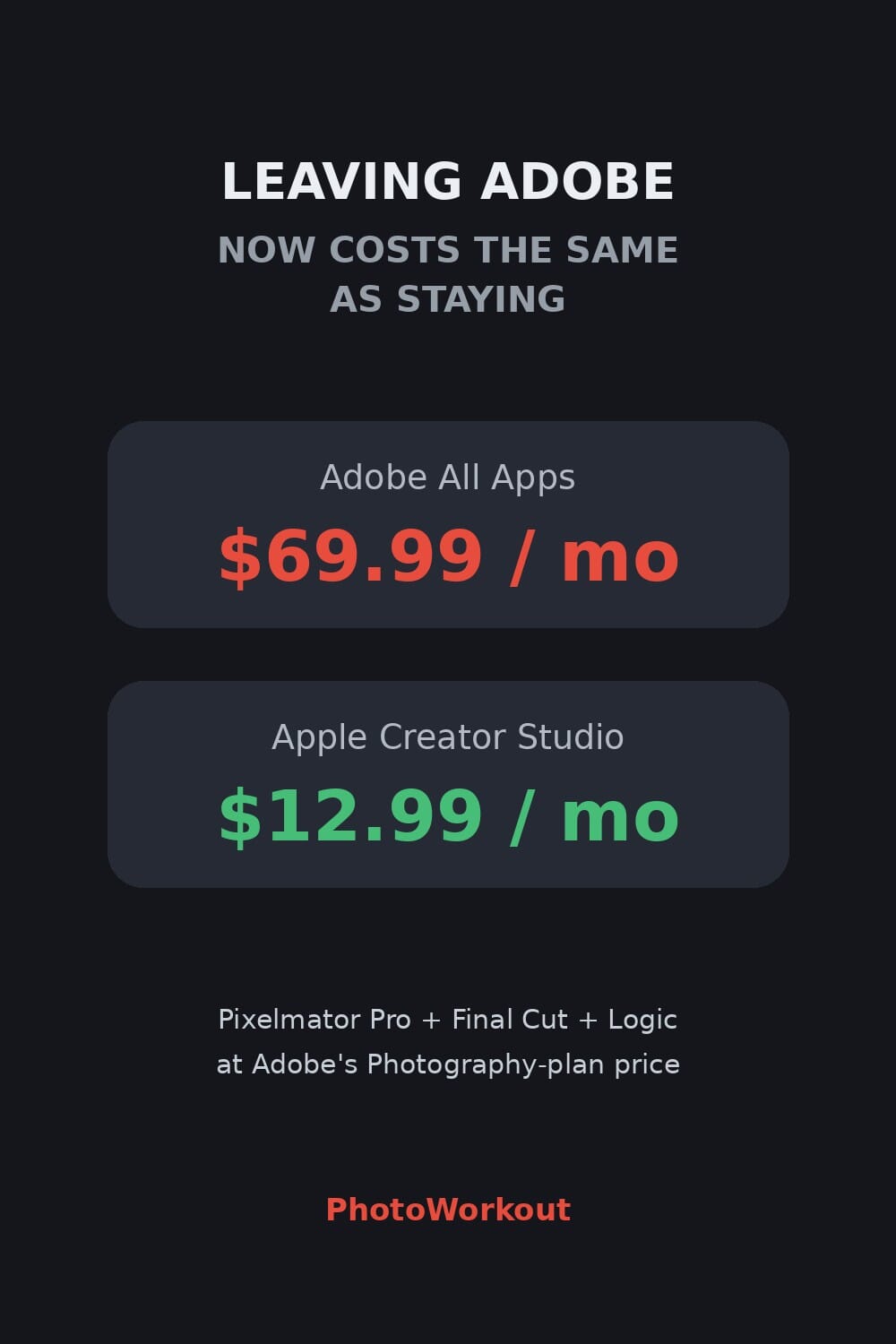
- That price is the point. $12.99 sits right at Adobe’s Photography Plan tier and is a fraction of Adobe’s $69.99-a-month All Apps plan. Leaving Adobe no longer costs more than staying.
- The honest catch: none of the alternatives, from Apple Creator Studio to Capture One, DxO, or open-source RapidRAW and Darktable, import your Lightroom catalog cleanly. That lock-in, not the editor itself, is what Adobe really sells.
PhotoWorkout usually covers what Adobe ships. This is about what happens when a 30-year Photoshop user finally leaves, and, crucially, where they land. On July 12, a developer and designer named Gavin Anderegg published an essay titled “An Infuriating Goodbye to Photoshop.” It hit roughly 195 points and 128 comments on Hacker News in a day, because it put names, receipts, and a price tag on a feeling a lot of photographers have been sitting with.
The news is not that Adobe alternatives exist. That is evergreen listicle bait. The news is that the exit now costs the same as staying, and the destination is a polished Apple product rather than a hobby project. The subscription-exit is no longer hypothetical, so it is worth mapping honestly: what it costs, where you land, and the one thing Adobe is actually charging you for.
When you buy through links on our site, we may earn a commission at no cost to you. We evaluate products independently. Commissions do not affect our evaluations.
The Goodbye That Went Viral
Anderegg is not a casual user. In his essay, he describes using Photoshop since the mid-1990s, buying a boxed copy of CS2 in 2005, and subscribing to Photoshop Creative Cloud in 2013 on day one because he loved the promise of always-current software. Then, in his telling, things rotted. The Creative Cloud desktop app went from a native tool to a slow, broken web app. Adobe discontinued its Synced Files service. He catalogs a cancellation flow with white-on-white rendering bugs, updates that silently stopped working for months, and license checks that quietly modified system files.
What makes the piece land is what it is not about. His complaints are not really about AI features. They are about maintenance and respect: the sense that the software you pay for every month is decaying, and that leaving is deliberately made painful. He calls the modern apps blobs of software that Adobe no longer seems able to properly maintain. And when he left, he did not switch to a scrappy open-source tool. He moved to Pixelmator Pro, through Apple Creator Studio.
The Number That Changes the Math: $12.99
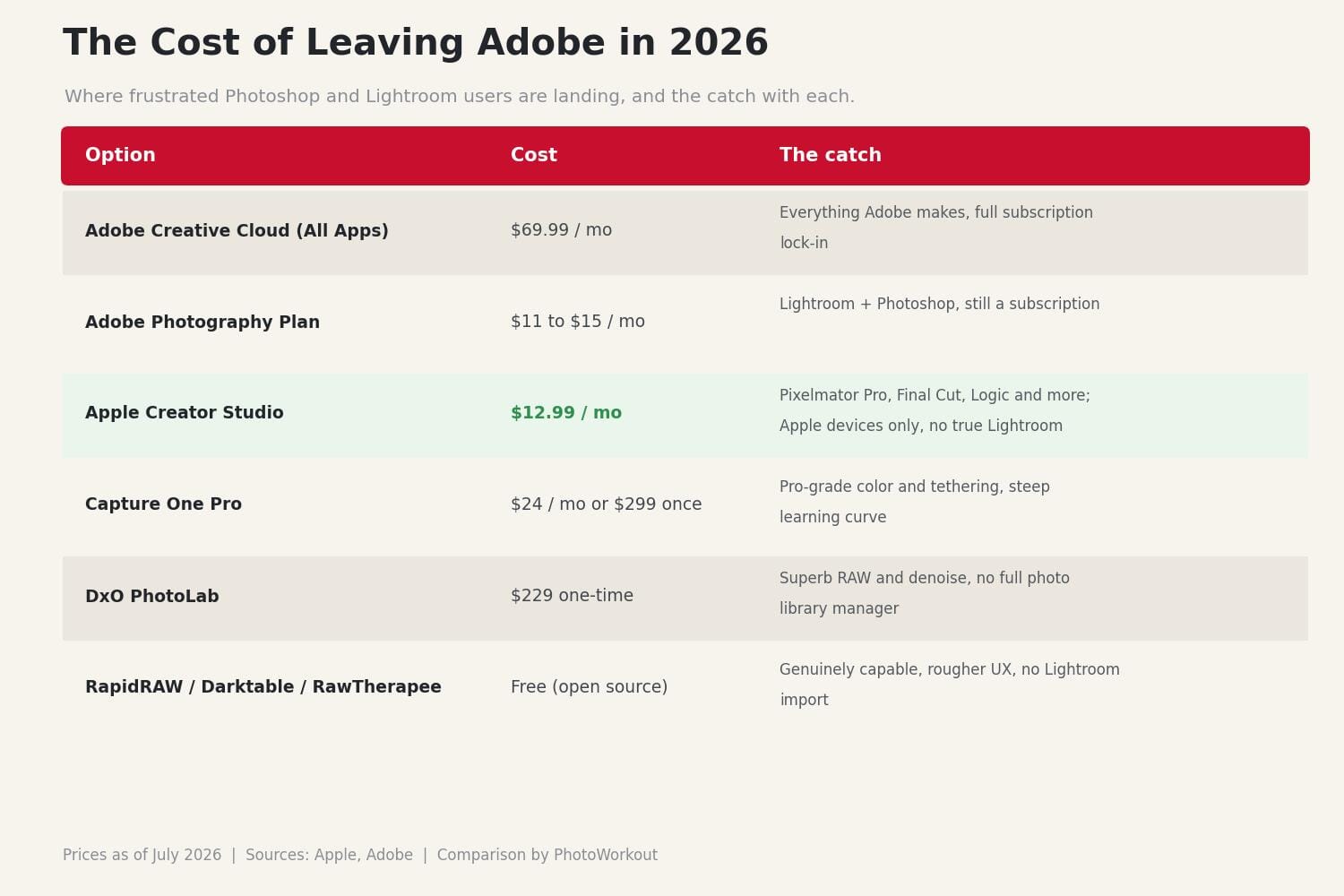
Apple Creator Studio launched on January 28, 2026, at $12.99 per month or $129 per year, with a one-month free trial and a $2.99 education rate. Per Apple’s own announcement, it bundles Final Cut Pro, Logic Pro, Pixelmator Pro, Motion, Compressor, and MainStage. Bought outright, those apps run well over $700, and Apple still sells Pixelmator Pro on its own for a one-time $49.99.
Now put that next to Adobe. Adobe’s Creative Cloud All Apps plan is $69.99 per month as of 2026. Its Photography Plan, the Lightroom-and-Photoshop bundle most photographers actually pay for, runs roughly $11 to $15 a month depending on storage. Apple’s $12.99 lands squarely on that Photography-Plan tier. That is the structural move hiding inside a viral blog post: Apple has quietly priced a serious Photoshop alternative at exactly what Adobe charges for Photoshop, and thrown in professional video and audio software on top.
Why This Is Structural, Not Just Grumbling
One angry essay is an anecdote. The pattern around it is the story. The same week Anderegg’s piece spread, a top thread on the Photoshop subreddit complained about Adobe shoving AI in users’ faces at the cost of core functionality, drawing thousands of upvotes. Surveys of creative professionals have repeatedly found large shares, on the order of 45%, actively looking for software they can buy once instead of rent forever.
This also fits a wider consolidation-versus-defection moment. In the same stretch of 2026, Adobe was busy acquiring Topaz Labs and pushing more AI into Photoshop and Lightroom, while frustrated users headed for the exits. Consolidation on one side, defection on the other, in the same month. When the company you are leaving is buying up your favorite plugins and the company you are joining is undercutting it on price, the calculus shifts for a lot of people at once.
Where You Actually Land (Three Tiers, Honestly)
Leaving Adobe is not one decision, it is a fork with three realistic paths. Each has a real strength and a real catch.
Tier 1: Apple Creator Studio (the easy, cheap default)
For $12.99 a month you get Pixelmator Pro, a genuinely capable layer-based editor, plus pro video and audio apps. It is the smoothest landing for a Photoshop refugee on a budget. The catches: it is Apple-only, so no Windows, and Pixelmator Pro is a Photoshop replacement, not a Lightroom replacement. There is no true catalog-based library manager with the depth of Lightroom’s organization and non-destructive workflow.
Tier 2: Capture One or DxO PhotoLab (pro-grade, paid)
If your real dependency is Lightroom, not Photoshop, these are the serious answers. Capture One offers arguably better color and tethering than Adobe, available as a subscription or a one-time purchase. DxO PhotoLab has best-in-class RAW conversion and noise reduction for a one-time fee. The catch: Capture One has a steeper learning curve, and DxO is a superb developer rather than a full digital-asset manager, so your organization workflow changes.
Tier 3: Open source (RapidRAW, Darktable, RawTherapee)
For zero dollars, the open-source RAW editors are more capable than their reputation suggests. RapidRAW is a fast, GPU-accelerated, non-destructive editor written in Rust; Darktable and RawTherapee are mature and powerful. The catch is the usual one: rougher interfaces, a real learning curve, and no hand-holding. You trade money for time.
The Catch Adobe Actually Sells: Your Lightroom Catalog
Here is the honest thing worth leading with, and the reason many people who want to leave do not. None of these alternatives import your Lightroom catalog cleanly. Your edits, star ratings, keywords, collections, virtual copies, and folder structure, built up over years, do not transfer intact to any of them. You can export originals and, in some cases, baked-in JPEGs, but the living, non-destructive database that is your photo library stays trapped.
That lock-in, not the pixel-pushing, is what Adobe truly sells. The Photoshop tools have real alternatives now. The Lightroom catalog does not, and Adobe knows it. Anyone weighing a switch should treat the catalog migration as the actual project. If you shoot going forward in a new tool and let Lightroom become a read-only archive of old work, the move is very doable. If you need a decade of edits to follow you perfectly, that is the wall, and it is worth being clear-eyed about before you cancel.
Frequently Asked Questions
What is Apple Creator Studio, and what does it cost?
It is Apple’s creative-app subscription, launched January 28, 2026, at $12.99 per month or $129 per year with a one-month free trial. It includes Final Cut Pro, Logic Pro, Pixelmator Pro, Motion, Compressor, and MainStage. Pixelmator Pro is also still sold separately for a one-time $49.99.
Is Pixelmator Pro a real Photoshop replacement?
For most photographers, yes. It is a mature, layer-based, non-destructive editor with strong retouching and machine-learning tools. Heavy Photoshop power users who rely on specific plugins or advanced compositing may still miss features, but for typical photo editing it covers the ground.
Can I move my Lightroom catalog to these alternatives?
Not cleanly. No mainstream alternative imports a Lightroom catalog with your edits, keywords, ratings, and collections intact. You can export your original files and rendered images, but the non-destructive edit history and organization do not transfer. Plan any switch around that reality.
Is Apple Creator Studio available on Windows?
No. It is an Apple-only offering that runs on Mac, iPad, and iPhone. Windows users leaving Adobe should look at Capture One, DxO PhotoLab, Affinity, or the open-source editors instead.
Which alternative is best if I mostly use Lightroom, not Photoshop?
Capture One is the closest full-featured, catalog-style replacement, with excellent color and tethering. DxO PhotoLab is outstanding for RAW conversion and denoise. Both are paid. For free, Darktable and RapidRAW are the most Lightroom-like open-source options, with a steeper learning curve.
The Bottom Line
For years, the case for leaving Adobe ran into the same wall: the alternatives were either niche, unfinished, or not obviously cheaper once you priced in your time. Anderegg’s viral goodbye matters because that wall just moved. The alternatives are polished, and with Apple pricing a real Photoshop replacement at Adobe’s own Photography-Plan tier, the exit no longer costs a premium.
The honest caveat remains the Lightroom catalog, which still does not follow you cleanly anywhere. But for a growing number of frustrated photographers, that is a project to plan, not a reason to stay. When leaving costs the same as staying, loyalty has to be earned on the software, not enforced by the bill, and that is a very different position for Adobe to be in.
Primary Sources
- Gavin Anderegg: An Infuriating Goodbye to Photoshop – The July 12 essay that catalyzed the discussion, including the move to Pixelmator Pro
- Apple Newsroom: Introducing Apple Creator Studio – Official pricing ($12.99/mo) and the full list of included apps
- MacRumors: Apple Creator Studio hands-on, what you get for $12.99 – Independent breakdown of the bundle and its value
- Adobe Creative Cloud pricing (All Apps and Photography Plan) – Adobe's current subscription tiers, including the $69.99 All Apps plan
- RapidRAW (CyberTimon) open-source RAW editor – The Rust and GPU-based open-source Lightroom alternative referenced
Image Sources
- MacBook photo by Maxim Hopman on Unsplash – Featured image representing the Apple ecosystem
- Cost-comparison table and pin: PhotoWorkout – Editorial price comparison and graphic by PhotoWorkout