


- Imagen is offering full, uncapped AI editing for $10 for the first month (code LIMITLESS, launched May 26) — far below its usual $0.05/photo or roughly $127.50/month annual pricing.
- The deal is timed for peak wedding and event season, when high-volume shooters edit thousands of frames and per-photo pricing bites hardest.
- It lands in a crowded field: Adobe bundles Lightroom + Photoshop (Generative Expand, AI Remove) for $14.99/month, while Topaz Photo AI is a ~$199 one-time purchase for denoise, sharpen, and upscale.
- The four tools price on completely different models — per-photo, subscription, and perpetual — so the best value depends on your volume and workflow, not a flat price race.
Peak season is the worst time to do math on editing software — and the best time for software companies to fight over a photographer’s wallet. On May 26, Imagen AI fired the opening shot: full access to its AI culling and editing for $10 for the first month, unlocked with the coupon code LIMITLESS. No volume cap, no feature restrictions.
For a tool that normally charges by the photo, that is an aggressive land grab right as wedding and event photographers face their heaviest editing loads of the year. It also reframes a question every working photographer asks each spring: which AI editing tool is actually worth paying for? Here is how Imagen’s deal stacks up against the heavyweights — Adobe’s Lightroom and Photoshop, and Topaz — on both price and what the AI really does.
When you buy through links on our site, we may earn a commission at no cost to you. We evaluate products independently. Commissions do not affect our evaluations.
What Imagen’s $10 offer actually includes
The promotion gives full, uncapped access to Imagen‘s software for $10 in the first month, with code LIMITLESS applied at checkout. That covers AI culling (sorting frames for sharpness, exposure, blinks, and expression), AI editing that learns a photographer’s personal style from past edits, plus sky replacement, subject masking, and background adjustments — with no add-ons required.
Normally, Imagen runs pay-as-you-go at about $0.05 per photo (with a small monthly minimum), or annual plans that work out to roughly $127.50 per month at high volume. So the $10 month is a heavy loss-leader aimed squarely at high-volume shooters during their busiest stretch; after the first month, billing reverts to a standard monthly or volume-based plan. The pitch is automation — Imagen edits an entire gallery in your style while you sleep, a different proposition from the manual editors most photographers already pay for.
The real price war: four tools, four pricing models
Here is the catch that makes a flat “which is cheapest” comparison misleading — these tools do not price the same way at all.
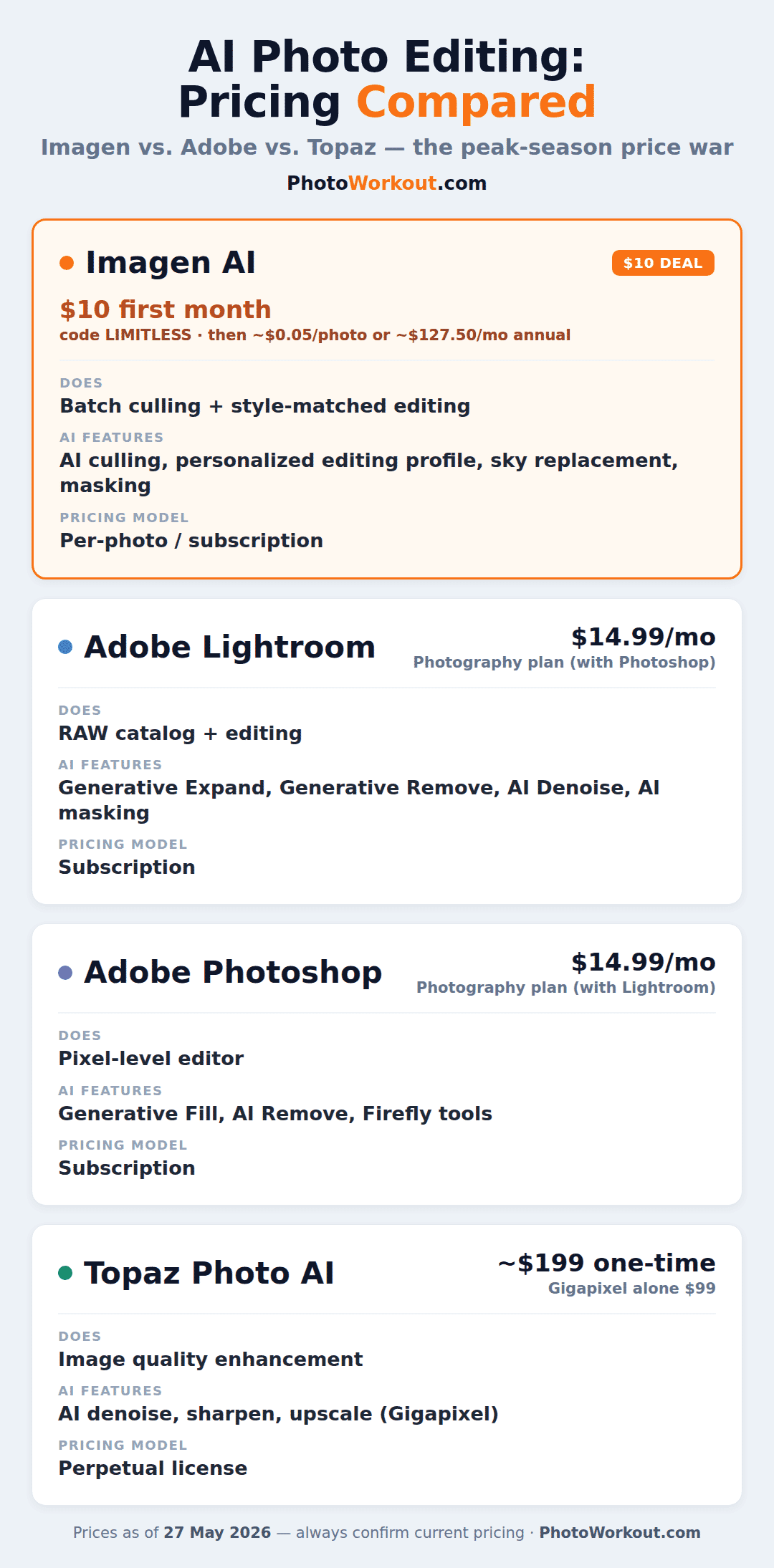
The Adobe Photography plan bundles Lightroom and Photoshop for $14.99/month (or $119.88/year). Adobe is phasing out that cheapest 20GB tier for new sign-ups, nudging newcomers toward the $19.99/month 1TB plan. Topaz Photo AI breaks the subscription mold entirely: roughly $199 one-time for a perpetual license (Gigapixel alone is $99), although Topaz has been steering buyers toward subscriptions too.
So the “war” is not really Imagen versus Adobe versus Topaz on a single price. It is three business models competing for the same monthly software budget: per-photo automation (Imagen), all-you-can-edit subscription (Adobe), and buy-once enhancement (Topaz).
What each tool’s AI actually does

The feature names blur together, so here is the plain-English version. Imagen automates the whole edit — culling and applying your style across a full gallery, batch-first. Adobe Lightroom’s Generative Expand stretches a photo beyond its original frame, Generative Remove erases objects in a click, and AI Denoise rescues high-ISO RAW files. Adobe Photoshop’s Generative Fill and AI Remove handle the heavy pixel-level work — swapping skies, deleting tourists, extending backgrounds — with more control than Lightroom, as covered in our Photoshop editing guide.
Topaz Photo AI does not generate anything; it fixes image quality — denoise, sharpen, and upscale via Gigapixel — making it the cleanup specialist rather than the creative one. (If noise reduction is your main need, DxO PureRAW is a strong rival.) In short: Imagen saves time, Adobe gives control, and Topaz fixes pixels. For the full field, see our roundup of the best AI photo editors.
Which is the best value for your workflow
High-volume pros (weddings, events, real estate): Imagen’s automation is the real time-saver, and the $10 month is a near-free test of whether it can match your style. The per-photo model only stings once you are editing tens of thousands of frames a year.
All-rounders and hybrid shooters: Adobe’s $14.99 Lightroom + Photoshop bundle is still the most versatile dollar in editing — generative AI plus full manual control in one subscription.
Occasional editors who resent subscriptions: Topaz’s one-time license is the rational pick if you mainly need cleaner, sharper files and refuse to pay monthly. The shift toward AI-driven workflows is making that buy-once camp smaller every year, but it still exists.
The honest takeaway: there is no single winner, because these are not really the same product. The $10 Imagen offer is worth grabbing if you shoot high volume and want to test AI automation risk-free — just set a calendar reminder before month two bills.
FAQ
Is Imagen’s $10 offer worth it?
For high-volume photographers, yes — it is effectively a full-access trial for the price of a coffee, and peak season is when AI culling and editing save the most time. Lower-volume shooters who edit only a few hundred photos a month may not need the automation and should weigh the post-promo per-photo or subscription cost first.
Can Imagen replace Lightroom or Photoshop?
Not entirely. Imagen automates culling and style-matched edits, but it does not replace Photoshop’s pixel-level tools like Generative Fill or precise compositing. Most pros use Imagen to handle the bulk edit, then finish select images in Adobe.
Is Topaz Photo AI a one-time purchase or a subscription?
Topaz Photo AI has traditionally been a perpetual license (around $199, including a year of updates), which is why it appeals to photographers avoiding subscriptions. Topaz has been adding subscription options, so check the current terms before buying.
The bottom line
Peak-season price wars are good news for photographers: Imagen’s $10 month, Adobe’s bundled generative AI, and Topaz’s buy-once model all push more capability within reach. Pick based on volume and workflow rather than the sticker price — and if you grab the Imagen deal, diarize the renewal date so month two does not surprise you.
Featured image: Photo by Zulfugar Karimov on Unsplash. In-body photo by Radek Grzybowski on Unsplash.
Offer & Pricing
- SLR Lounge — Imagen Is Offering Full AI Editing Access for $10 – Offer details, coupon code, and feature scope.
- Imagen AI — official site – AI culling and editing; current pricing.
- Adobe — Creative Cloud plans & pricing – Photography plan pricing.
- Topaz Labs — Topaz Photo AI – Photo AI / Gigapixel pricing.
Image Sources
- Unsplash — Zulfugar Karimov, Radek Grzybowski – Featured and in-body photography.
PhotoWorkout is reader-supported. Some links above are affiliate links, and we may earn a commission at no extra cost to you. Prices are accurate as of publication and change frequently — always confirm current pricing on the vendor's site.