- Topaz Photo Pro (v1.4.1) is the gold standard for AI noise reduction, sharpening, and upscaling — now with Wonder 2, a one-step model that handles all three without sliders.
- NeuroStream technology slashes VRAM usage by 95%, letting massive AI models run locally on mid-range GPUs instead of requiring cloud processing.
- Pricing is subscription-only: $17–21/month for Personal, $50–58/month for Pro with local Wonder and Standard MAX models.
- Best for wildlife, sports, event, and astro photographers who regularly shoot in demanding conditions — the AI enhancement quality remains unmatched.
- The broader Topaz ecosystem now includes Astra, Bloom, and Gigapixel as separate products, all under the Topaz Studio bundle.
When you buy through links on our site, we may earn a commission at no cost to you. We evaluate products independently. Commissions do not affect our evaluations.
Introduction
Topaz Labs has spent years building the most capable AI-powered image enhancement software available. Their flagship product — now called Topaz Photo Pro — combines noise reduction, sharpening, upscaling, and eight additional AI tools into one focused application.
The April 2026 release (v1.4.1) brings optimizations specifically for wildlife, astrophotography, and sports photography workflows. But the bigger story is what happened in March: Topaz introduced NeuroStream, a proprietary VRAM optimization technology that reduces GPU memory requirements by up to 95%. This means their most powerful AI models — including Wonder 2 — now run locally on consumer hardware.
In this review, we evaluate whether Topaz Photo Pro delivers on its promises, how the new technology changes the workflow, and whether the subscription pricing makes sense for different types of photographers.
Topaz Photo Pro: Overview


Industry-leading AI enhancement software with 11 tools for noise reduction, sharpening, upscaling, face recovery, and more. Now featuring Wonder 2 local model and NeuroStream VRAM optimization. Subscription required.
From $17/month- Best-in-class AI noise reduction and sharpening
- Wonder 2 model delivers one-step denoise + sharpen + upscale
- NeuroStream cuts VRAM usage by 95% for local processing
- Excellent motion blur recovery and face restoration
- Clean interface — productive within minutes
- Unlimited cloud and local rendering on all plans
- Subscription pricing only — no perpetual license for new users
- Pro tier ($50-58/month) required for local Wonder and Standard MAX models
- No file management, cropping, or basic editing tools
- Preview re-rendering when panning or zooming can be slow
Topaz Photo Pro is a standalone application for applying AI-powered enhancements to your images. It supports RAW files, JPEG, TIFF, PNG, and DNG, and runs on Windows and Mac. It also works as a plugin for Photoshop, Lightroom Classic, Capture One, and Apple Photos.
You get access to 11 AI-powered tools:
- Denoise — Remove grain while preserving texture (standard and RAW modes)
- Sharpen — Recover soft focus and enhance edge detail
- Upscale — Enlarge images without losing quality (up to 16x with Gigapixel)
- Recover Faces — Restore facial detail with Realistic or Creative modes
- Super Focus — Fix motion blur and missed focus
- Adjust Lighting — Correct exposure, highlights, and shadows
- Balance Color — Automatic color and contrast optimization
- Remove — Context-aware removal of objects and blemishes
- Dust and Scratch — Clean scanned or archival images
- Healing Brush — Manual touch-ups for small artifacts
- Preserve Text — Maintain legibility of text in upscaled images
These tools combine what were once three separate products — DeNoise AI, Sharpen AI, and Gigapixel AI — into a single application. The standalone products have been discontinued.
Important: Topaz Photo Pro is an enhancement tool, not a full editor. It has no file management, color grading, or cropping capabilities. You still need a dedicated photo editor for complete processing.
Wonder 2: One-Step AI Enhancement
The Wonder 2 model is the headline feature, and after testing it extensively, we can say it represents a fundamental shift in how AI image enhancement works.
Traditional workflows require you to apply denoise, sharpen, and upscale as separate steps — each with its own sliders and settings to fine-tune. Wonder 2 combines all three operations into a single pass with zero parameters. You load an image, select Wonder 2, and it does everything automatically.
The results are impressive. In our testing, Wonder 2 consistently produced output that matched or exceeded what we could achieve by manually tuning individual tools. It’s particularly effective on:
- Extremely low-resolution source images
- High-ISO photos with significant grain
- Photos with combined noise and softness issues
- Quick batch processing where speed matters more than pixel-perfect control
Unlike some generative AI tools that “hallucinate” new details, Wonder 2 is tuned to stay faithful to the original image. It preserves textures, colors, and artistic intent — critical for photographers who want enhancement, not AI-generated artifacts.
There’s a catch: local Wonder 2 processing requires the Pro tier ($50–58/month). Personal plan subscribers can still use Wonder 2 via cloud rendering, but local processing — which is faster and doesn’t require an internet connection — is Pro-only.
NeuroStream: Running Large AI Models Locally
Wonder 2 is a massive model. Without optimization, it would require ~56 GB of VRAM — far beyond any consumer GPU. This is where NeuroStream comes in.
Announced in March 2026, NeuroStream is Topaz’s proprietary VRAM optimization technology. It reduces memory requirements by up to 95%, meaning that 56 GB model now runs on roughly 3 GB of VRAM. That’s within reach of virtually any modern dedicated GPU.
Compatible hardware includes:
- NVIDIA — Nearly all RTX and RTX PRO GPUs (even mid-range cards with 6–8 GB VRAM)
- AMD — GPUs with at least 8 GB dedicated VRAM (added with the March Precision Update)
- Apple Silicon — M1/M2/M3/M4 Macs with unified memory
- CPU fallback — Possible but significantly slower; 24 GB+ system RAM recommended
Topaz CEO Eric Yang framed NeuroStream as bigger than just Topaz products: “We envision a world where AI models are simply on your device — no cloud needed, no additional usage costs, no specialized hardware, and no security gaps.” The company has indicated NeuroStream won’t be limited to Topaz models in the future.
For photographers, the practical impact is significant. You no longer need to choose between slow local processing on inadequate hardware and cloud-dependent workflows. NeuroStream makes local AI enhancement accessible on the kind of laptops and desktops most photographers already own.
In-Depth Look at Key Features
Noise Reduction
Noise reduction remains Topaz’s crown jewel. The results consistently outperform what’s available in Lightroom, Capture One, or competitors like DxO PureRAW.
Two modes are available:
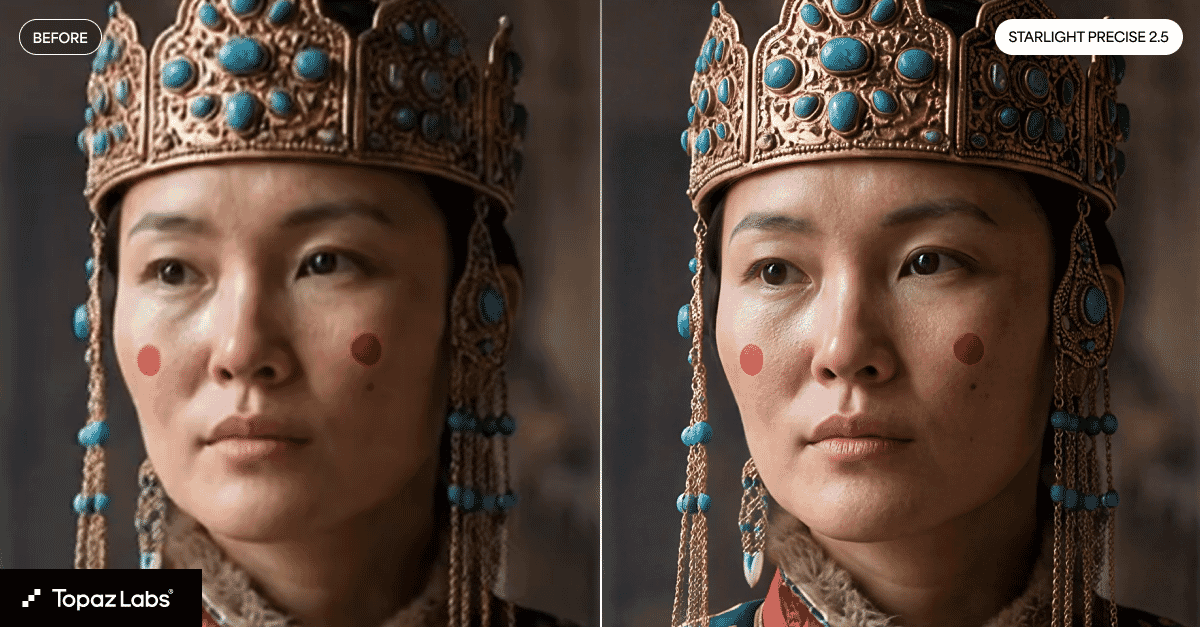
- Denoise — For processed images (JPEG, TIFF)
- Denoise RAW — Optimized for unprocessed RAW files, with better detail preservation
Both modes use AI to distinguish between noise and actual image detail — preserving texture in fur, fabric, and foliage while eliminating grain. The v1.4.1 update specifically improved performance on wildlife shots, where fine feather and hair detail is critical.
For photographers who regularly push ISO to 6400 or beyond, this alone justifies the subscription. The difference between Topaz’s noise reduction and Lightroom’s AI denoise is visible at 100% crop on virtually every high-ISO image.
Sharpening and Focus Recovery
Topaz offers three sharpening modes for different problems. In our testing with out-of-focus portraits and handheld macro shots, the results varied significantly by mode:
- Standard — General enhancement for slightly soft images
- Lens Blur — Corrects optical softness from lower-quality lenses
- Motion Blur — Recovers detail lost to camera shake or subject movement
The motion blur recovery is particularly impressive. Images that would otherwise be headed for the trash can often be salvaged — not miraculously, but enough to be usable. Sports and action photographers benefit enormously here.
Super Focus takes this further, specifically targeting missed autofocus. Combined with the proper output sharpening workflow, the results are remarkably close to what you’d get from nailing focus in-camera.
Face Recovery
The Recover Faces tool offers double the resolution of previous versions. We tested it on group photos where faces were barely 50 pixels across, and the results were remarkable. It offers two modes:
- Realistic — Preserves the original character of the face
- Creative — Generates more detail, which may diverge slightly from the original
For event photographers, this is transformative. Group shots where some faces are soft or small become usable. The AI reconstructs pores, hair wisps, and eye reflections with surprising accuracy. Portrait and event photographers will find this tool saves images that no amount of manual editing could fix.
Upscaling
The upscaling engine offers multiple models for different scenarios:
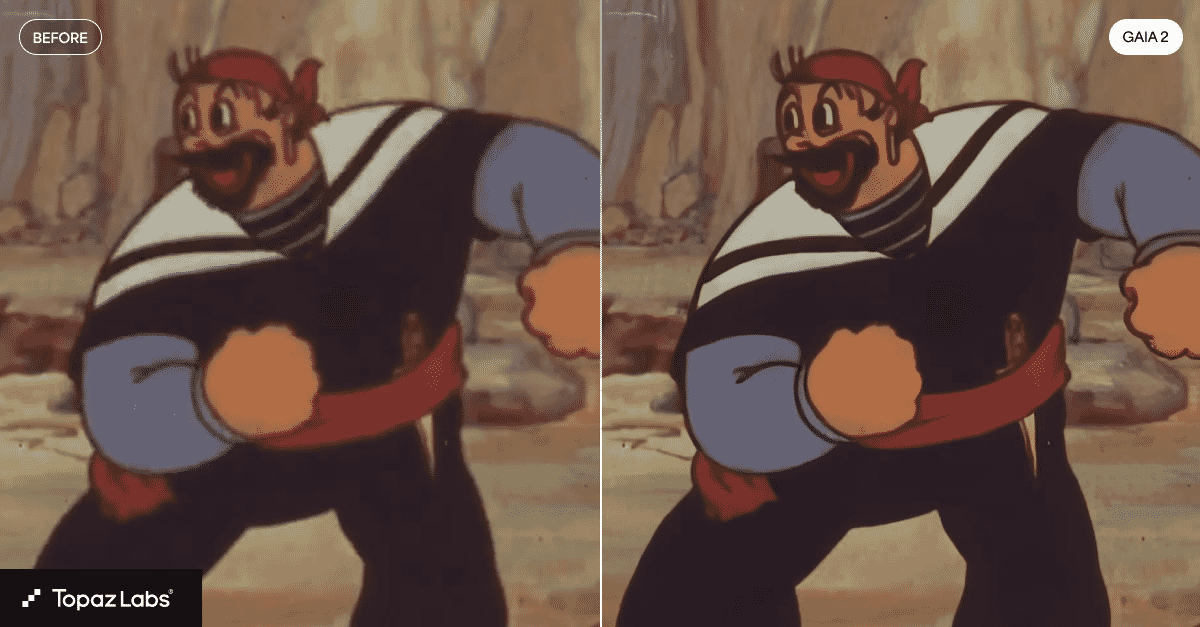
- Wonder 2 — One-click combined denoise + sharpen + upscale (see above)
- Standard MAX — Precise, true-to-input restoration; described as “100x faster than first-generation diffusion models”
- Low Resolution — Optimized for extremely small source images
- Graphics — For illustrations and non-photographic content
You can upscale by specific factors (1x, 2x, 4x) or set a target resolution. The Standard MAX model, like Wonder 2, also requires the Pro tier for local processing.
Additional Tools
Beyond the core trio of denoise/sharpen/upscale, Topaz Photo Pro includes:
- Dust and Scratch — Automatically identifies and removes blemishes from scanned images. Essential for anyone working with film scans or archival material.
- Healing Brush — Manual touch-up tool for small artifacts the AI misses
- Adjust Lighting — Exposure, highlight, and shadow sliders for quick corrections
- Balance Color — AI-powered color and contrast optimization
- Remove — Context-aware object removal, similar to Photoshop’s Content-Aware Fill
- Preserve Text — Maintains legibility of text when upscaling documents or signage
We Ran Our Own Topaz Photo AI Tests
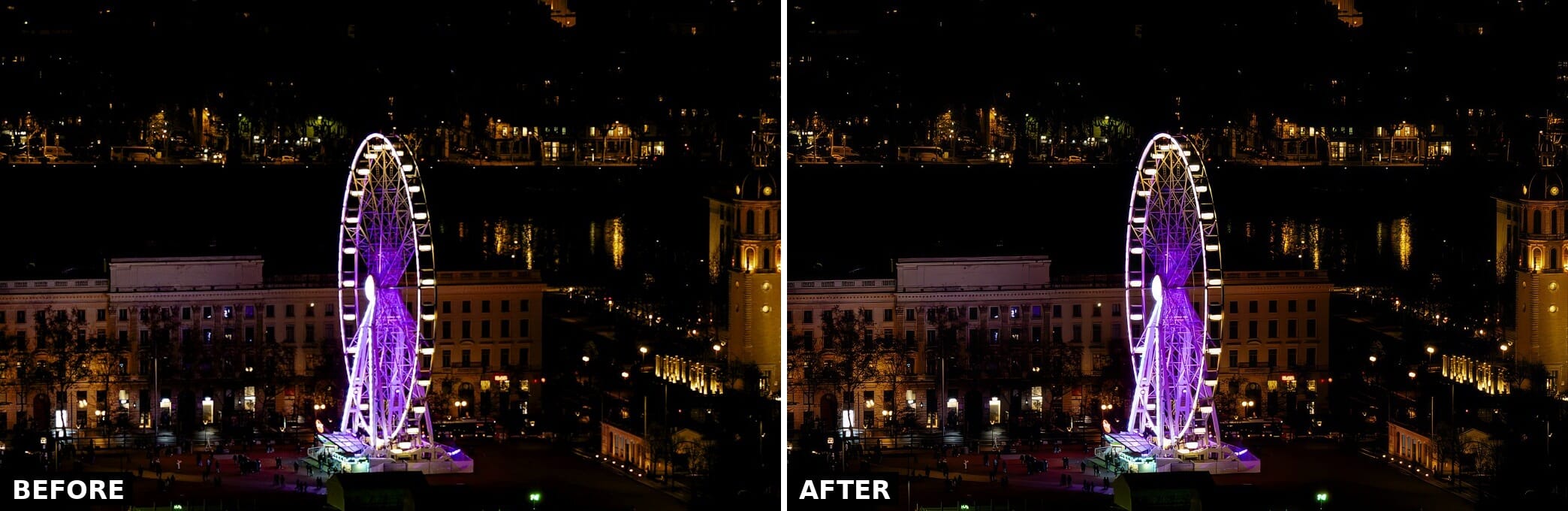
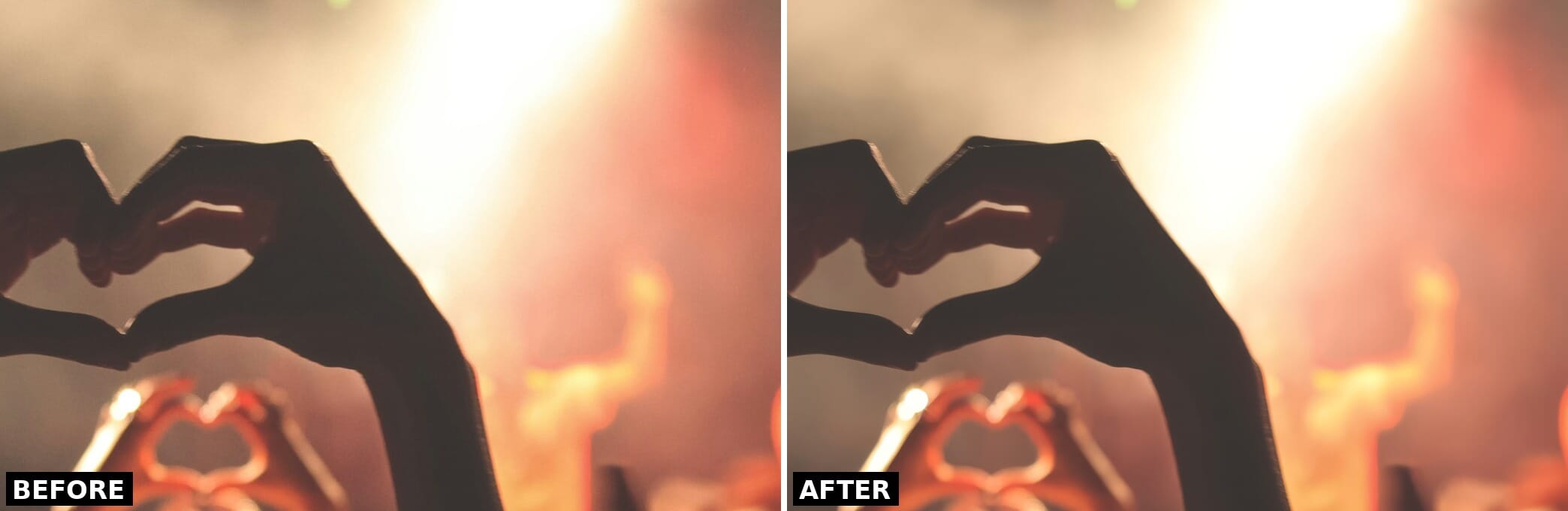
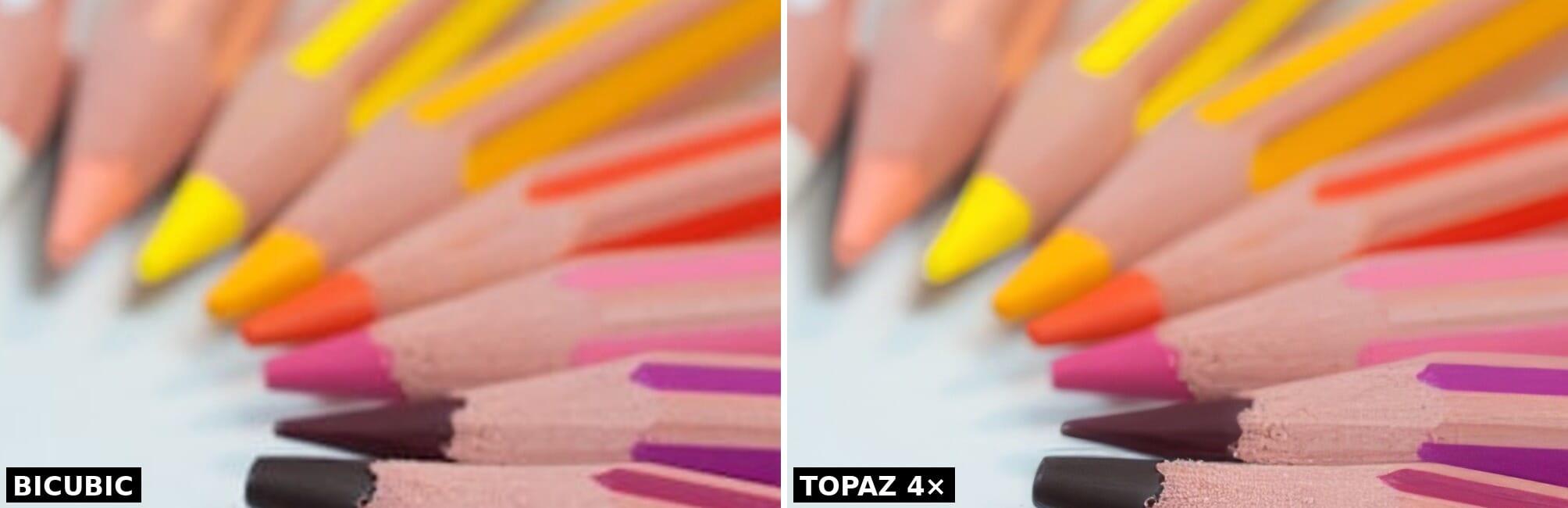
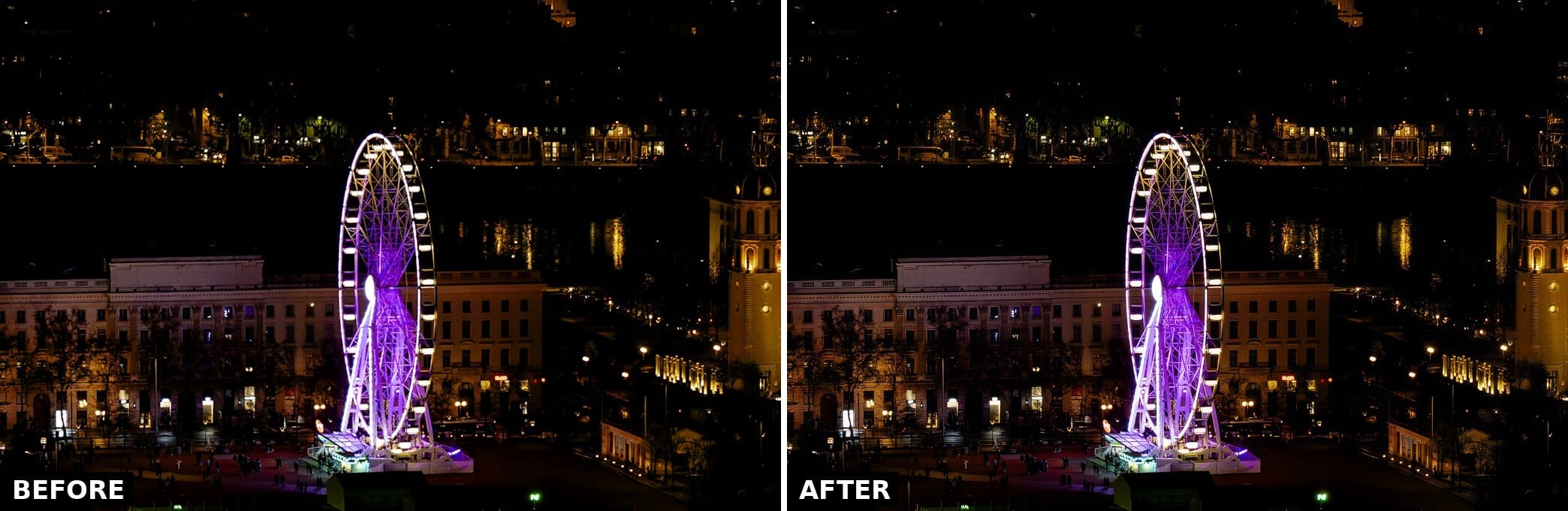
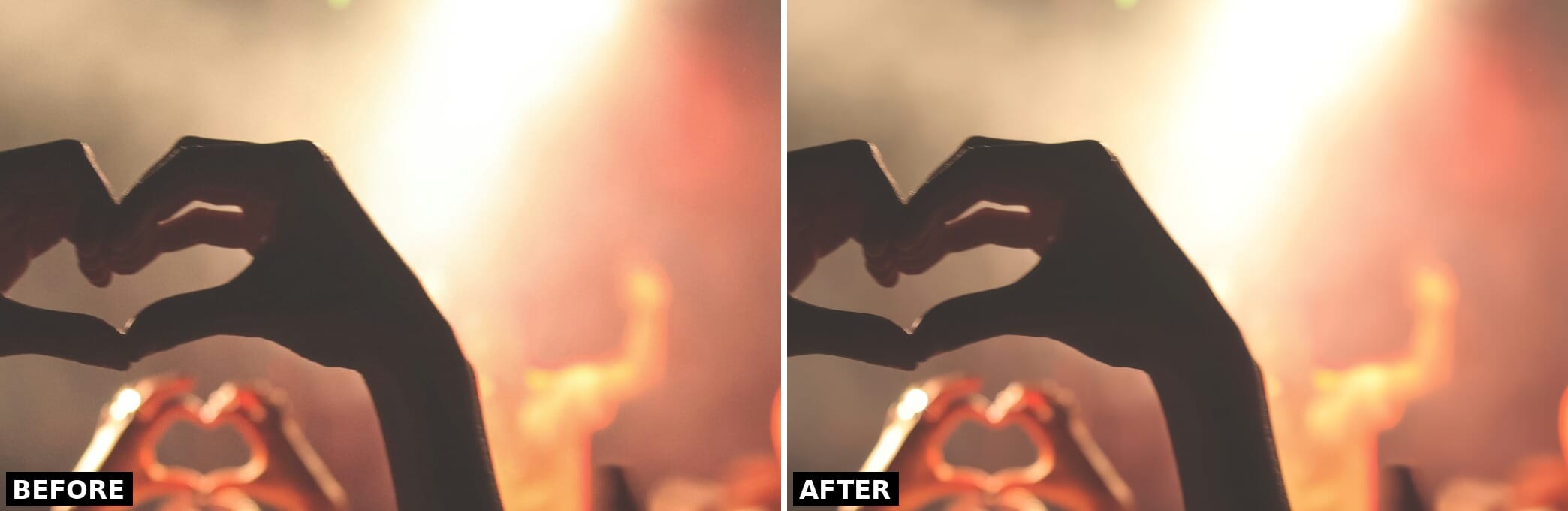
Marketing demos always look flattering, so we ran Topaz Photo AI on a set of real, license-free photos from SampleShots (Unsplash) and processed them through the Topaz Labs API with no manual tuning — just the model’s autopilot. Each comparison below is a 100% crop so the pixel-level differences are visible; full-resolution before/after files are linked under each one so you can download and inspect them yourself.
Denoise: ISO 1600 Night Cityscape
Denoise: Backlit Concert Shot
Upscale: 4× Detail Recovery
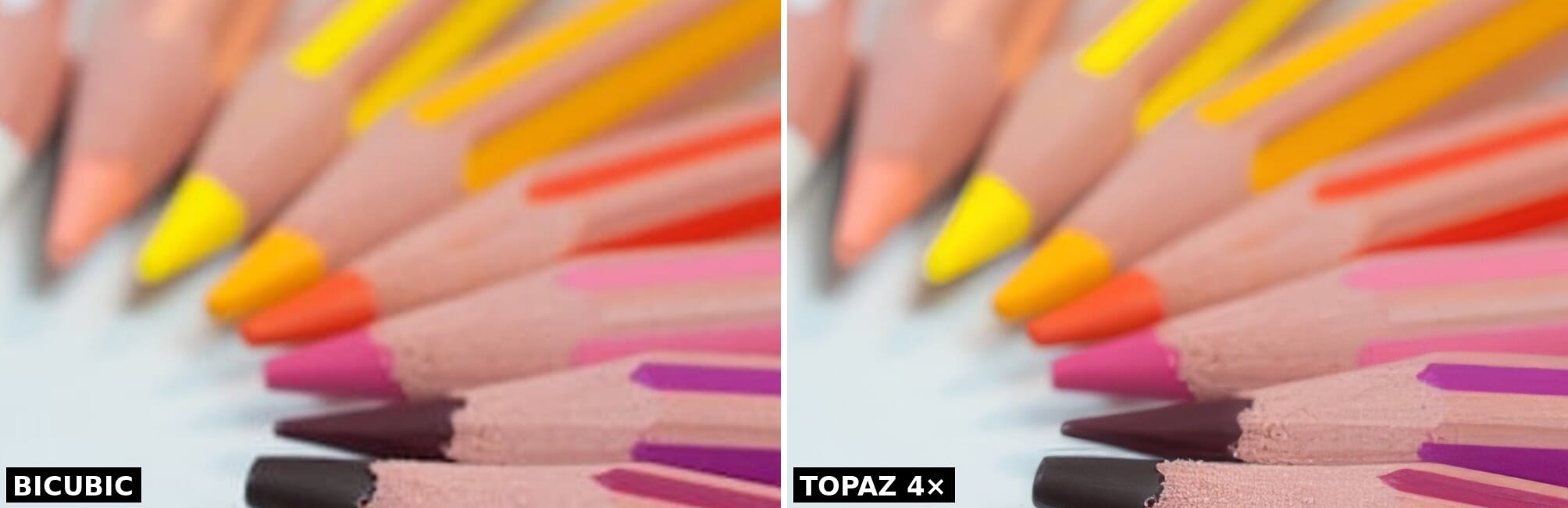
Across all three, the pattern held: Topaz’s strength is recovering real detail and suppressing noise without the plasticky over-smoothing that gives most AI enhancers away. The denoise is most dramatic in dark, high-ISO frames, and the upscaling genuinely rebuilds edges rather than just interpolating them — which is the whole reason it ends up in professional and archival workflows.
Performance and User Experience
System Requirements
Topaz Photo Pro runs on Windows and Mac (no Linux support).
Windows:
- Processor: Intel/AMD with AVX2 support
- Memory: 16 GB RAM minimum (32 GB recommended)
- Graphics: DirectX 12 compatible; NVIDIA RTX or AMD with 6+ GB VRAM recommended
- OS: Windows 10 or later
Mac:
- Apple Silicon (M1/M2/M3/M4) or Intel (2nd Gen i5+)
- Memory: 16 GB (8 GB minimum for Apple Silicon)
- OS: macOS 11 Big Sur or later
Apple Silicon Macs show significantly better performance than Intel Macs, particularly M3 and M4 chips. NeuroStream support extends to Apple’s unified memory architecture.
Processing Speed
AI-intensive software is demanding, and Topaz Photo Pro is no exception. Each enhancement passes through complex neural networks.
Local rendering: On a mid-range Windows PC (Core i7, 32 GB RAM, RTX 3060), expect 10–30 seconds per enhancement depending on file size and tools applied. NeuroStream significantly improved local speeds compared to earlier versions, especially for the larger models.
Cloud rendering: Included with all subscription tiers. This offloads processing to Topaz’s servers, delivering faster results without taxing your hardware. Files are processed securely and not stored on Topaz servers.
The preview still needs to re-render when panning or zooming, which can be frustrating when evaluating results on large files. This is our primary usability complaint.
Interface and Workflow
The interface is clean and uncluttered: your original image on the left, the enhanced preview on the right, and the tool panel on the far right. The Autopilot feature analyzes each image on import and automatically suggests enhancements — in most cases, its suggestions are solid starting points.
New users can be productive within minutes. The limited number of tools (compared to Photoshop or Lightroom) means there’s less to learn, but each tool is exceptionally refined. You can customize Autopilot behavior in Preferences to enable or disable subject detection, face detection, auto-upscaling, and more.
The v1.4.1 update also brought a 10% Autopilot speed increase and UI refinements for project settings management.
Pricing: Personal vs. Pro
Topaz Photo Pro uses subscription-only pricing. The old $199 perpetual license is no longer available for new customers (existing perpetual license holders retain their licenses with discounted upgrade pricing).
Topaz Photo — Personal:
- Monthly: $21/month
- Annual (monthly billing): $17/month
- Annual (one payment): ~$39/month equivalent
- Includes: All 11 standard tools, unlimited local + cloud rendering, Wonder and Standard MAX via cloud
Topaz Photo — Pro:
- Monthly: $58/month
- Annual (monthly billing): $50/month
- Adds: Local Wonder and Standard MAX models, seat management, 4-image cloud concurrency, full commercial use rights
Topaz Studio (all apps bundle): $37–69/month depending on commitment. Includes Photo, Video, Gigapixel, Bloom, Astra, Express, and Mosaic.
All plans include a free trial for evaluation.
The key distinction: Personal gives you access to every tool and AI model, but Wonder 2 and Standard MAX process through the cloud. Pro lets you run those models locally via NeuroStream — faster, offline-capable, and with full commercial rights. For hobbyists, Personal is sufficient. For working professionals who need reliability and offline capability, Pro is worth the premium.
The Topaz Ecosystem
Topaz Photo Pro doesn’t exist in isolation. Topaz Labs now offers a broader suite of tools:

- Topaz Gigapixel — Dedicated upscaling up to 16x, with additional models not available in Photo Pro. For photographers who need extreme enlargements for large-format printing.
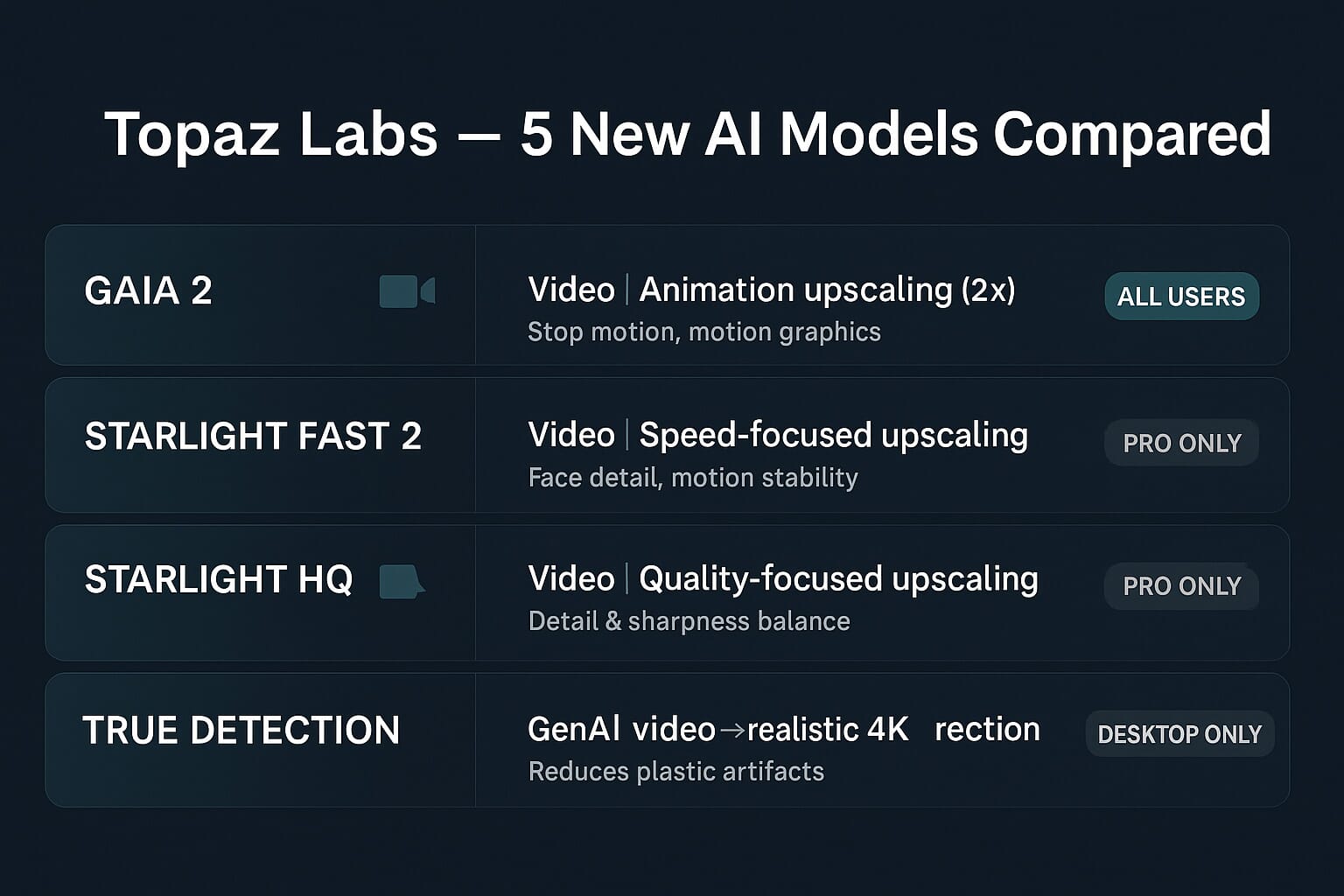
- Topaz Video — Video enhancement with denoising, upscaling, and frame interpolation. The March Precision Update introduced Starlight Fast 2, a local diffusion model that’s 3–5x faster than previous versions.
- Bloom — Creative AI upscaling for AI-generated art, concept art, and stylized content. Cloud-based.
- Astra — Creative video upscaling with Starlight Precise 2.5, which improves realism in AI-generated video footage. Useful for content creators working with GenAI video tools.
- Express — Lightweight cloud-based image tools
If you use more than one Topaz product, the Topaz Studio bundle ($37–69/month) makes financial sense — it costs less than two individual subscriptions and includes everything.
Topaz Photo Pro Alternatives
If the subscription model doesn’t fit your budget, several alternatives exist — though none match Topaz’s enhancement quality in direct comparisons.
For noise reduction:
- DxO PureRAW 6 — One-time purchase with excellent DeepPRIME XD3 noise reduction. The closest competitor to Topaz for RAW denoising specifically.
- Adobe Lightroom / Camera Raw — Built-in AI denoise has improved significantly. Good enough for many workflows, and you may already be paying for it.
- More options in our best noise reduction software roundup
For sharpening:
- DxO PhotoLab — Strong sharpening with lens correction profiles
- Capture One — Excellent built-in sharpening tools
For upscaling:
- Pixelmator Pro (Mac) — ML Super Resolution feature, one-time purchase
- ON1 Resize AI — Dedicated upscaling tool
All-in-one editors with AI tools:
- Adobe Lightroom — Now includes AI noise reduction and has the broadest feature set
- ON1 Photo RAW — One-time purchase option with AI features
Explore more options in our guide to the best AI photo editing tools.
Verdict: Who Should Subscribe?
Topaz Photo Pro is worth it if you:
- Regularly shoot in challenging conditions — low light, fast action, long telephoto distances
- Need to rescue slightly soft or noisy images on a regular basis
- Process archival, scanned film, or vintage images
- Want the absolute best results for print or commercial use
- Shoot sports or wildlife and need motion blur recovery
Consider alternatives if you:
- Only occasionally need enhancement tools (a few images per month)
- Already use Lightroom or Capture One and find their built-in AI tools sufficient
- Strongly prefer one-time purchases over subscriptions
- Are on a tight budget — DxO PureRAW offers most of the denoising quality at a lower cost
The bottom line: Topaz Photo Pro remains the industry leader in AI-powered image enhancement. The combination of Wonder 2’s one-step processing, NeuroStream’s local hardware optimization, and continuously improving models creates a package that no competitor currently matches. The subscription model is the main friction point — it’s a fair deal for power users but harder to recommend for casual photographers who need it a few times a month.
For professionals who regularly push their gear to its limits, Topaz Photo Pro is an indispensable tool that can salvage shots and elevate good images to great ones.
Frequently Asked Questions
Is Topaz Photo Pro the same as Topaz Photo AI?
Yes. Topaz Labs dropped “AI” from the name in 2024, and the product was rebranded to “Topaz Photo” and later “Topaz Photo Pro” with the introduction of tiered pricing. The software is the same application with continuous updates.
Can I still use my old perpetual license?
Yes. Existing perpetual license holders keep their licenses, receive discounted upgrade pricing, and retain access to founding benefits including local Pro-only models like Wonder and Starlight. However, new perpetual licenses are no longer sold.
What’s the difference between Personal and Pro plans?
Both plans include all 11 tools and unlimited rendering. Pro adds local access to Wonder 2 and Standard MAX models (Personal users access these via cloud only), seat management, 4-image cloud concurrency, and full commercial use rights.
Does Topaz Photo Pro work as a Lightroom plugin?
Yes. It integrates with Photoshop, Lightroom Classic, Capture One, and Apple Photos as an external editor plugin. You can send images directly from your editor, process them in Topaz, and return the enhanced files automatically.
How does Wonder 2 compare to manual denoise + sharpen + upscale?
In most cases, Wonder 2 produces results comparable to or better than manually tuning each tool separately. It’s especially effective on heavily degraded images. For maximum control on critical images, you may still prefer manual adjustments — but Wonder 2 is the faster workflow for the majority of photos.
Featured image: Topaz Labs